Google Cloud Operations Suite vs. ManageEngine Site24x7

Overview
ProductRatingMost Used ByProduct SummaryStarting Price
Google Cloud Operations Suite
Score 7.2 out of 10
N/A
The Google Cloud Operations Suite (formerly Stackdriver) is an APM platform based on three tools for error detection, tracing, and resolution. It manages cloud-based or on-premise applications in live or mid-production environments.
$0.01
per 1,000 read API calls
ManageEngine Site24x7
Score 9.8 out of 10
N/A
Site24x7 from ManageEngine is a full-stack application, website, server, cloud and network monitoring tool. Site24x7 offers code-level diagnostics and customizable error thresholds, end-to-end monitoring with topology visualization tools, and mobile accessibility.
$9
10 monitors
Pricing
Google Cloud Operations SuiteManageEngine Site24x7
Editions & Modules
Monitoring API Calls
$0.01
per 1,000 read API calls
Trace Ingestion
$0.20
per million spans
Monitoring Data
$0.26
per MB
Logging Data
$0.50
per GB
Starter
$9.00
10 monitors
Pro
$35.00
40 Monitors
Classic
$89.00
100 Monitors
Elite
$225.00
250 Monitors
Enterprise
$449.00
500 Monitors
Enterprise Plus Web
$899.00
2500 Monitors
Offerings
Pricing Offerings
Google Cloud Operations SuiteManageEngine Site24x7
Free Trial
NoYes
Free/Freemium Version
NoYes
Premium Consulting/Integration Services
NoNo
Entry-level Setup FeeNo setup fee$1 monitors
Additional DetailsEach Pack will also support additional benefits such as Network interfaces, Applogs, Alert credits etc. You can also, purchase add-ons to create custom pricing options. Please visit the vendor's pricing page, for more information.
More Pricing Information
Community Pulse
Google Cloud Operations SuiteManageEngine Site24x7
Features
Google Cloud Operations SuiteManageEngine Site24x7
Application Performance Management
Comparison of Application Performance Management features of Product A and Product B
Google Cloud Operations Suite
8.6
Ratings
12% above category average
ManageEngine Site24x7
-
Ratings
Application monitoring9.10 Ratings00 Ratings
Database monitoring9.10 Ratings00 Ratings
Threshold alerts7.30 Ratings00 Ratings
Predictive capabilities9.00 Ratings00 Ratings
Application performance management console6.40 Ratings00 Ratings
Collaboration tools9.00 Ratings00 Ratings
Out-of-the box templates to monitor applications9.00 Ratings00 Ratings
Application dependency mapping and thresholding8.00 Ratings00 Ratings
Virtualization monitoring10.00 Ratings00 Ratings
Server availability and performance monitoring8.20 Ratings00 Ratings
Server usage monitoring and capacity forecasting8.20 Ratings00 Ratings
IT Asset Discovery10.00 Ratings00 Ratings
Monitoring Tasks
Comparison of Monitoring Tasks features of Product A and Product B
Google Cloud Operations Suite
-
Ratings
ManageEngine Site24x7
8.4
Ratings
8% above category average
Remote monitoring00 Ratings9.10 Ratings
Network device monitoring00 Ratings7.50 Ratings
Multiple Server Monitoring00 Ratings8.60 Ratings
Multi-device monitoring00 Ratings8.00 Ratings
Automated alerts and notifications00 Ratings9.00 Ratings
Management Tasks
Comparison of Management Tasks features of Product A and Product B
Google Cloud Operations Suite
-
Ratings
ManageEngine Site24x7
7.4
Ratings
0% above category average
Policy-based automation00 Ratings7.40 Ratings
Reporting
Comparison of Reporting features of Product A and Product B
Google Cloud Operations Suite
-
Ratings
ManageEngine Site24x7
8.5
Ratings
11% above category average
Performance data reports00 Ratings8.10 Ratings
Customizable reporting00 Ratings8.40 Ratings
Data visualization00 Ratings8.80 Ratings
Risk analysis00 Ratings8.60 Ratings
Security
Comparison of Security features of Product A and Product B
Google Cloud Operations Suite
-
Ratings
ManageEngine Site24x7
6.6
Ratings
5% above category average
Antivirus and malware management00 Ratings6.60 Ratings
Best Alternatives
Google Cloud Operations SuiteManageEngine Site24x7
Small Businesses
GitLab
GitLab
Score 8.7 out of 10
Panda Systems Management
Score 9.8 out of 10
Medium-sized Companies
ManageEngine Site24x7
Score 9.8 out of 10
ManageEngine ADAudit Plus
Score 9.2 out of 10
Enterprises
ManageEngine Site24x7
Score 9.8 out of 10
ManageEngine ADAudit Plus
Score 9.2 out of 10
All AlternativesView all alternativesView all alternatives
User Ratings
Google Cloud Operations SuiteManageEngine Site24x7
Likelihood to Recommend
8.2
(0 ratings)
8.6
(0 ratings)
Support Rating
10.0
(0 ratings)
8.0
(0 ratings)
User Testimonials
Google Cloud Operations SuiteManageEngine Site24x7
Likelihood to Recommend
Stackdriver is really a very good tool for errors and reporting. It provides the application issues especially the exception errors and sends the alerts. It's available for multiple languages like Python, GO and Java, etc. The best part is all the application errors are available at a single place and it comes with the GAE application. It's slow if you want to search very old logs and need to wait couple of hrs sometimes.
Read full review
I have tried other tools (PRTG etc) in the past, and switched from US monitor to [Site24x7 All-in-One Monitoring], for all the built-in features and ability to implement by using with or without the agents deployed (ip discovery LAN). This is one tool that encompasses the entire organization and allows that single pane of glass feel (NOC screen view) for an accurate virtual snapshot of your entire organization, either cloud and/or LAN.
Read full review
Pros
  • All the application error reporting available at a single place.
  • You will get the real-time application error and alerts.
  • It's really easy to use and no need to worry for the setup.
Read full review
  • Alerts: Site24x7 can be configured to send alerts in all sorts of ways, from email, to text messages, to even direct automated phone calls.
  • Internal monitoring: An agent installed on one or more machines can monitor internal connectivity to other network devices. This means if connectivity to a server goes down, we often know about it before users alert us.
  • External monitoring: Site24x7 also watched our websites and sends alerts if they're unreachable. It uses multiple locations to do so, which means if there's a partial network outage in some part of the country, we know who is affected.
Read full review
Cons
  • For searching and filtering the logs the system is slow sometimes.
  • An agent needs to be installed in each VM to monitor specific metrics.
  • The pricing model is confusing.
Read full review
  • I wish the advanced monitors were not so expensive.
  • It is a cloud solution, so it is necessary to open up outbound ports in all security zones.
  • If you lose outbound internet service, all your internal servers will throw alarms and life gets extremely noisy.
Read full review
Support Rating
It is also a great problem detection tool, and this is extremely important for General Motors.
The user can count on the ease of flexible panels and advanced visualization tools that help to identify problems. Among the most common, we can mention:
- containment of hosts;
- cloud provider limitation;
- hardware wear.
And also Stackdriver Integration with other Google Cloud data tools such as BigQuery, Cloud Pub/Sub, Cloud Storage and Cloud Database.
Read full review
I have only had to use support once, so I can't go into much detail about their support team. The one time I did use it the response was fast but the resolution took some time.
Read full review
Alternatives Considered
Honestly, because it is from Google, we also mainly chose this product on the recommendation of other friends and businesses, and because of its reliability, security and ease of access. It also has excellent technical support and warranty. The staff is fast and super efficient and always helps us when we need help.
Read full review
Site24x7 [All-in-One Monitoring] has some similarities to ThousandEyes. Especially in the troubleshooting aspect where both offer Web performance waterfall charts to analyze the issue better. Both have cloud-based servers globally that allow to determine performance on the Internet. Site24x7 has more features available so we selected it instead.
Read full review
Return on Investment
  • Record storage and search.
  • Real-time insights.
  • Troubleshooting without interruption.
Read full review
  • Positivity wise, we're spending a third of what we were on our website monitoring, this has allowed us to focus funding elsewhere (namely SolarWinds).
  • We have enhanced our core monitoring by now also being able to provide better coverage, whereas we were handicapped with our previous supplier due to the scaling costs of multi-step transactions.
  • The general feeling from our IT staff is that the platform is not great, which obviously reduces confidence in the ability for the platform to provide accurate monitoring data for our websites.
Read full review
ScreenShots

ManageEngine Site24x7 Screenshots

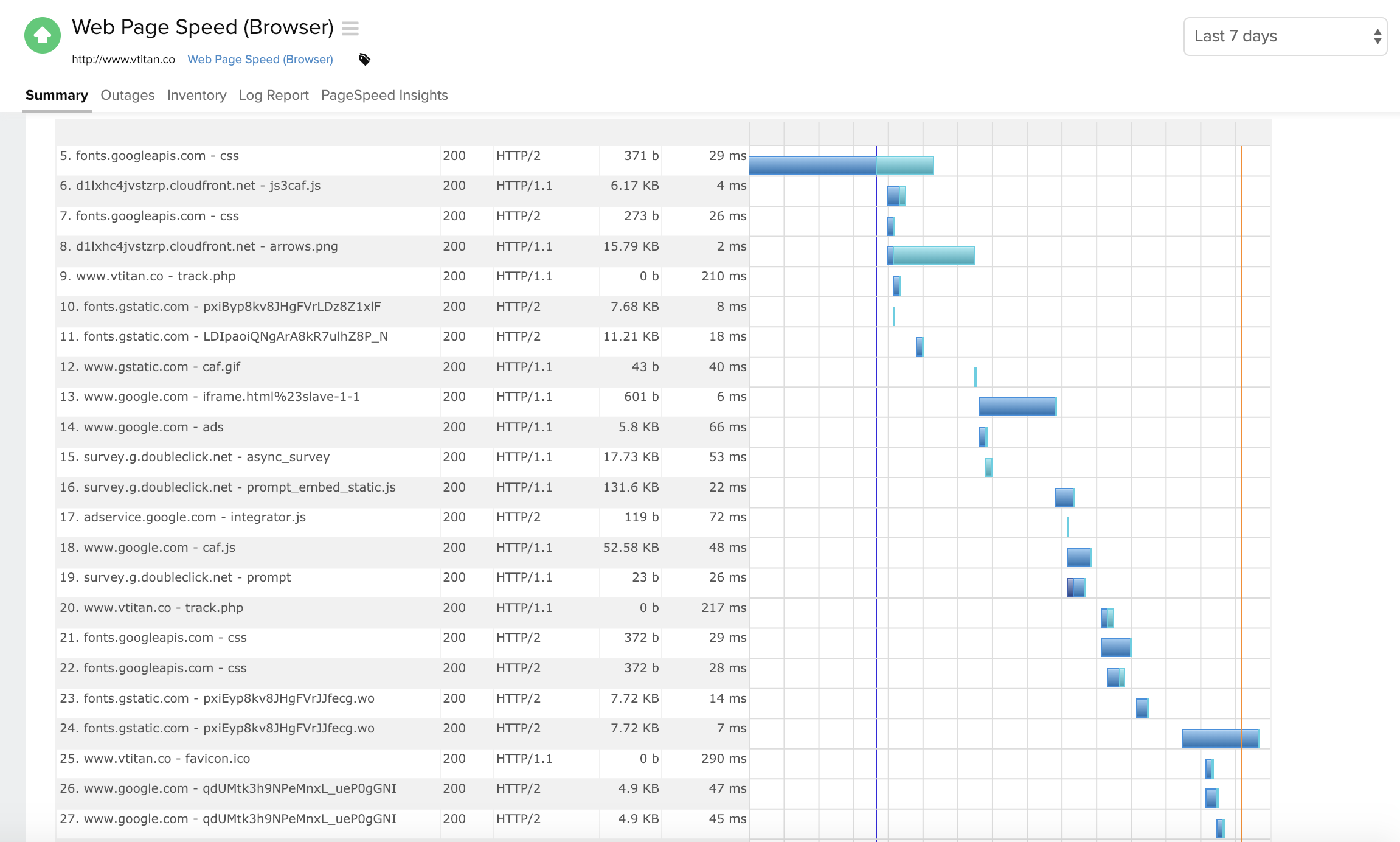
Screenshot of Component wise metric breakdown in a Webpage Speed (Browser) monitorScreenshot of Summary page for a windows server monitorScreenshot of Response time and outages summary for a DNS server monitorScreenshot of Summary page for traces run on a Java applicationScreenshot of Desktop and mobile view of a Website monitorScreenshot of Homepage view