Google Cloud AI provides modern machine learning services, with pre-trained models and a service to generate tailored models.
N/A
OpenText Magellan
Score 9.0 out of 10
N/A
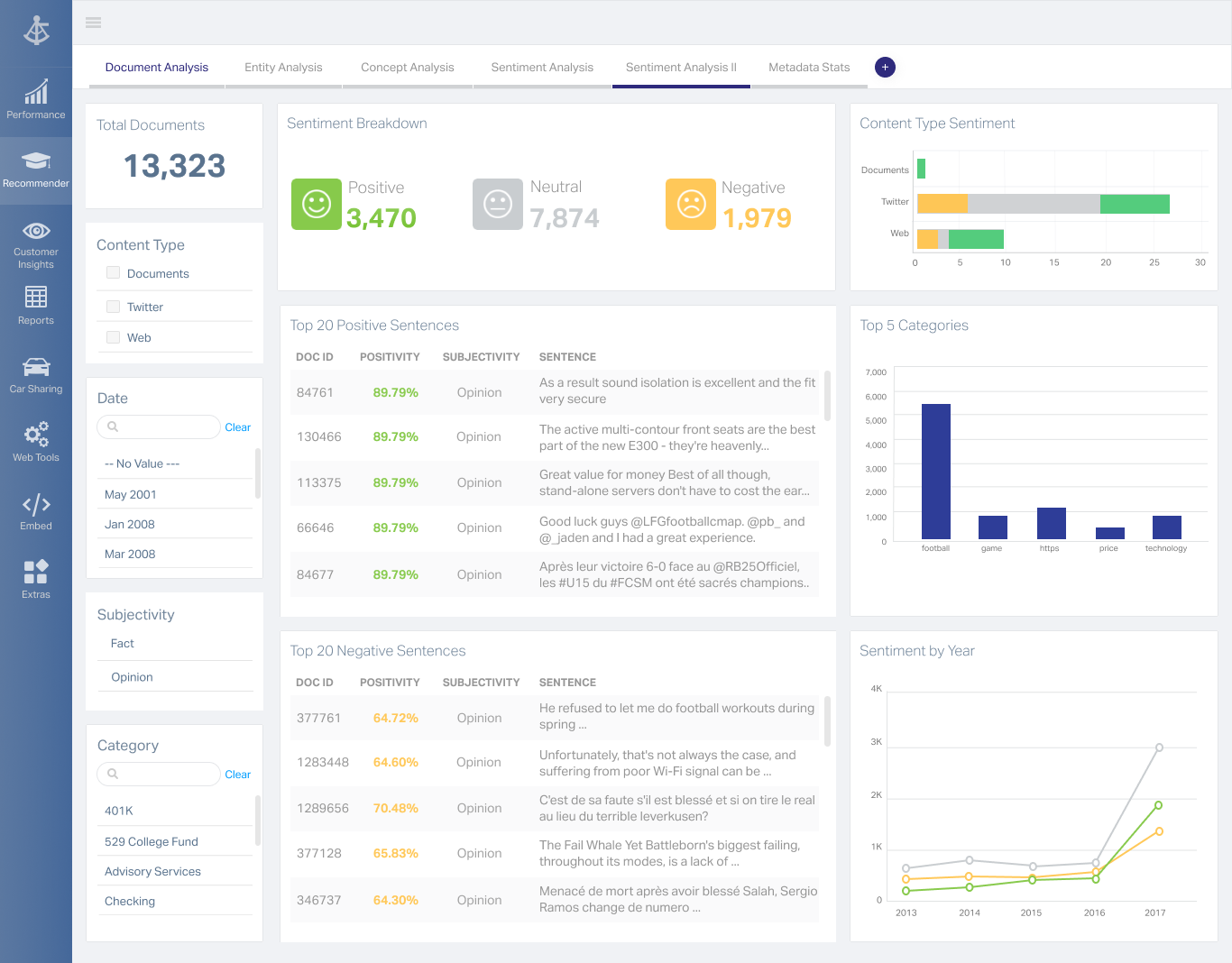
OpenText Magellan Analytics Suite leverages a comprehensive set of data analytics software to identify patterns, relationships and trends through data visualizations and interactive dashboards.
N/A
Pricing
Google Cloud AI
OpenText Magellan
Editions & Modules
No answers on this topic
No answers on this topic
Offerings
Pricing Offerings
Google Cloud AI
OpenText Magellan
Free Trial
No
No
Free/Freemium Version
No
No
Premium Consulting/Integration Services
No
No
Entry-level Setup Fee
No setup fee
No setup fee
Additional Details
—
—
More Pricing Information
Community Pulse
Google Cloud AI
OpenText Magellan
Features
Google Cloud AI
OpenText Magellan
BI Standard Reporting
Comparison of BI Standard Reporting features of Product A and Product B
Google Cloud AI
-
Ratings
OpenText Magellan
7.0
Ratings
15% below category average
Customizable dashboards
00 Ratings
7.00 Ratings
Report Formatting Templates
00 Ratings
7.00 Ratings
Ad-hoc Reporting
Comparison of Ad-hoc Reporting features of Product A and Product B
Google Cloud AI
-
Ratings
OpenText Magellan
8.3
Ratings
3% above category average
Drill-down analysis
00 Ratings
8.00 Ratings
Formatting capabilities
00 Ratings
8.00 Ratings
Integration with R or other statistical packages
00 Ratings
9.00 Ratings
Report sharing and collaboration
00 Ratings
8.00 Ratings
Report Output and Scheduling
Comparison of Report Output and Scheduling features of Product A and Product B
Google Cloud AI
-
Ratings
OpenText Magellan
8.3
Ratings
0% below category average
Publish to Web
00 Ratings
8.00 Ratings
Publish to PDF
00 Ratings
8.00 Ratings
Report Versioning
00 Ratings
9.00 Ratings
Report Delivery Scheduling
00 Ratings
8.00 Ratings
Data Discovery and Visualization
Comparison of Data Discovery and Visualization features of Product A and Product B
Google Images analysis model is a good one and I think is very useful in our case of detections. Speech AI is also a good one. I can only recommend Google Cloud AI API and the model for that second will be SpeechKit by Yandex both these tools have exceptional values one can utilise to enhance their projects.
It depends on extensibility, set-up, access & style. Actuate performs fairly well, but has performance issues because it sits on top of eclipse, which sits on top of Java. Extensibility usually comes at that price. Set-up is fairly straightforward and it can be secured.
Smart reply and its AI suggestions make the organization think more carefully about their e-mail responses in Gmail. We were skeptical at first but it really works well for many instances.
We do a lot of business and contracts in Western Europe and South America, so the translate solutions make this much easier for our banking paperwork.
When we go to meetings or during a meeting, we often use the Google voice search to save time on research and filtering ideas or analysis.
Hard to find what to use - To find the right products, you need look closely at the details of each API, and find which suits your purposes. This can be easily fixed by creating a main page that details all of the products simply.
Expensive - The API costs can quickly add up, especially during the setup process and as engineers figure out the usage of the API.
No playground or training - There is a lack of an "API playground" or training sessions that could make onboarding engineers to this API much easier.
We are extremely satisfied with the impact that this tool has made on our organization since we have practically moved from crawling to walking in the process of generating information for our main task to investigate in the field through interviews. With the audio to text translation tool there is a difference from heaven to earth in the time of feeding our internal data.
I am no longer working for the company that was using Actuate but I believe they would continue to use it because the stitching costs would be to high. It would require a complete rewrite of the reports and the never version of Actuate (BIRT) even required an almost complete report rewrite
I give 8 because although it´s a tool I really enjoy working with, I think Google Cloud AI's impact is just starting, therefore I can visualize a lot/space of improvements in this tool. As an example the application of AI in international environments with different languages is a good example of that space/room to improve.
It is quite intuitive to use. It is fit specifically for doing sentiment, emotion, and intention analysis as well as text classification and text summarization. I would have given 10 if it is fit for the purpose of doing image processing and analysis as well. There is a huge market to analyze video and image data.
Every rep has been nice and helpful whenever I call for help. One of the systems froze and wouldn't start back up and with the help of our assigned rep we got everything back up in a timely manner. This helped us not lose customers and money.
In fact, you only need the basic tech knowledge to do a Google search. You need to know if your organization requires it or not,. our organization required it. And that is why we acquired it and solved a need that we had been suffering from. This is part of the modernization of an organization and part of its growth as a company.
Google's documentation for their AI and Machine Learning products is a bit more straightforward and still much easier to onboard into compared to the Azure Machine Learning and other AI products. Additionally, Google's Cloud AI products provide more comprehensive specific use-cases that are API-optimized, and easier to integrate into existing scripts and backends.
It is vastly superior to these in many ways, for complex reporting it is a much more sophisticated solution. Visualizations are very good. Javascript extensibility is very powerful, others don't support this or as well. Pentaho and MS are both OLAP oriented. Pentaho is moving more toward big data, which was not our primary focus. Others are stuck in the Crystal Reports Band metaphor.
Actuate can handle 50 to 60 sub reports inside a report very well.
Dynamically creating the datasource, chart, graph, reports are the main advantages. We can do any level of drilling, and can create a performance matrix dashboard efficiently.