Google Analytics 360 (formerly Google Analytics Premium) was an enterprise-level analytics solution that was sunset in July of 2024.
$150,000
Up to 1 Billion hits/month
Salesforce Marketing Cloud
Score8.1 out of 10
N/A
Marketing Cloud is an AI-powered, cloud-based digital marketing platform within the Salesforce Customer 360 ecosystem. Marketers can segment their audience, deliver personalized messages, track campaign performance, engage leads and accounts, and optimize strategies based on real-time insights.
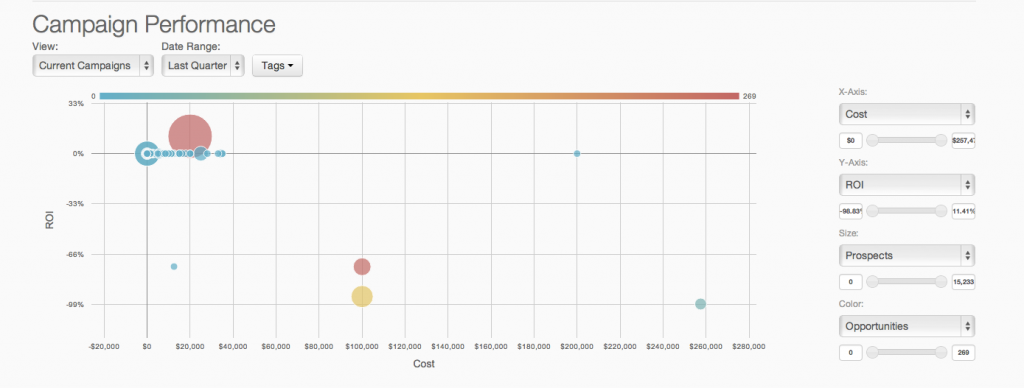
As I have discussed previously their insights were very useful. The second thing is since it is a Google product you will connect the data very easily from other platforms like Bigquery, Google Drive, etc. and even you can connect Google marketing platform. through this tool, you can track your live campaign how they were performing, and how it will be engaging your customer as well.
I rated this a seven because I love Salesforce, and it is excellent on the sales side. However, the marketing side has some pros and cons. It is terrific for keeping track of lead, customer, and dealer information, but it is not easy to automate workflows, integrate other software, or create well-designed emails. It is also straightforward to generate reports, which is very helpful in keeping track of lead progression to better market those leads and turn them into customers.
A de minimis incentive was given to thank the reviewer for their time. The incentive was not used to bias or drive a particular response, nor was the incentive contingent on a positive endorsement. TR verified that a representative sample of customers was invited. More Info
It is an excellent cloud analytics platform that is easy to install and configure and easy to deploy and use, allowing us to measure web traffic and other tools.
It is an entirely online tool; it does not take up hard disk space like other desktop tools.
Since this tool is draggable, Google is constantly adding more features.
Even beginners who do not have a custom dashboard can get information. If there is a problem somewhere on the site that needs to be investigated, Google Analytics 360 will notify you.
A de minimis incentive was given to thank the reviewer for their time. The incentive was not used to bias or drive a particular response, nor was the incentive contingent on a positive endorsement. More Info
A de minimis incentive was given to thank the reviewer for their time. The incentive was not used to bias or drive a particular response, nor was the incentive contingent on a positive endorsement. TR verified that a representative sample of customers was invited. More Info
Generally I think there is a lot you can do within the tool, but as it is a Google product it means there is limited support - something which I think lets all of the platform stacks down
There could be more visual signifiers to identify if a feature is a normal or 360 feature. This would mean you can really get to grips with what the extra more advanced elements are
A de minimis incentive was given to thank the reviewer for their time. The incentive was not used to bias or drive a particular response, nor was the incentive contingent on a positive endorsement. TR verified that a representative sample of customers was invited. More Info
Google Analytics 360 is an upgraded version of the most widely used web/app analytics tracking tools in the market. The price is stable and predictable making it a long-term product of choice. It's easy to use and pairs so well with other Google Marketing Platform products.
A de minimis incentive was given to thank the reviewer for their time. The incentive was not used to bias or drive a particular response, nor was the incentive contingent on a positive endorsement. More Info
As of right now we have not seen any other program that integrates as seamlessly into our Salesforce platform. We have barely scratched the surface of all the features and use cases. It would be irresponsible to make a move to another platform in the near future. We have not come up against any limitations that would prompt a need to switch
The UI is very easy to navigate and use. The features are well designed and intuitive. As long as the user has a good understanding of basic digital analytics definitions and capabilities, this tool should be quite easy to use. I consider Google Analytics Premium to be the easiest of all of the enterprise solutions out there to use.
You won't find another solution that has as many features as Salesforce Marketing Cloud Interaction Studio. We all know Salesforce, we all know how big they are and it's not for nothing... Their tools do most of the things you want, need and even imagine. Using it is complicated, but the usability is infinite.
A de minimis incentive was given to thank the reviewer for their time. The incentive was not used to bias or drive a particular response, nor was the incentive contingent on a positive endorsement. More Info
Upgrades and timing of the upgrades were communicated well and planned during off hours for our work. If we did have a campaign scheduled during that time, it would kick-off after the system was back active. There were a few unplanned system down times, but it was a rare occurrence and those times were also short in duration.
Though the make up of MA apps is not built this way today, it would be nice to see them become more real-time. The integration between Salesforce and Pardot is not a true real-time integration. If I modify something in Salesforce, those changes are not automatically reflected in Pardot immediately. There is a delay of about 15 minutes before the systems sync. This delay, although not long, is less than ideal We would love the systems to be integrated real time such that changes are propagated from one system to the other immediately.
If you purchase Premium through a reseller like LunaMetrics, you are going to be taken care of. The additional amount of support and services that a reseller provides to make sure you have the best experience with the product is the reason why the reseller program exists to begin with. Support doesn't have to be just reactive, it can be proactive as well.
They are really responsive and more than not solve the problem or give you insight to how you can manage the solution yourself. I do find however sometimes a long delay on the more complex issues when they need to loop in other departments. but overall a good experience with support
A de minimis incentive was given to thank the reviewer for their time. The incentive was not used to bias or drive a particular response, nor was the incentive contingent on a positive endorsement. TR verified that a representative sample of customers was invited. More Info
The trainers at the Pardot user conference (Elevate and Connections) were very knowledgeable and presented the material well. Again, the content was targeted to more of a new user audience, and was not really relevant for folks who had been using the product for 2+ years.
There is a ton of information online about Google Analytics, but Google Analytics Premium users will have dedicated support and training from Google or an Authorized Reseller.
Pardot's online training touches on all topics briefly and vaguely without much indepth exploration into how a final outcome could look, such as Nurturing Campaigns, Email templates, landing page templates, etc... The only true way to uncover Pardot's full capabilities is to have Front End design and coding experience. Without this key skill set, I would not recommend Pardot to another business.
If you already have the basic version of GA installed, "getting" GA Premium happens immediately through a virtual flipping of the switch - no need to re-implement. You'll want to expand your use of custom dimensions and metrics (you get 10x the amount with Premium). Ideally, you'll be using a tag management solution to talk with GA Premium, in concert with implementing a dataLayer (to note, Google's Tag Manager platform is covered under the same GA Premium SLA, and it's free). There are some welcomed "configurations" with GA Premium, such as integrating with DoubleClick products, activating data driven attribution models, and building roll-up executive reports - but all of these are easy point and click solutions. In comparison with any other enterprise analytics solution, implementing GA and GA Premium is traditionally easier and more flexible. And if you have any trouble or need an extra set of hands for implementation, GA Certified Partners like LunaMetrics can help
From an IT perspective, once you set up the Javascript beacon and start collecting data there is a waiting game. During this time you can start labeling your site actions which can be labor intensive for a single person, but you don't really have the final end-users on the platform yet. We did a lot of training so users were experienced, but it wasn't until they had their first tasks to accomplish that they started using the system and had questions. I'd recommend setting up some immediate goals for an end-user to start segmenting for the purpose of displaying message campaigns so you can jump start end-user action.
Unless you have very complex and edge case analytics needs, Google Analytics [360 (formerly Google Analytics Premium)] is likely going to be the best choice. From both a cost and usability stand point, Google wins. Adobe has the edge case when you need to create really custom reports, dimensions, metrics, etc. In my experience, this is rarely the case and you end up biting off more than you can chew. Stick with Google unless you are or plan on hiring an Adobe Analytics expert.
A de minimis incentive was given to thank the reviewer for their time. The incentive was not used to bias or drive a particular response, nor was the incentive contingent on a positive endorsement. More Info
I think that all of the marketing platforms I have evaluated and used in the past serve different markets and purposes. Salesforce Marketing Cloud was more palatable to our team because of our existing tech stack where we had Salesforce CRM already deployed and in use. Compared to Marketo and Hubspot, Salesforce Marketing Cloud is a bit dated in terms of the UI/UX and the overall experience but still meets the needs of our organization. Mailchimp, however, isn't even playing in the same arena and is meant for small organizations and companies that don't have a need for a full fledged offering that SFMC brings to the table.
A de minimis incentive was given to thank the reviewer for their time. The incentive was not used to bias or drive a particular response, nor was the incentive contingent on a positive endorsement. TR verified that a representative sample of customers was invited. More Info
A de minimis incentive was given to thank the reviewer for their time. The incentive was not used to bias or drive a particular response, nor was the incentive contingent on a positive endorsement. TR verified that a representative sample of customers was invited. More Info
Prior to this, we had no solution and literally were doing things on paper in a world where technology is outpacing paper. Having this process optimized has made it easier for the sales and marketing people to change information. From the training perspective, it has allowed us to see holes in where we could create additional support training, so the ROI here has been a lot more than just the optimization of a process.
A de minimis incentive was given to thank the reviewer for their time. The incentive was not used to bias or drive a particular response, nor was the incentive contingent on a positive endorsement. More Info
A de minimis incentive was given to thank the reviewer for their time. The incentive was not used to bias or drive a particular response, nor was the incentive contingent on a positive endorsement. More Info
Salesforce Marketing Cloud allows us to more efficiently reach out to a higher number of prospects.
Salesforce Marketing Cloud allows us to nimbly communicate important messages in a timely fashion to facilitate conversion.
Salesforce Marketing Cloud allows us to track who is opening our messages so that we can stop sending to those not interested and focus on the most engaged audiences.
A de minimis incentive was given to thank the reviewer for their time. The incentive was not used to bias or drive a particular response, nor was the incentive contingent on a positive endorsement. TR verified that a representative sample of customers was invited. More Info