TrustRadius: an HG Insights company

Save this comparison

Save this comparison

Add Product

Recommended Comparisons

    Overview
    ProductRatingMost Used ByProduct SummaryStarting Price

    GoGuardian Teacher

    Score8 out of 10
    N/AGoGuardian, headquartered in Los Angeles, offers GoGuardian Teacher, a classroom management and digital learning environment application featuring activity timeline, screen viewer, and other features.N/A

    Securly Filter

    Score8 out of 10
    N/ACloud-based web filtering for K-12 Schools | Parental controls for families | Manage screen time. Any device, anywhere. Securly's technology allows schools and parents to keep kids safe in an increasingly digital world. The vendor states their goal is not to censor the Internet, but to mitigate the negative effects it can have on children with the goal of creating a safer world for kids. Their cloud-based web filter is designed to keep…N/A
    Pricing
    GoGuardian TeacherSecurly Filter
    Editions & Modules
    No answers on this topic
    No answers on this topic
    Offerings
    Pricing Offerings
    GoGuardian TeacherSecurly Filter
    Free Trial
    NoYes
    Free/Freemium Version
    NoNo
    Premium Consulting/Integration Services
    NoNo
    Entry-level Setup FeeNo setup feeNo setup fee
    Additional Details——
    More Pricing Information
    Community Pulse
    GoGuardian TeacherSecurly Filter
    Considered Both Products
    GoGuardian
    No answer on this topic
    Securly
    No answer on this topic
    Key User Insights
    Would buy again
    100%
    Would buy again
    5 Answers
    No answers on this topic
    Delivers good value for the price
    No answers on this topic
    No answers on this topic
    Happy with the feature set
    100%
    Happy with the feature set
    5 Answers
    No answers on this topic
    Lived up to sales and marketing promises
    No answers on this topic
    No answers on this topic
    Implementation went as expected
    No answers on this topic
    No answers on this topic
    Features
    GoGuardian TeacherSecurly Filter
    Student and Faculty Administration
    Comparison of Student and Faculty Administration features of GoGuardian Teacher and Securly Filter
    Feature
    GoGuardian Teacher
    6.4
    3 Ratings
    25% below category average
    Securly Filter
    -
    Ratings
    District Communications, such as messaging and alerting7.01 Ratings00 Ratings
    Roster Management5.13 Ratings00 Ratings
    Platform Customization7.01 Ratings00 Ratings
    Teacher Self-Service6.01 Ratings00 Ratings
    Student Data Security6.12 Ratings00 Ratings
    Community Support6.82 Ratings00 Ratings
    Class Scheduling7.01 Ratings00 Ratings
    Best Alternatives
    GoGuardian TeacherSecurly Filter
    Small Businesses
    No answers on this topic
    No answers on this topic
    Medium-sized Companies
    Schoolmint Hero
    Score9.7 out of 10
    No answers on this topic
    Enterprises
    Schoolmint Hero
    Score9.7 out of 10
    No answers on this topic
    All AlternativesView all alternativesView all alternatives
    User Ratings
    GoGuardian TeacherSecurly Filter
    Likelihood to Recommend
    8.0
    (7 ratings)
    8.5
    (4 ratings)
    Likelihood to Renew
    10.0
    (1 ratings)
    10.0
    (1 ratings)
    Support Rating
    9.7
    (3 ratings)
    8.2
    (1 ratings)
    User Testimonials
    GoGuardian TeacherSecurly Filter
    Likelihood to Recommend
    GoGuardian
    GoGuardian Teacher is great for a teacher who needs a way to monitor student activities and work time on a laptop. It is easy to set up, simple to use and helps to keep students accountable when online in class. It integrates with Google Classroom which is a big help. It is more powerful for teachers experienced in using tech in the classroom. The archiving ability is great but the UX needs to improve.
    Incentivized
    Read full review
    Securly
    As I stated earlier, if you have iPads in a 1 to 1 usage, [Securly Filter] is your best filter. Students cannot break it or mess with any settings on a device that has an MDM setup.
    Incentivized
    Read full review
    Pros
    GoGuardian
    • Cloud-based. Teachers do not have to monitor from just one device - they can do it from any device.
    • GoGuardian allows teachers to lock a student's screen when he/she needs the students attention.
    • GoGuardian allows the teacher to view all students' devices simultaneously.
    Incentivized
    Read full review
    Securly
    • Blocks objectionable content
    • Customized profile management by OU.
    • Logging
    Incentivized
    Read full review
    Cons
    GoGuardian
    • Scope of device monitoring (laptops, desktop computers and not just Chromebooks)
    • Needs an updated interface to more accurately fit advances in technology
    • Ability to more easily interact and adjust with a student's device
    Incentivized
    Read full review
    Securly
    • Delegated management is sometimes difficult to get working, requiring undocumented changes.
    • Pricing has gone up for Chrome devices.
    • Syncing is a manual process.
    Incentivized
    Read full review
    Likelihood to Renew
    GoGuardian
    For a technology-heavy school, it is a necessary and good tool for managing classroom use of laptops. It is easy to set up and use. Helps track time on task and internet usage. Another source of data when speaking to parents about student work and activity. Can help plan and manage work time when you have limited devices.
    Incentivized
    Read full review
    Securly
    Love, Love, Love this product!!
    Incentivized
    Read full review
    Support Rating
    GoGuardian
    The support is great. On the rare occasion that I've had to reach out to support they have been very quick to respond and extremely helpful. I've also had teachers reach out directly to support themselves. Most of the time I don't even know that a teacher has reached out to support until after the fact. They always seem satisfied.
    Incentivized
    Read full review
    Securly
    I don't like giving a 10 since everyone always has room for improvement, and while Securly is doing an awesome job, there is still room for improvement across the board.
    Incentivized
    Read full review
    Alternatives Considered
    GoGuardian
    I have used Hapara in a previous school district. GoGuardian is more user-friendly and easier to setup. I do think GoGuardian has some room on improving the ease of finding some areas of the program, but once you know the path to get there it is quick.
    Incentivized
    Read full review
    Securly
    Securly Filter integration with Google Workspace for education makes it an ideal pairing for K-12 institutions. It has a friendlier portal and more intuitive UI, particularly when retrieving activity logs. The policy customization is also far easier and responsive. That being said, it does not provide a full-fledged firewall like Untangle NG (nor many of the other useful features from NG, such as simple-to-deploy VPN).
    Incentivized
    Read full review
    Return on Investment
    GoGuardian
    • We have been able to identify inappropriate websites that students have discovered. For example anonymous proxies, movie streaming, etc. Through this software, we have been able to identify the students and in turn block the websites.
    • We have been able to identify which students have been using other user's accounts. This was an unintended side effect of the software. If a teacher knows that a student is using a Chromebook but the student is not showing up in the software, we are easily able to deduce that the user must be using another student's account.
    Incentivized
    Read full review
    Securly
    • Securly has reduced our workload managing filters.
    • Securly makes it quick to respond to user audit requests.
    • Securly is quick to set up.
    Incentivized
    Read full review
    ScreenShots

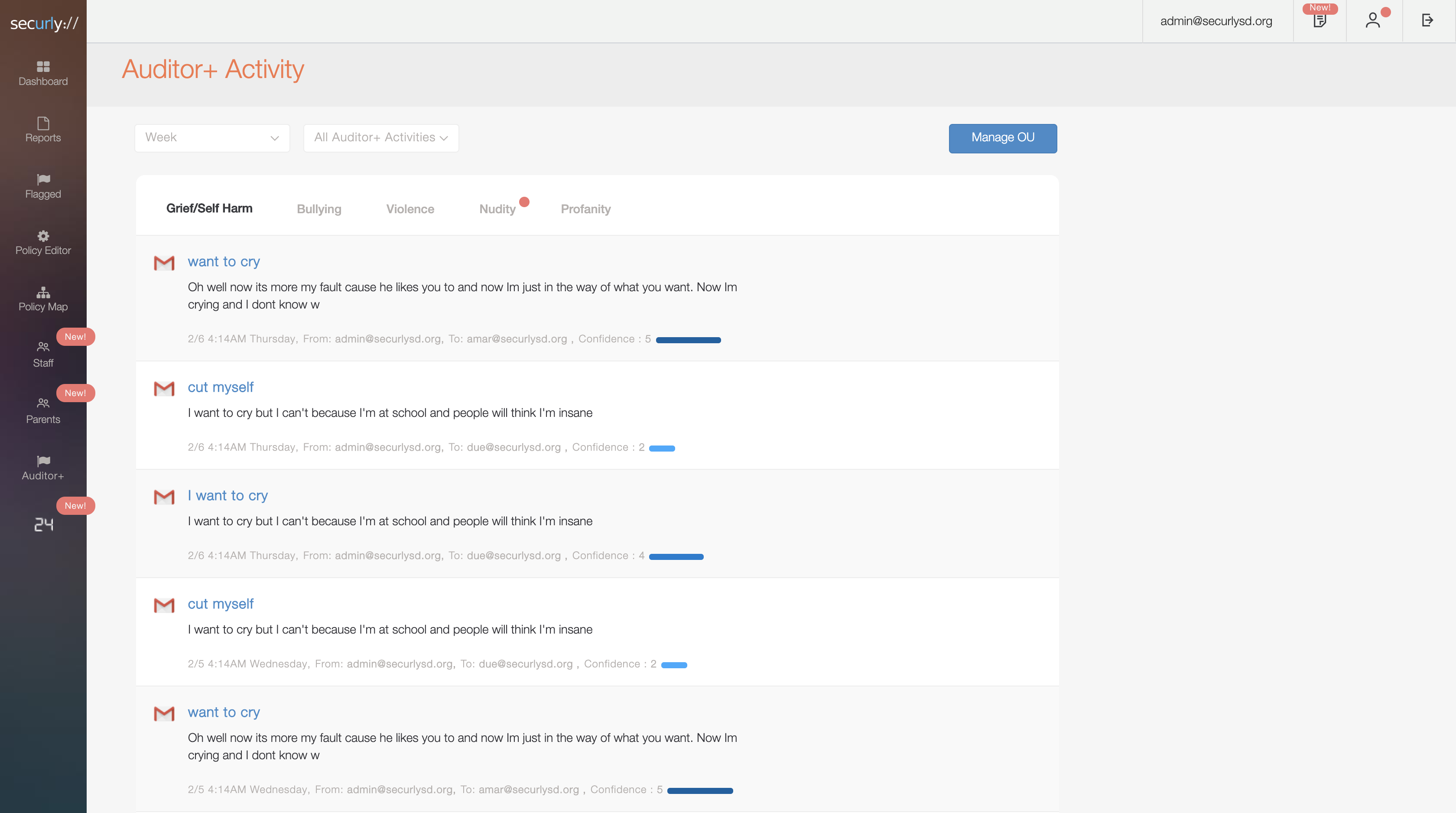
    Securly Filter Screenshots

    Screenshot of ReportingScreenshot of AuditorScreenshot of DashboardScreenshot of ActivitiesScreenshot of Staff GroupsScreenshot of Parent Settings