GoGuardian Admin is a web content filtering solution from education software company GoGuardian in Los Angeles, provide web filtering on-campus and off-campus filtering.
N/A
Lightspeed Filter
Score9.6 out of 10
N/A
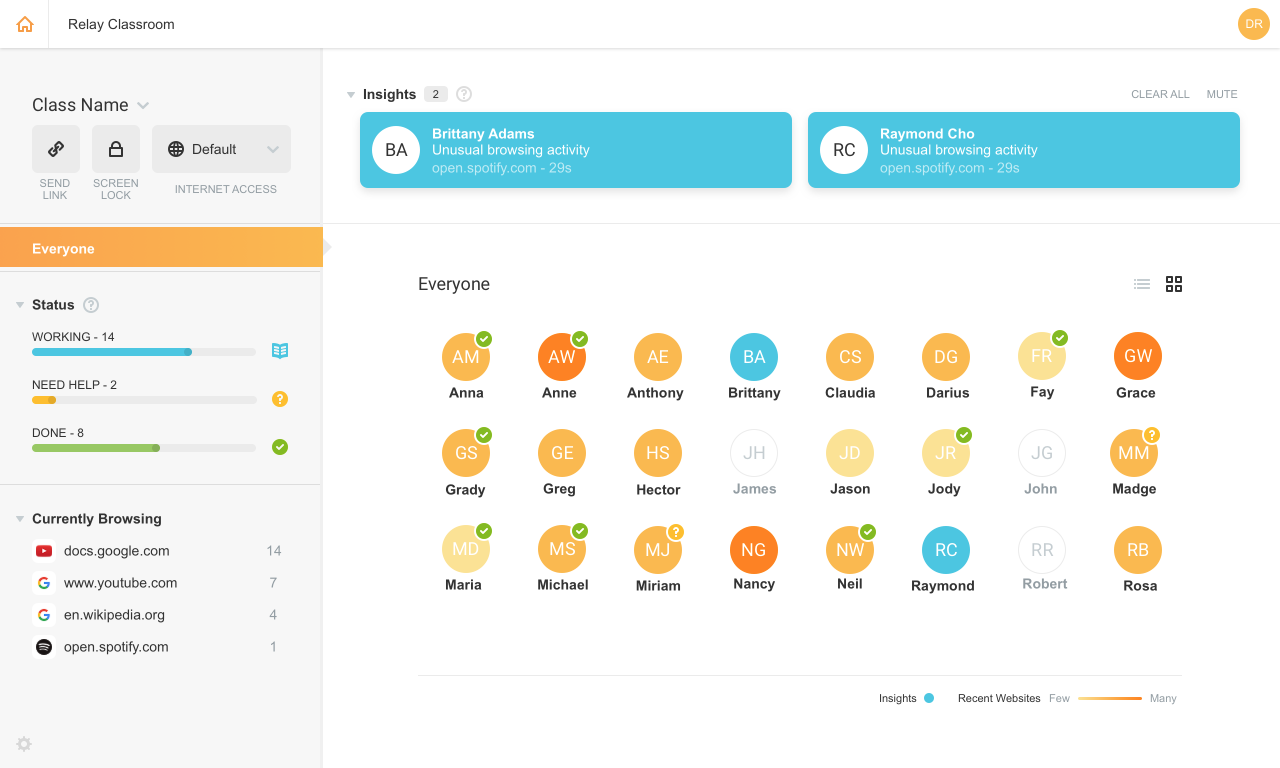
Lightspeed Filter (formerly Relay), from Lightspeed Systems in Austin, offers insights to help understand and maximize the use of 1:1 classroom devices, keep users safe and increase the educational return on technology investments. Lightspeed Systems aims to help users make decisions to enhance technology use, report up administrators, present to your board, reassure concerned parents, empower teachers, and direct students on appropriate use. According to the vendor, Lightspeed Filter powers…
N/A
Pricing
GoGuardian Admin
Lightspeed Filter
Editions & Modules
No answers on this topic
No answers on this topic
Offerings
Pricing Offerings
GoGuardian Admin
Lightspeed Filter
Free Trial
No
Yes
Free/Freemium Version
No
No
Premium Consulting/Integration Services
No
No
Entry-level Setup Fee
No setup fee
No setup fee
Additional Details
—
Priced per student device. Quote available upon request.
More Pricing Information
Community Pulse
GoGuardian Admin
Lightspeed Filter
Considered Both Products
GoGuardian
Verified User
Chose GoGuardian Admin
GoGuardian Admin has been leading the way in content filtering for both on and off site with an easy-to-use interface. At the time, it was one of the first to offer cloud-based off-site filtering for Chromebooks. They continue to grow and provide new features every year with …
A de minimis incentive was given to thank the reviewer for their time. The incentive was not used to bias or drive a particular response, nor was the incentive contingent on a positive endorsement. More Info
Lightspeed Systems
Verified User
Chose Lightspeed Filter
This was a much easier platform to deploy and manage. Simple dashboard navigation. Easy reporting tools. Cross-platform (windows, chrome, apple). The agent used to manage is reliable and simple to deploy. After using all other products over the years this has been the most …
A de minimis incentive was given to thank the reviewer for their time. The incentive was not used to bias or drive a particular response, nor was the incentive contingent on a positive endorsement. More Info
GoGuardian is excellent for any district with a 1:1 Chromebook program. Our program would not be nearly as successful without it. GoGuardian does work with other devices (Windows, iPads) but I believe some features do not work as well in those setups. We haven't tried using it for anything other than Chromebooks and I am not aware of anyone using it for iPad/Windows or Macs.
A de minimis incentive was given to thank the reviewer for their time. The incentive was not used to bias or drive a particular response, nor was the incentive contingent on a positive endorsement. More Info
Lightspeed web filtering using the Chromebook Relay agent is amazing and does a great job for a cloud filtering solution. The reports that are available are great and can be customized and retains data for 90 days. Reports are easily shared with staff and/or parents for transparency and disciplinary reasons. The agent for Lightspeed (Relay) does not work well with OSX and works okay in Windows, but doesn't allow you to access local IP addresses in the web browser. There needs to be a way to bypass filtering for local network access. This can make it unusable in some cases.
A de minimis incentive was given to thank the reviewer for their time. The incentive was not used to bias or drive a particular response, nor was the incentive contingent on a positive endorsement. More Info
A de minimis incentive was given to thank the reviewer for their time. The incentive was not used to bias or drive a particular response, nor was the incentive contingent on a positive endorsement. More Info
A de minimis incentive was given to thank the reviewer for their time. The incentive was not used to bias or drive a particular response, nor was the incentive contingent on a positive endorsement. More Info
With the new Minnesota state laws regarding student data privacy - it made it somewhat challenging for us to continue utilizing GoGuardian Admin. However, they provided some updates to their software to address these issues.
GoGuardian Admin recently put out an option to checkbox COPPA/CIPA compliance verifications for web filtering. It seems that this still needs some work, as several educational websites we utilize are coming up as "uncategorized" - and then are being falsely flagged and declining access.
A de minimis incentive was given to thank the reviewer for their time. The incentive was not used to bias or drive a particular response, nor was the incentive contingent on a positive endorsement. More Info
A de minimis incentive was given to thank the reviewer for their time. The incentive was not used to bias or drive a particular response, nor was the incentive contingent on a positive endorsement. More Info
Does what we need it to do and more in a very cost-effective manner. Relatively easy to use and great customer support. They are quick and clear and will walk you through things in real time.
A de minimis incentive was given to thank the reviewer for their time. The incentive was not used to bias or drive a particular response, nor was the incentive contingent on a positive endorsement. More Info
A de minimis incentive was given to thank the reviewer for their time. The incentive was not used to bias or drive a particular response, nor was the incentive contingent on a positive endorsement. More Info
GoGuardian Admin has been leading the way in content filtering for both on and off site with an easy-to-use interface. At the time, it was one of the first to offer cloud-based off-site filtering for Chromebooks. They continue to grow and provide new features every year with great tutorials and updates.
A de minimis incentive was given to thank the reviewer for their time. The incentive was not used to bias or drive a particular response, nor was the incentive contingent on a positive endorsement. More Info
We were already a [Lightspeed] customer so the transition was seamless to Relay. Their support and team at [Lightspeed] are top-notch. We have been with Lightspeed for over 20 years and have evaluated on occasions other options and [ended] up back with [Lightspeed] each time. Their price point, ease of use, great team of engineers, and overall customer focus keep them on top in my eyes.
A de minimis incentive was given to thank the reviewer for their time. The incentive was not used to bias or drive a particular response, nor was the incentive contingent on a positive endorsement. More Info
A de minimis incentive was given to thank the reviewer for their time. The incentive was not used to bias or drive a particular response, nor was the incentive contingent on a positive endorsement. More Info
A de minimis incentive was given to thank the reviewer for their time. The incentive was not used to bias or drive a particular response, nor was the incentive contingent on a positive endorsement. More Info