Fortra's GoAnywhere MFT vs. SFTP To Go

Overview
ProductRatingMost Used ByProduct SummaryStarting Price
Fortra's GoAnywhere MFT
Score 9.7 out of 10
N/A
Fortra's GoAnywhere MFT is a secure file transfer solution that automates and encrypts data using industry standard protocols (e.g. OpenPGP, SFTP, HTTPS). With auditing and reporting, GoAnywhere can help organizations meet compliance regulations like PCI DSS and HIPAA. GoAnywhere can be deployed on-premises or in the cloud. As a VMware-validated product, it also runs in several virtualized environments including VMware, Amazon AWS, and Microsoft Azure. GoAnywhere exchanges batch and ad…N/A
SFTP To Go
Score 10.0 out of 10
Mid-Size Companies (51-1,000 employees)
SFTP To Go is a secure, cloud-based file transfer solution used by over 1,000 businesses worldwide. Powered by Amazon Web Services (AWS), it’s built for reliability and scalability, and is designed to make file sharing simple and secure. With compliance to SOC 2, HIPAA, and GDPR, SFTP To Go ensures that data is safe and stored with the strictest regulatory standards. Business Associate Agreements (BAA) are also available for those working with sensitive data. Only…
$60
per month 15 credentialed users, 20 GB storage
Pricing
Fortra's GoAnywhere MFTSFTP To Go
Editions & Modules
No answers on this topic
Mini
$60
per month 15 credentialed users, 20 GB storage
Small
$120
per month 50 credentialed users, 50 GB storage
Starter
$300
per month 100 credentialed users, 1 TB storage
Professional
$600
per month 250 credentialed users, 2 TB storage
Premium
$1200
per month 800 credentialed users, 4 TB storage
Custom
Custom Pricing
unlimited credentialed users and storage
Offerings
Pricing Offerings
Fortra's GoAnywhere MFTSFTP To Go
Free Trial
YesYes
Free/Freemium Version
YesNo
Premium Consulting/Integration Services
NoNo
Entry-level Setup FeeOptionalNo setup fee
Additional Details
More Pricing Information
Community Pulse
Fortra's GoAnywhere MFTSFTP To Go
Best Alternatives
Fortra's GoAnywhere MFTSFTP To Go
Small Businesses
DataMotion
DataMotion
Score 9.3 out of 10
DataMotion
DataMotion
Score 9.3 out of 10
Medium-sized Companies
DataMotion
DataMotion
Score 9.3 out of 10
DataMotion
DataMotion
Score 9.3 out of 10
Enterprises
Control-M
Control-M
Score 9.3 out of 10
Fortra's GoAnywhere MFT
Score 9.7 out of 10
All AlternativesView all alternativesView all alternatives
User Ratings
Fortra's GoAnywhere MFTSFTP To Go
Likelihood to Recommend
9.9
(0 ratings)
-
(0 ratings)
Likelihood to Renew
10.0
(0 ratings)
-
(0 ratings)
Usability
8.1
(0 ratings)
-
(0 ratings)
Availability
9.0
(0 ratings)
-
(0 ratings)
Performance
10.0
(0 ratings)
-
(0 ratings)
Support Rating
8.6
(0 ratings)
-
(0 ratings)
Implementation Rating
10.0
(0 ratings)
-
(0 ratings)
Configurability
8.0
(0 ratings)
-
(0 ratings)
Product Scalability
9.0
(0 ratings)
-
(0 ratings)
Vendor post-sale
10.0
(0 ratings)
-
(0 ratings)
Vendor pre-sale
10.0
(0 ratings)
-
(0 ratings)
User Testimonials
Fortra's GoAnywhere MFTSFTP To Go
Likelihood to Recommend
Go Anywhere is perfect for moving data between systems. It is great for pulling data and emailing it or sending it to another server. However, Go Anywhere is limited as an ETL tool. It is not good for large datasets. When we had to move millions of rows from one server to another, it totally choked.
Read full review
No answers on this topic
Pros
  • Automated Task Scheduling - This is a no-brainer. Schedules are easily set up to accomplish anything from basic file transfer tasks to advanced database queries and e-mails.
  • User Interface - Easy to navigate and organized. A central administration dashboard is available to keep up with processes and users.
  • Multiple file transfer solutions - GA MFT provides FTP, FTPS, SFTP, HTTPS, Secure E-Mail as options for secure file transfers. If one method does not suit the needs internally or for a vendor, other options are available.
Read full review
No answers on this topic
Cons
  • In the beginning, when implementing, it can take a while to understand how it works thoroughly.
  • Due to the added abilities learning to configure the software can take some time.
  • Training for this product will cost extra. The training is also not excellent.
  • The software seems glitchy at times, sometimes being slow or corrupting jobs.
Read full review
No answers on this topic
Usability
Since using it and having time to work with it, its process and actions are growing on me and once a project is created one can implement across numerous location or platforms
Read full review
No answers on this topic
Support Rating
GoAnywhere's support team is absolutely wonderful. They are always very fast to respond and will do anything that they can to help you with whatever dilemma you are facing. They also have a great user forum that is very helpful if you are looking for the solution to a problem or just want some advice from others. They are constantly looking to improve and always looking for suggestions on what customers would like to see next which is refreshing.
Read full review
No answers on this topic
Implementation Rating
Implementation was straight forward. We paid for 50 hours of professional service in case, we need help. We end using only 10 hours. I have only 1 month to convert over 120 scripts from FTP voyager to goanywhere. Old script was had written using bat files. Some of the batch file were written by some other person, who passed away. Documents for old script was not in details. With the professional service, I was able to convert all script within windows
Read full review
No answers on this topic
Alternatives Considered
I've never used a product that handles file transfers in the way GoAnywhere does. I have used other SFTP servers and this is by far the most robust and easiest to use. I've used FileZilla, Cerberus and Windows for FTP services and this by far is easier to set up and manage than the other options.
Read full review
No answers on this topic
Return on Investment
  • With the Secure Mail feature we automated massive secure mail distributions that were previously done by post.
  • By building corporate and EDI frameworks with the Project designer, we reduce the complexity of adding new project to adding a new configuration file to the framework.
  • Simplify security administration by having a single point of entry for process that need file transfers with external partners.
Read full review
No answers on this topic
ScreenShots

Fortra's GoAnywhere MFT Screenshots

Screenshot of The GoAnywhere Dashboard, where users can access features and choose customizable Gadgets that display vital system statistics and file transfer activity

SFTP To Go Screenshots

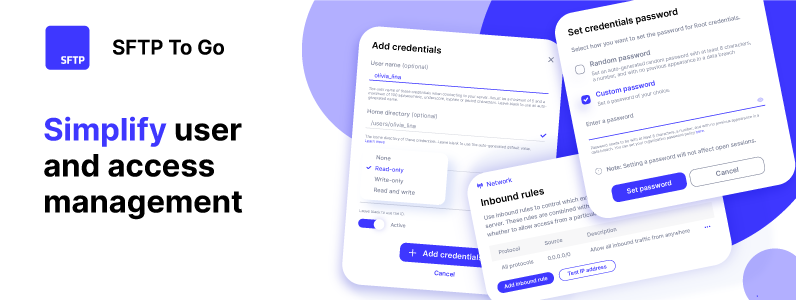
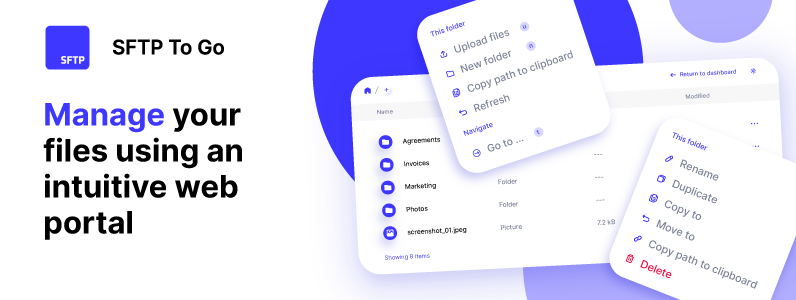
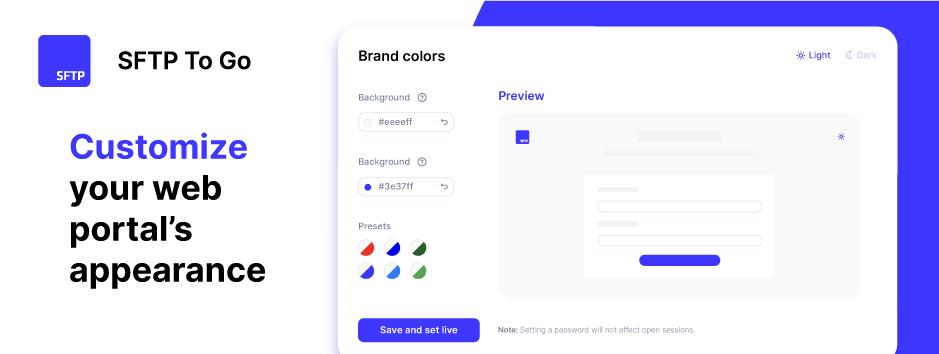
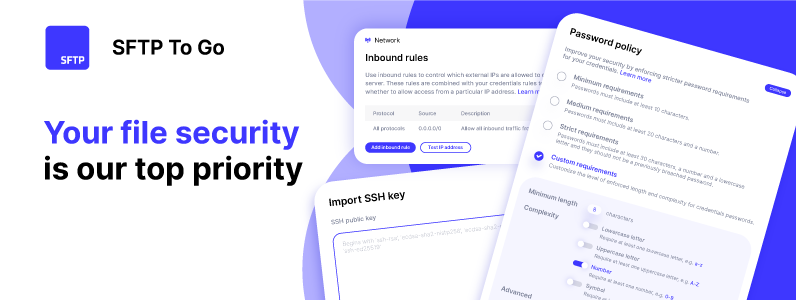
Screenshot of user and access management - User-specific home directories and permissions can be assigned, as well as inbound network rules to restrict cloud storage access.Screenshot of file management in the web portal - Files can be managed directly through a browser using any set of credentials. From the admin dashboard, the user can upload, download, and delete files, as well as copy and move files within the storage without having to download or upload files.Screenshot of the customizable web portal - The web portal can be personalized with a brand's logo, and colors to make it consistent with a brand's identity.Screenshot of automations using webhooks - Other applications and systems can be alerted as soon as files are uploaded using real-time programmatic notifications.Screenshot of file security rules restrict access to known IP addresses, and maintains compliance with HIPAA, SOC2, and GDPR, to guarantee the safety of sensitive data.