GlobiFlow for Podio is a workflow automation and data visualization solution for Citrix Podio.
N/A
Process Street
Score8.2 out of 10
N/A
Process Street in San Francisco offers their application which allows teams to create simple recurring checklists, collaborate around them and track as they’re completed.
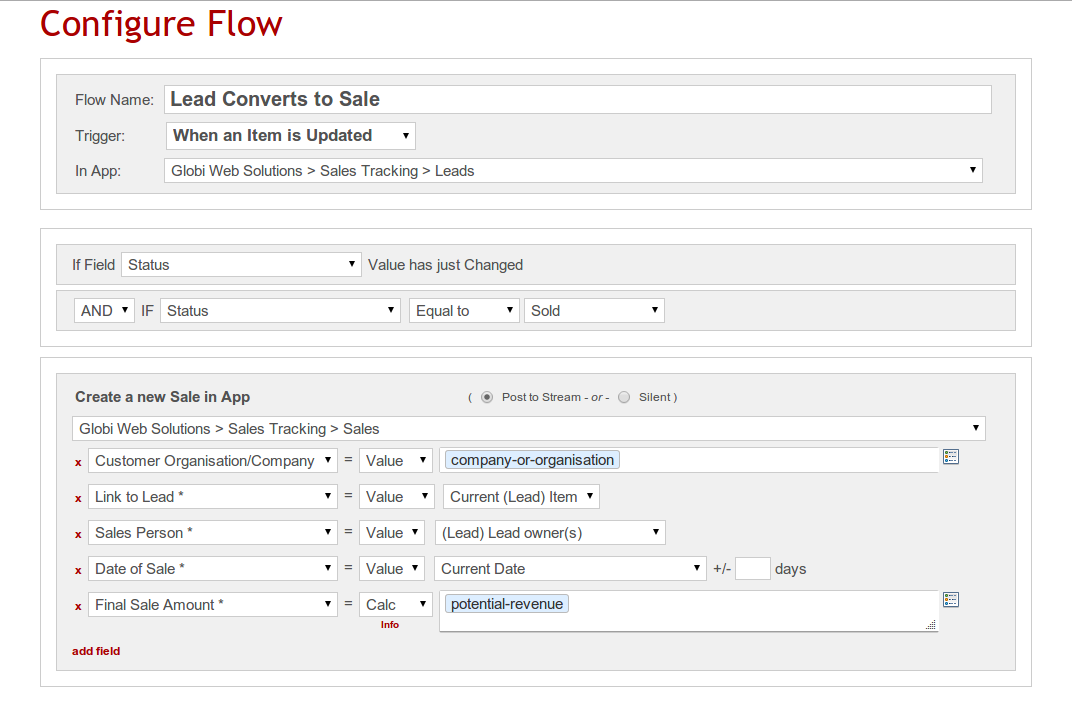
GlobiFlow should be considered advanced software for a limited number of employees. If users of GlobiFlow don't work together, they could easily create processes that cancel out other work. GlobiFlow works very well when one person understands the program well and uses it to help coworkers think through processes. The most helpful way we've used it is in automating our hiring process somewhat. Instead of receiving hundreds of emails with job applications, we set up an app in Podio and used Globiflow to notify supervisors when applications were received through our website. As a candidate moves through the hiring process, GlobiFlow processes provide triggers to help us remember what needs to happen at each step along the way by automatically generating tasks, emails, and items in other apps.
A de minimis incentive was given to thank the reviewer for their time. The incentive was not used to bias or drive a particular response, nor was the incentive contingent on a positive endorsement. More Info
if you have standard processes that are often executed, it's worth to use. If you are a small company it is generally not worth to implement because you will need somebody who permanently works with it and maintains the processes.
GlobiFlow allows one event to prompt a task or notification automatically, which greatly improves workflows and internal communications.
GlobiFlow makes it possible to automate some interactions we have with people outside the agency, for example, responding immediately to an application when it is received, creating a Sharefile folder to collect submitted documents all in one secure location, etc.
GlobiFlow suggests new ways of setting up workflows that makes us think through and improve our processes.
GlobiFlow helps us keep track of events in new and improved ways. For example, when a leave request is approved GlobiFlow automates the process for putting that date on an agency-wide calendar.
GlobiFlow helps us use Podio and Sharefile better so we communicate with employees in other offices and out in the field more effectively.
A de minimis incentive was given to thank the reviewer for their time. The incentive was not used to bias or drive a particular response, nor was the incentive contingent on a positive endorsement. More Info
A de minimis incentive was given to thank the reviewer for their time. The incentive was not used to bias or drive a particular response, nor was the incentive contingent on a positive endorsement. More Info
There is a steep learning curve for your typical PC user. I've used GlobiFlow for over a year but there are many things I still don't understand about it. The help pages are somewhat helpful, but there is a whole vocabulary associated with GlobiFlow that is a bit mysterious at the front end.
Any limitations in Podio are repeated in GlobiFlow.
Setting up processes in GlobiFlow is somewhat complicated, which makes it a little tedious when employees change and responsibilities shift, as they often do in a growing organization. Naming your processes well is important so you can go back and find places where changes need to be made.
A de minimis incentive was given to thank the reviewer for their time. The incentive was not used to bias or drive a particular response, nor was the incentive contingent on a positive endorsement. More Info
If you had the ability to drag tasks around in a nonlinear way, it could be a cool creative feature. An example is to have a subtask next to another that says N/A if the task wasn't executed because it wasn't applicable.
Inbox tab can be overwhelming but that may just be the style in which I built my checklists.
A de minimis incentive was given to thank the reviewer for their time. The incentive was not used to bias or drive a particular response, nor was the incentive contingent on a positive endorsement. More Info
Since my last login into the platform, the latest update made the app much easier to use and learn. It's incredibly clean, and everything is exactly where it should be location-wise. You can tell they listen to their user base for features.
A de minimis incentive was given to thank the reviewer for their time. The incentive was not used to bias or drive a particular response, nor was the incentive contingent on a positive endorsement. More Info
We acquired GlobiFlow at the same time that we GlobiFlow Podio and ShareFile. GlobiFlow helped us use both Podio and ShareFile more efficiently. Podio has an internal automation function that performs some of the same tasks as GlobiFlow but is far more limited, which is why we decided to go ahead and learn how to implement GlobiFlow.
A de minimis incentive was given to thank the reviewer for their time. The incentive was not used to bias or drive a particular response, nor was the incentive contingent on a positive endorsement. More Info
I've tried other checklist tools like Google Keep, but it was too simple. I've tried Flowster, which is very similar to Process Street, but I like Process Street better. The interface is a lot more balanced and pleasant to look at. I found Flowster to be a less appealing interface even though the features were similar. I also briefly tried systemHUB but it is very expensive for what it offers compared to Process Street.
A de minimis incentive was given to thank the reviewer for their time. The incentive was not used to bias or drive a particular response, nor was the incentive contingent on a positive endorsement. More Info
A de minimis incentive was given to thank the reviewer for their time. The incentive was not used to bias or drive a particular response, nor was the incentive contingent on a positive endorsement. More Info
Because of Process Street I am no longer losing money when having to redo things
It helps me eliminate those nasty "egg on the face" situations with clients because now nothing slips through the cracks. The team is able to be on top of it!
A de minimis incentive was given to thank the reviewer for their time. The incentive was not used to bias or drive a particular response, nor was the incentive contingent on a positive endorsement. More Info