GitLab DevSecOps platform enables software innovation by aiming to empower development, security, and operations teams to build better software, faster. With GitLab, teams can create, deliver, and manage code quickly and continuously instead of managing disparate tools and scripts. GitLab helps teams across the complete DevSecOps lifecycle, from developing, securing, and deploying software. Differentiators, as described by Gitlab:
Simplicity: With GitLab, DevSecOps can…
$0
per month per user
Planview AgilePlace
Score9.9 out of 10
N/A
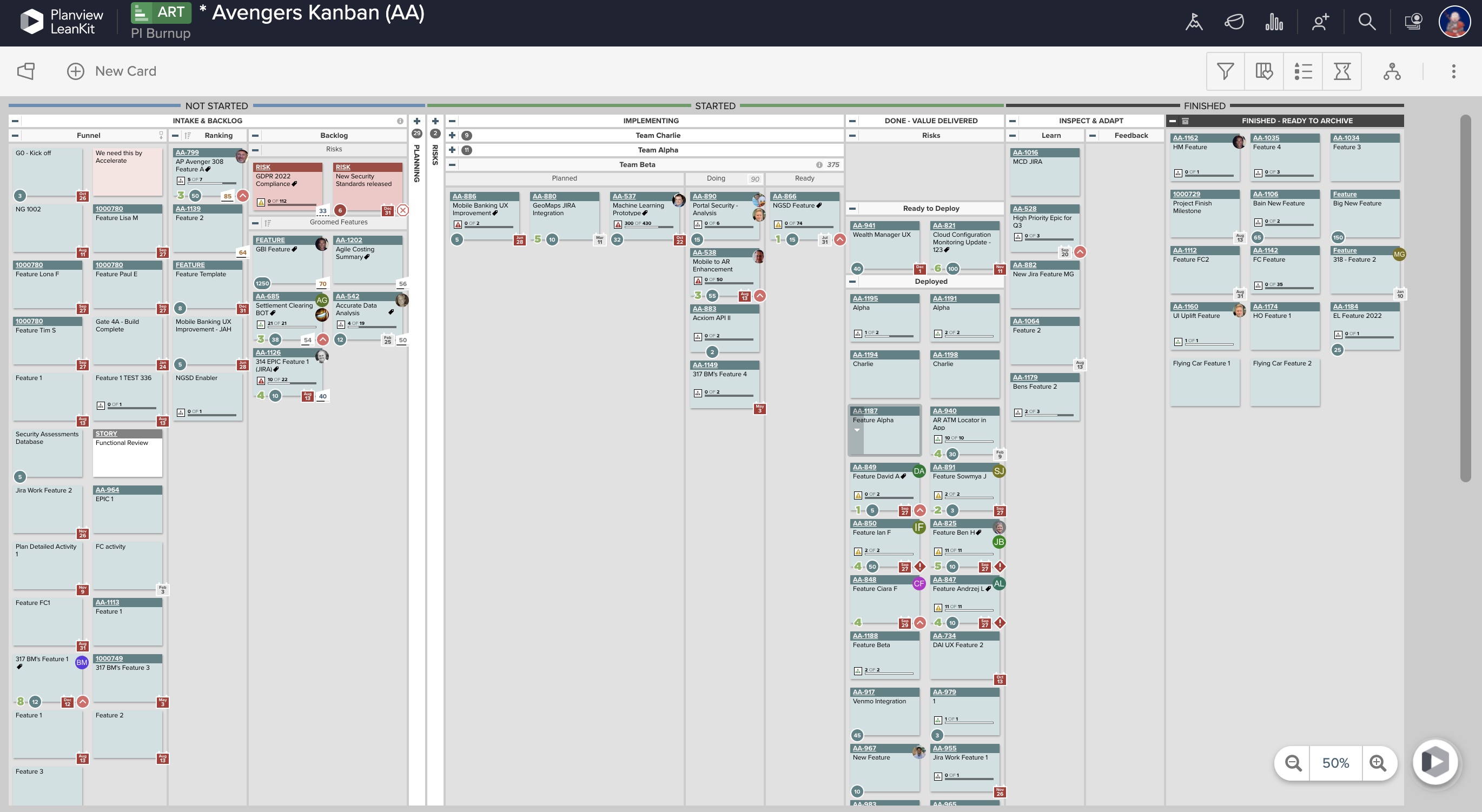
AgilePlace is a project management solution built around flexibility, data-driven analytics, and workflow automation. The software was acquired by Planview in December 2017 to expand that company's capabilities.
GitLab is good if you work a lot with code and do complex repository actions. It gives you a very good overview of what were the states of your branches and the files in them at different stages in time. It's also way easier and more efficient to write pipelines for CI\CD. It's easier to read and it's easier to write them. It takes fewer clicks to achieve the same things with GitLab than it does for competitor products.
A de minimis incentive was given to thank the reviewer for their time. The incentive was not used to bias or drive a particular response, nor was the incentive contingent on a positive endorsement. TR verified that a representative sample of customers was invited. More Info
This tool enables the visual management needed in many offshore teams to easily and quickly see the pending work, work in progress and completed work.For teams that work with a waterfall methodology and do not have AGILE internalized, I believe there are other solutions from Planview or other providers.
A de minimis incentive was given to thank the reviewer for their time. The incentive was not used to bias or drive a particular response, nor was the incentive contingent on a positive endorsement. TR verified that a representative sample of customers was invited. More Info
A de minimis incentive was given to thank the reviewer for their time. The incentive was not used to bias or drive a particular response, nor was the incentive contingent on a positive endorsement. TR verified that a representative sample of customers was invited. More Info
Ability to add more than 1 visual cue to the card. We use custom icons and sometimes more than 1 is appropriate but you have to choose which is most important since only 1 can be applied.
Better visibility to board access from the user administration screens. Currently have to run 1-2 reports to see this information. Would like to be able to click on a user within Configure Users and see what boards they have access to quickly.
I really feel the platform has matured quite faster than others, and it is always at the top of its game compared to the different vendors like GitHub, Azure pipelines, CircleCI, Travis, Jenkins. Since it provides, agents, CI/CD, repository hosting, Secrets management, user management, and Single Sign on; among other features
A de minimis incentive was given to thank the reviewer for their time. The incentive was not used to bias or drive a particular response, nor was the incentive contingent on a positive endorsement. TR verified that a representative sample of customers was invited. More Info
I find it easy to use, I haven't had to do the integration work, so that's why it is a 9/10, cause I can't speak to how easy that part was or the initial set up, but day to day use is great!
A de minimis incentive was given to thank the reviewer for their time. The incentive was not used to bias or drive a particular response, nor was the incentive contingent on a positive endorsement. More Info
LeanKit isn't the best designed Kanban system I've seen, but overall it's pretty usable. The boards I've used are pretty complex, so it can be difficult to find things. I found that searching and filtering for specific cards was somewhat of a challenge. Dragging a card from one lane to another is kind of a fun way to get things done though.
A de minimis incentive was given to thank the reviewer for their time. The incentive was not used to bias or drive a particular response, nor was the incentive contingent on a positive endorsement. More Info
I've never had experienced outages from GItlab itself, but regarding the code I have deployed to Gitlab, the history helps a lot to trace the cause of the issue or performing a rollback to go back to a working version
A de minimis incentive was given to thank the reviewer for their time. The incentive was not used to bias or drive a particular response, nor was the incentive contingent on a positive endorsement. TR verified that a representative sample of customers was invited. More Info
A de minimis incentive was given to thank the reviewer for their time. The incentive was not used to bias or drive a particular response, nor was the incentive contingent on a positive endorsement. More Info
GItlab reponsiveness is amazing, has never left me IDLE. I've never had issues even with complex projects. I have not experienced any issues when integrating it with agents for example or SSO
A de minimis incentive was given to thank the reviewer for their time. The incentive was not used to bias or drive a particular response, nor was the incentive contingent on a positive endorsement. TR verified that a representative sample of customers was invited. More Info
A de minimis incentive was given to thank the reviewer for their time. The incentive was not used to bias or drive a particular response, nor was the incentive contingent on a positive endorsement. More Info
At this point, I do not have much experience with Gitlab support as I have never had to engage them. They have documentation that is helpful, not quite as extensive as other documentation, but helpful nonetheless. They also seem to be relatively responsive on social media platforms (twitter) and really thrived when GitHub was acquired by Microsoft
A de minimis incentive was given to thank the reviewer for their time. The incentive was not used to bias or drive a particular response, nor was the incentive contingent on a positive endorsement. More Info
Every time I have reached out to the AgilePlace support team I have received a timely response in addition to professional & personal feedback. Their consultants are knowledgeable and the management team is happy to jump in and help when needed.
A de minimis incentive was given to thank the reviewer for their time. The incentive was not used to bias or drive a particular response, nor was the incentive contingent on a positive endorsement. More Info
Gitlab seems more cutting-edge than GitHub; however, its AI tools are not yet as mature as those of CoPilot. It feels like the next-generation product, so as we selected a tool for our startup, we decided to invest in the disruptor in the space. While there are fewer out-of-the-box templates for Gitlab, we have never discovered a lack of feature parity.
A de minimis incentive was given to thank the reviewer for their time. The incentive was not used to bias or drive a particular response, nor was the incentive contingent on a positive endorsement. More Info
Originally, we had evaluated two other tools next to Planview LeanKit: Kanbantool and Kanbanflow. The latter was a close contestant for productive use, as it was also very customizable and a joy to work with and look at. It also had lower user fees and a mobile integration. In the end, we picked Planview LeanKit because of several reasons: Aesthetics: The look was much more clean and professional. Reporting: It was obvious from the start that we could use Planview LeanKit as a tool for improvement. API: We needed to integrate the Kanban into our central systems and Planview LeanKit API was (and still is) a way to do it. Card Headers: This sounds like a simple thing, but the headers above the titles fit our work perfectly and looked perfect, which helped the decision.
A de minimis incentive was given to thank the reviewer for their time. The incentive was not used to bias or drive a particular response, nor was the incentive contingent on a positive endorsement. More Info
A de minimis incentive was given to thank the reviewer for their time. The incentive was not used to bias or drive a particular response, nor was the incentive contingent on a positive endorsement. TR verified that a representative sample of customers was invited. More Info
A de minimis incentive was given to thank the reviewer for their time. The incentive was not used to bias or drive a particular response, nor was the incentive contingent on a positive endorsement. More Info
A de minimis incentive was given to thank the reviewer for their time. The incentive was not used to bias or drive a particular response, nor was the incentive contingent on a positive endorsement. TR verified that a representative sample of customers was invited. More Info
A de minimis incentive was given to thank the reviewer for their time. The incentive was not used to bias or drive a particular response, nor was the incentive contingent on a positive endorsement. More Info