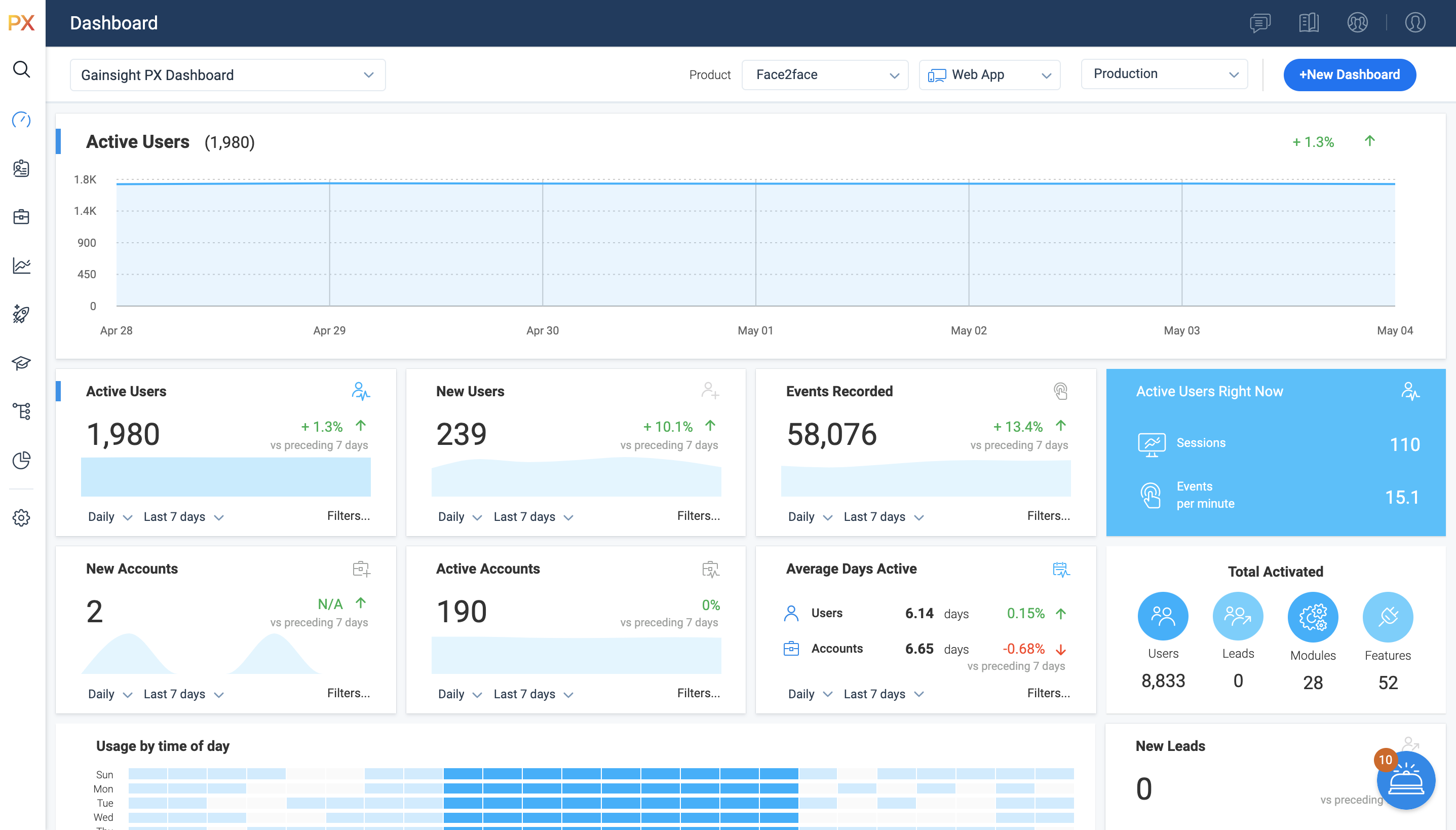
For SaaS products, Gainsight's product experience software enables companies to track every step of their user's journey and fully understand how they're interacting with a product over time.
$0
100 or less MAUs (Monthly Active Users)
Whatfix
Score8.2 out of 10
N/A
Whatfix is advancing the "userization" of application technology, by empowering companies to maximize the ROI of digital investments across the application lifecycle. Powered by GenAI, Whatfix’s product suite includes a digital adoption platform, simulated application environments for hands-on training, and no-code application analytics. Whatfix enables organizations to drive user productivity, ensure process compliance, and improve user experience of internal and customer-facing…
N/A
Pricing
Gainsight PX
Whatfix
Editions & Modules
Starter (Free)
$0
100 or less MAUs (Monthly Active Users)
Starter
Starting at $400/M
500+ MAUs (Monthly Active Users)
Growth
Custom
Per MAUs (Monthly Active Users) and more
No answers on this topic
Offerings
Pricing Offerings
Gainsight PX
Whatfix
Free Trial
Yes
Yes
Free/Freemium Version
Yes
Yes
Premium Consulting/Integration Services
Yes
Yes
Entry-level Setup Fee
No setup fee
Optional
Additional Details
—
All Pricing models are customized and tailor-made according to the customer's requirement.
Support Manager in Customer Service at Bongo (E-Learning, 11-50 employees)
Chose Gainsight PX
WalkMe: while the in-app engagements were powerful, there was no email capability, and the analytics were an afterthought (rather than a core part of the solution). Whatfix: the concept was great; the in-app engagements could be made into documentation and videos. However, we …
A de minimis incentive was given to thank the reviewer for their time. The incentive was not used to bias or drive a particular response, nor was the incentive contingent on a positive endorsement. More Info
Verified User
Chose Gainsight PX
The feature on Gainsight PX are easy to understand and implement in the solution, the pricing is also very competitive and functionalities like Customer health score, Customer monitoring, playbooks, surveys etc helps us to provide great insight to the team.
A de minimis incentive was given to thank the reviewer for their time. The incentive was not used to bias or drive a particular response, nor was the incentive contingent on a positive endorsement. More Info
It’s a robust tool that allows you to easily map and track key features and actions within your products. It also allows for in app communications to help guide the user through the path you want them to follow. The ability to connect with Gainsight CS also allows you to leverage that data to drive actions for the account team, incorporate it in health scoring, and use it to trigger digital programs. You do need a well thought out strategy for management of the platform, the data and how you will use it.
Currently, we are only using Whatfix with Salesforce but are in the process of implementing on other systems. It is an excellent tool to organize and provide in-app access to training materials already created. It excels at providing guidance about tasks users don't complete often and, therefore, forget what they were trained about the process. The only sort of system it might not work well is one that provides its own robust in-app assistance. More than one type of tip icon being displayed, for instance, could be confusing.
Gainsight PX provides powerful segmentation capabilities to help marketers target the right customers with the right message. Through its segmentation capabilities, Gainsight PX enables marketers to create custom segments based on user behavior, demographics, and other criteria to ensure that the right message is delivered to the right customer.
Gainsight PX offers robust analytics capabilities to help marketers gain insights into customer behavior and engagement. Through its analytics capabilities, Gainsight PX enables marketers to track user engagement, identify customer trends, and gain insights into customer behavior.
Gainsight PX provides an intuitive user interface to help marketers quickly and easily create and manage campaigns. Through its user interface, Gainsight PX enables marketers to create and manage campaigns with ease, allowing them to quickly launch campaigns and track their progress.
A de minimis incentive was given to thank the reviewer for their time. The incentive was not used to bias or drive a particular response, nor was the incentive contingent on a positive endorsement. More Info
Dashboards. There is no way to provide notes to others which would be very beneficial in consuming data across a team. Lacking functionality - no resizing, no organization options, run into bugs when using it frequently, overall hard to design a layout that is easy to follow.
No way to identify what features/elements are being used but aren't tagged. This would be a huge value add.
Retention Analyzer. Default view doesnt allow for filtering and includes test data. In our case this doesnt allow for a true comparison between two segments.
Segments. You can't use segments in areas you should be able to. I shouldnt have to recreate a segment as a saved filter.
A de minimis incentive was given to thank the reviewer for their time. The incentive was not used to bias or drive a particular response, nor was the incentive contingent on a positive endorsement. More Info
The possibility to select content/widgets at the time for "push to production" (some we would like to p2p for one single content, that is not possible at the moment).
I wish the filters in the dashboard would stay when you choose a content, currently you have to filter again and again.
In the analytics area, I would like the system to remember this for a certain time window after selecting the start date.
A de minimis incentive was given to thank the reviewer for their time. The incentive was not used to bias or drive a particular response, nor was the incentive contingent on a positive endorsement. More Info
[We feel like] even though Whatfix has its flaws, we are impressed by the speed of development [and] their openness about their future improvements, [but] most important their proactive customer service and customer success team. Whatfix acts more like a partner than a supplier of a 3rd party tool, and we welcome that experience.
It is a good product, but like with every product, there is room for improvement or even just things I, as a user, would prefer, such as the ability to click on a company and have it go to Salesforce instead of Insight. It can also be difficult to find certain reports.
A de minimis incentive was given to thank the reviewer for their time. The incentive was not used to bias or drive a particular response, nor was the incentive contingent on a positive endorsement. More Info
While they've made a lot of improvements in the last year, there are still challenges with walkthroughs and how beacons can be created. They are aware of these limitations and are actively soliciting customer feedback to help them remedy these shortcomings.
A de minimis incentive was given to thank the reviewer for their time. The incentive was not used to bias or drive a particular response, nor was the incentive contingent on a positive endorsement. More Info
I have not had to contact support frequently but when I have I used the chat and my questions were answered immediately. I've also used their knowledge center, help documentation and training videos which are all very thorough. The support we've received from our Customer Success Manager has been helpful as well.
A de minimis incentive was given to thank the reviewer for their time. The incentive was not used to bias or drive a particular response, nor was the incentive contingent on a positive endorsement. More Info
Whatfix is THE best vendor I've ever worked with when it comes to supporting their customers. The support team is friendly, helpful and always willing to listen to your suggestions and ideas. This also applies to the Engineering team who I've spent several hours on calls with debugging a few of the more challenging scenarios we have in place. Nothing is ever too much trouble for Whatfix and they are truly best-in-class when it comes to their support model.
While helpful, the feedback from our employee was, that [they felt] the training was very high-level - sometimes confusing. It would be great to have some kind of sandbox environment for new users to train certain scenarios.
Although Whatfix make the process relatively straightforward (they will provide Group Policy Scripts to install a Google Chrome extension specific to your organisation) its important to ensure your network deployment teams (if you have more than one) understand their role and what they need to do to test deployment once they undertaken the work.
Heap has a great value proposition and very nice user experience. But it lacks the clear funnel analysis that Gainsight PX provides. Plus Heap also does not have integration with a lot of CRMs and Customer data platforms. Also, Additionally if you go in the market to find Heap implementors or SI vendors, you won't find any.
A de minimis incentive was given to thank the reviewer for their time. The incentive was not used to bias or drive a particular response, nor was the incentive contingent on a positive endorsement. More Info
There is no comparison - Whatfix is the clear winner with us from the very beginning. As Whatfix continues to grow and innovate their product, engage with it's customers on a level beyond any I have every seen. They work as Partners with us, their teams from bottom to top are incredible - Customer Service, Collaboration Teams, Innovation, Sales, Success Mangers and everyone I missed are incredible. One team in particular I want to call out for there outstanding service, care and innovation to help us launch one of our systems is the Professional Services Team. Ganish, Joel, and everyone else who has been on our calls and worked behind the scenes to hit our incredible tight deadline in August - KUDOs for a job well done, You ROCK, THANK YOU words cannot describe how great you guys have been with us on this project, but on all of them. Whatfix's team definitely understands, the customer is first, they align with our values and we will continue to grow with them
A de minimis incentive was given to thank the reviewer for their time. The incentive was not used to bias or drive a particular response, nor was the incentive contingent on a positive endorsement. More Info
Allow us to integrate actual product usage with Salesforce.
Too much developer time went into it, especially when the premise was that this was mostly going to be handled by the Product team. This was mostly because the Gainsight PX event editor doesn't support more complex querying on events.
A de minimis incentive was given to thank the reviewer for their time. The incentive was not used to bias or drive a particular response, nor was the incentive contingent on a positive endorsement. More Info
Reduced Training Costs: By cutting traditional training time by 40%, Whatfix has saved significant resources while increasing learning efficiency.
Improved User Productivity: Faster onboarding and fewer errors have led to a 25% improvement in user performance metrics, directly contributing to operational efficiency.
Decreased Support Requests: Self-service guidance has reduced support tickets by 30%, freeing up teams to focus on strategic initiatives and cutting support costs.