Freshdesk Omni is an AI-powered, comprehensive solution for offering customers seamless experiences today and in the future.
$35
per month per agent
SolarWinds Web Help Desk (WHD)
Score8 out of 10
N/A
SolarWinds
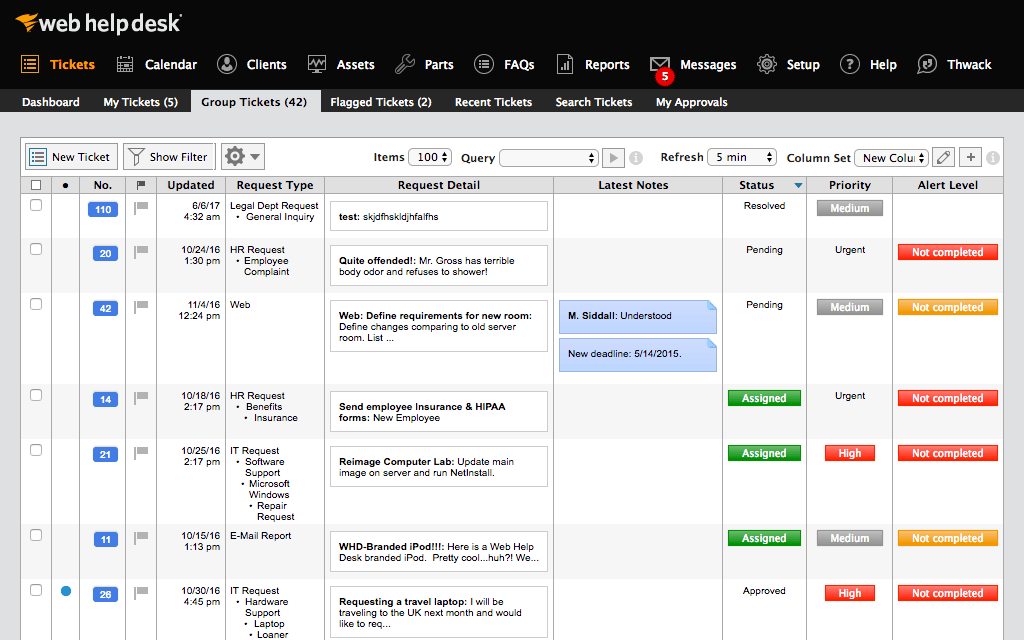
Web Help Desk is ticketing and IT asset management software. It is designed to
simplify help desk management. This solution includes built-in ticketing
management, asset management, change management, and knowledge base
capabilities.
$533
per year per user
Pricing
Freshdesk Omni
SolarWinds Web Help Desk (WHD)
Editions & Modules
Growth
$29
per month (billed annually) per agent
Pro
$69
per month (billed annually) per agent
Enterprise
$109
per month (billed annually) per agent
No answers on this topic
Offerings
Pricing Offerings
Freshdesk Omni
SolarWinds Web Help Desk (WHD)
Free Trial
Yes
Yes
Free/Freemium Version
No
No
Premium Consulting/Integration Services
No
No
Entry-level Setup Fee
No setup fee
No setup fee
Additional Details
—
SolarWinds also offers Perpetual licensing starting at $1129 per technician.
For a typical technical support help desk use case Freshdesk Omni is great! It has the advanced features of automating responses and canned answers where appropriate. The AI functionality seems good but not something we are leveraging at this point given the volume of tickets.
A de minimis incentive was given to thank the reviewer for their time. The incentive was not used to bias or drive a particular response, nor was the incentive contingent on a positive endorsement. More Info
SolarWinds WHD is well suited if you have a limited budget, as it costs less than many help desk software packages that are more full featured and modern in their design. It is not well suited to an environment where you want to manage inventory, users, purchases and tickets all in one package. It has an asset feature that we don't use but that looks quite limited. We track our assets and users separately from this.
A de minimis incentive was given to thank the reviewer for their time. The incentive was not used to bias or drive a particular response, nor was the incentive contingent on a positive endorsement. More Info
When an agent receives a call via Dialpad or Amazon Connect, Freshdesk Omni automatically displays relevant customer details, previous interactions, and ticket history in a single view.
Every call (answered, missed, or voicemail) is automatically logged into Freshdesk as a ticket, including details like call duration, customer number, and agent notes.
Agents can initiate outbound calls directly from Freshdesk using click-to-call functionality, reducing manual dialing errors and saving time.
A de minimis incentive was given to thank the reviewer for their time. The incentive was not used to bias or drive a particular response, nor was the incentive contingent on a positive endorsement. More Info
Customized reporting allows us to track our service and support better, and find where we need improvements. This allows us to constantly upgrade our service levels and keep the customers happy.
Detailed tracking and response to the end users have led to quicker remediation of tickets. We are able to see where we need a better response or where to add additional resources for support.
Overall metrics allow us to staff properly for our tickets by location and remote users.
A de minimis incentive was given to thank the reviewer for their time. The incentive was not used to bias or drive a particular response, nor was the incentive contingent on a positive endorsement. More Info
A de minimis incentive was given to thank the reviewer for their time. The incentive was not used to bias or drive a particular response, nor was the incentive contingent on a positive endorsement. More Info
Because of AD integration, users sometimes try logging in with their email address and not AD credentials. The user then calls stating they can't put a ticket in, it would be nice if there was a method of matching the AD Email field with a login.
Setting up new techs with the building they are responsible for can be a little messy
I would like to see the UI updated. It looks old, even in the latest releases.
A de minimis incentive was given to thank the reviewer for their time. The incentive was not used to bias or drive a particular response, nor was the incentive contingent on a positive endorsement. More Info
We are definitely going to be sticking with Web Help Desk for the foreseeable future since the product is very inexpensive for the features that it provides, the integration that it has with our existing systems, and the ease for managing users, assets, locations, and tickets. Web Help Desk is a great product that is backed by even better support, which is well worth looking into if you are considering moving to a new ticketing system.
A de minimis incentive was given to thank the reviewer for their time. The incentive was not used to bias or drive a particular response, nor was the incentive contingent on a positive endorsement. More Info
Utilizing a unified platform has successfully reduced the resolution time for customer-facing issues. This streamlined approach enhances efficiency and generates valuable insights that can be leveraged to improve our services and better understand customer needs, ultimately leading to a more satisfying experience for our clients.
It's not cloud based so users have to be on the network to submit a ticket. It doesn't plug into Google or Microsoft Azure so all inventory has to be manually entered. It seems like solar winds is allowing the product to slow fall into obsolescence
A de minimis incentive was given to thank the reviewer for their time. The incentive was not used to bias or drive a particular response, nor was the incentive contingent on a positive endorsement. More Info
SolarWinds is a great customizable and affordable ticketing system. We use SolarWinds Web Help Desk for IT and Software Development trouble ticket tracking and resolution. The reporting that SolarWinds provides is great since it helps us discover problem areas and fix those areas so they don't keep reoccurring
A de minimis incentive was given to thank the reviewer for their time. The incentive was not used to bias or drive a particular response, nor was the incentive contingent on a positive endorsement. More Info
Take the time to roll out a test VM to configure and make changes to before doing a live deployment, this way you don't end up with a VM that has been tweaked and re-tweaked until it's perfect and instead end up with a final, polished product. I would also recommend taking the time to read through the support forums for figuring out minor issues that may pop up, chances are that you aren't going to be the first one to encounter them. When all is said and done, SolarWinds Support is VERY responsive and you shouldn't hesitate to contact them.
A de minimis incentive was given to thank the reviewer for their time. The incentive was not used to bias or drive a particular response, nor was the incentive contingent on a positive endorsement. More Info
1) Price is also a point to decide, other Service Providers were providing similar features but the prices were slightly on a higher side. 2) Coming to feature comparison, JIRA offers whole lot of other features but currently we did not require them and Zoho had few less features comparing to Freshworks
A de minimis incentive was given to thank the reviewer for their time. The incentive was not used to bias or drive a particular response, nor was the incentive contingent on a positive endorsement. More Info
Web Help Desk is definitely lacking in the UI/UX department compared to most other ticketing systems I have used int he past. It's very utilitarian; however, what it lacks in UI it makes up for in extensibility and customization. The main issue that the developers need to address is the use of a Web Objects back-end.
A de minimis incentive was given to thank the reviewer for their time. The incentive was not used to bias or drive a particular response, nor was the incentive contingent on a positive endorsement. More Info
A de minimis incentive was given to thank the reviewer for their time. The incentive was not used to bias or drive a particular response, nor was the incentive contingent on a positive endorsement. More Info
A de minimis incentive was given to thank the reviewer for their time. The incentive was not used to bias or drive a particular response, nor was the incentive contingent on a positive endorsement. More Info