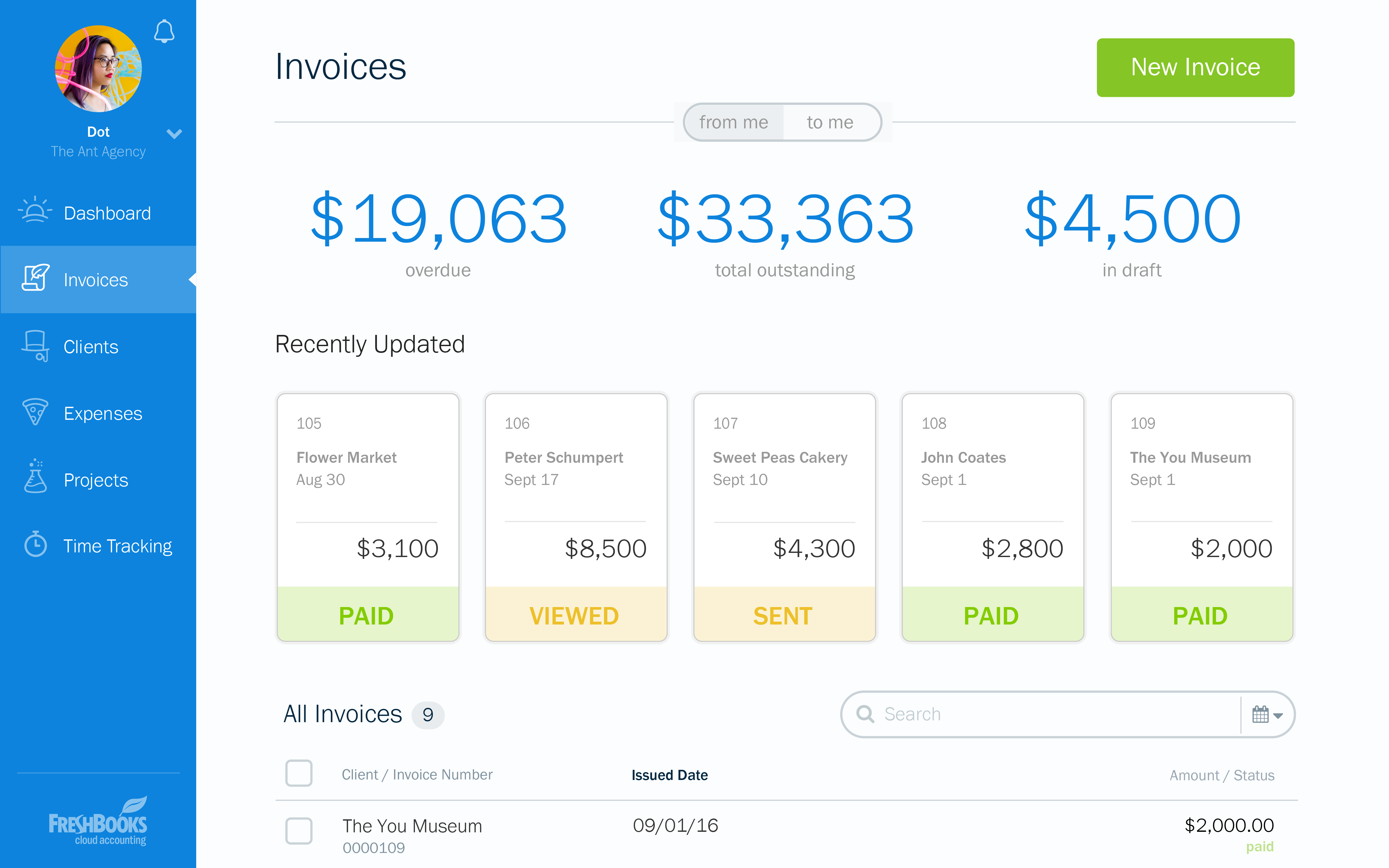
FreshBooks is an accounting service for small businesses. The solution enables users to send and manage invoices, track billable time and collect online payments. The vendor’s value proposition this that their solution provides a straightforward service that simplifies the billing process.
$21
per month
Futuramo Time Tracker
Score7 out of 10
N/A
Futuramo creates SaaS apps to provide a collaborative workspace for teams. Futuramo Time Tracker is an app used to track, analyze, and manage time, free for teams of up to 3 users, and $6 per license for each additional user.
I recommend FreshBooks to anyone running a service-based business that needs invoicing, time reporting, and accounting tools. FB is adept in all three of these scenarios and isn't overly complicated like similar accounting packages I have used. I love how I can write estimates and proposals, manage the business development process from the software, and quickly convert prospects to invoiced clients.
A de minimis incentive was given to thank the reviewer for their time. The incentive was not used to bias or drive a particular response, nor was the incentive contingent on a positive endorsement. More Info
Futuramo is best for when you're working alone on a project, or with a small team, given the glitches with the time tracker and the poor integration with Futuramo Tasks and Projects. Unless you're going to manually calculate the times spent on all tasks individually in order to know the total time spent on the project, I would not recommend using it on projects where you'd be billed per the time spent rather than a fixed amount.
A de minimis incentive was given to thank the reviewer for their time. The incentive was not used to bias or drive a particular response, nor was the incentive contingent on a positive endorsement. More Info
Invoicing - FreshBooks basically ensures our accountants spend less time on invoices via its automated invoicing system, which sends invoices to our customers and clients alike and also send them regular reminders for them to pay up their bills.
Collecting business insights - FreshBooks enable our company analysts measure our business performances via data reports provided by FreshBooks' intuitive dashboard. Allowing us do a comparative analysis of key business metrics of a current month against past months and determine if the business is growing.
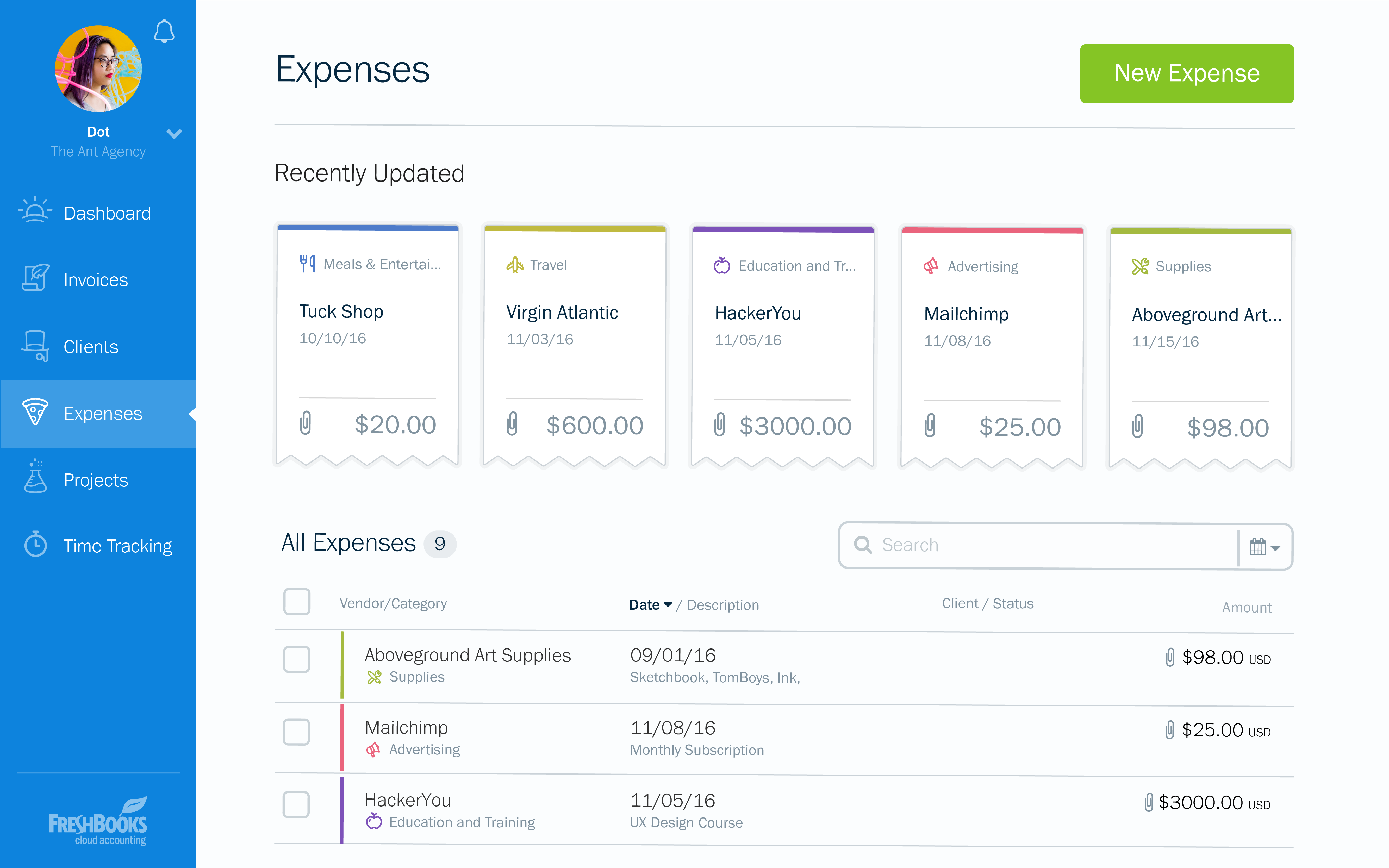
Expense tracker - We have recently embraced FreshBooks as an expense tracker for teams at our company branch. Thusfar, FreshBooks has performed very well, making our expense management a perfect operation; ensuring teams do not exceed their planned budget and also eliminating the need for tracking expenses on excel spreadsheets.
A de minimis incentive was given to thank the reviewer for their time. The incentive was not used to bias or drive a particular response, nor was the incentive contingent on a positive endorsement. More Info
The biggest pro of Futurama Time tracker is that it comes bundled with other tools. These are "Projects, Tasks, Virtual Tickets, Time Tracker, and Icons." This means I can track the time spent on each task within a project.
Time Tracker is easy to use, all you need to do is go to time tracker, enter the task you want to track, choose what project and clients it's under, and then click the play/start icon.
For projects that involve collaborating with others (either external freelancers I'm managing, or my staff) I can track the time spent on each task by each user. So I know how long each person spent on their task and how it related to the estimated time. This way I know if the project will take longer or shorter than estimated.
A de minimis incentive was given to thank the reviewer for their time. The incentive was not used to bias or drive a particular response, nor was the incentive contingent on a positive endorsement. More Info
I can brand invoices with my business logo, but I might like to change colours of the invoices themselves to match the rest of my business documents. That isn't a major point at all, but it's something that I'd like to see.
Freshbooks doesn't remember the categories that similar expenses were previously assigned to. It would be nice if Freshbooks would suggest a category for an already saved vendor, to ensure the consistency of expense reporting.
The home page of a Freshbooks account has a great graph display of expenses and income, but it only shows the last 6 months. This is still very useful, but I'd like to be able to see this kind of graph for different periods of time.
I'ver been using Futuramo for almost 2 years, primarily because they reached out to me to be one of the first users/testers. I've also shared some glitches that could be improved but the timer glitch is still there. When I start the timer to track a project, instead of the timer to start counting, it remains at 00:00 which is worrying because it makes me feel like it's not actually tracking what I'm working on. I was once 18 mins unto a task and when I checked the tracker it said 00:16 I was so worried I ended the task. Interestingly when I ended the task, it showed the correct time which was 18 minutes. I'm happy the timer was working but I'm also frustrated and in near-panic.
Like TopTracker, I wish there was a way to take screenshots of what I'm doing, that way I can be sure that the rest of the team is actually working on the timed tasks.
In the Time Tracker section of Futuramo, where the tasks timed are listed, I wish it was possible to actually click on any of the tasks there to see things like mouse clicks and keyboard taps. Similar to how Hubstaff and Upwork tracker tracks "productivity" (I'm not sure what this is called).
If you track a task not originally in Futuramo Task but created in Time Tracker, connected to a project or client, when you go to Futuramo Task, it won't be listed there. And when you to go Futuramo Projects, you still wouldn't see it there. I would like to go to Futuramo Project and see all the tasks there, both those timed and those yet to start.
A de minimis incentive was given to thank the reviewer for their time. The incentive was not used to bias or drive a particular response, nor was the incentive contingent on a positive endorsement. More Info
At the current needs of our business, FreshBooks suits us perfectly - it allows online access by our accountant to the system for GST purposes, easy input of expenses and tracking of Profit and Loss statements. FreshBooks customer service is great as well - very understanding and accommodating.
FreshBooks is very easy to use even for novices. If you're looking for an online accounting software that is full of features, has great aesthetics and is user-friendly, then this is definitely the software for you. I've been using it for several years now and despite being tempted to switch by other vendors, I like the feel of FreshBooks and it's mobile features.
A de minimis incentive was given to thank the reviewer for their time. The incentive was not used to bias or drive a particular response, nor was the incentive contingent on a positive endorsement. More Info
A de minimis incentive was given to thank the reviewer for their time. The incentive was not used to bias or drive a particular response, nor was the incentive contingent on a positive endorsement. More Info
I think the support level for FreshBooks is on par with a 6 because the folks behind this application do a fairly good job at providing support for their customer base. I still don't think they are at an elite level when it comes to supporting but are getting there although too slow in my opinion.
A de minimis incentive was given to thank the reviewer for their time. The incentive was not used to bias or drive a particular response, nor was the incentive contingent on a positive endorsement. More Info
FreshBooks does very well in comparison, especially since it is free software for Barclays bank users. Sage software is much worse than FreshBooks. However, Xero and QuickBooks, the market leaders, are still ahead with usability, additional features, reporting, and connection with third-party software providers. We chose FreshBooks as it does everything we require from this type of software.
A de minimis incentive was given to thank the reviewer for their time. The incentive was not used to bias or drive a particular response, nor was the incentive contingent on a positive endorsement. More Info
A de minimis incentive was given to thank the reviewer for their time. The incentive was not used to bias or drive a particular response, nor was the incentive contingent on a positive endorsement. More Info
In reality, we do not implement all of its use at the moment in order to determine an adequate ROI.
In our approach to the use of the system, it seems to us a considerable time saving by achieving the integration of the Mexican subsidiary with its parent located in the US.
Financial reports meet the necessary USGAAP requirements.
A de minimis incentive was given to thank the reviewer for their time. The incentive was not used to bias or drive a particular response, nor was the incentive contingent on a positive endorsement. More Info
Increased productivity: Futuramo Time Tracker makes it easy to know how long it'll actually take me to complete a task, and when put together, how long it'd take me to complete a project.
Track Billables: While calculating all the time spent on each task manually was exhausting, once that was done, I knew how long it took me and my team to complete a project and was able to bill my client for just that time.
A de minimis incentive was given to thank the reviewer for their time. The incentive was not used to bias or drive a particular response, nor was the incentive contingent on a positive endorsement. More Info