Foglight is a database performance management suite from Quest, with modules to perform cloud analytics, network performance monitoring and virtualization management, scaling to a broad, cloud / virtualization focused IT infrastructure monitoring solution.
N/A
PingPlotter
Score 9.3 out of 10
N/A
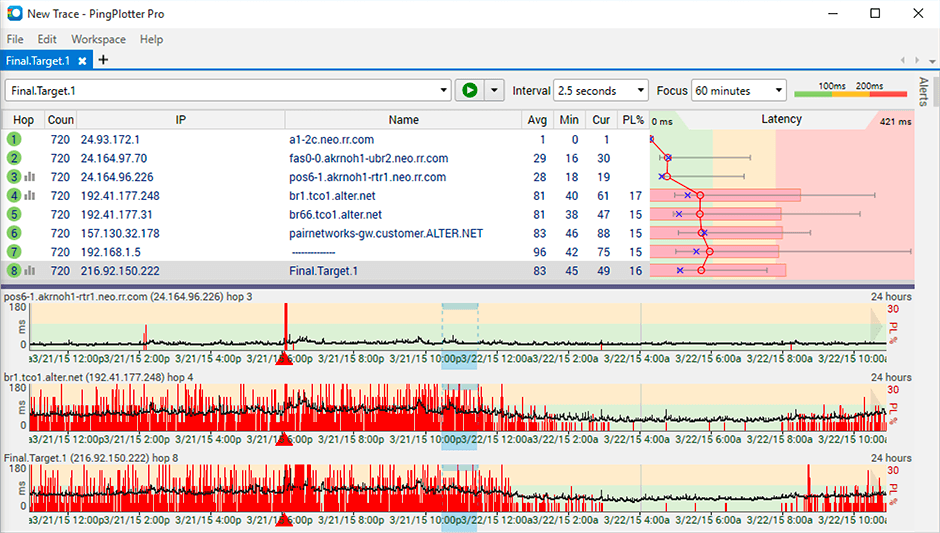
PingPlotter is a graphical traceroute and ping tool that visualizes network performance in a way that makes identifying the source of problems quicker and easier for everyone from online gamers and video streamers to VoIP admins and IT pros. Features for remote deployment, network monitoring, scripting, and a web interface are included along with several additional capabilities.
$0
per user
Pricing
Foglight
PingPlotter
Editions & Modules
No answers on this topic
PingPlotter Free
$0.00
per user
PingPlotter Free
$0.00
per user
PingPlotter Standard
$6.99
per user per month
PingPlotter Professional
$29.00
per user per month
PingPlotter Standard
$39.99
per user
PingPlotter Professional
$349.00
per user
Offerings
Pricing Offerings
Foglight
PingPlotter
Free Trial
No
Yes
Free/Freemium Version
No
Yes
Premium Consulting/Integration Services
No
No
Entry-level Setup Fee
No setup fee
No setup fee
Additional Details
—
—
More Pricing Information
Community Pulse
Foglight
PingPlotter
Features
Foglight
PingPlotter
Network Performance Monitoring
Comparison of Network Performance Monitoring features of Product A and Product B
It really depends on why my colleague is evaluating Foglight. If it is for Database monitoring and management, I highly recommend it. If it is for anything else, I would encourage them to look at others in this space.
The best scenario and best results are seen when the path does not reuse the same device for the "next hop". It is less well suited in situations where the path is being tricked by the re-use of devices for the next interface. This is seen required in many networks where the proper type of connection is not on an end device and the core device is used to provide a fiber to copper sort of "pass-through" connection.
Foglight allows detecting and diagnosing performance problems simplifying hybrid environments, it is a solution that has perfect features which work in a flexible and intuitive way, it allows database performance in a safe and fast way. It works perfectly with nothing else to add.
Its a little confusing to see which targets are currently running pings and which ones are displayed in the plots.
Starting and stopping pings requires a right click and that would be better with a play/pause button I think.
Ability to drag and drop the graphs to reorder them.
more columns to show which targets are running and which are displayed. Currently this is done with symbols so you cant sort by just the running targets for example I've found.
I installed it and it just started working. I realized I could then tweak it to show what I needed but didn't have to spend a long time configuring it before use, editing YAML files etc. Maybe that's fine for a network professional, but I only need this software if something goes wrong, and then need it to work quickly out of the box.
I have not had much contact with the PingPlotter support, only one time have I went to them and it was a positive experience. The questions I had were answered quickly and professionally. I have no issue with the experience I had with the Support team. This was from before and after the purchase of the product.
Foglight was chosen years ago as a replacement for Groundwork. After 2.5 years of implementing Groundwork things were still not complete and the decision to go with a more formalized solution was made. Foglight installed easily and quickly nearly across the board and the full implementation for complex infrastructure was completed (with no Professional Services) by us in under 4 months. Nagios is a wonderful toolkit but you have to be ready to build what you need. It's flexibility and breadth are excellent features but with that comes the need to define things very tightly lest you embark on the project that never ends (see above about Groundwork). Dynatrace is an excellent APM tool and has advanced analytics but as a general infrastructure monitoring tool it is actually very expensive and to be honest does not have the same focus and full feature set that it does on it's APM (which to be fair is it's wheelhouse). vROPs (we also have) is a wonderful tool but focused (and rightly so) on satisfying the VMware engineers in the crowd and doesn't put itself out there too far to make things palatable for the non-engineering crowd.
PingPlotter has better visualizations and a stronger ability to capture historical data than other tools I've used. This makes it easier to find the root cause by looking back in the log data to find where latency or packet loss occurred.