FMX provides facilities and maintenance management solutions designed to help organizations accelerate operational excellence. Their CMMS software enables users to streamline processes, increase asset productivity, and turn actionable insights into meaningful results.
N/A
TOPdesk
Score 8.8 out of 10
Mid-Size Companies (51-1,000 employees)
TOPdesk is the flagship highly-modular cloud-based or installed ITSM service desk and asset management solution from the Dutch company of the same name, for enterprise companies.
$76
per month Per agent
Pricing
FMX
TOPdesk
Editions & Modules
No answers on this topic
Essential
$76
per month Per agent
Engaged
$109
per month Per agent
Excellent
$155
per month Per agent
Offerings
Pricing Offerings
FMX
TOPdesk
Free Trial
Yes
Yes
Free/Freemium Version
No
No
Premium Consulting/Integration Services
No
No
Entry-level Setup Fee
Required
Optional
Additional Details
—
The TOPdesk license model:
- Modular: Organizations purchase only the modules needed
- Saas or On premise
- Supports unlimited number of assets.
- Service agents based.
- Discount available for annual pricing.
More Pricing Information
Community Pulse
FMX
TOPdesk
Features
FMX
TOPdesk
Incident and problem management
Comparison of Incident and problem management features of Product A and Product B
FMX
-
Ratings
TOPdesk
8.1
Ratings
0% below category average
Organize and prioritize service tickets
00 Ratings
8.80 Ratings
Expert directory
00 Ratings
7.70 Ratings
Service restoration
00 Ratings
8.00 Ratings
Self-service tools
00 Ratings
8.40 Ratings
Subscription-based notifications
00 Ratings
7.50 Ratings
ITSM collaboration and documentation
00 Ratings
8.20 Ratings
ITSM reports and dashboards
00 Ratings
7.80 Ratings
ITSM asset management
Comparison of ITSM asset management features of Product A and Product B
FMX
-
Ratings
TOPdesk
8.2
Ratings
0% below category average
Configuration mangement
00 Ratings
8.60 Ratings
Asset management dashboard
00 Ratings
7.80 Ratings
Policy and contract enforcement
00 Ratings
8.10 Ratings
Change management
Comparison of Change management features of Product A and Product B
I can only speak to our organization and it is very appropriate and well suited for our purposes. We use it every single day and I find it to be user-friendly. I am excited about utilizing more of FMX's features. We can't wait to learn more and be able to keep better records for our tenants.
As TOPdesk is pretty intuitive it is often not needed to instruct colleagues on how to use TOPdesk. Most modules and fields do explain themselves. This means there aren't many additional instructions needed for the applications itself. Most information we do need to support our colleagues on based on organizational processes, not our ITSM tool of choice. And if there is more information needed, the knowledge base system can be used for this. On the other hand this could create the idea that no additional instructions are needed. Which might be true for the application itself, but not for how it is being used within your organisation
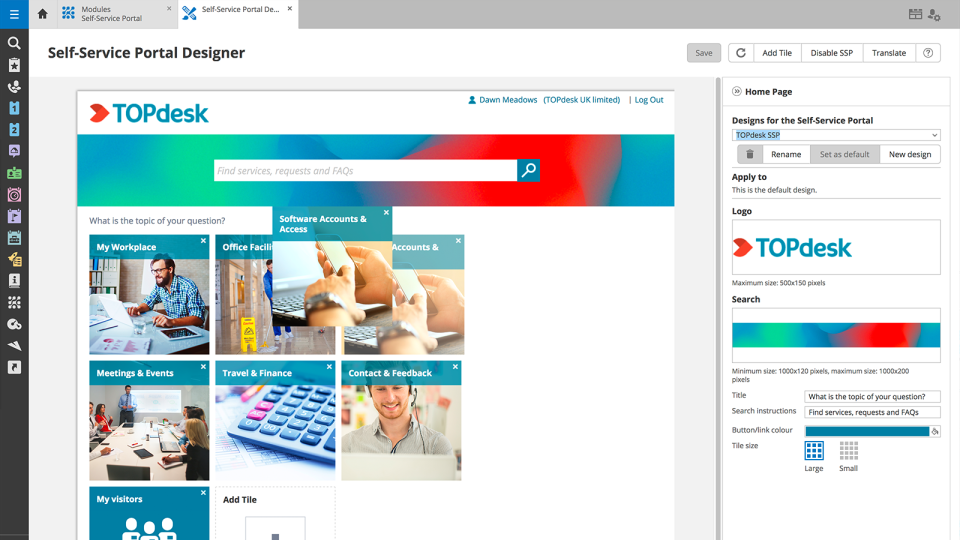
TOPdesk provides a clean and modern interface for all of its modules. Many of the modules have a similar look and feel, which makes it easy for users to utilize each one.
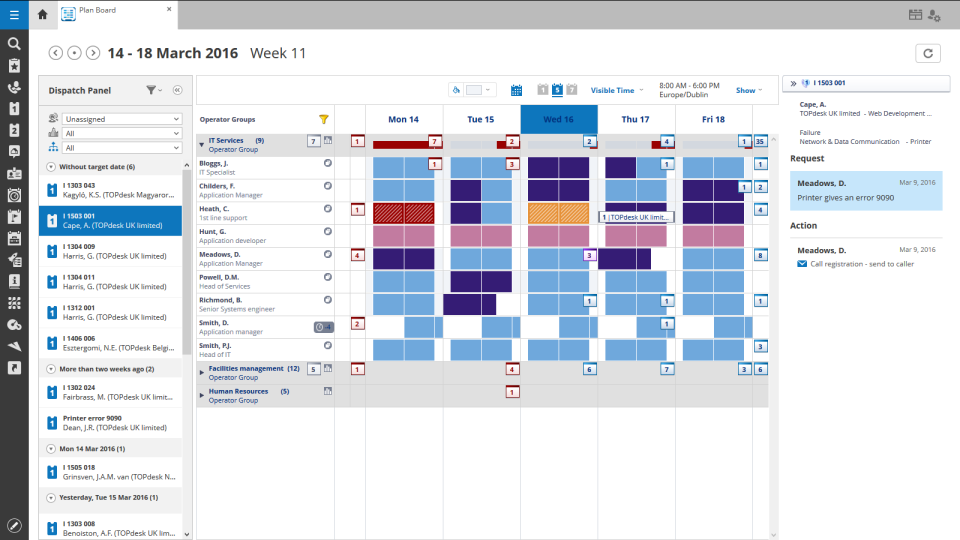
Its workflow system allows administrators and developers to define what needs to occur when certain events happen. This can ensure that processes happen in the correct sequence.
TOPdesk includes a vast API system to allow for external systems to integrate with it, and for TOPdesk to communicate with external systems.
We are very content with the application. We use it now for 1 year and we are still learning. We still discover new features withing the application that help improve our efficiency and customer-friendliness and reduce costs. We feel like we can still improve the use of TOPdesk within our organisation and make more use of more modules.
Sometimes I think some things are hard to find. I often do not know if I have to search in Settings or in Modules. In some cases the user has to do a lot of clicks for example to link a key to a user. Something could work a little smarter.
Like I said somewhere else in this review: the helpdesk of TOPdesk is top of the bill! In the Netherlands, that is. I can not plea for the helpdesks in other countries, but I guess the TOPdesk organization will make sure the quality of the helpdesk is the same in every country.
Although being a SAAS solution, TOPdesk performs pretty fast. One can imagine that any SAAS solution is slow or has hiccups, but we have not experienced such with TOPdesk. Pages load quickly, logging in goes smoothly. We have made reports on premise in the past - that always took some time, as you might expect with such complex tasks. It seems that in the SAAS solution TOPdesk somehow has managed to make it even faster!
Most if not nearly all questions are answered within the same or a few days. The helpdesk is very knowledgable about their product and are always willing to help. The only downside is that for more difficult questions it can take a while due to the experts being further removed from the helpdesk. But they are always willing to answer questions, even if they are not directly related to a problem with the service.
We had Topdesk in-house here training staff for almost a month (2-3 hour meetings 3x a week.) It was invaluable and we were able to take that training and share with the rest of our IT staff. Once implemented we were able to fly from there. The challenges we found were in how to get started. Once started the knowledge base offered from Topdesk has been invaluable.
Online training documentation is easy to access and consume. There is no real challenges with finding information on how to use the product and some really helpful knowledge base items that show us how valuable these options are in our own implementation of it. The online training we've used has been self driven
It was a challenge to port over years of the same thing and we ended up keeping old ideas in Topdesk that we will eventually weed out as time passes and we learn how users view categories and flows of tickets. Planning is key but bear in mind that just because you used to do it this way doesn't mean you still have to
Spiceworks is an easier-to-use Help Desk solution but it lacks all other features that Topdesk has. Freshdesk was just too much for our environment. It was cost-prohibitive for our intended use. TOPdesk fit our org size and budget better than the others.
Topdesk is a saas solution. As far as we can notice, there are no scalability problems. We are a small organization, so performance issues are for now not an issue