FlowMapp vs. WebEngage

Overview
ProductRatingMost Used ByProduct SummaryStarting Price
FlowMapp
Score 8.8 out of 10
N/A
FlowMapp, headquartered in Moscow aims to enable users to design exceptional UX for beautiful products, websites, and apps with an online collaborative tools.
$12
per month
WebEngage
Score 8.0 out of 10
N/A
WebEngage calls itself a multi-channel user engagement platform. It automates communication across a user's lifecycle and helps companies send messages via these channels: Web Messages In-app Messages Push Notifications Web Push Notification Email Marketing SMS Marketing Facebook Remarketing According to the vendor, cross-device tracking helps keep communication coherent and contextual, making the…N/A
Pricing
FlowMappWebEngage
Editions & Modules
Pro
$12
per month
Team
$39
per month
Agency
$159
per month
No answers on this topic
Offerings
Pricing Offerings
FlowMappWebEngage
Free Trial
YesYes
Free/Freemium Version
YesYes
Premium Consulting/Integration Services
NoNo
Entry-level Setup FeeNo setup feeNo setup fee
Additional DetailsDiscounts available for annual subscriptions.Pricing is customised according to the customer usage and requirement. Contact support@webengage.com to know more about pricing plans.
More Pricing Information
Community Pulse
FlowMappWebEngage
Features
FlowMappWebEngage
Email & Online Marketing
Comparison of Email & Online Marketing features of Product A and Product B
FlowMapp
-
Ratings
WebEngage
7.4
Ratings
2% below category average
Dynamic content00 Ratings7.30 Ratings
Ability to test dynamic content00 Ratings7.70 Ratings
Mobile optimization00 Ratings6.30 Ratings
Email deliverability reporting00 Ratings7.10 Ratings
List management00 Ratings7.80 Ratings
Triggered drip sequences00 Ratings8.20 Ratings
Lead Management
Comparison of Lead Management features of Product A and Product B
FlowMapp
-
Ratings
WebEngage
6.1
Ratings
24% below category average
Lead nurturing automation00 Ratings6.60 Ratings
Automated sales alerts and tasks00 Ratings5.60 Ratings
Campaign Management
Comparison of Campaign Management features of Product A and Product B
FlowMapp
-
Ratings
WebEngage
6.9
Ratings
7% below category average
Calendaring00 Ratings8.00 Ratings
Event/webinar marketing00 Ratings5.70 Ratings
Reporting & Analytics
Comparison of Reporting & Analytics features of Product A and Product B
FlowMapp
-
Ratings
WebEngage
7.2
Ratings
2% below category average
Dashboards00 Ratings7.50 Ratings
Standard reports00 Ratings7.50 Ratings
Custom reports00 Ratings6.70 Ratings
Platform & Infrastructure
Comparison of Platform & Infrastructure features of Product A and Product B
FlowMapp
-
Ratings
WebEngage
7.1
Ratings
5% below category average
API00 Ratings8.20 Ratings
Role-based workflow & approvals00 Ratings7.10 Ratings
Customizability00 Ratings6.80 Ratings
Integration with Salesforce.com00 Ratings6.10 Ratings
Best Alternatives
FlowMappWebEngage
Small Businesses
Ortto
Ortto
Score 9.0 out of 10
Vbout
Vbout
Score 9.9 out of 10
Medium-sized Companies
Quadient Inspire
Quadient Inspire
Score 8.6 out of 10
PFL Direct Mail Platform
Score 9.0 out of 10
Enterprises
Quadient Inspire
Quadient Inspire
Score 8.6 out of 10
PFL Direct Mail Platform
Score 9.0 out of 10
All AlternativesView all alternativesView all alternatives
User Ratings
FlowMappWebEngage
Likelihood to Recommend
8.8
(0 ratings)
7.3
(0 ratings)
User Testimonials
FlowMappWebEngage
Likelihood to Recommend
FlowMapp is the best tool that I have found for mapping the user journeys, user flows, and buyer personas. Sitemaps, user journeys, and personas are quick and simple to design, and they always look fantastic and professional. This is especially important when presenting to clients. Saves a lot of design time.
Read full review
When the business is expected to scale and expand, tools such as this proves very handy where it helps to target the correct segments or correct audiences with the right offerings, thereby increasing the chances of transaction or desired action from the user while saving pennies which could have been burnt if a blanket approach would have been used. Automation saves a lot of time and effort for the marketers and businesses boosted due to its operation.
Read full review
Pros
  • UX Research
  • User flow
  • User Persona
  • Sitemap
  • Organization
Read full review
  • Ease in creating user journeys.
  • Easy implementation of APIs.
  • Good reporting dashboard and scheduling features.
  • Segmentation of the users is easy.
Read full review
Cons
  • FlowMapp has no request form, which would significantly help a company.
  • FlowMapp requires a swift integration with other planning options like Google calendar.
  • More so, FlowMapp lacks the sharing of files feature to other players outside the company.
Read full review
  • Relays
  • Onsite should have more options of templates.
  • Backend support for better reachability of the channels.
  • Cohort studies should be more customizable.
Read full review
Alternatives Considered
FlowMapp is the absolute planning option, with all the formulas for automatic computations and systematic management. Besides, collaborations through outstanding strategies that support communications and other innovation procedures. Besides, FlowMapp has routine check-up procedures, which makes the monitoring of every action simple, effective, and timely. Lastly, FlowMapp has combined the customer journey modeling factor, making it easy to analyze the market.
Read full review
WebEngage's dashboard is relatively more intuitive and easy to understand. Further in terms of cost as well it is value to money as it delivers excellent ROI. The after-sales support is also better in terms of responsiveness and helps in case of issues with the execution of campaigns. The account managers also ideate and help in the optimization and creation of new user journeys.
Read full review
Return on Investment
  • Improve velocity of the product designer during the discovery process
  • Helps us to map the right flow that will help us to convert more users
  • Discover the pain points thanks to user journey to correct it
Read full review
  • Helped in lowering cost of marketing.
  • Driving higher volume of Direct Sales.
  • Increasing conversion rate on the website.
  • Increasing lead to sale ratio.
Read full review
ScreenShots

WebEngage Screenshots

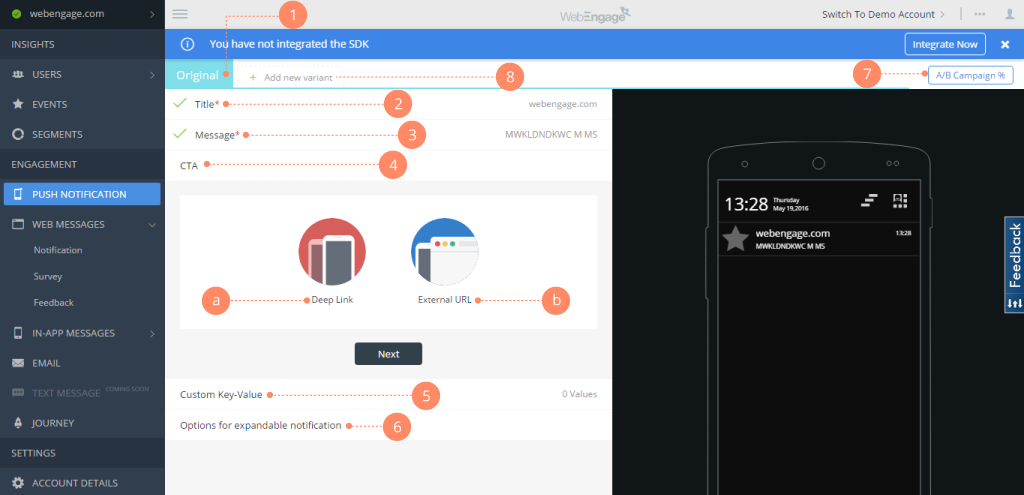
Screenshot of Webengage dashboard - User AnalyticsScreenshot of Webenagge dashboard - User DetailsScreenshot of Webengage dashboard - Creating Mobile notificationsScreenshot of Webengage dashboard - Creating EmailsScreenshot of Webengage Dashboard - Journey DesignerScreenshot of Webengage Dashboard - Journey Designer (2)