Figma vs. HotGloo

Overview
ProductRatingMost Used ByProduct SummaryStarting Price
Figma
Score 8.9 out of 10
N/A
Figma, headquartered in San Francisco, offers their collaborative design and prototyping application to support digital product and UI development.
$15
per month per editor
HotGloo
Score 8.0 out of 10
Small Businesses (1-50 employees)
HotGloo is an online wireframing and prototyping tool. This solution has been designed for all those engaged in the concept, design and development of web or app projects: project managers, information architects, usability experts, freelancers, concept people, digital agencies, web companies, publishers, web designers, web developers and many more. The vendor’s value proposition is that this solution makes it easy to wireframe web and mobile sites and to collaborate with others due to the…
$13
up to 4 users, 2 active projects, unlimited reviewers
Pricing
FigmaHotGloo
Editions & Modules
Professional
$144
per year
Organization
$540
per year
Starter
Free
Group
$13
up to 4 users, 2 active projects, unlimited reviewers
Team
$27
up to 10 users / 6 active projects / unlimited reviewers
Agency
$54
up to 20 users / 15 active projects / unlimited reviewers
Enterprise
150 +
More users and projects, priority support. Get in touch for an individual quote.
Offerings
Pricing Offerings
FigmaHotGloo
Free Trial
NoYes
Free/Freemium Version
YesNo
Premium Consulting/Integration Services
NoYes
Entry-level Setup FeeNo setup feeNo setup fee
Additional DetailsThe billing period starts on the day you upgrade from the free trial to a paying plan. If you pay by credit card the service is billed in advance on a monthly basis and is non-refundable. There will be no refunds or credits for partial months of service, upgrade/downgrade refunds, or refunds for months unused with an open account. If you do choose to cancel your account in the future, you will never be charged again, but you are responsible for charges already incurred up until your cancellation. For monthly recurring payments we accept Visa, MasterCard and American Express through our online payment system. You can also prepay any account for 12 months with credit card. In certain cases we also take money transfers – please contact us beforehand if you want to use this option.
More Pricing Information
Community Pulse
FigmaHotGloo
Best Alternatives
FigmaHotGloo
Small Businesses
OmniGraffle
OmniGraffle
Score 9.1 out of 10
OmniGraffle
OmniGraffle
Score 9.1 out of 10
Medium-sized Companies
OmniGraffle
OmniGraffle
Score 9.1 out of 10
OmniGraffle
OmniGraffle
Score 9.1 out of 10
Enterprises
OmniGraffle
OmniGraffle
Score 9.1 out of 10
OmniGraffle
OmniGraffle
Score 9.1 out of 10
All AlternativesView all alternativesView all alternatives
User Ratings
FigmaHotGloo
Likelihood to Recommend
9.1
(201 ratings)
7.8
(3 ratings)
Likelihood to Renew
10.0
(7 ratings)
-
(0 ratings)
Usability
8.6
(33 ratings)
-
(0 ratings)
Availability
5.5
(1 ratings)
-
(0 ratings)
Performance
8.2
(1 ratings)
-
(0 ratings)
Support Rating
5.1
(17 ratings)
-
(0 ratings)
In-Person Training
9.1
(1 ratings)
-
(0 ratings)
Online Training
6.4
(1 ratings)
-
(0 ratings)
Configurability
6.4
(1 ratings)
-
(0 ratings)
Contract Terms and Pricing Model
7.3
(1 ratings)
-
(0 ratings)
Ease of integration
6.4
(1 ratings)
-
(0 ratings)
Product Scalability
7.3
(1 ratings)
-
(0 ratings)
Professional Services
8.2
(1 ratings)
-
(0 ratings)
Vendor post-sale
7.3
(1 ratings)
-
(0 ratings)
Vendor pre-sale
7.3
(1 ratings)
-
(0 ratings)
User Testimonials
FigmaHotGloo
Likelihood to Recommend
Figma
Figma is a solid design tool to craft the UX design concepts/solutions for digital products. For printed marketing materials such as brochures, marketing flyers, press releases, etc, other design tools such as Adobe Illustrator, Photoshop, or InDesign might make more sense to use for those use case scenarios.
Read full review
HotGloo
Overall, I am happy with HotGloo. It supports and fits well into my workflow. Here, I use HotGloo mainly during the prototyping scale. More preciously for wireframing. Eventhough, there are other tools - which I also use in subsequent steps - that would support wireframing as well, I like HotGloo and will keep using it during this stage. This is mainly because I think the elements and symbol library has just the right depth and detail for wireframing. It is important in wireframing to not include to much detail yet. Otherwise, testers get distracted by design aspects. Therefore, I like HotGloo and us it for different Product and Service design projects.
Read full review
Pros
Figma
  • Detailed enough to create pixel perfect designs with total control over the outcome
  • Creating and implementing design systems to improve consistency and speed up design work
  • Robust prototyping tools to create simple animations or to connect various pages
  • I love autolayout, which improves design spacing and responsiveness
Read full review
HotGloo
  • Prototyping.
  • Collaboration.
  • Widget library.
Read full review
Cons
Figma
  • Prototyping in Figma is pretty much nothing more than a glorified slide show. Sure, variables, etc are available but it takes way to long to set them up and even more time when there are revisions needed.
  • It would be helpful if there were a contextual help system for various functionality. For example, advanced autolayout (like space between) can become very tricky to implement sometimes. I often wish there were an AI assistant to ask for help. I often use ChatGTP to help me through these times.
  • Searching layers needs to be much easier and more intuitive.
  • I would like to be able to make groups like the layers palette in Photoshop. That would help with organization and speed a lot.
Read full review
HotGloo
  • logical structure of interface objects
  • preview view does not scale frame on small screens
  • Tool ribbon
Read full review
Likelihood to Renew
Figma
Figma is a pretty cool tool in many areas. My team almost uses it on daily basis, such as, brainstorming on product/design topics, discussing prototypes created by designers. We even use it for retrospectives, which is super convenient and naturally keeps records of what the team discusses every month. Furthermore, I do see the potential of the product - currently we mainly use it for design topics, but it seems it is also a good fit for tech diagrams, which we probably will explore further in the future.
Read full review
HotGloo
No answers on this topic
Usability
Figma
It's easy to use for designers who are familiar with design terms and functions from Photoshop and Illustrator. However, non-tech and non-designer collaborators have a hard time figuring out how to leave comments and apply changes, compared to other online design tools like Canva and Squarespace. Even simple drag-and-drops and rearrangement of certain blocks become too complicated due to uncommon functions like Hug and Lock.
Read full review
HotGloo
No answers on this topic
Reliability and Availability
Figma
The only regret I have is, its not available when there is no internet
Read full review
HotGloo
No answers on this topic
Performance
Figma
I think its great, As there are many other software or systems which can be integrated with it as plugins or API's
Read full review
HotGloo
No answers on this topic
Support Rating
Figma
I haven't used their support lately but in the past, they had a chat that I used often. They often responded in a few hours and were able to give a satisfactory solution. I would imagine it's less personal now but the community has expanded drastically so there are more resources out there to self serve with a bit of Google magic.
Read full review
HotGloo
No answers on this topic
In-Person Training
Figma
In-person training has its own benefits - 1. It helps in resolving queries then and there during the training. 2. I find classroom or in-person training more interactive. 3. Classroom or in-person training could be more practical in nature where participants can have an hands on experience with tools and clarify their doubts with the trainer.
Read full review
HotGloo
No answers on this topic
Online Training
Figma
Online training has its own merits and demerits - 1. Sometimes we may face issues with connectivity or the training content 2. The way training is being delivered becomes very important because not everyone is comfortable taking online training and learning by themselves. 3. With the advancement of technology online training has become popular but there is a segment of people who still prefer class-room training over online one.
Read full review
HotGloo
No answers on this topic
Alternatives Considered
Figma
Figma compared to other tools has user friendly UI which is very easy for all levels of designers. Compared to Adobe XD and Sketch Figma is stable, while in other tools I have faced software crashing in the middle of the work which resulted in loss of data/design. Compared to other tools it's fast and shows less lag. Collaboration in Figma is very easy as it is cloud based but in XD it's not that smooth working with other designers.
Read full review
HotGloo
Being able to export the finished wireframe to HTML was a huge time saver for me and my team. Getting to that next step quickly and seamlessly was a massive help. Not only that, but other tools that do this, we have not as much luck. HotGloo's functionality was a step above the others.
Read full review
Scalability
Figma
I think this is great and as I mentioned at ADP we use Figma extensively whether by designers, researchers or content writers
Read full review
HotGloo
No answers on this topic
Return on Investment
Figma
  • Allows us to get funding for further phases of the project (which is uncountable)
  • Well, it lets us show off when needed due to well suited UI-oriented character
  • Easily approachable by anyone (browser use)
  • User friendly interface
  • More advanced cooperation requires some of the users to have a license
Read full review
HotGloo
  • Quicker lead time in testing interactions with latest designs.
  • Shorter build time through use of standard branding.
Read full review
ScreenShots

HotGloo Screenshots

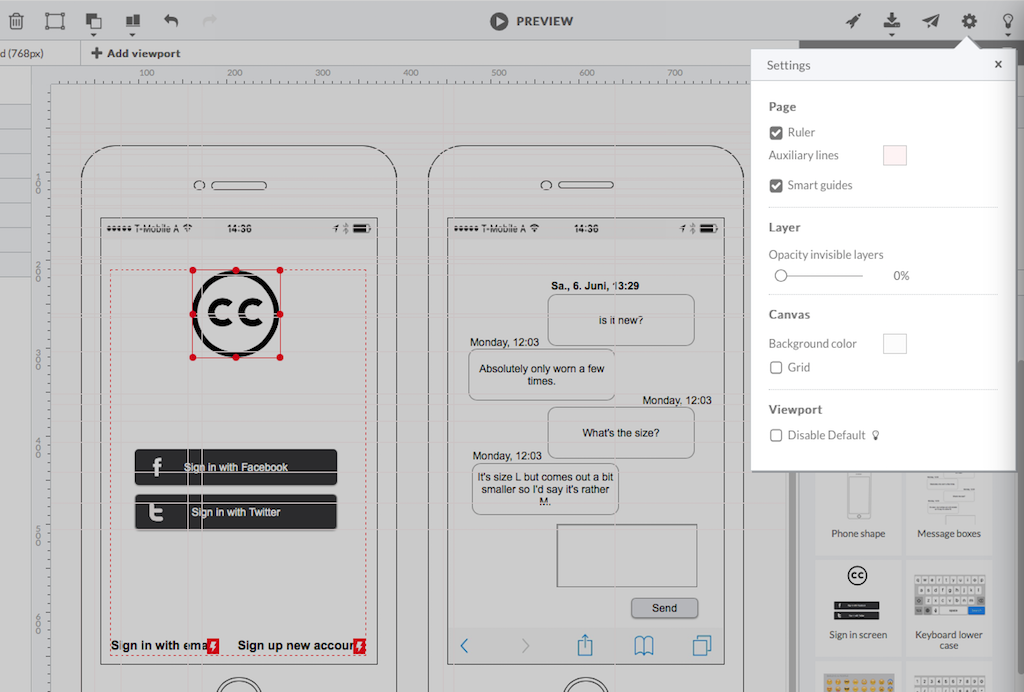
Screenshot of HotGloo 24/7 run & test anywhere.Screenshot of Responsive wireframing with different viewports.Screenshot of Create mobile app wireframesScreenshot of From desktop over tablet to mobile.