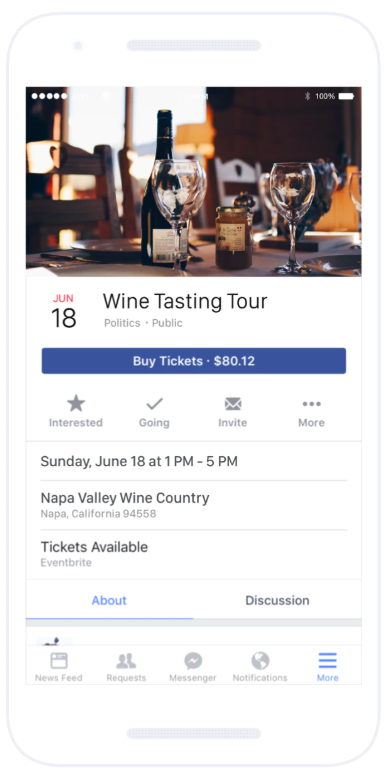
Eventbrite is a global ticketing and event technology platform that provides creators of events with tools and resources to plan, promote, and produce live experiences. The vendor says event organizers can benefit from Eventbrite’s self-service event planning tools including email invitation creation, RSVP tracking, and ticket selling. Ticket sales can be managed online via the ticketing website or through integration with social media sites including Facebook, and real-time sales data…
N/A
Zoom Events & Webinars
Score 8.5 out of 10
N/A
Zoom Events and Webinars are part of Zoom’s event solutions that uses existing Zoom products to produce interactive and engaging virtual experiences. It combines Zoom Meetings, Chat, and Video Webinars in one solution that enables event organizers to produce ticketed, live events for internal or external audiences of any size.
$79
per month starting with 500 attendees
Pricing
Eventbrite
Zoom Events & Webinars
Editions & Modules
No answers on this topic
Zoom Webinars
starting at $79
per month starting with 500 attendees
Zoom Sessions
starting at $99
per month starting with 100 attendees
Zoom Events
starting at $149
per month starting with 100 attendees
Offerings
Pricing Offerings
Eventbrite
Zoom Events & Webinars
Free Trial
No
No
Free/Freemium Version
Yes
No
Premium Consulting/Integration Services
No
No
Entry-level Setup Fee
No setup fee
No setup fee
Additional Details
Only pay when ticket sales are made
Essentials plan: 2% + $0.79/ paid ticket
Professional plan: 3.5% + $1.59/ paid ticket
Premium plan: contact Eventbrite for a custom pricing plan
Free for free events
—
More Pricing Information
Community Pulse
Eventbrite
Zoom Events & Webinars
Features
Eventbrite
Zoom Events & Webinars
Online Events Marketing
Comparison of Online Events Marketing features of Product A and Product B
Eventbrite
-
Ratings
Zoom Events & Webinars
9.3
Ratings
6% above category average
Branding options
00 Ratings
8.70 Ratings
Virtual Event
Comparison of Virtual Event features of Product A and Product B
This software is very well suited for a variety of larger events, like lectures and performances. I have appreciated setting it up and allowing it to run around the clock for our participants, which ultimately provides a smoother experience. However, I probably wouldn't recommend it for events where you're expecting a smaller audience. It can take a while to set up exactly as you'd like, and it may not be worth the time if you're expecting 30 people or less (depending on how much info you're trying to gather, of course).
I had an issue with my calendar syncing to Zoom Workplace for a while, that was annoying, but it resolved itself someway. Maybe an update. The invite feature is week when in a call, my team never receives them, I manually always have to send a link. I also do not get Zoom call notifications so I am late to meetings often. Too much work to manually find that feature, wish it was a default setting like Teams. I prefer Zoom Workplace because I think it works faster, is smoother, and I prefer the video settings UI over other platforms. Everyone else makes it too complicated to change backgrounds or blur as necessary. The adjustment for low light is also a huge win.
Eventbrite is a well-known and trusted place for purchasing tickets. That trust helps us sell tickets. It also eliminates the need for integrating some other payment system into a webpage, which would be the alternative.
Eventbrite makes sending invitations easy. Upload contacts and using contacts from a previous event is very straight-forward. Building emails is simple, since there are a couple of prebuilt templates.
Discount codes and strategic pricing structures are a significant part of our marketing for events. Eventbrite makes it easy to offer discount codes. We also create several ticket types that include multi-ticket discounts, early-bird type specials and more. Each of which help us reach our audience at the right time with the right price.
While integration with Facebook is fairly seamless, once you have uploaded the event description to Facebook, any additional revisions must be made on both Eventbrite and Facebook individually. It's not a live integration.
My initial on boarding was extended by needing to seek information through various blogs, outside users and exploration through the site. More comprehensive training for first timers to the site would be welcome.
Integration with the manager calendar would help the marketing timeline. It's helpful to get email reminders, but would be fabulous if milestones could be dropped in my calendar.
I will we could add registration disclaimer language to the Webinar templates.
Some of the customization and setup features are difficult to find.
I would like to add someone to help me run webinars without paying for them to have their own webinar platform. We should be able to buy one platform and both of us log into it and setup and run webinars from it.
Excellent platform and easy to use to create events. Eventbrite sets the standard for simple, effective and safe ticketing platforms. Our customers trust Eventbrite and we've always done well when we use this platform for ticketing. They have recently updated some of the virtual connectivity tools which make it even easier to set up and promote virtual events.
We will be renewing with Zoom as long as it continues to meet our needs for client and lead outreach needs in a robust manner. With little error and an easy to use interface, Zoom has met our needs and exceeded our expectations. The cost is right and with a short learning curve, Zoom has been an easy decision to make and maintain.
Great platform with so many incredible features. It streamlines workflow, communication, messaging, and analyzing data. I know of no other platform that can do what Eventbrite can do for the price or user-friendliness. They also offer great support for new users and integrate well with other platforms (i.e., social media and Sched).
Zoom [Video Webinar] is easy and secure to use. It has all those feature which can make a virtual meeting go smooth. Zoom [Video Webinar] provides one click join option and easy screen sharing. It also has strong tools to restrict meeting controls and is secure enough to let you start with it. Zoom [Video Webinar] in relation to other video webinar application is easy to use and lightweight, its mobile application is also easy to use.
Always willing to help out and they have a ton of information handy on their website for self-service. If you can't find what you're looking for, their support team is quick to help out and provide any assistance you may need.
Zoom Video Webinar provides users with updates on their newest functions as part of an email subscribed list. They provide you with up-to-date information on all their latest changes and functions for ease [in] transition. Zoom Video Webinar can be contacted easily for any questions or concerns you may have with the platform and the response is timely.
Just jump in, don't over thinking it, doing it will net the very few basic questions you'll have. There's not much complexity so one doesn't need to plan as if moving a canal. It's as simple as can be.
My "go to" for event registration has always been Constant Contact because they don't charge additional processing fees above the standard transaction. If it's a more basic event where I just need to capture name, email, and payment, I'll continue to use Constant Contact over Eventbrite. However, if it's more complex and requires marketing, I would choose Eventbrite.
Zoom is a good option compared to these other softwares as it is more universally accepted. The advantage of this is that most people use Zoom, making it easier to arrange a call with external stakeholders. Microsoft Teams is often very unreliable, and Zoom seems to work more consistently compared to the other options.
We have greater flexibility using Eventbrite than with our previous system. Previously, we could not schedule events or invites to occur at a specific time. If we wanted to promote our event 1-week in advance, our invite would go out based on the date/time of the event.
Generally, about half the number of people who register for our events actually attend. But there are occasions when we need to limit registrations, something we couldn't do with our previous system.
Eventbrite allows us to email our registered attendees ahead of an event with further details, or to follow-up with things discussed during our event. It provides yet another way of promoting our next event.
Our main need that Zoom Webinar meets is the need to have frequent company video webinars, and it's a need that Zoom meets far better than any other tool available.
The branding features available allow us to keep branding for internal and external webinars strong, unlike other tools which have minimal branding capabilities for webinars.
Zoom's new Events offering makes it easy to set up engaging and interactive hubs for multi-day webinars.