EmpMonitor vs. MonitUp

Overview
ProductRatingMost Used ByProduct SummaryStarting Price
EmpMonitor
Score 9.7 out of 10
N/A
EmpMonitor launched in 2014 as an early entrant of employee monitoring. With time and the latest versions, it’s now specialized in productivity management and insider threat detection. It helps in providing insights into employee computer working activities, forensics, user behavior analytics, data loss prevention, etc. to make the workplace productive and secure. EmpMonitor marks a fine line between the privacy and productivity of the employees, and states they are
$2.92
per month per user
MonitUp
Score 0.0 out of 10
N/A
Employee monitoring platform designed to help businesses with monitoring employee website access, computer performance, and time tracking. Features of the platform include an activity dashboard with an overview of all employees' activity, login and logout tracking, visibility into which websites employees are accessing, a list of all online and offline computers, customization, and user-specific data.N/A
Pricing
EmpMonitorMonitUp
Editions & Modules
GOLD
$2.92
per month per user
GOLD
$2.92
per month per user
SILVER
$3.75
per month per user
SILVER
$3.75
per month per user
BRONZE
$4.59
per month per user
BRONZE
$4.59
per month per user
No answers on this topic
Offerings
Pricing Offerings
EmpMonitorMonitUp
Free Trial
YesYes
Free/Freemium Version
NoNo
Premium Consulting/Integration Services
NoNo
Entry-level Setup FeeNo setup feeOptional
Additional Details
More Pricing Information
Community Pulse
EmpMonitorMonitUp
User Ratings
EmpMonitorMonitUp
Likelihood to Recommend
9.7
(0 ratings)
-
(0 ratings)
Likelihood to Renew
10.0
(0 ratings)
-
(0 ratings)
Usability
10.0
(0 ratings)
-
(0 ratings)
Support Rating
10.0
(0 ratings)
-
(0 ratings)
User Testimonials
EmpMonitorMonitUp
Likelihood to Recommend
Because of EmpMonitor, I can keep an eye on my employees from anywhere any time and it increased my firm’s productivity rate.
With the screen capturing feature, I can question any employee for their non-working hours with proof
It made it very easy for management to maintain the attendance of every employee.
Read full review
No answers on this topic
Pros
  • Time monitoring to help employees keep track of employee work times.
  • Productivity tracker generates reports of individual employees.
  • Screen monitoring for easy work monitoring and fraud detection.
Read full review
No answers on this topic
Cons
  • Sometimes it would show no activity at all even when there is.
  • Direct billed hours facility is missing[.]
  • Need better synchronization between PC and mobile app[.]
Read full review
No answers on this topic
Return on Investment
  • Project tracking and support for Macs.
Read full review
No answers on this topic
ScreenShots

MonitUp Screenshots

Screenshot of User Dashboard
It gives you information about users, when he turned on his computer, how long he was away from his computer, when he shut down his computer in the evening. You can see the pie chart of the most used applications. The list at the bottom will show you the details of all the transactions of the user in the date range you have specified. In this way, you can have an idea about the efficiency of the user.Screenshot of Dashboard
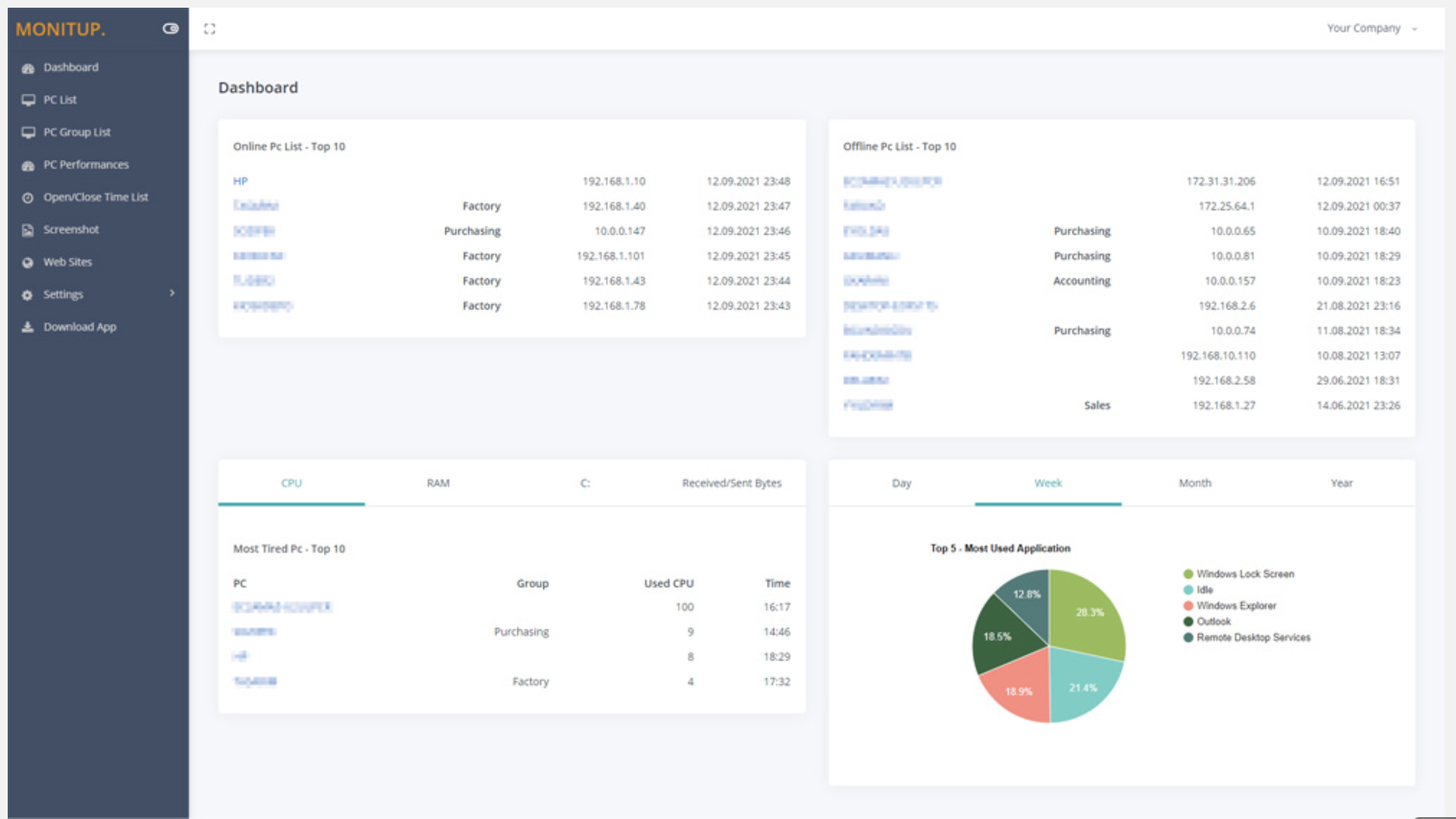
You can see the summary of the movements of the company employees on this screen. Online Computers, Offline Computers, IP Addresses, latest trading hours and pie chart of the most used programs in your company.Screenshot of Employee entrance and exit control
You can see when all employees turned on and off their computers. It helps you to distinguish missing or overwork easily.Screenshot of Websites are under control
You can see which websites employees browse and keep them under control. It is important information to increase employee productivity.Screenshot of Screenshot
Screenshots of the users you specify are taken every 5 minutes. In this way, you will have more data at hand to increase efficiency.Screenshot of Application Categories
All applications are divided into 3 categories. You can set the desired application as Productive, Unproductive Neutral. Thus, you can see the transactions on the graph and instantly analyze the efficiency of the user.