dotCMS vs. WP Engine

Overview
ProductRatingMost Used ByProduct SummaryStarting Price
dotCMS
Score 10.0 out of 10
Enterprise companies (1,001+ employees)
dotCMS is a Java open-source content management system for companies that demand performance in web operations and content management. With dotCMS, companies can create value and deliver dynamic user experiences across multiple channels. The solution is built on open standards: JSON, XML, REST, Spring, OSGI and CMIS. The vendor says it is extensible and massively scalable, and can help companies rapidly deliver personalized, engaging content across devices, channels, second screens…
$0
WP Engine
Score 8.9 out of 10
N/A
WP Engine is a website hosting service built to host WordPress for companies of any size, with features such as daily backups, firewall,SSL, and proprietary caching technology.
$25
*Per Month
Pricing
dotCMSWP Engine
Editions & Modules
Community
$0
Standard
$0
Professional
$0
Prime
$0
Standard
$0
Professional
$0
Startup
$25.00
*Per Month
Growth
$95.00
*Per Month
Scale
$241.00
*Per Month
Offerings
Pricing Offerings
dotCMSWP Engine
Free Trial
YesYes
Free/Freemium Version
YesNo
Premium Consulting/Integration Services
NoNo
Entry-level Setup FeeOptionalNo setup fee
Additional DetailsPricing is per server. One server equals one JVM. There is no limit on users, seats, or web sites.*Pricing for annual contract.
More Pricing Information
Community Pulse
dotCMSWP Engine
Best Alternatives
dotCMSWP Engine
Small Businesses
ManageWP
ManageWP
Score 10.0 out of 10
Flywheel
Flywheel
Score 9.9 out of 10
Medium-sized Companies
RWS Tridion Sites
RWS Tridion Sites
Score 9.0 out of 10
Pantheon
Pantheon
Score 8.6 out of 10
Enterprises
RWS Tridion Sites
RWS Tridion Sites
Score 9.0 out of 10
Pantheon
Pantheon
Score 8.6 out of 10
All AlternativesView all alternativesView all alternatives
User Ratings
dotCMSWP Engine
Likelihood to Recommend
-
(0 ratings)
9.9
(0 ratings)
Likelihood to Renew
-
(0 ratings)
3.0
(0 ratings)
Usability
-
(0 ratings)
10.0
(0 ratings)
Support Rating
-
(0 ratings)
7.7
(0 ratings)
User Testimonials
dotCMSWP Engine
Likelihood to Recommend
No answers on this topic
New users to WordPress can rejoice with a very hands-off hosting approach. If 100% uptime is not essential, you can get breakneck speeds with minimal tinkering using their platform. If you need to get up and running quickly and scale as required, the cost-benefit is here, although you need to pay a lot to get the most from it.
Read full review
Pros
No answers on this topic
  • I love the database backups and how quickly & easy it is to restore from an old backup point. This gives me & my clients confidence that any change can be rolled back.
  • The built in caching & CDN mean that I have to spend less time worrying about the speed of the server & site. The caching has some side-effects that take getting used to (on-page dynamic PHP code sometimes needs to be moved to API endpoints), but this is true for most caching systems.
  • They have really good support for multiple environments. It's very easy to have separate production & staging environments. It's also very simple to deploy from staging to production, making product launches and large scale website copy changes much easier to coordinate.
Read full review
Cons
No answers on this topic
  • The user interface is not very intuitive, which means new staff members require more training than I'd like.
  • The way they manage production/development servers and FTP access is somewhere between nebulous and tragically unique.
  • Their premium pricing is surely worthwhile, but it is significantly higher than virtually all of their competitors, without much obvious distinction in feature sets.
  • Some very basic features like spinning up a second instance require a PHONE CALL to their BILLING department to enable. What is this, 1990?
Read full review
Likelihood to Renew
No answers on this topic
I was in a situation where I had to bolt Wordpress on to an existing infrastructure that could not support it. If I ever end up in that situation again, please kill me. Other than that reasonably common use case, I don't think it offers a lot of value over robust shared hosting, virtual private server (VPS) or dedicated servers.
Read full review
Usability
No answers on this topic
It took very little time to learn their dashboard for managing WordPress sites. Their built-in tools are really well done, and the addition of security and CDN tools is great.
Read full review
Support Rating
No answers on this topic
Support is generally great. Enterprise support is fantastic, with little to no wait times. I find that chat support can almost always take care of the problem without escalating to a ticket for a higher level of troubleshooting. The chat support for many other hosting providers can only handle basic issues. This is a big bonus for us to get quick and helpful answers.
Read full review
Alternatives Considered
No answers on this topic
For Acquia and AEM the major differentiator was the cost for WPEngine was significantly lower and we could use the more common WordPress CMS. AEM is better for large marketing sites that integrate with the Abobe Marketing Cloud and we didn't feel we could support Drupal on Acquia. AWS EC2 is a viable option if you are going to self support and maintain your own WordPress experts. We felt that the value from WPEngine was they handled the support and the WordPress security patches and knowledge beyond simple theme usage. Pantheon was the closest in matching but we felt with our large installs that the hosting model for WPEngine was more cost-effective than the Container architecture for Pantheon
Read full review
Return on Investment
No answers on this topic
  • Positive: We've been able to scale up more easily as adding new sites has been easier.
  • Positive: The load speed improvements we saw were immediate and have not let up.
  • Negative: Adding advanced security and other tools to a multiple sites is expensive.
Read full review
ScreenShots

dotCMS Screenshots

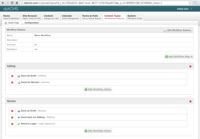
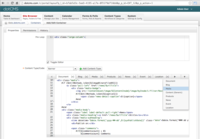
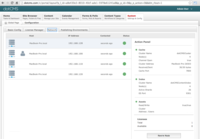
Screenshot of Custom WorkflowsScreenshot of HTML5 and CSS3 templating with full support for responsive design.Screenshot of Auto clustering servers allows customers to quickly scale environments.Screenshot of Mobile development framework with full support for responsive design.