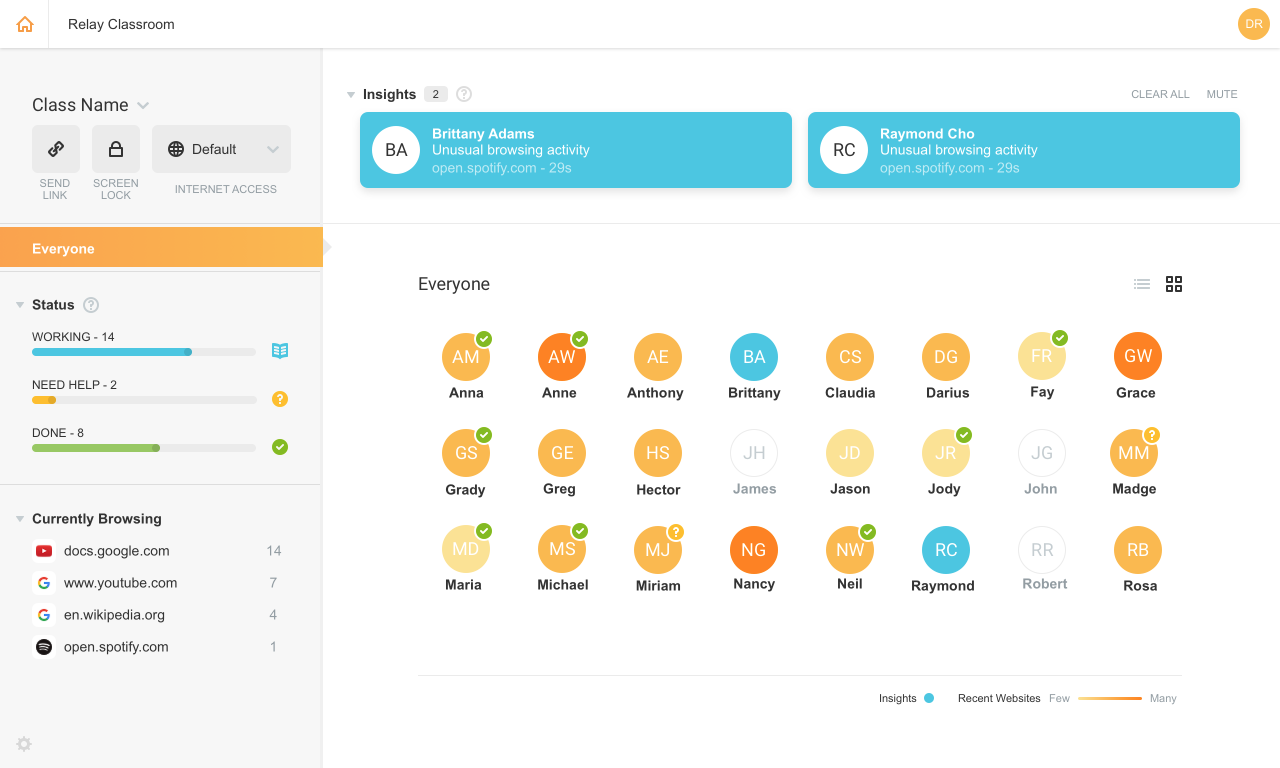
Lightspeed Filter (formerly Relay), from Lightspeed Systems in Austin, offers insights to help understand and maximize the use of 1:1 classroom devices, keep users safe and increase the educational return on technology investments. Lightspeed Systems aims to help users make decisions to enhance technology use, report up administrators, present to your board, reassure concerned parents, empower teachers, and direct students on appropriate use. According to the vendor, Lightspeed Filter powers…
N/A
Pricing
DNSFilter
Lightspeed Filter
Editions & Modules
BASIC
$0.90
per month per user
PRO
$1.80
per month per user
ENTERPRISE
$2.70
per month per user
No answers on this topic
Offerings
Pricing Offerings
DNSFilter
Lightspeed Filter
Free Trial
Yes
Yes
Free/Freemium Version
No
No
Premium Consulting/Integration Services
No
No
Entry-level Setup Fee
No setup fee
No setup fee
Additional Details
Each tier has a monthly minimum price. Contact sales today for more details.
Add-On support is an additional 20% of plan cost.
Priced per student device. Quote available upon request.
Software Engineer in Information Technology at AI Singapore (Computer Software, 51-200 employees)
Chose Lightspeed Filter
DNSFilter and Lightspeed Filter are great web filtering and security solutions that provide businesses with a secure way to filter and protect their network from unwanted content online, both software can be used to protect organizations of any size to block access to certain …
A de minimis incentive was given to thank the reviewer for their time. The incentive was not used to bias or drive a particular response, nor was the incentive contingent on a positive endorsement. More Info
I like how easy it is to manage the filtering software from the web portal. It's super straightforward to set up my networking equipment with clear instructions. I like that it automatically blocks threats without me having to do anything. It also lets me remotely manage both of our locations and networks from the same portal with the same policies. Very useful for saving time setting up content filtering.
A de minimis incentive was given to thank the reviewer for their time. The incentive was not used to bias or drive a particular response, nor was the incentive contingent on a positive endorsement. More Info
Lightspeed web filtering using the Chromebook Relay agent is amazing and does a great job for a cloud filtering solution. The reports that are available are great and can be customized and retains data for 90 days. Reports are easily shared with staff and/or parents for transparency and disciplinary reasons. The agent for Lightspeed (Relay) does not work well with OSX and works okay in Windows, but doesn't allow you to access local IP addresses in the web browser. There needs to be a way to bypass filtering for local network access. This can make it unusable in some cases.
A de minimis incentive was given to thank the reviewer for their time. The incentive was not used to bias or drive a particular response, nor was the incentive contingent on a positive endorsement. More Info
A de minimis incentive was given to thank the reviewer for their time. The incentive was not used to bias or drive a particular response, nor was the incentive contingent on a positive endorsement. More Info
A de minimis incentive was given to thank the reviewer for their time. The incentive was not used to bias or drive a particular response, nor was the incentive contingent on a positive endorsement. More Info
Improved scalability: As an organization's needs grow and evolve, the software should be able to scale up and handle an increasing number of users and devices.
More granular controls: The ability to set more detailed and specific policies, such as the ability to block certain types of content for specific groups of users, would give organizations more flexibility and control over their internet usage.
Advanced threat protection: Increasing the software's ability to detect and protect against advanced threats such as zero-day exploits and APTs would provide a more comprehensive security solution.
A de minimis incentive was given to thank the reviewer for their time. The incentive was not used to bias or drive a particular response, nor was the incentive contingent on a positive endorsement. More Info
A de minimis incentive was given to thank the reviewer for their time. The incentive was not used to bias or drive a particular response, nor was the incentive contingent on a positive endorsement. More Info
When compared to Kerio Control we found Central Management of filtering to be much easier, it also allowed us to apply filtering to remote devices like laptops and had better logging. We found DNSFilter to be much easier to deploy then Webroot DNS Protection because Webroot required the Anti Virus to be installed before deployment was even possible, and reporting features were very lacking.
A de minimis incentive was given to thank the reviewer for their time. The incentive was not used to bias or drive a particular response, nor was the incentive contingent on a positive endorsement. More Info
We were already a [Lightspeed] customer so the transition was seamless to Relay. Their support and team at [Lightspeed] are top-notch. We have been with Lightspeed for over 20 years and have evaluated on occasions other options and [ended] up back with [Lightspeed] each time. Their price point, ease of use, great team of engineers, and overall customer focus keep them on top in my eyes.
A de minimis incentive was given to thank the reviewer for their time. The incentive was not used to bias or drive a particular response, nor was the incentive contingent on a positive endorsement. More Info
We used to deploy Cisco Umbrella before switching to DNSFilter. I feel like you need an advanced degree to set up and manage Cisco Umbrella. Not the case with DNSFilter. You will save time and money by leveraging a very easy to use product.
A de minimis incentive was given to thank the reviewer for their time. The incentive was not used to bias or drive a particular response, nor was the incentive contingent on a positive endorsement. More Info
A de minimis incentive was given to thank the reviewer for their time. The incentive was not used to bias or drive a particular response, nor was the incentive contingent on a positive endorsement. More Info