Dixa vs. Help Scout

Overview
ProductRatingMost Used ByProduct SummaryStarting Price
Dixa
Score 8.0 out of 10
N/A
Dixa, headquartered in Copenhagen, offers their VoIP and call center software, featuring browser based phone, email, and live chat, intelligent skill-based call routing and other agent management tools, queue management and prioritization, and other features designed to provide scalable customer support for ecommerce and small businesses.
$109
per month per user
Help Scout
Score 7.9 out of 10
N/A
Help Scout is help desk software. The vendor’s value proposition is that that their solution reduces time spent on training users because Help Scout is simple to use and set up and scales like any enterprise product. This solution includes multiple mailboxes to support as many email addresses as needed in order to work collaboratively across teams, and manage several products or brands from one account. Reports on conversation trends, team performance, productivity, and customer happiness are…
$30
per month starts with 100 contacts
Pricing
DixaHelp Scout
Editions & Modules
Growth
$109
per month per user
Ultimate
$169
per month per user
Prime
$215
per month per user
*Custom
Contact for quote
per month per user
Standard
$30
per month starts with 100 contacts
Plus
$90
per month starts with 200 contacts
Company
Contact sales team
Offerings
Pricing Offerings
DixaHelp Scout
Free Trial
YesYes
Free/Freemium Version
NoYes
Premium Consulting/Integration Services
NoNo
Entry-level Setup FeeOptionalNo setup fee
Additional DetailsDiscount offered for annual billing. Many product add-ons available: - Dixa Chatbot - Dixa Quality and Insights - Collaboration Users - Seasonal Agents Service add-ons - Active Guidance: Dixa Platform - Active Guidance: Chatbot & Automation - Custom Card Integration
More Pricing Information
Community Pulse
DixaHelp Scout
Features
DixaHelp Scout
Incident and problem management
Comparison of Incident and problem management features of Product A and Product B
Dixa
-
Ratings
Help Scout
8.8
Ratings
9% above category average
Organize and prioritize service tickets00 Ratings9.00 Ratings
Subscription-based notifications00 Ratings10.00 Ratings
Ticket creation and submission00 Ratings8.10 Ratings
Ticket response00 Ratings8.10 Ratings
Self Help Community
Comparison of Self Help Community features of Product A and Product B
Dixa
-
Ratings
Help Scout
8.5
Ratings
8% above category average
External knowledge base00 Ratings9.00 Ratings
Internal knowledge base00 Ratings8.00 Ratings
Multi-Channel Help
Comparison of Multi-Channel Help features of Product A and Product B
Dixa
-
Ratings
Help Scout
8.0
Ratings
3% above category average
Email support00 Ratings8.00 Ratings
Help Desk CRM integration00 Ratings8.00 Ratings
User Ratings
DixaHelp Scout
Likelihood to Recommend
9.3
(0 ratings)
7.1
(0 ratings)
Likelihood to Renew
-
(0 ratings)
7.0
(0 ratings)
Usability
-
(0 ratings)
10.0
(0 ratings)
User Testimonials
DixaHelp Scout
Likelihood to Recommend
This is software that has increased the performance of customer service employees because they work more comfortably with a simple to use software. There's almost no learning curve and has presented very few problems, so I recommend it.
Read full review
Small businesses that want a conversational type of customer support experience. Nothing wrong with support tickets, but it does make you feel like a number. Also, we needed to get up and running quickly so the "inbox" feel of the dashboard was already familiar with the team so they could adopt the new software quickly.
Read full review
Pros
  • The text recording of calls has made our life in the office easier since we often miss some requests, which with this feature we can attend to.
  • The pre-recorded greeting is a good way to keep the customer waiting to be answered.
  • The chatbot feature is perfect for customers with simpler problems to be solved.
Read full review
  • Extremely simple to use and understand as a user - treats communications like human beings and provides a much more personal feel to communication (as opposed to making people feel like numbers).
  • The email newsletter.
  • They are super responsive. They are pretty rad and transparent: if something goes wrong on their end they are not afraid of admitting fault. Which leads me to trust them because I can believe them. I know that tells you very little about the product, but as leadership, that's something that I really need
  • Help Scout does exactly what it needs to (facilitate organized, efficient conversations between customers and support people) without getting in the way.
Read full review
Cons
  • It can be difficult to communicate with some of the numbers in our customer data at times, but Dixa's response team has always been available to help.
  • Dixa's software is constantly being updated to meet the needs of its users, who are its primary source of revenue.
Read full review
  • It is a bit slow sometimes, but not very often.
  • I've noticed more network errors with their server in the past year.
  • Small annoyance - they use a lot of lightbox popups and if you click outside the box all of your work is lost.
Read full review
Likelihood to Renew
No answers on this topic
We are receiving feedback from the organizational level that they may want us to transition to a different solution to provide consistency across the company.
Read full review
Usability
No answers on this topic
Help Scout is a great solution for support teams. There are many articles and webinars to help you learn how to use Help Scout. There are also many features to help make your workflows easier and more efficient. I would readily recommend Help Scout to any small or medium-growing support teams.
Read full review
Alternatives Considered
Dixa demonstrates that it is much easier to use than similar products; it also has a free license for testing before purchasing a product; Dixa currently seeks to cover market demands through daily updates, and it allows us to make an implementation by migrating the existing data on the platform used to Dixa without major conflicts.
Read full review
This is tricky because there's helpdesk apps and chat apps (now Help Scout offers both). We first used just an email inbox (of course not scalable but we were very small), then we turned to Freshdesk, which was painful to use. It had some cool features but in general it was ugly, slow, using the interface was very non-intuitive and the prioritization was hard. I have to say this was more than a year ago, so probably they have changed, but anyway. Zendesk is very expensive considering the features are almost the same AND the chat app needs to be paid separately. As chat we used Tawk.to, it was functional but metrics were not that good and it was buggy at times. Comparing Help Scout with their competitors, at least for us, made it a no-brainer to hire them. The price was very attractive considering the amount of features, the great support and the quality of the app. I don't regret my decision at all because Help Scout, unlike other helpdesk companies, tries to have their app "smart" and not a big, corporate thing piled with features. It does what it needs, it's easy to use and helps you achieve your goals regarding support for your customers.
Read full review
Return on Investment
  • Improved consumer experience
  • Improved channel partner experience
  • Agent productivity and lower stress
Read full review
  • We are able to retain our customer base due to the outstanding customer service our Customer Experience department provides. Without an organized tool like Help Scout, this would not be possible. We pride ourselves in quick response times to customers and are able to do so by effectively routing tickets to the right agents.
Read full review
ScreenShots

Dixa Screenshots

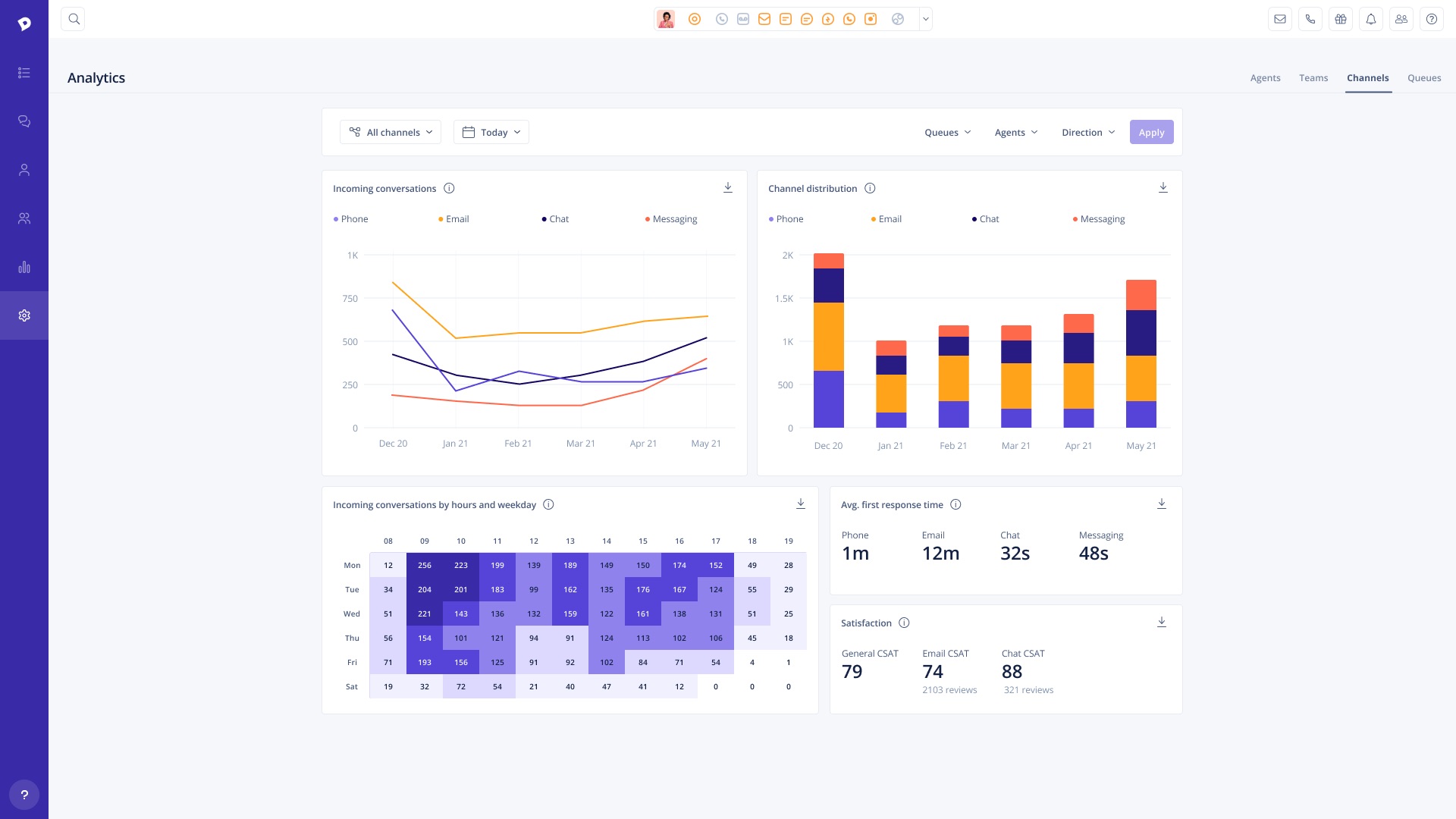
Screenshot of Conversations View: Add tags, write notes & transfer any conversation to another agent in seconds, regardless of channel (calls, emails, chats or Facebook messages).Screenshot of Conversations List: All conversations are updated dynamically in real-time so agents can see what a team is working on and which customers are waiting in queue without having to refresh. Utilize filters to sort by channel, assigned agent, and conversation status.Screenshot of Analytics: Analyze team performanceScreenshot of Organization: Add team members on the fly

Help Scout Screenshots

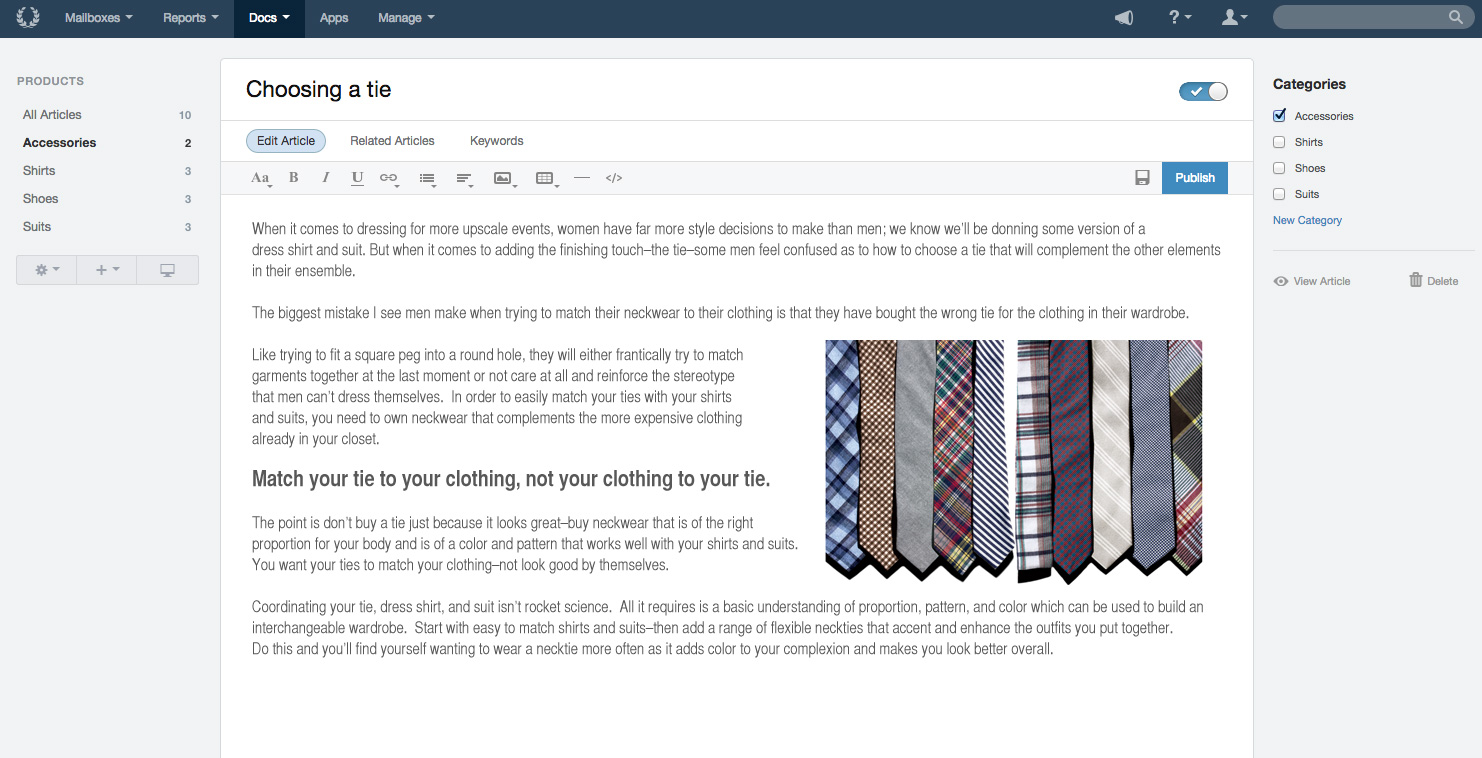
Screenshot of Build better relationships with your customers, and work together better as a teamScreenshot of Tools designed specifically for team collaboration on customer supportScreenshot of Docs Knowledge Base provides self-service that sets your customers up for successScreenshot of The conversation report can change the conversation with your customers from problems to praise by pinpointing what they write in about and when.Screenshot of Productivity Reports track your team's customer-helping velocity and identify sticking points to push through with even greater momentum.Screenshot of Happiness Reports are the closest you can get to your customer's true feelings without hiring a telepath.