Dell NetWorker is an enterprise-level data protection software product that unifies and automates backup to tape, disk-based, and flash-based storage media across physical and virtual environments for granular and disaster recovery.
N/A
Veeam Data Cloud for Microsoft 365
Score8.2 out of 10
Mid-Size Companies (51-1,000 employees)
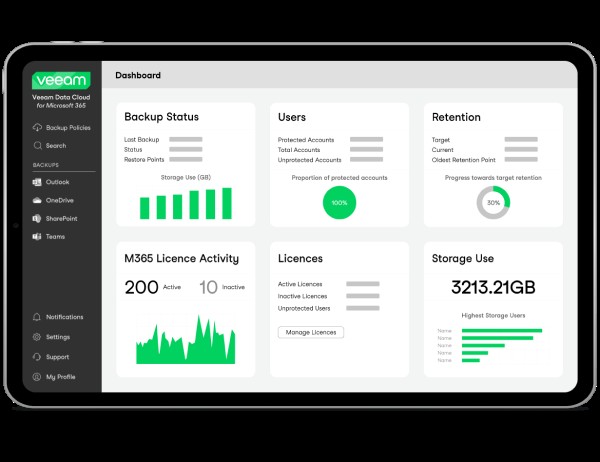
Veeam Data Cloud for Microsoft 365 is a BaaS (Backup as a Service) solution used to back up and restore Microsoft 365 data, including Microsoft Exchange, Microsoft SharePoint, Microsoft OneDrive for Business and Microsoft Teams data.
For users with a basic backup system that does not provide advanced data protection this is a life saver in the age we live in where hackers are looking to encrypt and ruin your important backups. I would recommend [Dell EMC Networker] based on its features, price, and ease of use. If you have a similar product already it does not offer many unique features however.
A de minimis incentive was given to thank the reviewer for their time. The incentive was not used to bias or drive a particular response, nor was the incentive contingent on a positive endorsement. More Info
The implementation of their services is fairly simple and their engineers will assist in any issues that arise when you attempt to get the solutions implemented. One scenario we experienced in implementation is a server was not able to be backed up. The engineer logged onto our system on a remote support session and helped to diagnose why we were experiencing the issue. They ensured we were up and running again in a timely manner to remain covered on our backed up services.
A de minimis incentive was given to thank the reviewer for their time. The incentive was not used to bias or drive a particular response, nor was the incentive contingent on a positive endorsement. TR verified that a representative sample of customers was invited. More Info
Seamlessly integrates with vmWare for extremely fast VM backups
Provides agent-based integration for a very wide array of applications-aware backups, including but not limited to: Microsoft SQL/Exchange/Sharepoint, Meditech, Oracle, DB2, Informix, SAP
Integrates with a wide family of NAS solutions for NDMP backups
My CFO seemed to have lost a whole year of important emails. I simply restored them to his mailbox in a matter of minutes.
An employee left the company but an issue came up with a quote this person sent out. I could search his mailbox and got the quote as well as all communications from that customer.
It is nice to be able to search emails in various mailboxes without disturbing the user.
It is also nice to go back in time. Say they deleted those emails last month I can go back years if needed.
A de minimis incentive was given to thank the reviewer for their time. The incentive was not used to bias or drive a particular response, nor was the incentive contingent on a positive endorsement. More Info
The GUI is horrible. Giant windows that don't size properly, confusing terminology, multiple clicks to get things done, it's just a disorganized mess. I can't put this in front of my junior techs because it requires some background in DR software to fully comprehend, and even then it's not easy. It feels very much like this was tacked on to a command-line based product as an afterthought.
Better management features. It's difficult to integrate with Active Directory, for one. You'll need a Dell EMC tech to help you. Items can't be renamed and have to be recreated. Options are buried in multiple GUI tabs and often are just command line strings in a free-text field. Diagnosing failed jobs and workflows is cumbersome and the errors are often cryptic without some experience. Design it well and pray for uptime, because you need this to work when disaster requires it to.
Poor reporting features for an enterprise class product. You can't schedule any type of simple summary (an audit requirement for us) in the base product. To do this requires the additional cost of Data Protection Advisor, which is also horribly designed and impossible to get working quickly.
Post-sales contact is non-existent. We've been through a few reps and the project team dropped us at one point with a half-finished implementation when the original sales guy moved on. We only got the the promised product implementation by telling Dell that we weren't paying the bill until they delivered what they promised and were contractually obligated to.
A de minimis incentive was given to thank the reviewer for their time. The incentive was not used to bias or drive a particular response, nor was the incentive contingent on a positive endorsement. More Info
Veeam Backup for Microsoft 365 isn't 'multi geo' aware - this means we have to manually select resources to back up depending on their geo-location.
Veeam Backup for Microsoft 365 doesn't backup Private Channels users create in a Team - there are workarounds for this but it would be nice if this just worked.
A de minimis incentive was given to thank the reviewer for their time. The incentive was not used to bias or drive a particular response, nor was the incentive contingent on a positive endorsement. More Info
There are three reasons for not renewing our use of NetWorker: 1) the rising and extremely high cost of support and proprietary hardware needed for deduplication, 2) the complete unreliability of the product (we couldn't recover from a true disaster if we wanted to), and 3) the horrible support from EMC for the product
A de minimis incentive was given to thank the reviewer for their time. The incentive was not used to bias or drive a particular response, nor was the incentive contingent on a positive endorsement. More Info
Veeam Backup for Microsoft 365 just works so well and is so easy to use. I researched multiple options for Office 365 backup and none seemed to be as easy to setup and use as Veeam Backup for Microsoft 365 and the pricing was very comfortable to us. I can't imagine any reason why we would change away from Veeam Backup for Microsoft 365.
A de minimis incentive was given to thank the reviewer for their time. The incentive was not used to bias or drive a particular response, nor was the incentive contingent on a positive endorsement. More Info
NetWorker has the clunkiest interface and unfriendliest CLI with which I have ever had to work. I spent three years hating this application because it took ALL of my time just to keep it running. Even then, I had no confidence in our ability to recover from a disaster because of its unreliability.
A de minimis incentive was given to thank the reviewer for their time. The incentive was not used to bias or drive a particular response, nor was the incentive contingent on a positive endorsement. More Info
While the product is rock-solid and only has errors when Microsoft changes things on their API side, the solution is at times too simplistic. The need to analyze and report on the data being stored is lackluster. The functionality and use of the product is a 10, but the niceties and features you would want in a product of this caliber are lacking.
A de minimis incentive was given to thank the reviewer for their time. The incentive was not used to bias or drive a particular response, nor was the incentive contingent on a positive endorsement. TR verified that a representative sample of customers was invited. More Info
A de minimis incentive was given to thank the reviewer for their time. The incentive was not used to bias or drive a particular response, nor was the incentive contingent on a positive endorsement. More Info
We have a lot of data, and pulling backups out of the store sometimes takes a bit of time - but this is within acceptable tolerances. I don't expect restores to be instantaneous, and I can't quantify if the speed is software or data repository.
A de minimis incentive was given to thank the reviewer for their time. The incentive was not used to bias or drive a particular response, nor was the incentive contingent on a positive endorsement. More Info
The support team has always been good, and there is never an issue that can't be resolved. The techs are competent and know the product. The slightly less than perfect rating I'm giving is because Support shouldn't carry the burden themselves. We hear from Dell sales people all the time, but they never call and ask about this product, nor do they offer to upsell it or make it better. That lack of sales support and coherence hurts the overall rating a bit. When I spend my company's money on your product, I expect you to at least ACT like you care, if not actually care for real. It influences my opinion and future purchasing habits.
A de minimis incentive was given to thank the reviewer for their time. The incentive was not used to bias or drive a particular response, nor was the incentive contingent on a positive endorsement. More Info
Veeam Data Cloud support for Microsoft 365 is excellent (just like for Veeam Backup & Replication). It's easy to create a ticket in the support portal, and the support engineers respond quickly and accurately, usually within a few hours! Issues are resolved and/or investigated quickly.
A de minimis incentive was given to thank the reviewer for their time. The incentive was not used to bias or drive a particular response, nor was the incentive contingent on a positive endorsement. TR verified that a representative sample of customers was invited. More Info
How can anyone build a house without a blueprint? NetWorker was ramrodded into place here without a design or implementation plan. The result was a setup that was doomed from the start and never worked reliable over the full three years of our contract obligation.
A de minimis incentive was given to thank the reviewer for their time. The incentive was not used to bias or drive a particular response, nor was the incentive contingent on a positive endorsement. More Info
A de minimis incentive was given to thank the reviewer for their time. The incentive was not used to bias or drive a particular response, nor was the incentive contingent on a positive endorsement. More Info
EMC and Unitrends are equal at the file level and SQL backups. What makes Unitrends the better product is the ability to backup VMs as a whole. They both have the ability to email reports about failures and hardware issues. Unitrends has superior support and knowledge base and support is available 24/7.
A de minimis incentive was given to thank the reviewer for their time. The incentive was not used to bias or drive a particular response, nor was the incentive contingent on a positive endorsement. More Info
Veeam Data Cloud for Microsoft 365 offered a straightforward, upfront billing model with no hidden storage fees.In contrast, Rubrik’s proposal emphasized enterprise-grade features like air-gapped backups, sensitive data monitoring, and zero-trust architecture—but came with a higher initial investment as well as higher recurring costs. Simplicity and Microsoft 365 Focus Veeam Data Cloud for Microsoft 365’s solution was purpose-built for Microsoft 365, offering granular recovery, seamless integration, and a user-friendly interface
A de minimis incentive was given to thank the reviewer for their time. The incentive was not used to bias or drive a particular response, nor was the incentive contingent on a positive endorsement. TR verified that a representative sample of customers was invited. More Info
A de minimis incentive was given to thank the reviewer for their time. The incentive was not used to bias or drive a particular response, nor was the incentive contingent on a positive endorsement. More Info
A de minimis incentive was given to thank the reviewer for their time. The incentive was not used to bias or drive a particular response, nor was the incentive contingent on a positive endorsement. More Info
The only real impact is from a compliance standpoint. Our company is expected at a regulatory level to be protecting our data and even though the tenant has little traffic there could still be some regulated data in there. We have to be able to tell an auditor that it's being backed up by an enterprise grade solution, and that's what VDC was intended for.
A de minimis incentive was given to thank the reviewer for their time. The incentive was not used to bias or drive a particular response, nor was the incentive contingent on a positive endorsement. More Info