TrustRadius: an HG Insights company

Save this comparison

Save this comparison

Add Product

Recommended Comparisons

    Overview
    ProductRatingMost Used ByProduct SummaryStarting Price

    DbVisualizer

    Score8.8 out of 10
    N/ADbVisualizer is a multi-database tool for developers, analysts and database administrators, providing a single interface across a wide variety of operating systems. Boasting an easy-to-use and clean interface, DbVisualizer runs on all major operating systems and supports all major RDBMS that are available. Users only need to learn and master one application. DbVisualizer integrates transparently with the operating system being used.

    $0

    Pragmatic Workbench (discontinued)

    Score8.5 out of 10
    Enterprise companies (1,001+ employees)
    Pragmatic Workbench Enterprise was a suite that combined four Pragmatic Works products: BI xPress, DBA xPress, DOC xPress and LegiTest. It was acquired by SentryOne in April 2018, and has reached its EOL phase. After the summer of 2022 it will likely no longer be available, and unsupported.

    $2,490

    per seat

    Pricing
    DbVisualizerPragmatic Workbench (discontinued)
    Editions & Modules
    DbVisualizer Free
    $0
    DbVisualizer Pro with Basic support - Renewal
    $89
    per year per user
    DbVisualizer Pro with Premium support - Renewal
    $119
    per year per user
    DbVisualizer Pro with Basic support
    $199
    per year per user
    DbVisualizer Pro with Premium support
    $229
    per year per user
    Workbench Client Edition
    2,490
    per seat
    Workbench Server Edition
    8,995
    per server
    Workbench Enterprise Edition (Client + Server)
    9,995
    1 user / 1 server
    Offerings
    Pricing Offerings
    DbVisualizerPragmatic Workbench (discontinued)
    Free Trial
    YesYes
    Free/Freemium Version
    YesYes
    Premium Consulting/Integration Services
    NoYes
    Entry-level Setup FeeOptionalNo setup fee
    Additional DetailsNew license cost includes a perpetual license, software upgrades and support for the length of the term. 1, 2 & 3 year terms are offered. Once license expires the user may access all Pro versions released before the license expiry indefinitely. To gain access to Pro versions released after the license expired, license renewal is offered. Volume discounts apply to both new and renewal licenses.Workbench Enterprise combines all of the functionality within Workbench Client (local install) and Workbench Server (server install).
    More Pricing Information
    Community Pulse
    DbVisualizerPragmatic Workbench (discontinued)
    Considered Both Products
    DbVis Software AB
    No answer on this topic
    Discontinued Products
    No answer on this topic
    Key User Insights
    Would buy again
    100%
    Would buy again
    47 Answers
    No answers on this topic
    Delivers good value for the price
    98%
    Delivers good value for the price
    44 Answers
    No answers on this topic
    Happy with the feature set
    98%
    Happy with the feature set
    46 Answers
    No answers on this topic
    Lived up to sales and marketing promises
    97%
    Lived up to sales and marketing promises
    37 Answers
    No answers on this topic
    Implementation went as expected
    100%
    Implementation went as expected
    42 Answers
    No answers on this topic
    Features
    DbVisualizerPragmatic Workbench (discontinued)
    Database Development
    Comparison of Database Development features of DbVisualizer and Pragmatic Workbench (discontinued)
    Feature
    DbVisualizer
    7.8
    40 Ratings
    9% below category average
    Pragmatic Workbench (discontinued)
    9.0
    1 Ratings
    5% above category average
    Performance optimization tools7.835 Ratings00 Ratings
    Schema maintenance7.938 Ratings00 Ratings
    Test data generation00 Ratings9.01 Ratings
    Database Administration
    Comparison of Database Administration features of DbVisualizer and Pragmatic Workbench (discontinued)
    Feature
    DbVisualizer
    7.2
    28 Ratings
    16% below category average
    Pragmatic Workbench (discontinued)
    -
    Ratings
    User management7.725 Ratings00 Ratings
    Database security7.322 Ratings00 Ratings
    Database status reporting6.621 Ratings00 Ratings
    Best Alternatives
    DbVisualizerPragmatic Workbench (discontinued)
    Small Businesses
    DBeaver
    Score9.2 out of 10
    DBeaver
    Score9.2 out of 10
    Medium-sized Companies
    DBeaver
    Score9.2 out of 10
    DBeaver
    Score9.2 out of 10
    Enterprises
    DBeaver
    Score9.2 out of 10
    DBeaver
    Score9.2 out of 10
    All AlternativesView all alternativesView all alternatives
    User Ratings
    DbVisualizerPragmatic Workbench (discontinued)
    Likelihood to Recommend
    8.8
    (47 ratings)
    8.0
    (1 ratings)
    Likelihood to Renew
    9.1
    (2 ratings)
    -
    (0 ratings)
    Usability
    8.1
    (17 ratings)
    -
    (0 ratings)
    Support Rating
    9.1
    (1 ratings)
    6.0
    (1 ratings)
    Implementation Rating
    9.1
    (1 ratings)
    -
    (0 ratings)
    User Testimonials
    DbVisualizerPragmatic Workbench (discontinued)
    Likelihood to Recommend
    DbVis Software AB
    Whenever you have to access data sources from more than one database engine provider, you should consider using DbVisualizer for the task. Switching between multiples IDE consumes time and resources (memory), and you also need to learn menus, shortcuts, etc., for each IDE, while using DbVisualizer allows you to work consistently no matter which database engine you are connecting. You can use it to simply navigate through data structures, write SQL sentences or even create new tables and views, develop stored procedures, etc.
    Incentivized
    Read full review
    Discontinued Products
    Workbench Enterprise is consistent across devices and users so far. It works the same, and access is easy. I have a problem with its security. If you use an enterprise password to access databases, it's very easy to click the show password on the connection page and expose the enterprise password. You shouldn't allow users to use the same accounts to access the database because that means all users are sharing the same password.
    Incentivized
    Read full review
    Pros
    DbVis Software AB
    • Timed queries that add their result to the result grid for every execution are helpful. Creation of graphs also extremely helpful.
    • Query history and auto-recover feature makes sure we don't lose our queries.
    • Actions like exporting grids to Excel or other tools is a very easy task.
    Incentivized
    Read full review
    Discontinued Products
    • Querying is easy and quick.
    • Updating tables is very easy.
    • It gives us very accurate error messages.
    Incentivized
    Read full review
    Cons
    DbVis Software AB
    • Small, but noticeable: it would be nice to be able to highlight just one column of a data output for copy/paste by clicking on the column header (a feature some of us are accustomed to from SQL Server Management Studio)
    • Is there an ability to bulk import an excel file to a table in a connected SQL Server in DbVis? If so, I haven't figured that out yet. I still largely use Microsoft SSMS to import data to our team's personal SQL Server, but can easily query that server via DbVis)
    • (I really don't have any major complaints - our company has tried to steer users toward DBeaver for YEARS, which I cannot stand. DbVis knocks the beaver out of the water)
    Read full review
    Discontinued Products
    • It has autocompleted, but I find it difficult to use or get to use.
    • It doesn't automatically complete table names or field names.
    Incentivized
    Read full review
    Likelihood to Renew
    DbVis Software AB
    We never had problems with it. It is able to connect to all data sources (Oracle, Informix, DB2, SQL Server) that we currently use.
    Incentivized
    Read full review
    Discontinued Products
    No answers on this topic
    Usability
    DbVis Software AB
    I use this tool for several hours each day, spanning many years in various projects. It's wide support for various database types while keeping consistency within the UI for each is important when working with various databases day in and day out.
    Read full review
    Discontinued Products
    No answers on this topic
    Support Rating
    DbVis Software AB
    Never used
    Incentivized
    Read full review
    Discontinued Products
    Our team does the support for us. Sometimes we see download related issues that can easily be fixed by our team. Most issues you will see with one user in your org will probably happen to others, so keep a log and track those issues. Then have a fix for them somewhere that everyone has access to. This will save you a lot of time troubleshooting.
    Incentivized
    Read full review
    Alternatives Considered
    DbVis Software AB
    DbVisualizer provides a good value when compared against other 3rd party products with similar features as well as products with similar functionality made by the database vendors. The user interface is good and user friendly / intuitive and easy to learn. It doesn't take too long for an experienced DBA / database developer to come up to speed.
    Read full review
    Discontinued Products
    No answers on this topic
    Return on Investment
    DbVis Software AB
    • Positive: Real time saver when working across multiple databases. At least 30-40 mins a day are saved
    • Positive: Helpful for the 'quick DBA' tasks without switching to the native tools: approx 1-2 hours saved weekly
    • Positive: Easy switch between environments / schemas / etc without hassle: saved at least an hour daily
    Read full review
    Discontinued Products
    • I personally like Workbench Enterprise, and I can do everything I need to do using it.
    Incentivized
    Read full review
    ScreenShots

    DbVisualizer Screenshots

    Product screenshotScreenshot of SQL formattingScreenshot of ERD diagramScreenshot of Auto completeScreenshot of Database connectionScreenshot of Database connection

    Pragmatic Workbench (discontinued) Screenshots
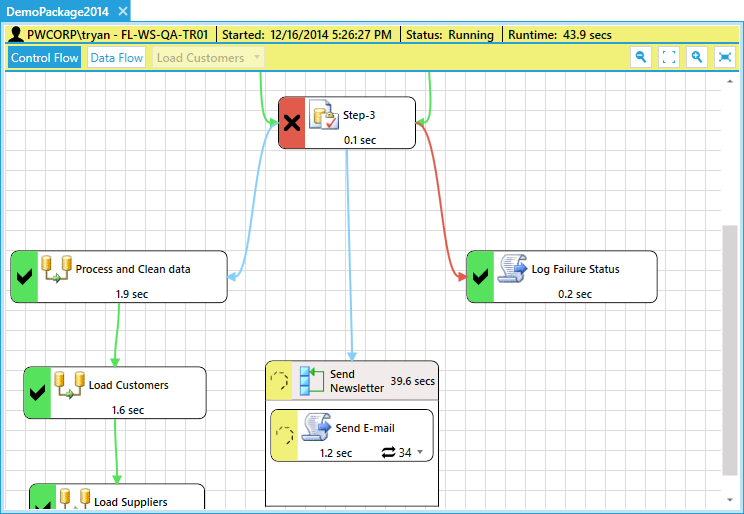
    Screenshot of Real-Time SSIS Execution DiagramScreenshot of Visual Object LineageScreenshot of Data Validation Testing DesignerScreenshot of Data Validation Testing -  Performance DashboardScreenshot of Workbench Launch Dashboard
