Customer.io vs. WebEngage

Overview
ProductRatingMost Used ByProduct SummaryStarting Price
Customer.io
Score 9.4 out of 10
Small Businesses (1-50 employees)
Customer.io is a customer engagement platform that enables marketers to build sophisticated automated messaging campaigns. With access to real-time behavioral data, users can create personalized and relevant messages to engage and retain customers. This includes sending emails, push notifications, SMS, in-app messages, and more through a visual building experience. Built for scale, Customer.io boasts users among over 5,300 companies, sending over 17 billion messages per year.N/A
WebEngage
Score 8.0 out of 10
N/A
WebEngage calls itself a multi-channel user engagement platform. It automates communication across a user's lifecycle and helps companies send messages via these channels: Web Messages In-app Messages Push Notifications Web Push Notification Email Marketing SMS Marketing Facebook Remarketing According to the vendor, cross-device tracking helps keep communication coherent and contextual, making the…N/A
Pricing
Customer.ioWebEngage
Editions & Modules
No answers on this topic
Offerings
Pricing Offerings
Customer.ioWebEngage
Free Trial
YesYes
Free/Freemium Version
NoYes
Premium Consulting/Integration Services
NoNo
Entry-level Setup FeeOptionalNo setup fee
Additional DetailsEssentials: For startups and small teams engaging customers on their mobile and web apps. - Up to 5,000 profiles*, Send Emails, Push, In-App, and SMS, Visual Workflow Builder, Segmentation, Two Workspaces, Email Support, Customer Community Premium: For high-growth companies looking for greater control over their messaging outcomes. - Everything in Essentials, Custom Data + Message Volume, Premium Product Features, Additional Workspaces, 90-day Onboarding Program, Premium Email & Chat Support, Managed Deliverability, Dedicated IPs, Parcel Pro Licenses, HIPAA Compliance Enterprise: For at-scale companies looking to create world-class customer experiences. - Everything in Premium, Managed Infrastructure*, Customer Success Manager, Quarterly Success Reviews, Technical Account Manager*, Audit Logging & Data Governance*, Parcel Business Licenses, Migration Support*, *Available by consultation.Pricing is customised according to the customer usage and requirement. Contact support@webengage.com to know more about pricing plans.
More Pricing Information
Community Pulse
Customer.ioWebEngage
Features
Customer.ioWebEngage
Email & Online Marketing
Comparison of Email & Online Marketing features of Product A and Product B
Customer.io
-
Ratings
WebEngage
7.4
Ratings
3% below category average
Dynamic content00 Ratings7.30 Ratings
Ability to test dynamic content00 Ratings7.70 Ratings
Mobile optimization00 Ratings6.30 Ratings
Email deliverability reporting00 Ratings7.10 Ratings
List management00 Ratings7.80 Ratings
Triggered drip sequences00 Ratings8.20 Ratings
Lead Management
Comparison of Lead Management features of Product A and Product B
Customer.io
-
Ratings
WebEngage
6.1
Ratings
24% below category average
Lead nurturing automation00 Ratings6.60 Ratings
Automated sales alerts and tasks00 Ratings5.60 Ratings
Campaign Management
Comparison of Campaign Management features of Product A and Product B
Customer.io
-
Ratings
WebEngage
6.9
Ratings
7% below category average
Calendaring00 Ratings8.00 Ratings
Event/webinar marketing00 Ratings5.70 Ratings
Reporting & Analytics
Comparison of Reporting & Analytics features of Product A and Product B
Customer.io
-
Ratings
WebEngage
7.2
Ratings
2% below category average
Dashboards00 Ratings7.50 Ratings
Standard reports00 Ratings7.50 Ratings
Custom reports00 Ratings6.70 Ratings
Platform & Infrastructure
Comparison of Platform & Infrastructure features of Product A and Product B
Customer.io
-
Ratings
WebEngage
7.1
Ratings
5% below category average
API00 Ratings8.20 Ratings
Role-based workflow & approvals00 Ratings7.10 Ratings
Customizability00 Ratings6.80 Ratings
Integration with Salesforce.com00 Ratings6.10 Ratings
Best Alternatives
Customer.ioWebEngage
Small Businesses
Simplify360
Simplify360
Score 7.8 out of 10
Vbout
Vbout
Score 9.9 out of 10
Medium-sized Companies
Dialpad Support
Dialpad Support
Score 9.0 out of 10
PFL Direct Mail Platform
Score 9.0 out of 10
Enterprises
Verint Community
Verint Community
Score 9.9 out of 10
PFL Direct Mail Platform
Score 9.0 out of 10
All AlternativesView all alternativesView all alternatives
User Ratings
Customer.ioWebEngage
Likelihood to Recommend
10.0
(0 ratings)
7.3
(0 ratings)
Usability
9.0
(0 ratings)
-
(0 ratings)
User Testimonials
Customer.ioWebEngage
Likelihood to Recommend
This tool is well-suited for companies looking to run email marketing campaigns or send out newsletters regularly to their users/customers. The workflow setup is especially useful for companies who want to send specific emails based on user behavior - i.e. they've not logged in recently, have bought a specific product, haven't opened any emails, etc. This could also be useful for freelancers like me since you can create different workspaces within Customer.io. I have configured it this way to handle email marketing for a few of my clients, and the software keeps everything organized and separate. This might not be the best tool for small businesses, considering the price. It may be better to start out with a cheaper email marketing tool, and then if/when necessary, scale-up with a tool like Customer.io.
Read full review
When the business is expected to scale and expand, tools such as this proves very handy where it helps to target the correct segments or correct audiences with the right offerings, thereby increasing the chances of transaction or desired action from the user while saving pennies which could have been burnt if a blanket approach would have been used. Automation saves a lot of time and effort for the marketers and businesses boosted due to its operation.
Read full review
Pros
  • Ease of use, a good tool for non programmers, or not so tech savvy people.
  • Great support, willing to help a lot, by chat, calls, or screen sharing.
  • Fast updates, it's a newer tool, but they are coming with fixes and updates fast.
Read full review
  • Ease in creating user journeys.
  • Easy implementation of APIs.
  • Good reporting dashboard and scheduling features.
  • Segmentation of the users is easy.
Read full review
Cons
  • I may be missing it in the UI, but a place to see the list of emails who qualify for a certain email.
  • One easy to view chart of all our automated/lifecycle emails to see what a given user would see over their customer journey. (This is really just a feature request/idea - the product itself is really awesome.)
Read full review
  • Relays
  • Onsite should have more options of templates.
  • Backend support for better reachability of the channels.
  • Cohort studies should be more customizable.
Read full review
Usability
It is really difficult to leverage all the neat features without a developer. I actually think the base software could be really great for a small business if the price is right, but there are so many things you *can* do but have to know how to do them or have access to your website and the ability to code.
Read full review
No answers on this topic
Alternatives Considered
We used Autopilot in the past. It worked well but the integration wasn't very good, considering they only used cookies. We have a very complex system right now to be able to track every customer, and it was expensive but worth it. Autopilot worked very well when we were starting, but then it didn't track purchases, it wasn't easy to change a customer attribute, and so on (this was a few years ago, probably they have improved a lot). It was more visual and better to create huge workflows. . Mailchimp was the first program we used. It's very basic but good at what it does: sending a newsletter to your small database. It has integrated very well with other services and we haven't used in a lot of time, but certainly was grown a lot so it must be doing things fine. I also tried Active Campaign but it was almost the same as Autopilot.
Read full review
WebEngage's dashboard is relatively more intuitive and easy to understand. Further in terms of cost as well it is value to money as it delivers excellent ROI. The after-sales support is also better in terms of responsiveness and helps in case of issues with the execution of campaigns. The account managers also ideate and help in the optimization and creation of new user journeys.
Read full review
Return on Investment
  • Helped increase our new user engagement with our cloud-based software
  • Helped our sales team identify clients who had dropped off and stopped interacting with our software
  • Helped our sales and customer service team track which clients were completing their full registration process
  • Helped our marketing, sales, and customer service team identify key features and messaging with A/B testing for different campaigns
Read full review
  • Helped in lowering cost of marketing.
  • Driving higher volume of Direct Sales.
  • Increasing conversion rate on the website.
  • Increasing lead to sale ratio.
Read full review
ScreenShots

Customer.io Screenshots

Screenshot of data-driven or manual segments that can be created in the no-code builder for recipient lists, campaign triggers, filters, and conversion goals.Screenshot of the code editor for email, that helps navigate code and iterate.Screenshot of account performance, visible at a glance from the Dashboard view.Screenshot of drag and drop messages, time delays, and branches where desired, to build cross-channel campaigns.Screenshot of triggered campaigns based on forms submissions, customer attributes, customer actions, and dates.Screenshot of localization for global audiences. One message can be delivered in multiple languages.

WebEngage Screenshots

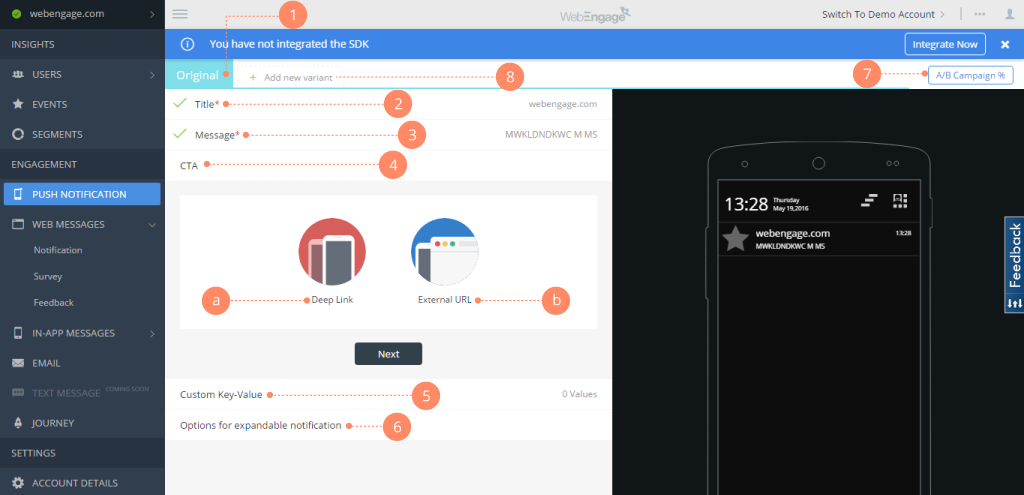
Screenshot of Webengage dashboard - User AnalyticsScreenshot of Webenagge dashboard - User DetailsScreenshot of Webengage dashboard - Creating Mobile notificationsScreenshot of Webengage dashboard - Creating EmailsScreenshot of Webengage Dashboard - Journey DesignerScreenshot of Webengage Dashboard - Journey Designer (2)