Customer.io is a customer engagement platform that enables marketers to build sophisticated automated messaging campaigns. With access to real-time behavioral data, users can create personalized and relevant messages to engage and retain customers. This includes sending emails, push notifications, SMS, in-app messages, and more through a visual building experience. Built for scale, Customer.io boasts users among over 5,300 companies, sending over 17 billion messages per year.
N/A
Kustomer
Score 8.7 out of 10
N/A
Kustomer is a customer service CRM platform built for managing high support volume by optimizing experiences throughout the customer service journey. Kustomer was acquired by Facebook in late 2020, but spun out in 2023 and re-launched as an independent entity, Kustomer, LLC.
$89
per month, per user
Pricing
Customer.io
Kustomer
Editions & Modules
No answers on this topic
Enterprise
$89
per month, per user
Ultimate
$139
per month, per user
Offerings
Pricing Offerings
Customer.io
Kustomer
Free Trial
Yes
No
Free/Freemium Version
No
No
Premium Consulting/Integration Services
No
No
Entry-level Setup Fee
Optional
No setup fee
Additional Details
Essentials: For startups and small teams engaging customers on their mobile and web apps.
- Up to 5,000 profiles*, Send Emails, Push, In-App, and SMS, Visual Workflow Builder, Segmentation, Two Workspaces, Email Support, Customer Community
Premium: For high-growth companies looking for greater control over their messaging outcomes.
- Everything in Essentials, Custom Data + Message Volume, Premium Product Features, Additional Workspaces, 90-day Onboarding Program, Premium Email & Chat Support, Managed Deliverability, Dedicated IPs, Parcel Pro Licenses, HIPAA Compliance
Enterprise: For at-scale companies looking to create world-class customer experiences.
- Everything in Premium, Managed Infrastructure*, Customer Success Manager, Quarterly Success Reviews, Technical Account Manager*, Audit Logging & Data Governance*, Parcel Business Licenses, Migration Support*, *Available by consultation.
All plans require an annual subscription and 8 users minimum.
More Pricing Information
Community Pulse
Customer.io
Kustomer
Features
Customer.io
Kustomer
Incident and problem management
Comparison of Incident and problem management features of Product A and Product B
Customer.io
-
Ratings
Kustomer
8.1
Ratings
1% above category average
Organize and prioritize service tickets
00 Ratings
8.00 Ratings
Expert directory
00 Ratings
8.30 Ratings
Subscription-based notifications
00 Ratings
8.50 Ratings
ITSM collaboration and documentation
00 Ratings
8.00 Ratings
Ticket creation and submission
00 Ratings
8.00 Ratings
Ticket response
00 Ratings
8.00 Ratings
Self Help Community
Comparison of Self Help Community features of Product A and Product B
Customer.io
-
Ratings
Kustomer
8.5
Ratings
8% above category average
External knowledge base
00 Ratings
8.00 Ratings
Internal knowledge base
00 Ratings
9.00 Ratings
Multi-Channel Help
Comparison of Multi-Channel Help features of Product A and Product B
This tool is well-suited for companies looking to run email marketing campaigns or send out newsletters regularly to their users/customers. The workflow setup is especially useful for companies who want to send specific emails based on user behavior - i.e. they've not logged in recently, have bought a specific product, haven't opened any emails, etc. This could also be useful for freelancers like me since you can create different workspaces within Customer.io. I have configured it this way to handle email marketing for a few of my clients, and the software keeps everything organized and separate. This might not be the best tool for small businesses, considering the price. It may be better to start out with a cheaper email marketing tool, and then if/when necessary, scale-up with a tool like Customer.io.
It works really well for you to ask a teammate to review a case/email/message and provide some input since you can all review the same conversations and client accounts. They can also cover your inbox using your email handle in case you are out of the office suing some well deserved PTO.
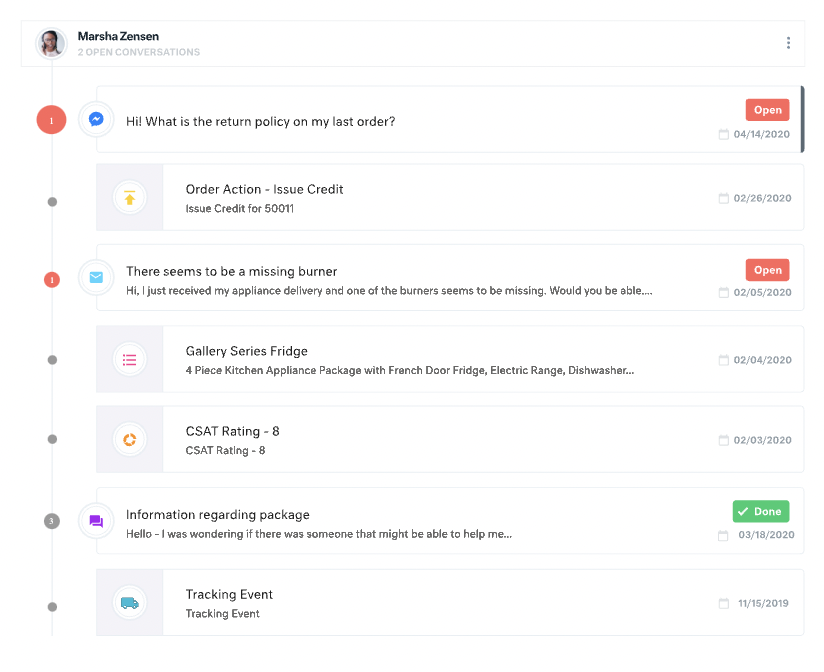
All customer data (past orders, communication with customer service, rewards account data) is in one place. This helps agents avoid confusion and reduces the number of tabs they need to open.
The Knowledge Base (or K Base) is very helpful. Any time we roll out a new policy or have a limited-time promotion, we can add all the relevant information and worksheets there for the convenience of the agents. That way they can stay in a chat while looking up the answer to a question.
We can seamlessly move from chat into email if the customer leaves or the queue times are too long. All the interactions will stay on the customer profile page, so they are kept up to date.
I may be missing it in the UI, but a place to see the list of emails who qualify for a certain email.
One easy to view chart of all our automated/lifecycle emails to see what a given user would see over their customer journey. (This is really just a feature request/idea - the product itself is really awesome.)
For our team, the feature that defaults all notes to begin in "done" status is difficult. Throughout each day we need to have notes open and assigned back and forth to different teams, and we have to remember to manually "open" each note. There is too much room for human error with this setting, and it is easy for important notes to be missed if a user forgets to open the note.
Similarly, it can be hard to remember to assign emails/notes to a particular team in addition to a user. We almost exclusively work out of team inboxes, and if someone on Care writes an email to a customer, the email will automatically be "done" when it is created, and it will be assigned to the user who wrote it, but not also to the user's team. There are instances where an email needs to be snoozed for several days/hours with further action needed, and unless the user remembers to assign the email to their team it may "awake" from the snooze and not be visible to anyone except the user who created it. Similarly to my first comment, this leaves a lot of room for human error and is not very intuitive.
Personally, I do not love that all tickets/emails/notes are jumbled together in the same inbox. While this gives visibility to everything on the "to do" list at the same time, it can be visually overwhelming. We have created unique folders for certain types of projects or categories of work, but have experienced tech glitches or just the awkwardness of another step to manually read the note, determine what type of category it is, and then manually assign it to another folder. Would love to have things auto-sort and take out this manual lift.
I love the idea of the autopilot setting, but we have not been able to use this for our work because it sorts items based on time, and not based on priority. In our line of work, we may have an urgent situation arise that needs attention before an email that was sent in 60 minutes ago. The autopilot feature would push the email to my associates sooner than it would the urgent situation from 5 minutes ago. Due to this, we manually monitor inboxes and assign work to ourselves and others.
It is really difficult to leverage all the neat features without a developer. I actually think the base software could be really great for a small business if the price is right, but there are so many things you *can* do but have to know how to do them or have access to your website and the ability to code.
There is a learning curve, but it is more than worth it, especially to have a dedicated resource pointed at Kustomer and any other software it interacts with. The basic implementation is useful, and powerful - certainly a MASSIVE upgrade over taking care of your customers in an email inbox or shuffling between multiple windows and applications! It is also set up really well to grow and reconfigure with your business. I'm a big fan.
It’s a great tool that has helped our company and overall customer service. I believe if we were able to edit certain setting for our specific company that would be hopeful. We have been told before that certain desires of ours would make a change throughout all of Kustomer. Which is not something we would want, we would just want that to change for our business.
We used Autopilot in the past. It worked well but the integration wasn't very good, considering they only used cookies. We have a very complex system right now to be able to track every customer, and it was expensive but worth it. Autopilot worked very well when we were starting, but then it didn't track purchases, it wasn't easy to change a customer attribute, and so on (this was a few years ago, probably they have improved a lot). It was more visual and better to create huge workflows. . Mailchimp was the first program we used. It's very basic but good at what it does: sending a newsletter to your small database. It has integrated very well with other services and we haven't used in a lot of time, but certainly was grown a lot so it must be doing things fine. I also tried Active Campaign but it was almost the same as Autopilot.
I find it baffling how little data can be stored or associated with a customer in many other systems, and how difficult that can be to set up. It is fine if you already have a robust CDP that you can hook up and use to power your CRM, but it is rare that an organization has the resources or the customer-focus to rally behind setting up their customer service/experience team up for success. With a platform like Kustomer, you can actually evolve the relationship over time, or use the past experiences (number of contacts, purchases, previous issues, etc.) to power your next steps with a customer, making for a much more nuanced relationship with a human, not just a ticket.
We’re getting so much positive feedback — which is not something you traditionally associate with a customer care team — because we’re making it effortless for customers to deliver both positive and negative feedback, and we can now resolve the bad feedback really really quickly.
Primarily from our increased efficiency with Kustomer, we’ve seen a significant reduction of $3 to $4 for every cost per contact.