
Crownpeak Digital Accessibility and Quality vs. WAVE Web Accessibility Evaluation Tool
| Product | Rating | Most Used By | Product Summary | Starting Price |
|---|---|---|---|---|
 Crownpeak Digital Accessibility and Quality | Score8.1 out of 10 | N/A | Crownpeak Digital Accessibility and Quality is a digital governance and web content management and monitoring solution designed to support excellent customer experience across all digital touchpoints, supporting web accessibility needs, error catching, SEO best practices, brand compliance, and analytics with benchmarking. Crownpeak Digital Accessibility and Quality can be integrated into an existing CMS. | N/A |
 WAVE Web Accessibility Evaluation Tool | Score5 out of 10 | N/A | WAVE is a suite of evaluation tools that helps authors make their web content more accessible to individuals with disabilities. WAVE can identify many accessibility and Web Content Accessibility Guideline (WCAG) errors, but also facilitates human evaluation of web content. The vendor, WebAIM who offers WAVE as a free suite of tools, states their philosophy is to focus on issues that they know impact end users, facilitate human evaluation, and to educate about web… | $0 |
| Crownpeak Digital Accessibility and Quality | WAVE Web Accessibility Evaluation Tool | |||||||||||||||
|---|---|---|---|---|---|---|---|---|---|---|---|---|---|---|---|---|
| Editions & Modules | No answers on this topic |
| ||||||||||||||
| Offerings |
| |||||||||||||||
| Entry-level Setup Fee | No setup fee | No setup fee | ||||||||||||||
| Additional Details | — | — | ||||||||||||||
| More Pricing Information | ||||||||||||||||
| Crownpeak Digital Accessibility and Quality | WAVE Web Accessibility Evaluation Tool | |
|---|---|---|
| Considered Both Products | No answer on this topic | No answer on this topic |
| Key User Insights | ||
| Would buy again | ||
100% Would buy again 17 Answers | No answers on this topic | |
| Delivers good value for the price | ||
93% Delivers good value for the price 13 Answers | No answers on this topic | |
| Happy with the feature set | ||
100% Happy with the feature set 17 Answers | No answers on this topic | |
| Lived up to sales and marketing promises | ||
100% Lived up to sales and marketing promises 14 Answers | No answers on this topic | |
| Implementation went as expected | ||
100% Implementation went as expected 17 Answers | No answers on this topic | |
| Crownpeak Digital Accessibility and Quality | WAVE Web Accessibility Evaluation Tool | |||||||||||||||||||||||||||||||||||||
|---|---|---|---|---|---|---|---|---|---|---|---|---|---|---|---|---|---|---|---|---|---|---|---|---|---|---|---|---|---|---|---|---|---|---|---|---|---|---|
| Accessibility Testing |
| |||||||||||||||||||||||||||||||||||||
| Crownpeak Digital Accessibility and Quality | WAVE Web Accessibility Evaluation Tool | |
|---|---|---|
| Likelihood to Recommend | 7.5 | 5.0 |
| Likelihood to Renew | 9.6 | - |
| Usability | 8.4 | - |
| Availability | 9.1 | - |
| Performance | 9.1 | - |
| Support Rating | 7.5 | - |
| Online Training | 9.1 | - |
| Implementation Rating | 9.1 | - |
| Configurability | 7.3 | - |
| Product Scalability | 9.1 | - |
| Vendor post-sale | 9.1 | - |
| Vendor pre-sale | 9.1 | - |
| Crownpeak Digital Accessibility and Quality | WAVE Web Accessibility Evaluation Tool | |
|---|---|---|
| Likelihood to Recommend |
|
|
| Pros |
|
|
| Cons |
|
|
| Likelihood to Renew |
| No answers on this topic |
| Usability |
| No answers on this topic |
| Reliability and Availability |
| No answers on this topic |
| Performance |
| No answers on this topic |
| Support Rating |
| No answers on this topic |
| Online Training |
| No answers on this topic |
| Implementation Rating |
| No answers on this topic |
| Alternatives Considered |
|
|
| Scalability |
| No answers on this topic |
| Return on Investment |
|
|
| ScreenShots | Crownpeak Digital Accessibility and Quality Screenshots 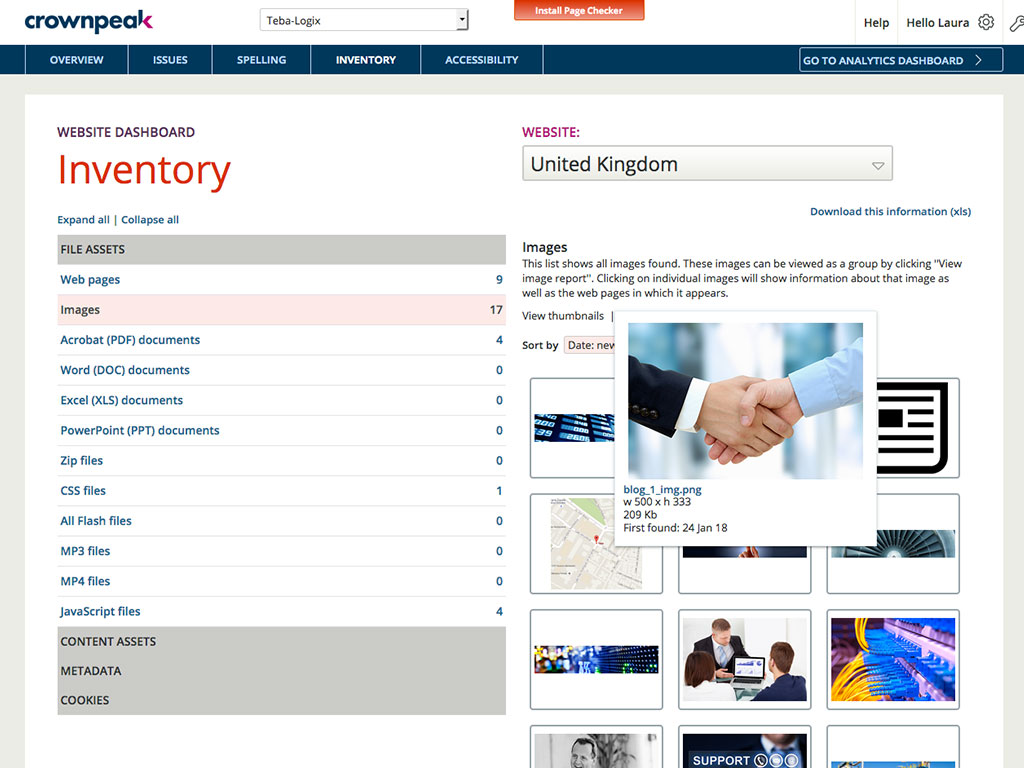  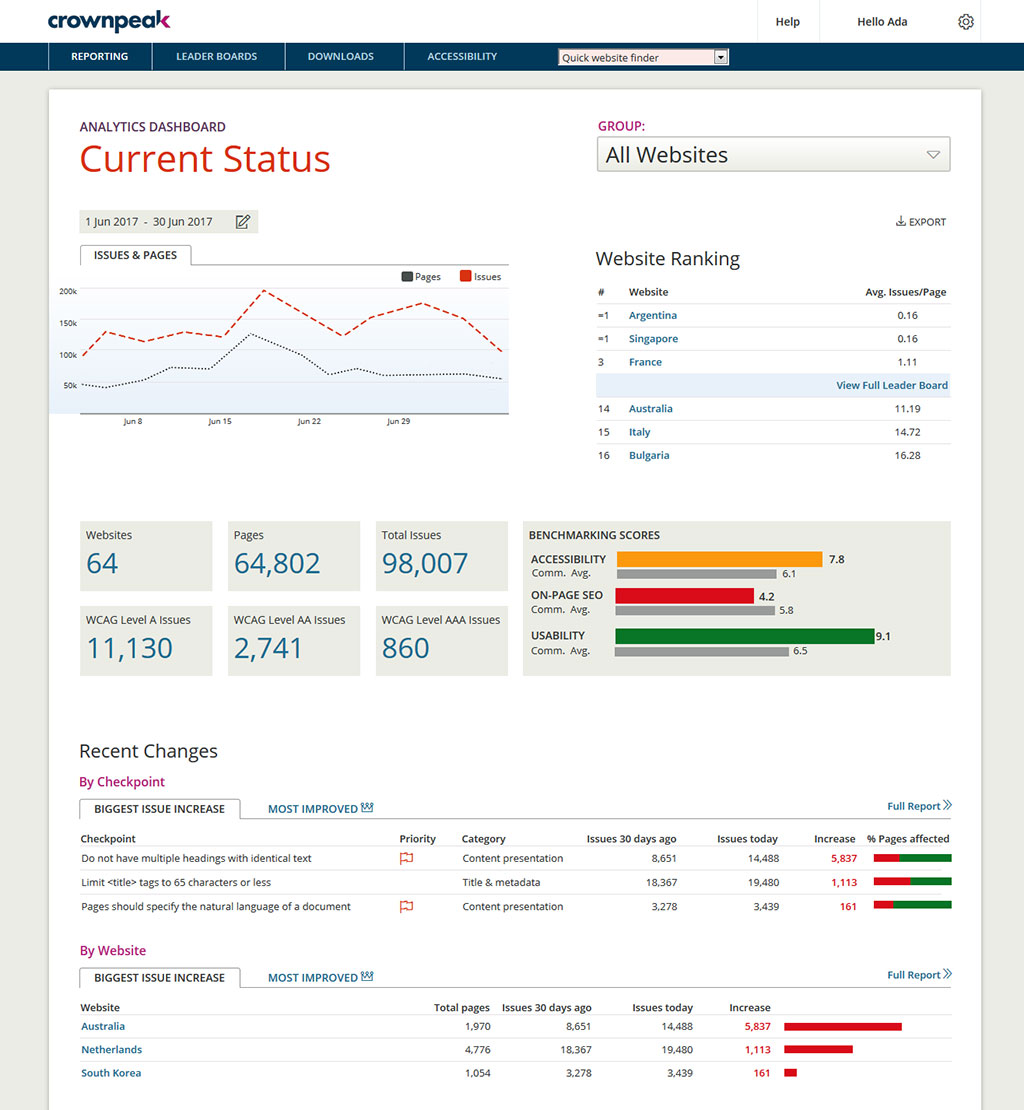 |





