TrustRadius: an HG Insights company

Crownpeak Digital Accessibility and Quality vs. UserWay Accessibility Widget

Save this comparison

Save this comparison

Add Product

Recommended Comparisons

    Overview
    ProductRatingMost Used ByProduct SummaryStarting Price

    Crownpeak Digital Accessibility and Quality

    Score8.1 out of 10
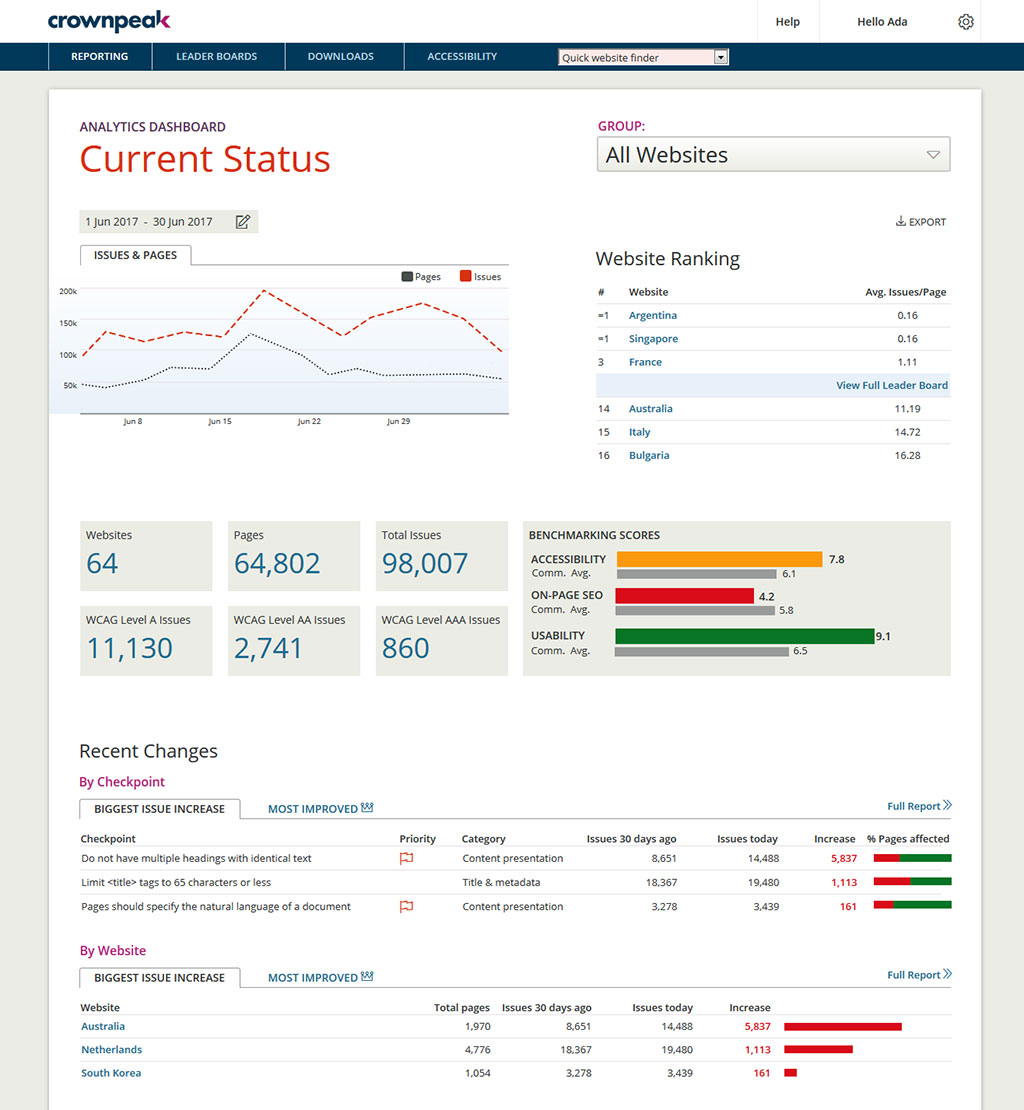
    N/ACrownpeak Digital Accessibility and Quality is a digital governance and web content management and monitoring solution designed to support excellent customer experience across all digital touchpoints, supporting web accessibility needs, error catching, SEO best practices, brand compliance, and analytics with benchmarking. Crownpeak Digital Accessibility and Quality can be integrated into an existing CMS.N/A

    UserWay Accessibility Widget

    Score10 out of 10
    N/AUserWay ensures that websites, apps, and digital documents more readily comply with accessibility regulations, such as WCAG 2.1 AA, WCAG 2.2, EN 301-549, EAA, ADA, and Section 508.

    $49

    per month

    Pricing
    Crownpeak Digital Accessibility and QualityUserWay Accessibility Widget
    Editions & Modules
    No answers on this topic
    No answers on this topic
    Offerings
    Pricing Offerings
    Crownpeak Digital Accessibility and QualityUserWay Accessibility Widget
    Free Trial
    YesYes
    Free/Freemium Version
    NoNo
    Premium Consulting/Integration Services
    NoNo
    Entry-level Setup FeeNo setup feeOptional
    Additional Details——
    More Pricing Information
    Community Pulse
    Crownpeak Digital Accessibility and QualityUserWay Accessibility Widget
    Considered Both Products
    Crownpeak
    No answer on this topic
    UserWay
    No answer on this topic
    Key User Insights
    Would buy again
    100%
    Would buy again
    17 Answers
    No answers on this topic
    Delivers good value for the price
    93%
    Delivers good value for the price
    13 Answers
    No answers on this topic
    Happy with the feature set
    100%
    Happy with the feature set
    17 Answers
    No answers on this topic
    Lived up to sales and marketing promises
    100%
    Lived up to sales and marketing promises
    14 Answers
    No answers on this topic
    Implementation went as expected
    100%
    Implementation went as expected
    17 Answers
    No answers on this topic
    Features
    Crownpeak Digital Accessibility and QualityUserWay Accessibility Widget
    Accessibility Testing
    Comparison of Accessibility Testing features of Crownpeak Digital Accessibility and Quality and UserWay Accessibility Widget
    Feature
    Crownpeak Digital Accessibility and Quality
    6.5
    1 Ratings
    4% below category average
    UserWay Accessibility Widget
    -
    Ratings
    Accessibility Scanning and Assessment6.41 Ratings00 Ratings
    Automatic or Scheduled Scanning8.21 Ratings00 Ratings
    Automatic Fixes6.41 Ratings00 Ratings
    Issue Ranking6.41 Ratings00 Ratings
    Manual Auditing Services6.41 Ratings00 Ratings
    Compliance Reporting and Tracking6.41 Ratings00 Ratings
    HTML and CSS scanning6.41 Ratings00 Ratings
    PDF scanning6.41 Ratings00 Ratings
    JavaScript scanning6.41 Ratings00 Ratings
    Integrations and Interoperability6.41 Ratings00 Ratings
    Color/Contrast Analysis6.41 Ratings00 Ratings
    User Ratings
    Crownpeak Digital Accessibility and QualityUserWay Accessibility Widget
    Likelihood to Recommend
    7.5
    (18 ratings)
    9.2
    (4 ratings)
    Likelihood to Renew
    9.6
    (2 ratings)
    -
    (0 ratings)
    Usability
    8.4
    (15 ratings)
    -
    (0 ratings)
    Availability
    9.1
    (1 ratings)
    -
    (0 ratings)
    Performance
    9.1
    (1 ratings)
    -
    (0 ratings)
    Support Rating
    7.5
    (15 ratings)
    -
    (0 ratings)
    Online Training
    9.1
    (1 ratings)
    -
    (0 ratings)
    Implementation Rating
    9.1
    (2 ratings)
    -
    (0 ratings)
    Configurability
    7.3
    (1 ratings)
    -
    (0 ratings)
    Product Scalability
    9.1
    (1 ratings)
    -
    (0 ratings)
    Vendor post-sale
    9.1
    (1 ratings)
    -
    (0 ratings)
    Vendor pre-sale
    9.1
    (1 ratings)
    -
    (0 ratings)
    User Testimonials
    Crownpeak Digital Accessibility and QualityUserWay Accessibility Widget
    Likelihood to Recommend
    Crownpeak
    If you have a fully customized cms and have people working on the site with html and css knowledge this is the best tool ever, all specifics can be checked. Using ab tests and optimization services we identify best practices of the website and everywhere the best practices aren't implemented we find using the custom checkpoints. Aspects that cannot be automated via a quick IT solution is turned into a checkpoint and that's great!
    Incentivized
    Read full review
    UserWay
    Accessibility on websites today is usually a convoluted process of testing and re-designing, but with Userway, the process is smooth. So for someone making their own simple marketing website for their small business, Userway could potentially save their company thousands of dollars and countless hours of development time and stress.
    Incentivized
    Read full review
    Pros
    Crownpeak
    • Preconfigured checkpoints to gather a baseline.
    • Reporting at regular intervals to identify pain points.
    • Mapping to WCAGG standard to understand how to resolve errors.
    • Ability to add customized checkpoints to align with messaging changes
    • Aggregating images in a visual repository to scan for relevancy.
    Incentivized
    Read full review
    UserWay
    • Turnkey solution for website compliance
    • Easy to implement
    • Automatic updates allow you to maintain compliance without constant updates.
    Incentivized
    Read full review
    Cons
    Crownpeak
    • It would be helpful if the Issues page under Website showed the WCAG level for each issue (A, AA, AAA). You currently have to look up the guideline to find the level.
    • There is no indicator that a page is currently being scanned. During a website scan, some of the reports are blank or missing information. Having a notification on the main page showing which websites are being scanned would be helpful.
    • Some ADA compliance items are left off, such as keyboard navigation, tabbing, etc.
    • It doesn't view the websites on mobile devices or if using a screen reader. Some pages or formatting changes depending on resolution. The DQM, from what I have seen, doesn't account for that.
    Incentivized
    Read full review
    UserWay
    • Violations Widget when managing UserWay appears to be incorrectly tallied
    Incentivized
    Read full review
    Likelihood to Renew
    Crownpeak
    We've seen competitors, they're not doing as well of a job as dqm is. It's a wonderful tool and there a huge opportunities for crownpeak
    Incentivized
    Read full review
    UserWay
    No answers on this topic
    Usability
    Crownpeak
    I had a small learning curve in order to become fluent with the platform as it doesn't work like the other automated accessibility tools that I've used. However, once I was up to speed, I like it better than any of the other tools and find the data more useful, digestible, and relevant.
    Incentivized
    Read full review
    UserWay
    No answers on this topic
    Reliability and Availability
    Crownpeak
    Haven't had issues accessing the dashboard when needed.
    Read full review
    UserWay
    No answers on this topic
    Performance
    Crownpeak
    No issues with speed and performance
    Read full review
    UserWay
    No answers on this topic
    Support Rating
    Crownpeak
    DQM support teams are responsive and knowledgeable, and will spend time working directly with client and agency teams to ensure the best outcomes are achieved. I can't fault the level of input and engagement from Crownpeak support teams across the board.
    Read full review
    UserWay
    No answers on this topic
    Online Training
    Crownpeak
    Product is straight-forward but the training was helpful and beneficial
    Read full review
    UserWay
    No answers on this topic
    Implementation Rating
    Crownpeak
    The initial process is not clear but after the first cookie banner all others are faster to implement.
    Incentivized
    Read full review
    UserWay
    No answers on this topic
    Alternatives Considered
    Crownpeak
    One of the most similar solutions to Crownpeak is the Yext tool because it has a good set of functions that can be managed from content to customer experiences, it is fascinating to be able to track all user interactions through users, in the same way as in Crownpeak that allows all users to create digital experiences.
    Read full review
    UserWay
    There are no other competitors that would compare to Userway and I feel like I've been around long enough to have tried every single one of them.
    Incentivized
    Read full review
    Scalability
    Crownpeak
    haven't had issues accessing when needed.
    Read full review
    UserWay
    No answers on this topic
    Return on Investment
    Crownpeak
    • When driving Customer Care, it was great to be able to add the Autofix tool to the web estate - a quick-win that really drives the accessibility agenda.
    • Building reports off the back of DQM gives senior stakeholders an understanding of the importance of usability and accessibility.
    • The gamification of league tables highlights to stakeholders the areas that need focus and budget in order to improve.
    Incentivized
    Read full review
    UserWay
    • Allows us to maintain compliance
    • Positive view from customers who see we are a compliant business
    Incentivized
    Read full review
    ScreenShots

    Crownpeak Digital Accessibility and Quality Screenshots
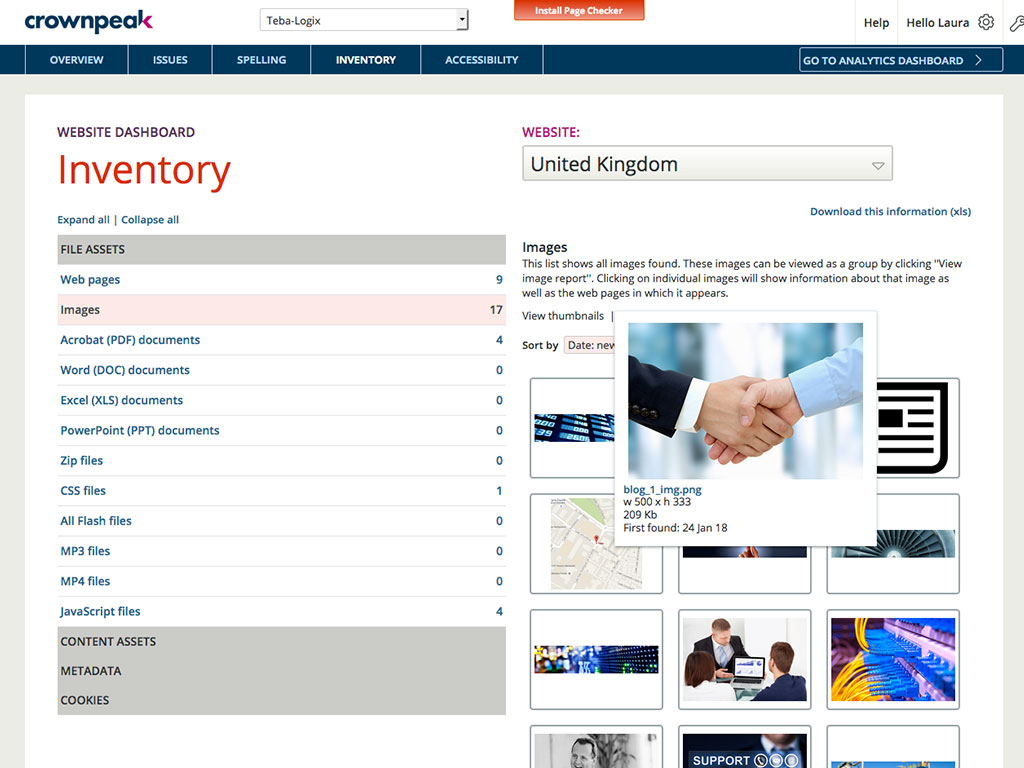
    Screenshot of DQM banishes the silos and brings it all together in one powerful but simple to use dashboard, providing visibility and control across all your global digital properties.Screenshot of Do you know what's actually out there on your sites? Take control with a global view of your digital assets.Screenshot of Web accessibility is legally mandated in many countries. We make it easy to ensure compliance and expand audience by adhering to industry best-practice standards for accessible web design.Screenshot of Powerful reports and diagnostic tools provide deep insight across your global web properties, so you can drive improvement, manage risk and react quickly.

    UserWay Accessibility Widget Screenshots

    Screenshot of UserWay's AI-Powered Remediations address and resolve accessibility violationsScreenshot of Remediations initiated by the userScreenshot of One feature of UserWay's AI-Powered Accessibility Widget: Voice NavigationScreenshot of The capabilities of UserWay's WidgetScreenshot of UserWay's Accessibility Scanner, used to gain code-leve insights. It displays reports both with and without UserWay's AI-Powered Accessibility Widget.