Contractor Foreman is an online construction management software for contractors and boasts users among contractors in more than 75 countries.
$588
per year
ProProfs Project
Score 8.3 out of 10
Mid-Size Companies (51-1,000 employees)
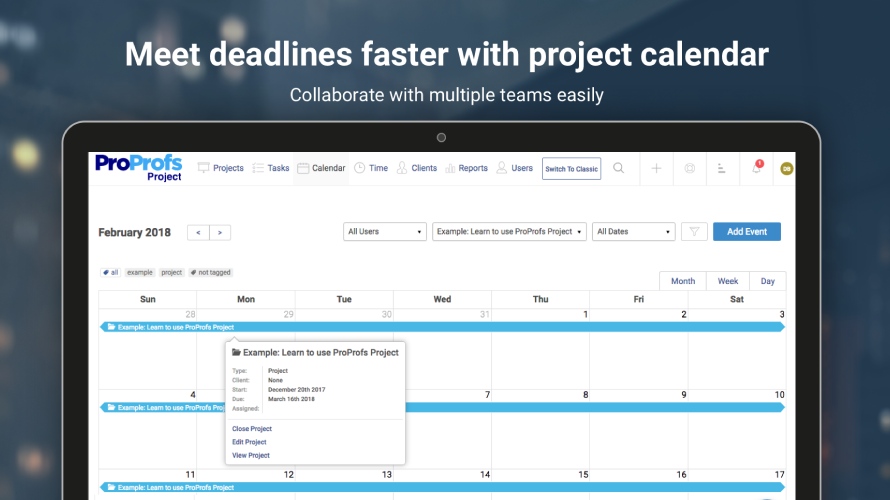
ProProfs Project is an online project management software for managing both teams and multiple projects on one dashboard. From creating project goals and objectives to tracking work progress, this PM tool aims to allow users to meet project deadlines efficiently. The PM tool allows users to communicate with in-house or remote teams - anytime, anywhere. Moreover, the vendor says users can generate insightful reports and accurate invoices in just a few clicks. Along with these features,…
$0
3 Projects
Pricing
Contractor Foreman
ProProfs Project
Editions & Modules
Basic
$588
per year
Standard
$948
per year
Plus
$1,497
per year
Pro
$1,990
per year
Unlimited
$2,988
per year
Forever Free
$0.00
3 Projects
Solopreneur
$19.00 per month
10 Projects
Team
$49.00 per month
50 Projects
Unlimited
$199.00 per month
Unlimited Projects
Offerings
Pricing Offerings
Contractor Foreman
ProProfs Project
Free Trial
Yes
Yes
Free/Freemium Version
No
Yes
Premium Consulting/Integration Services
No
No
Entry-level Setup Fee
No setup fee
No setup fee
Additional Details
Plans are based on features and licenses needed. Plus, Pro, and Unlimited plans include a 100-day money back guarantee.
—
More Pricing Information
Community Pulse
Contractor Foreman
ProProfs Project
Features
Contractor Foreman
ProProfs Project
Human Resource Management
Comparison of Human Resource Management features of Product A and Product B
Contractor Foreman
7.1
Ratings
7% below category average
ProProfs Project
-
Ratings
Employee demographic data
7.50 Ratings
00 Ratings
Employment history
5.60 Ratings
00 Ratings
Job profiles and administration
6.50 Ratings
00 Ratings
Workflow for transfers, promotions, pay raises, etc.
7.80 Ratings
00 Ratings
Organizational charting
7.30 Ratings
00 Ratings
Organization and location management
8.40 Ratings
00 Ratings
Compliance data (COBRA, OSHA, etc.)
6.50 Ratings
00 Ratings
Payroll Management
Comparison of Payroll Management features of Product A and Product B
Contractor Foreman
6.5
Ratings
16% below category average
ProProfs Project
-
Ratings
Pay calculation
6.10 Ratings
00 Ratings
Support for external payroll vendors
6.30 Ratings
00 Ratings
Off-cycle/On-Demand payment
4.50 Ratings
00 Ratings
Benefit plan administration
8.00 Ratings
00 Ratings
Direct deposit files
8.00 Ratings
00 Ratings
Salary revision and increment management
6.40 Ratings
00 Ratings
Reimbursement management
6.50 Ratings
00 Ratings
Asset Management
Comparison of Asset Management features of Product A and Product B
Contractor Foreman
7.5
Ratings
4% above category average
ProProfs Project
-
Ratings
Tracking of all physical assets
7.50 Ratings
00 Ratings
Reporting & Analytics
Comparison of Reporting & Analytics features of Product A and Product B
Contractor Foreman
6.7
Ratings
13% below category average
ProProfs Project
-
Ratings
Dashboards
6.80 Ratings
00 Ratings
Standard reports
6.70 Ratings
00 Ratings
Custom reports
6.60 Ratings
00 Ratings
Data exportability
6.60 Ratings
00 Ratings
Construction Project & Field Management
Comparison of Construction Project & Field Management features of Product A and Product B
Contractor Foreman
7.1
Ratings
6% below category average
ProProfs Project
-
Ratings
Plan distribution & viewing
6.90 Ratings
00 Ratings
Plan markups & sharing
6.60 Ratings
00 Ratings
Issue tracking & punchlists
6.80 Ratings
00 Ratings
Photo documentation
6.80 Ratings
00 Ratings
Jobsite reports
6.90 Ratings
00 Ratings
Document sharing
6.80 Ratings
00 Ratings
RFI tools
8.90 Ratings
00 Ratings
Collaboration & approvals
6.80 Ratings
00 Ratings
Mobile app
6.60 Ratings
00 Ratings
Submittal design and management
6.70 Ratings
00 Ratings
Checklists
6.90 Ratings
00 Ratings
Meeting Minutes
8.10 Ratings
00 Ratings
Specifications
7.40 Ratings
00 Ratings
Change orders
6.90 Ratings
00 Ratings
Estimating
Comparison of Estimating features of Product A and Product B
Contractor Foreman
6.9
Ratings
15% below category average
ProProfs Project
-
Ratings
Takeoff tools
7.50 Ratings
00 Ratings
Job costing
6.80 Ratings
00 Ratings
Cost databases
6.70 Ratings
00 Ratings
Cost calculator
6.80 Ratings
00 Ratings
Bid creation
6.80 Ratings
00 Ratings
Project Management
Comparison of Project Management features of Product A and Product B
Contractor Foreman
-
Ratings
ProProfs Project
8.6
Ratings
12% above category average
Task Management
00 Ratings
9.50 Ratings
Resource Management
00 Ratings
8.80 Ratings
Gantt Charts
00 Ratings
9.00 Ratings
Scheduling
00 Ratings
8.30 Ratings
Workflow Automation
00 Ratings
9.00 Ratings
Team Collaboration
00 Ratings
8.80 Ratings
Support for Agile Methodology
00 Ratings
8.50 Ratings
Support for Waterfall Methodology
00 Ratings
8.50 Ratings
Document Management
00 Ratings
7.20 Ratings
Email integration
00 Ratings
10.00 Ratings
Mobile Access
00 Ratings
7.70 Ratings
Timesheet Tracking
00 Ratings
8.20 Ratings
Budget and Expense Management
00 Ratings
8.60 Ratings
Professional Services Automation
Comparison of Professional Services Automation features of Product A and Product B
Contractor Foreman works well for subcontractors and GC’s who don’t have the budget for higher-priced platforms (like Procore) but still need estimating, scheduling, daily logs, change orders, and job costing in one system. For example, a 10–25 person construction company can replace separate tools (Excel, QuickBooks, text messaging, and whiteboard schedules) with Contractor Foreman and immediately improve organization and accountability.
If you’re executing creative projects, this tool will offload a lot of your work. It lets you clearly define the assignees and the associated timelines. You can even extract insightful reports to monitor team performance and project progress on the go.
I needed a project management software that had client access, ability to comment, percent-complete tracking, and email integration.
The mobile app is a big part of what has improved in the last year and why I have decided to stick with it ultimately. Many others I've decided do not have apps on the marketplace, which is a big hindrance, in my opinion.
Invoicing and tracking expenses is a huge plus.
White Labeling - I can customize the system with my own logo
Mostly great, especially for the price. The features appear to have definitely been designed by a team with a depth of construction specific experience. I also highly rate the usability because of the vast vast amount of customizability inherent in the system. It appears that almost all forms and features are customabizable on the company level and even specific to different individual users.
Many times we had issues that turned out to be errors and bugs. At first, we would be told forcefully that there were no bugs, then we would document them, and we would get an acknowledgement but no apology for essentially either gaslighting us or being ignorant of their system
Absolutely top notch! They were always there to help and immediately. Very happy with the communication they provided and the knowledge they had of their product. I would venture to say that they are one of the best in terms of support in their space.
I personally have not had to contact ProProfs Project Customer Support. I know that our media / marketing manager has used this tool for a while and is very comfortable with it. He has never expressed any issues or frustrations that I know of. The product is simple and easy to use and does not seem to require much support.
I used Projul and Buildium when I was primarily managing rental properties rather than full home builds. Projul was great for estimating and invoicing, while Buildium served its purpose well at the time. Now, as a small construction company, Contractor Foreman provides everything we need in one platform, making project management much more efficient.
We use Asana and Project Bubble for different project tracking. ProProfs Project is our media/marketing manager's favorite software and has been great for communicating across state lines. I have found pros and cons for each of the software we use for project tracking. Really, it depends on who is managing the projects and which software/system they prefer to use.
Cost Savings. Integration with QuickBooks and Bills improved financial control. 0-15% cost savings per project.
Time Savings: Streamlined project management led to a 20-30% reduction in administrative time, boosting on-site productivity, and with project tracking a 15-20% reduction in project delays.
Enhanced Collaboration: Centralized documentation and real-time updates improved team communication, increasing collaboration by 5-10%.
Overall, CF has provided a 10-15% return on investment annually through increased efficiency and cost control.