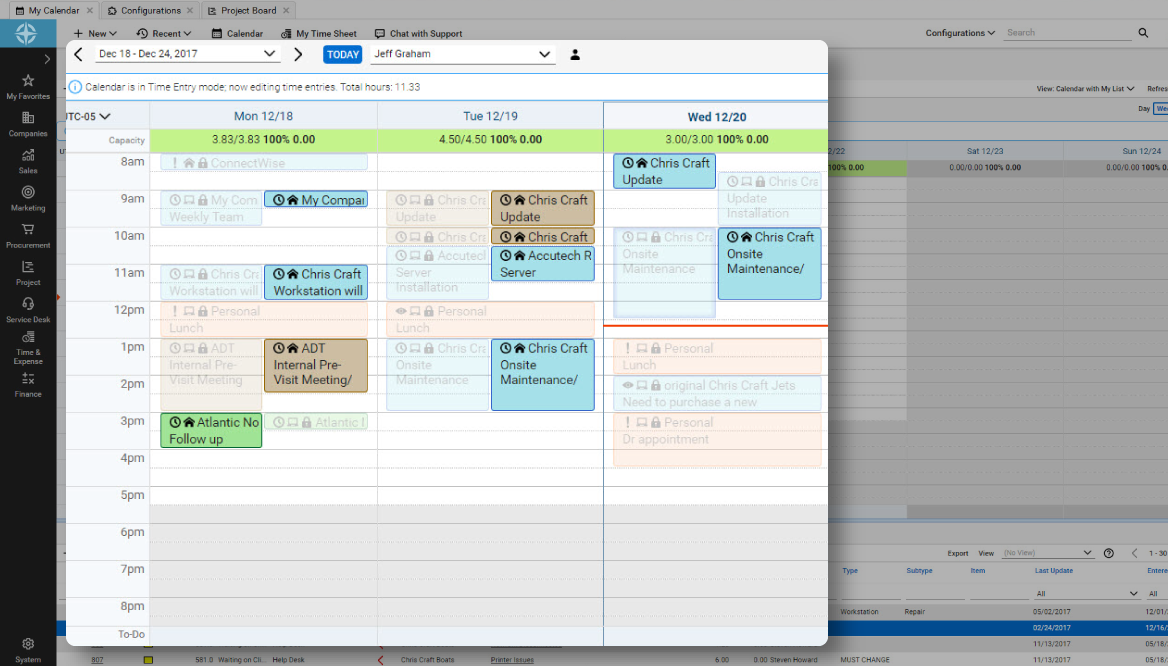
ConnectWise PSA (formerly Manage) is a business management platform for companies that sell, service, and support technology. The platform is cloud-based and integrates automation, help desk and customer service, sales, marketing, project management, and business analytics. It is the hub of the ConnectWise suite.
$35
Per Tech Per Month
Okta Workflows
Score 8.8 out of 10
N/A
Azuqua was a tool that helped users integrate their SaaS applications and build custom automations. It was acquired by Okta in late 2019, and is now part of Okta Workflows. Okta Workflows leverages Azuqua’s workflow orchestration engine and application integrations to automate complex identity-centric processes such as user onboarding and offboarding. The product is available as part of the Okta Lifecycle Management…
N/A
Pricing
ConnectWise PSA
Okta Workflows
Editions & Modules
Subscription
$35.00
Per Tech Per Month
No answers on this topic
Offerings
Pricing Offerings
ConnectWise PSA
Okta Workflows
Free Trial
No
No
Free/Freemium Version
No
No
Premium Consulting/Integration Services
No
No
Entry-level Setup Fee
No setup fee
Optional
Additional Details
—
—
More Pricing Information
Community Pulse
ConnectWise PSA
Okta Workflows
Features
ConnectWise PSA
Okta Workflows
Incident and problem management
Comparison of Incident and problem management features of Product A and Product B
ConnectWise PSA
8.5
Ratings
6% above category average
Okta Workflows
-
Ratings
Organize and prioritize service tickets
9.10 Ratings
00 Ratings
Expert directory
6.80 Ratings
00 Ratings
Subscription-based notifications
7.80 Ratings
00 Ratings
ITSM collaboration and documentation
7.60 Ratings
00 Ratings
Ticket creation and submission
9.80 Ratings
00 Ratings
Ticket response
9.50 Ratings
00 Ratings
Self Help Community
Comparison of Self Help Community features of Product A and Product B
ConnectWise PSA
7.9
Ratings
1% above category average
Okta Workflows
-
Ratings
External knowledge base
8.20 Ratings
00 Ratings
Internal knowledge base
7.50 Ratings
00 Ratings
Multi-Channel Help
Comparison of Multi-Channel Help features of Product A and Product B
MSPs wanting to find a single system to fill all their needs. Businesses wanting to increase their ability to deal with tickets, with advanced management and KPI monitoring. Small IT business who need more than just a ticketing system and are looking to make the leap to a full PSA with integration options, client portal and advanced configuration.
The integration I used Azuqua for was based on Salesforce, Wrike and Office 365. I found the integration of Salesforce reasonably straightforward, Wrike was limited in the "cards" capability but functional (there are bugs but there are also workarounds but they required assistance from the Azuqua support team) and Office 365 was quite immature (primarily around Excel bugs but also email was limited).
Tickets- Customers can email and a ticket is generated and falls under their profile for historical records. You can save documents and select if they are customer facing or only internal facing. The option as well to have communication in tickets whether its internal facing or customer facing is nice to have when you're trying to keep a record or important details for just internal means and the customer doesn't have to see all the jargon.
Procurement - It's great to have this integrate with Quosal Sell. Quotes being processed into opportunities and then into a sales order which connects to a ticket or project is pretty easy to use. It does have a learning curve but once you get the hang of it, it's straightforward. Everything is pretty connected, whether keeping track of products customers have purchased historically through us, to knowing what ticket is associated to an RMA.
The best part about Azuqua is that you do not need to write code. You do however need to have an understanding of logic and how the software works. This happens to fit me perfectly as someone with basic programming experience.
Their Support is second to none. Not only are they extremely quick and responsive, but their answers are never canned responses and always provide valuable content.
They seem to take feedback seriously and will continue to evolve and make a better product.
I will say the calendar option needs a little bit of work.
A calendar that looks more like lets say a Google Calendar would a nice feature.
Better Knowledge base section.
We attempted to get very good use out of the Knowledge however due to not really being able to organize it and it being very hard to navigate we had to go a different route for our documentation.
Possibly adding a cleaner user interface and adding more customization for the organization of companies would help.
A better layout for reporting would also be something good to have.
The layouts available are so difficult to put together to get what you want out of a report. Virtually makes it impossible to get what you want out of them.
I think it requires an easy way to migrate flows created from one user to then move the ownership to another user. It happened to us that one of our engineers left the company and he had the Azuqua account and flows. It required quite some time, cases and telephone calls to do the migration to my account.
The product works awesomely. The only factors holding back a 10 star rating are some of the upgrades that I believe are necessary. Namely, active directory integration for the customer portal is a feature that is long overdue. AD integration on the technician side should also be made available for subscribers of the cloud hosted solution.
ConnectWise has been great for our help desk. Over the years we have used it (5+), it has responded to community-sourced feedback and improved its product. I have always appreciated the support given when required, and overall the program has helped our service desk to become more efficient. The automated aspect, including workflow rules, has been an important part of our overall systems. When considering a help desk PSA, ConnectWise should not be overlooked.
The system is working as it should, keeping our programs safe from outside hackers. Helping us keep our passwords safe, convenient and already ready to get us logged into the program securely and quickly. Verification that only authorized users are able to access our company's programs. Okta Workflows (Azuqua) is a very good system that has helped our company greatly.
We use the cloud version of ConnectWise and in the last 5 years it has never been down for us during business hours. I can only recall 1 time when it was not available during off hours when we wanted to use it.
Overall, I love CW Manage. I think it is a great platform, but nothing is learned from saying "You're great!" So I will share 2 issues where I think improvement can be made. 1. There are times where service requests are closed inappropriately without explanation or warning which can be frustrating. I have learned that I must work extra hard to manage my open issues to ensure that they don't just disappear without resolution. 2. I recently found that I had mistakenly been charged $50 a month for a year for services I did not have. When I brought this to CW's attention, I was quickly given a credit memo and an apology, which was nice, but it was still annoying
The front line support techs are wildly inconsistent when it comes to the level of support. Sometimes you get someone who just wants to throw links to University documentation at you, sometimes you get someone who truly tries to understand your issue and confers with peers and managers to find an answer, and sometimes you get someone who just wants to create a ticket and escalate immediately. If you ask three different techs the same question you will probably get three different answers, one of them being, "That's not possible."
We are a telecoms company. Whilst CW were very happy to sell us their product and tell us how good it is for telecoms. All the training material is geared towards IT MSP's. The on-line training material was virtually useless. We found the implementation a bit of a joke. They tried telling us 12 hours of implementation time would be sufficient to launch the product. We erred on the side of caution and paid for 24 hours. This was quickly eaten away and we were nowhere near ready to go-live. I find the on-line chat facility is of much more use for us.
Thoroughly review the training at ConnectWise University BEFORE starting. Ask questions to other partners - there is a huge community that is more than willing to help. Lastly, I recommend getting ConnectWise Consulting to help - it's a BIG product, and the money you spend on consulting will pay for itself by helping you and your team get off to a running start (in the right direction)
Everyone but dynamics had holes in it. Dynamics is good, but it requires more development time. I spoke with some people that have CW and liked it. But when I inquired after our frustrations, I discovered they had a full time scheduling & logistics CW manager and the field people were using it purely like any other more simplistic ticket system. They said it would be impossible otherwise. The one big difference is the transparency of the sales effort. The other sales people were honest on the limitations or potential challenges and worked with us. They also worked with our agenda. At CW they don't have that option. The consulting time is eaten through a pre-formatted agenda which they communicate too you, not with you.
I evaluated Zapier and Microsoft Flow before coming across Azuqua. Zapier was too simplistic and didn't allow for transfer of enough variables. The price point also didn't work for the value it could provide. Microsoft Flow couldn't make the connection with Smartsheet, and I was unable to get Microsoft support or Smartsheet support to assist me with the issue.
ConnectWise seems to have a good understanding of the IT service industry. During the required onboarding training, they even preach configuring only features that you need right now, as you can always scale up later. The feature set for the most part takes into considerations all aspects of an IT business, whether small or enterprise, or growing from one to the next.
Increased time savings. We could not function as a matter of daily business if we did not have a tool to automate project folders (and complementary workflow management profiles) for the thousands of projects that flow through daily.
Opens up a greater understanding of all the silos and divisions within the company infrastructure and tests secure means to link those groups safely and share information.
Opens up the chance to communicate with other API information sources if our company is doing a partnership with another organization. Granted everything is square with IT security.