TrustRadius: an HG Insights company

Save this comparison

Save this comparison

Add Product

Recommended Comparisons

    Overview
    ProductRatingMost Used ByProduct SummaryStarting Price

    ConceptDraw MINDMAP

    Score4.1 out of 10
    N/AConceptDraw MINDMAP is l mind mapping software application that can also resolve tasks for project management. According to the vendor, multiple shortcuts help users create new topics, re-arrange them and highlight important points, and export to various file formats. Enrich your mind map with in-built visual…N/A

    Xmind

    Score9.3 out of 10
    N/AHong Kong based Xmind offers their diagramming tool featuring a range of templates, alternate brainstorming and presentation modes, a clip art library, and export to a wide variety of file types (e.g. PDF, JPG, Word or Excel, etc.).

    $5.99

    per month

    Pricing
    ConceptDraw MINDMAPXmind
    Editions & Modules
    No answers on this topic
    No answers on this topic
    Offerings
    Pricing Offerings
    ConceptDraw MINDMAPXmind
    Free Trial
    YesYes
    Free/Freemium Version
    NoYes
    Premium Consulting/Integration Services
    NoNo
    Entry-level Setup Fee$199 per seatNo setup fee
    Additional DetailsPrice varies for Individual, Commercial, Academic, Nonprofit and Government—
    More Pricing Information
    Features
    ConceptDraw MINDMAPXmind
    Mind Mapping
    Comparison of Mind Mapping features of ConceptDraw MINDMAP and Xmind
    Feature
    ConceptDraw MINDMAP
    -
    Ratings
    Xmind
    7.5
    2 Ratings
    2% above category average
    Cross-Platform Compatibility00 Ratings7.52 Ratings
    Customizable Templates00 Ratings8.02 Ratings
    Import and Export Options00 Ratings9.72 Ratings
    Real-time Collaboration Tools00 Ratings8.72 Ratings
    Drag-and-Drop Capabilities00 Ratings9.22 Ratings
    Notes and Attachments00 Ratings7.72 Ratings
    Color and Style Customization00 Ratings5.82 Ratings
    Presentation Mode00 Ratings7.52 Ratings
    Integration with Task Management00 Ratings6.72 Ratings
    Mind Map Revision History00 Ratings4.01 Ratings
    Best Alternatives
    ConceptDraw MINDMAPXmind
    Small Businesses
    OmniGraffle
    Score9.1 out of 10
    MindManager
    Score8.2 out of 10
    Medium-sized Companies
    OmniGraffle
    Score9.1 out of 10
    MindManager
    Score8.2 out of 10
    Enterprises
    OmniGraffle
    Score9.1 out of 10
    MindManager
    Score8.2 out of 10
    All AlternativesView all alternativesView all alternatives
    User Ratings
    ConceptDraw MINDMAPXmind
    Likelihood to Recommend
    8.7
    (4 ratings)
    8.2
    (4 ratings)
    Usability
    -
    (0 ratings)
    10.0
    (1 ratings)
    Support Rating
    8.6
    (2 ratings)
    5.0
    (1 ratings)
    User Testimonials
    ConceptDraw MINDMAPXmind
    Likelihood to Recommend
    CS Odessa LLC
    Organising results of brainstorming session for threat and error management solutions is how we mostly use ConceptDraw MINDMAP. Another common use is for dynamic note taking while attending conferences or classes. It can also be used to prepare notes when giving classes. We also used it sometimes for accident investigation analysis, building diagrams of probable causes leading to the event.
    Incentivized
    Read full review
    Xmind
    Definitely well suited to generate our total client profiles clearly presenting and displaying insights into particular clients.
    Incentivized
    Read full review
    Pros
    CS Odessa LLC
    • Brainstorming
    • Documenting hierarchies
    Incentivized
    Read full review
    Xmind
    • Hierarchical breakdown of information.
    • Visually pleasing diagrams.
    • Fast and responsive UI.
    • Generating Markdown (.md) files for the mindmaps.
    Incentivized
    Read full review
    Cons
    CS Odessa LLC
    • Limited drawing tools with the free version
    • initially seemed a bit fiddly to navigate
    • the interface was a bit 'busy'
    Read full review
    Xmind
    • A few steps are needed to mark a label for each customized branch.
    • Branch customization, such as line width and style, could be improved.
    • Customization, such as a different shape of nodes, would be good.
    Incentivized
    Read full review
    Usability
    CS Odessa LLC
    No answers on this topic
    Xmind
    Commands and controls extremely easy to navigate and use. Ability to import mindmaps and collaborate also contribute to a very pleasant usability experience
    Incentivized
    Read full review
    Support Rating
    CS Odessa LLC
    Support team is one of the best in ConceptDraw MINDMAP, the response was quick and solution for the problem is clear with best ticketing management. The right customer approach gives you hassle free interaction with support team.
    Read full review
    Xmind
    The support around a bug in the tool which prevented the correct printing of diagrams. Support came back after a few days, and there was no workaround. Eventually, the bug was fixed in a future release. The company does not pay much attention to user forums. With better support and plugin mechanism for user contributions, the product would be more convincing.
    Incentivized
    Read full review
    Alternatives Considered
    CS Odessa LLC
    As we were already using PROJECT, it became obvious that ConceptDraw MINDMAP was the product to use. The integration between those two products is very convenient and useful. The fact that ConceptDraw MINDMAP solutions was usable on Mac OS was also a pre requisite for us. We did not use any other Mind Map software.
    Incentivized
    Read full review
    Xmind
    This is the first tool of its kind that I have used, however it's simple UI and low learning curve make it very beginner friendly
    Incentivized
    Read full review
    Return on Investment
    CS Odessa LLC
    • More efficient brainstorming
    Incentivized
    Read full review
    Xmind
    • Increased productivity of employees.
    • Provided structure and clear thought processes.
    • Reusable content.
    Incentivized
    Read full review
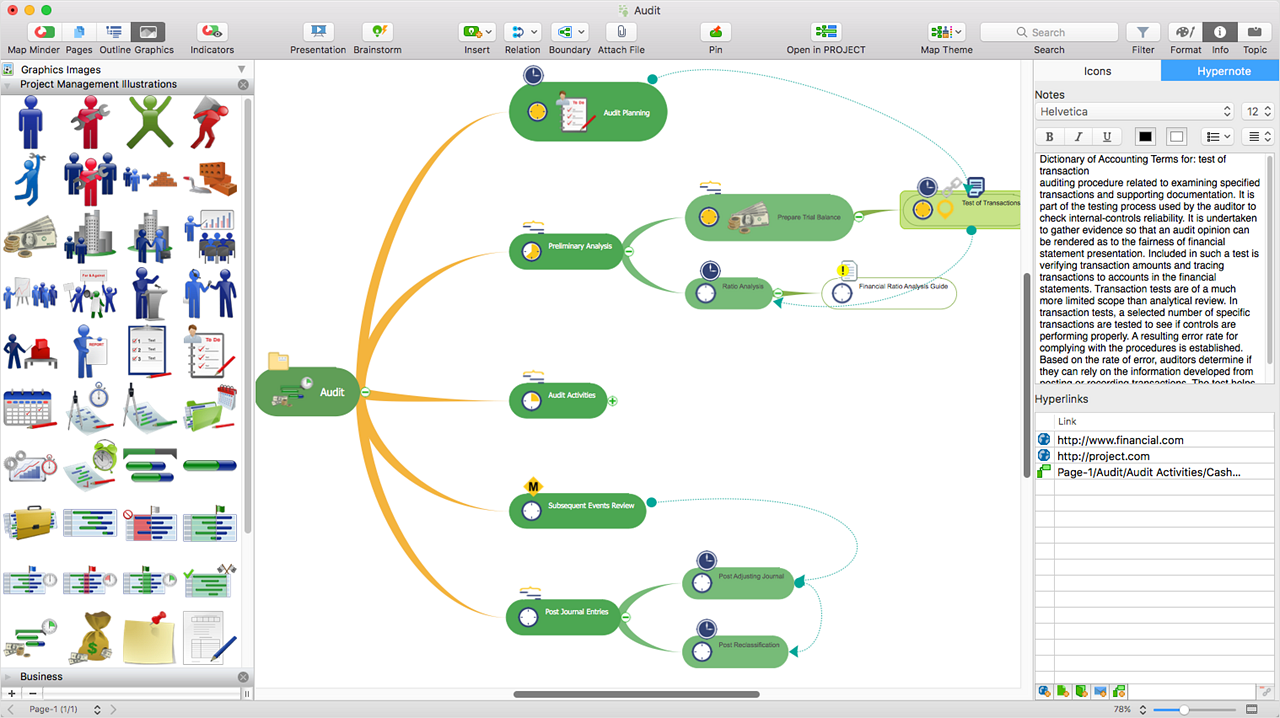
    ScreenShots

    ConceptDraw MINDMAP Screenshots

    Screenshot of ConceptDraw MIDMAP v10 is perfect for brainstorming, project planning, meeting management, note taking, and much more.Screenshot of Data ExchangeScreenshot of Presentation ModeScreenshot of ConceptDraw OFFICE IntegrationScreenshot of In-built GraphicsScreenshot of Hypernotes