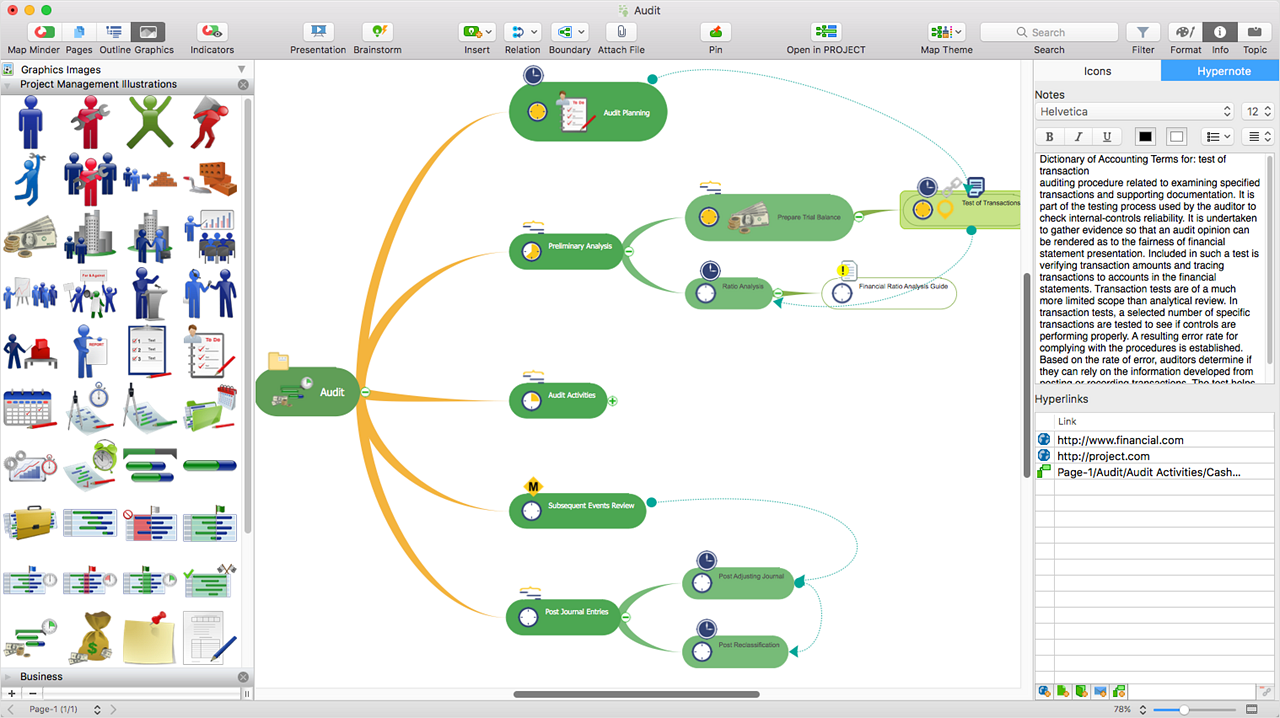
ConceptDraw MINDMAP is l mind mapping software application that can also resolve tasks for project management. According to the vendor, multiple shortcuts help users create new topics, re-arrange
them and highlight important points, and export to various
file formats. Enrich your mind map with in-built visual…
N/A
draw.io
Score7.3 out of 10
N/A
draw.io is an online diagramming tool with integrations with Jira, Google, and Confluence available free online or at cost depending on integration chosen.
$5
per month
Pricing
ConceptDraw MINDMAP
draw.io
Editions & Modules
No answers on this topic
Up to 10 Users
$5
per month
Up to 20 Users
$11
per month
Up to 50 Users
$27.50
per month
Up to 75 Users
$41.25
per month
Up to 100 Users
$55
per month
Up to 200 Users
$95
per month
Up to 500 Users
$152.50
per month
Up to 750 Users
$190
per month
Up to 1,000 Users
$227.50
per month
Up to 2,000 Users
$377.50
per month
Up to 5,000 Users
$827.50
per month
Up to 10,000
1,577.50
per month
Offerings
Pricing Offerings
ConceptDraw MINDMAP
draw.io
Free Trial
Yes
No
Free/Freemium Version
No
No
Premium Consulting/Integration Services
No
No
Entry-level Setup Fee
$199 per seat
No setup fee
Additional Details
Price varies for Individual, Commercial, Academic, Nonprofit and Government
Generald in Research & Development at Ensurity Technologies (Computer & Network Security, 51-200 employees)
Chose ConceptDraw MINDMAP
Best tool for brainstorming ideas and gathering requirements with an easy way to connect the information. The other software which we tried had limited options and were more time consuming. The pricing model of ConceptDraw MINDMAP is simple and straightforward. Apart from …
A de minimis incentive was given to thank the reviewer for their time. The incentive was not used to bias or drive a particular response, nor was the incentive contingent on a positive endorsement. More Info
Organising results of brainstorming session for threat and error management solutions is how we mostly use ConceptDraw MINDMAP. Another common use is for dynamic note taking while attending conferences or classes. It can also be used to prepare notes when giving classes. We also used it sometimes for accident investigation analysis, building diagrams of probable causes leading to the event.
A de minimis incentive was given to thank the reviewer for their time. The incentive was not used to bias or drive a particular response, nor was the incentive contingent on a positive endorsement. More Info
It's very easy to collaborate on the same file with team members and create simple concepts and flowcharts that you can use in the development process. It is also very handy for creating graphs and tables for presentations. Since this is a web application, we can use it anywhere, anytime and on any device; which provides great flexibility and accessibility. It also offers the functionality to save your work as you develop it, which is very helpful.
A de minimis incentive was given to thank the reviewer for their time. The incentive was not used to bias or drive a particular response, nor was the incentive contingent on a positive endorsement. More Info
A de minimis incentive was given to thank the reviewer for their time. The incentive was not used to bias or drive a particular response, nor was the incentive contingent on a positive endorsement. More Info
Draw.io offers a lot of shapes and customizability of how the diagrams are laid out. We've been able to create a lot of different things with it, and have barely scratched the surface of the sorts of things that we could do.
Draw.io is fairly intuitive in the way that you draw shapes and connect shapes together, I was able to figure it out without a tutorial.
Draw.io is fast and performant for me compared with some of the alternatives.
A de minimis incentive was given to thank the reviewer for their time. The incentive was not used to bias or drive a particular response, nor was the incentive contingent on a positive endorsement. More Info
One element that was hard to use was converting pre-existing drawings and workflows from Gliffy to Draw.io once our company made the change. While we were able to complete the migration, when going back we noticed, oftentimes, some formatting and dependencies did not make it or were not compatible.
While the template repository is vast, it has a heavy focus on network style maps. It would be ideal for added diversity in the templates with a focus on workflows just as much.
While the integrations are strong, the cloud collaborative environment could still use some work. While you can save and edit in the cloud. Group editing and live dynamic sharing/editing similar to Microsoft office are still missing.
Draw.io could add some version control functionality for ease of rollback, auditing, & comparison.
A de minimis incentive was given to thank the reviewer for their time. The incentive was not used to bias or drive a particular response, nor was the incentive contingent on a positive endorsement. More Info
Support team is one of the best in ConceptDraw MINDMAP, the response was quick and solution for the problem is clear with best ticketing management. The right customer approach gives you hassle free interaction with support team.
The support for draw.io is pretty decent, considering it is a free website. I had a question one time when I was trying to do something, so I sent an email to their support email and got a response fairly quickly with an answer to my question. They also have some excellent support tools on their support website for helping you get more familiar with their program, and I found that very helpful.
A de minimis incentive was given to thank the reviewer for their time. The incentive was not used to bias or drive a particular response, nor was the incentive contingent on a positive endorsement. More Info
As we were already using PROJECT, it became obvious that ConceptDraw MINDMAP was the product to use. The integration between those two products is very convenient and useful. The fact that ConceptDraw MINDMAP solutions was usable on Mac OS was also a pre requisite for us. We did not use any other Mind Map software.
A de minimis incentive was given to thank the reviewer for their time. The incentive was not used to bias or drive a particular response, nor was the incentive contingent on a positive endorsement. More Info
Draw.io is totally free and it has most of the features a commercial product like Visio would have, so I think it is a go-to. It has good integration with Google Drive and it can export to a variety of files. You are not constrained by some commercial proprietary file format. It can be used in a browser on any device or downloaded as a desktop app.
A de minimis incentive was given to thank the reviewer for their time. The incentive was not used to bias or drive a particular response, nor was the incentive contingent on a positive endorsement. More Info
A de minimis incentive was given to thank the reviewer for their time. The incentive was not used to bias or drive a particular response, nor was the incentive contingent on a positive endorsement. More Info
A de minimis incentive was given to thank the reviewer for their time. The incentive was not used to bias or drive a particular response, nor was the incentive contingent on a positive endorsement. More Info