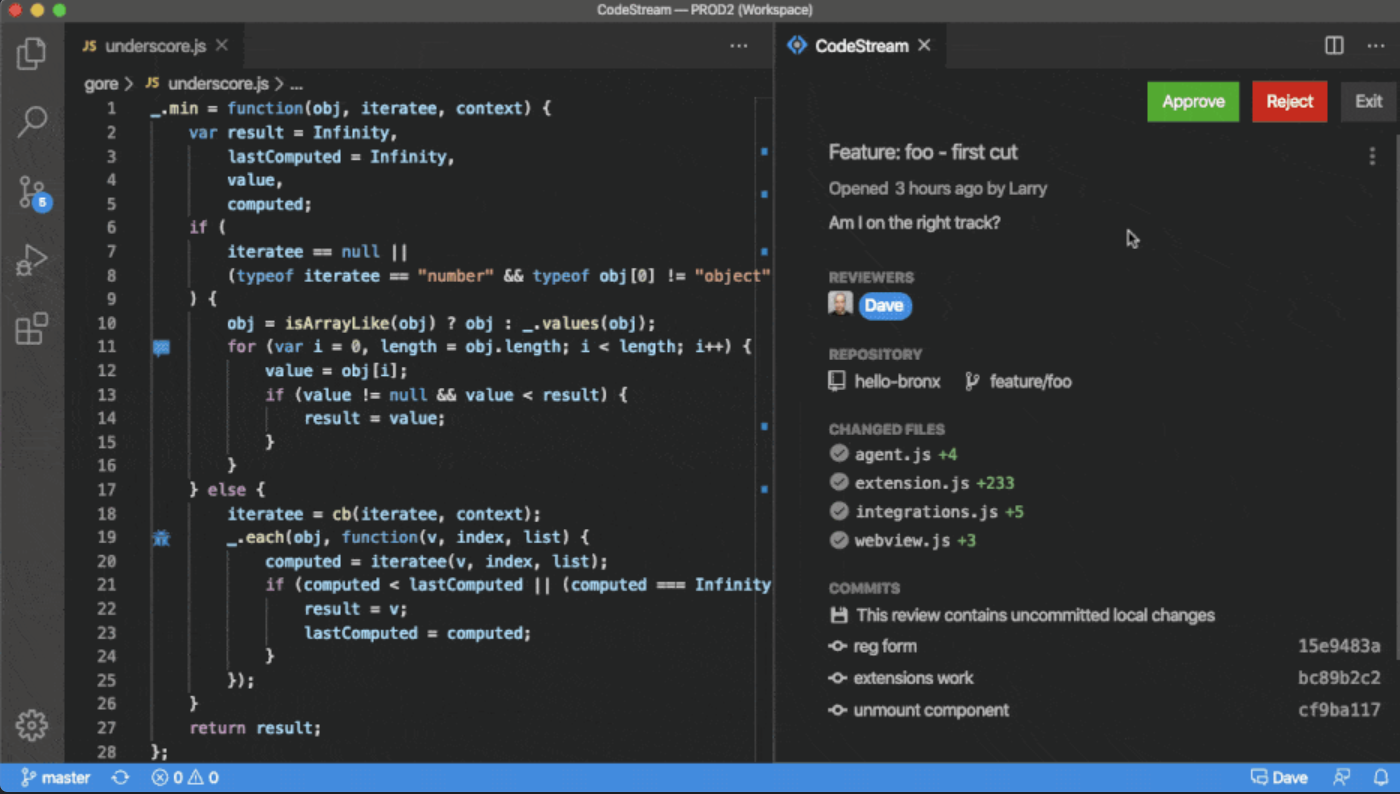
The vendor states CodeStream helps development teams resolve issues faster, and improve code quality by streamlining code reviews inside an IDE. CodeStream enables asynchronous communication among developers on a team, anywhere. Review changes in the context of the full source tree, using preferred keybindings and environments. Use a simple shortcut to highlight code and CodeStream will automatically assign a reviewer based on context and history. Comment and code review threads are…
$10
Per Seat / Per Month
Rally Software
Score6.8 out of 10
N/A
Rally Software headquartered in Boulder, Colorado developed the Rally agile software development / ALM platform which was acquired by CA Technologies and rebranded as CA Agile Central. After CA's acquisition by Broadcom the software was once again rebranded as Rally.
N/A
Pricing
CodeStream
Rally Software
Editions & Modules
Basic
$10.00
Per Seat / Per Month
Enterprise
$49.00
Per Seat / Per Month
No answers on this topic
Offerings
Pricing Offerings
CodeStream
Rally Software
Free Trial
Yes
No
Free/Freemium Version
Yes
No
Premium Consulting/Integration Services
Yes
No
Entry-level Setup Fee
No setup fee
No setup fee
Additional Details
Enterprise tier includes admin console with advanced usage analytics, realtime merge conflict detection, API access, Single sign-on (SSO), premium support and success services
CodeStream is well suited for all developments where two or more people are developing something and I feel there's rarely any project which is been developed and maintained by a single developer. So in short codestream is suitable for almost every development team: - More than one person is developing the code. - People need to get frequent reviews for efficient development. - Best suitable for the teams where new people are there very often. - Collaborations are part of every day to day activities. - Without raising PR and branch management reviews are been incorporated.
Rally is well suited to help outline the specific tasks of a project, create timelines, indicate progress/status of tasks and provide views of team members' workloads. My team used it for our weekly stand up meetings in order to update one another on our progress, and our manager used it as a way to determine who had capacity for additional tasks. It facilitated our transition to a more agile work environment and we used it to implement 2 week "sprints".
A de minimis incentive was given to thank the reviewer for their time. The incentive was not used to bias or drive a particular response, nor was the incentive contingent on a positive endorsement. More Info
A de minimis incentive was given to thank the reviewer for their time. The incentive was not used to bias or drive a particular response, nor was the incentive contingent on a positive endorsement. More Info
There are dashboards that provide friendly and useful metrics at the team, program and portfolio levels which help get an easy and quick visual representation of what's going on.
Story management made easier, It offers a quick way of quickly entering a number of user stories without losing the overview, by just typing the title and selecting a few attributes directly in the overview screen.
Sprint management is seamless in CA Agile Central . It allows you to drag stories from the backlog to the sprints and back again. When a story is dragged into an sprint, it automatically checks the velocity for that sprint and indicates how many more story points can be chipped in. No more manual checking needed by scrum master with respect to allocation and team velocity.
Though CA Agile Central has many inbuilt apps, but it also has an App-SDK that allows you to build free app extensions using JavaScript and HTML. So, as per their needs, teams can customize & build various apps & dashboards.
Dashboard is an awesome feature which allows you to select and drag panels with all kinds of graphical information about the current sprints and releases.
It offers tremendous support for scaled Agile & almost all scaling frameworks are supported specifically tuned to SAFe .
CA Agile Central includes several applications but it also integrates well with Jira, Confluence, Jenkins, Eclipse, Subversion, IBM, HP, Salesforce.com and many other products to allow users to organize projects to their specifications. So you can still use Jira at a team level & CA Agile Central at the program & portfolio level for efficient tracking & management.
The custom tags are very helpful in segregating the user stories based on the project needs. Even though it's a very small feature, it is very effective ( you will realize why specifically if you are using Jira).
CA Central Agile enables agile delivery with ease and provides comprehensive features to track time-boxes, Work In Progress items of the forecast increments.
Backlog management is hassle free since you can either drag and drop your user stories to the desired position on the backlog, or change a setting and manually enter priorities as a number.
A de minimis incentive was given to thank the reviewer for their time. The incentive was not used to bias or drive a particular response, nor was the incentive contingent on a positive endorsement. More Info
User management is pretty basic and could be better. For example more filters and reports and more ability to do mass updates.
The report generator is very, very basic and is not WYSIWYG. It has limited filters to generate reports. Often a Scrum master will need to export data to Excel or a tool like Crystal Reports to get enhanced reporting capability.
A de minimis incentive was given to thank the reviewer for their time. The incentive was not used to bias or drive a particular response, nor was the incentive contingent on a positive endorsement. More Info
A de minimis incentive was given to thank the reviewer for their time. The incentive was not used to bias or drive a particular response, nor was the incentive contingent on a positive endorsement. More Info
Great UI, recent refresh was terrific. Great graphs and metrics, inline editing for updates, and a multitude of views on sprint progress make for a great team collaboration experience. There is also an active community and forums so that if you do need help, it is readily available
The screens render relatively quickly but many actions that you would expect to require a single click require multiple clicks and pop-up windows. The extra windows and clicks make the product feel ponderous.
I've had to use support only one time and my issue was eventually resolved but not because of my ticket--because others complained about the functionality taken away so they brought it back. My ticket was never answered or addressed. So I can't really say much for the support factor for Rally.
A de minimis incentive was given to thank the reviewer for their time. The incentive was not used to bias or drive a particular response, nor was the incentive contingent on a positive endorsement. More Info
It more or less confirmed that we are using it the way they had in mind. We were hoping for a epiphany in terms of how we could use it better.
They also want to be a go to source for agile processes and have an online resource center. It’s not that great but had a couple of nuggets. It hasn’t really helped us too much and we are not too far off from the classical interpretation of agile.
I would recommend training, in particular for organizations that multiple on-going projects. The product seems optimized for larger, more complex teams and getting proper training on how to configure, administer and use the system would be beneficial
Implementation of RALLY services and program satisfaction among various group,... 1) Dev Outcomes: How were our resiliencies, development, learning & practitioners “make them do the work,” but that they ask you to do it “in a way like before. 2) The Ops group: Just wish to make sure any change won't break current production envirements All the stake holders has to be on the same page
A de minimis incentive was given to thank the reviewer for their time. The incentive was not used to bias or drive a particular response, nor was the incentive contingent on a positive endorsement. More Info
When compared to Bitbucket, CodeStream is a luck lustre. Even though the overall features are more with CodeStream like customisation of API and more control of triggers across the designed pipeline, Bitbucket and Visual Studio score better in terms of faster implementation and dedicated and proven support system . Apart from that CodeStream fairs better than AWS CodePipeline in overall features
A de minimis incentive was given to thank the reviewer for their time. The incentive was not used to bias or drive a particular response, nor was the incentive contingent on a positive endorsement. More Info
It was a close race between Jama, JIRA and Rally. We decided to go for Jama as a requirements management tool and use Rally for Agile projects. The cost was another factor that made us select Rally.
A de minimis incentive was given to thank the reviewer for their time. The incentive was not used to bias or drive a particular response, nor was the incentive contingent on a positive endorsement. More Info
it helped organizing many of the processes management use to communicate tasks with engineers, and provided detailed charts on the speed/blockage during any iteration
with time Rally became the main tool we used to track and report tasks/defects in our projects, but frequent service outages made it very hard to continue consider as a reliable solution
too much features is good, but for engineers a few features (User Stories section, iterations, defects, and Kanban boards) are necessary and the rest is just noise
A de minimis incentive was given to thank the reviewer for their time. The incentive was not used to bias or drive a particular response, nor was the incentive contingent on a positive endorsement. More Info