CloudApper SalesQ vs. MonitUp

Overview
ProductRatingMost Used ByProduct SummaryStarting Price
CloudApper SalesQ
Score 9.4 out of 10
N/A
SalesQ helps enterprises track the activities of field sales reps, such as their daily movements and tasks, visit details, meeting times, and sales orders that they have created. SalesQ helps improve employee engagement through the increase of accountability.N/A
MonitUp
Score 0.0 out of 10
N/A
Employee monitoring platform designed to help businesses with monitoring employee website access, computer performance, and time tracking. Features of the platform include an activity dashboard with an overview of all employees' activity, login and logout tracking, visibility into which websites employees are accessing, a list of all online and offline computers, customization, and user-specific data.N/A
Pricing
CloudApper SalesQMonitUp
Editions & Modules
No answers on this topic
Offerings
Pricing Offerings
CloudApper SalesQMonitUp
Free Trial
NoYes
Free/Freemium Version
NoNo
Premium Consulting/Integration Services
NoNo
Entry-level Setup FeeNo setup feeOptional
Additional Details
More Pricing Information
Community Pulse
CloudApper SalesQMonitUp
User Ratings
CloudApper SalesQMonitUp
Likelihood to Recommend
9.3
(0 ratings)
-
(0 ratings)
User Testimonials
CloudApper SalesQMonitUp
Likelihood to Recommend
Separate teams utilize it to monitor sales operations activities such as vendor acquisition. This software allows me to see if my reps are present in the field and logs their whereabouts. Phones may be used to manage reps, which simplifies the management process. Overall, the software is quite useful, and I strongly suggest it.
Read full review
No answers on this topic
Pros
  • Sales team tracking
  • Target monitoring
  • Data analysis
Read full review
No answers on this topic
Cons
  • No major issues found
Read full review
No answers on this topic
Alternatives Considered
Salesforce has sleek UI and UX and also has a plethora of robust features. However, it is quite expensive to adopt and develop for the average user and is also quite cumbersome. CloudApper SalesQ is quite affordable and simple, and gets the job done. It is great for monitoring sales teams and managing their performance.
Read full review
No answers on this topic
Return on Investment
  • A sound investment, since investment was far less than the returns
  • Increased accountability among the field salesforce
  • Reduced significant paperwork
Read full review
No answers on this topic
ScreenShots

CloudApper SalesQ Screenshots

Screenshot of Screenshot of

MonitUp Screenshots

Screenshot of User Dashboard
It gives you information about users, when he turned on his computer, how long he was away from his computer, when he shut down his computer in the evening. You can see the pie chart of the most used applications. The list at the bottom will show you the details of all the transactions of the user in the date range you have specified. In this way, you can have an idea about the efficiency of the user.Screenshot of Dashboard
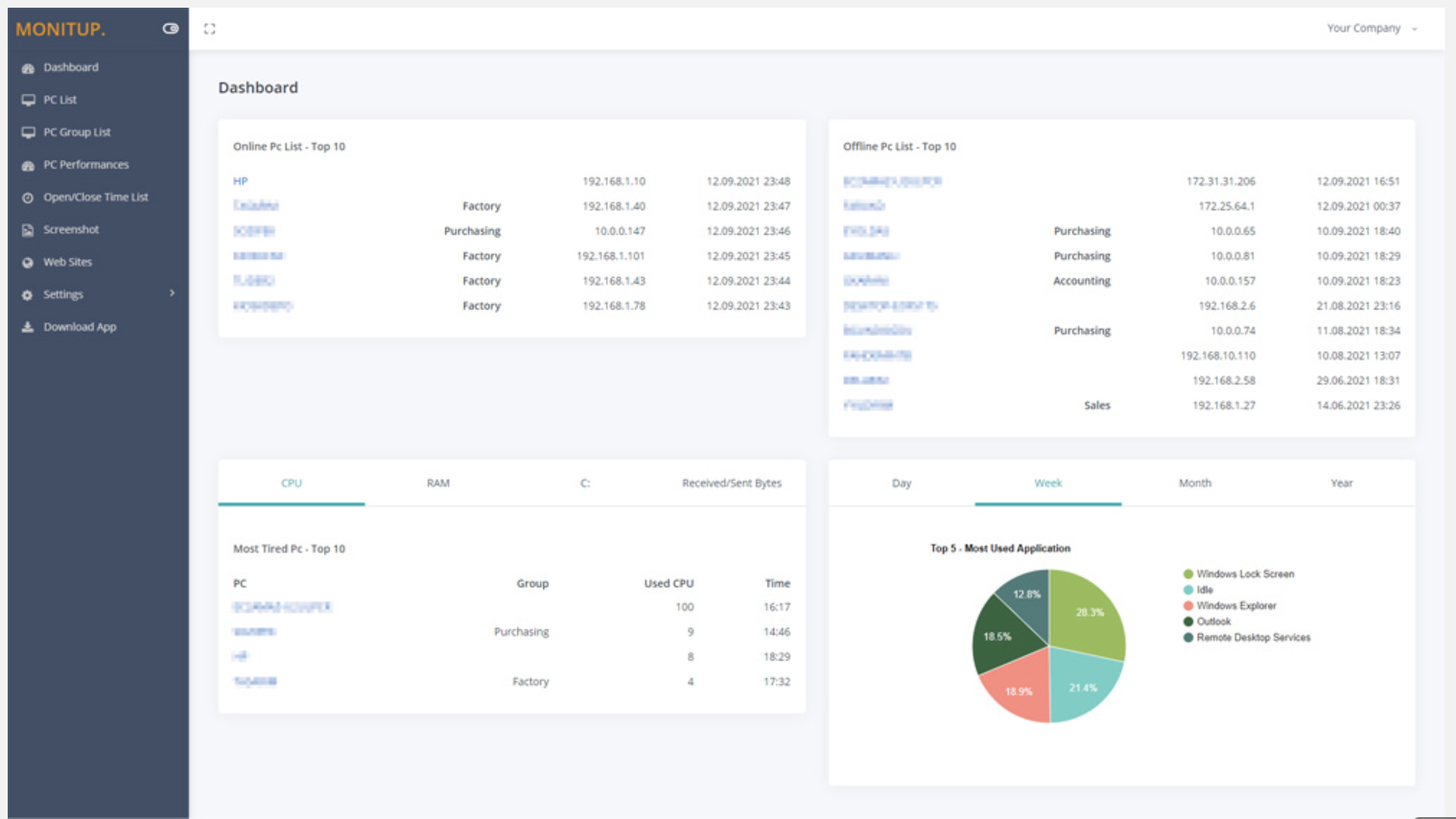
You can see the summary of the movements of the company employees on this screen. Online Computers, Offline Computers, IP Addresses, latest trading hours and pie chart of the most used programs in your company.Screenshot of Employee entrance and exit control
You can see when all employees turned on and off their computers. It helps you to distinguish missing or overwork easily.Screenshot of Websites are under control
You can see which websites employees browse and keep them under control. It is important information to increase employee productivity.Screenshot of Screenshot
Screenshots of the users you specify are taken every 5 minutes. In this way, you will have more data at hand to increase efficiency.Screenshot of Application Categories
All applications are divided into 3 categories. You can set the desired application as Productive, Unproductive Neutral. Thus, you can see the transactions on the graph and instantly analyze the efficiency of the user.