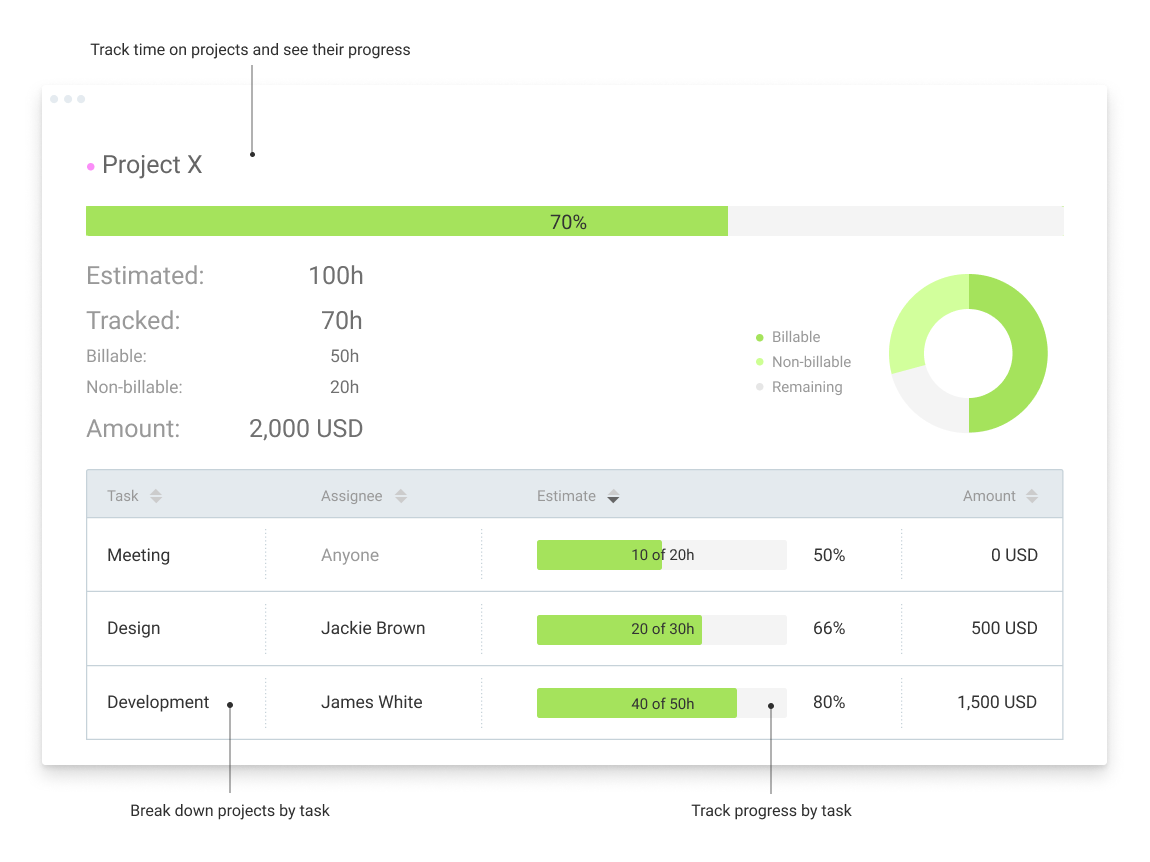
Clockify, from COING in Palo Alto, is a time tracker and employee timesheet software for teams of all sizes. Clockify lets users track how much time is spent working on tasks, as well as keep track of employee timesheets and billable hours, project completion, reports, and schedules.
$0
forever, unlimited everything
Futuramo Time Tracker
Score 7.0 out of 10
N/A
Futuramo creates SaaS apps to provide a collaborative workspace for teams. Futuramo Time Tracker is an app used to track, analyze, and manage time, free for teams of up to 3 users, and $6 per license for each additional user.
$0
up to 3 team members
Pricing
Clockify
Futuramo Time Tracker
Editions & Modules
Clockify Free
$0
forever, unlimited everything
Clockify Plus
$9.99
per month, per workspace
Clockify Enterprise
$9.99
per month, per user, per workspace
Clockify Premium
$29.99
per month, per workspace
Clockify Server
Starts at 450
Small Teams
$0.00
up to 3 team members
Growing Teams
$6.00
per each additional license
Offerings
Pricing Offerings
Clockify
Futuramo Time Tracker
Free Trial
Yes
Yes
Free/Freemium Version
Yes
Yes
Premium Consulting/Integration Services
No
No
Entry-level Setup Fee
Optional
No setup fee
Additional Details
Unlimited usage and number of users for free. Paid plans are solely for access to additional features. Self-hosting software on own servers available.
I would recommend this for someone who is a freelancer with multiple clients, but would not recommend to a company who has multiple employees doing the same job every single day. It'd be easier to have them clock in on one platform, like Square, for example, which automatically can take out taxes (for W9 employees)
Futuramo is best for when you're working alone on a project, or with a small team, given the glitches with the time tracker and the poor integration with Futuramo Tasks and Projects. Unless you're going to manually calculate the times spent on all tasks individually in order to know the total time spent on the project, I would not recommend using it on projects where you'd be billed per the time spent rather than a fixed amount.
The biggest pro of Futurama Time tracker is that it comes bundled with other tools. These are "Projects, Tasks, Virtual Tickets, Time Tracker, and Icons." This means I can track the time spent on each task within a project.
Time Tracker is easy to use, all you need to do is go to time tracker, enter the task you want to track, choose what project and clients it's under, and then click the play/start icon.
For projects that involve collaborating with others (either external freelancers I'm managing, or my staff) I can track the time spent on each task by each user. So I know how long each person spent on their task and how it related to the estimated time. This way I know if the project will take longer or shorter than estimated.
Personally, I don't like the Windows app. It isn't as fast to respond to the Start/Stop button clicks so I found myself hesitating on changing screens for example. I didn't like having to think about if I should check if it is recording time or not. I use the web page and it is fast and accurate.
I could see people wanting a small separate browser window to keep the Start/Stop button. It looks best in the browser in nearly a full-size screen. It could look nicer/easier to use when shrunk to a smaller browser screen size. The ease of use for me and ability to add in a detailed description for a specific time period I just worked or am working on overrides the browser screen size. It is just a personal preference.
I'ver been using Futuramo for almost 2 years, primarily because they reached out to me to be one of the first users/testers. I've also shared some glitches that could be improved but the timer glitch is still there. When I start the timer to track a project, instead of the timer to start counting, it remains at 00:00 which is worrying because it makes me feel like it's not actually tracking what I'm working on. I was once 18 mins unto a task and when I checked the tracker it said 00:16 I was so worried I ended the task. Interestingly when I ended the task, it showed the correct time which was 18 minutes. I'm happy the timer was working but I'm also frustrated and in near-panic.
Like TopTracker, I wish there was a way to take screenshots of what I'm doing, that way I can be sure that the rest of the team is actually working on the timed tasks.
In the Time Tracker section of Futuramo, where the tasks timed are listed, I wish it was possible to actually click on any of the tasks there to see things like mouse clicks and keyboard taps. Similar to how Hubstaff and Upwork tracker tracks "productivity" (I'm not sure what this is called).
If you track a task not originally in Futuramo Task but created in Time Tracker, connected to a project or client, when you go to Futuramo Task, it won't be listed there. And when you to go Futuramo Projects, you still wouldn't see it there. I would like to go to Futuramo Project and see all the tasks there, both those timed and those yet to start.
I'm using the free version at the moment and loving it. What a great product, easy, responsive and has better up time than Yahoo Mail. :) What isn't there to like?
I can use it effectively on day 1. Day 3 I added more options and back-filled my previous time tracking. I saw how to add Projects and clients and found a way that works well for me. I ran a report for the 3 days I was using it and extrapolated how it would work after 6 months. I saw benefits to being able to search anything, and run reports using several filters including user defined tags, clients, projects
I have never had an issue logging in or it not being available. I use Clockify every work day during the week, frequently starting/stopping projects. I've had past experience with other systems that suddenly aren't usable for an hour and that is something I have never experienced with Clockify. They are doing something right on their backend. Nice job, Clockify folks
I already mentioned how it feels light across the wire. Pages load fast in the web browser. I have not tried the browser plug-in nor the mobile app. I give it a 9 instead of 10 as the desktop app seemed to hesitate when I clicked the start/stop of a project/task
I dealt very little with customer support because Clockify is so easy to use. That being said, the few times I did, I got fast responses and any issues that I did have were solved in a very fast manner.
Harvest is very similar to Clockify. The only difference is that Harvest also has an invoicing and billing system built into it. So if you're billing your clients based off of time directly, Harvest may be a better option as far as that goes. Of course, Harvest only has minimum billing increments of 6 or 10 minutes, there is no 10-minute option so that's something where Clockify has them beat. They are both very easy to use.
Because it feels light on the wire and runs so smoothly with great up-time. I have to assume that the same is true as it scales. I'm a single user so maybe I don't see if there are any scalability issues. With the way it seems architected to run so quickly across many platforms (desktop, mobile, web, browser plug-in), I have to think that it is using recent technology that provides scalability options
The free plan really did everything we needed for the 6 months or so we used it. Without Clockify, we would have had to pay roughly $40+/month for a software tool.
When we upgraded to the paid version, it was still only $10/month and helped us be able to have minimum billing increments which is a huge monetary increase.
Increased productivity: Futuramo Time Tracker makes it easy to know how long it'll actually take me to complete a task, and when put together, how long it'd take me to complete a project.
Track Billables: While calculating all the time spent on each task manually was exhausting, once that was done, I knew how long it took me and my team to complete a project and was able to bill my client for just that time.