ClicData vs. Looker

Overview
ProductRatingMost Used ByProduct SummaryStarting Price
ClicData
Score 8.5 out of 10
N/A
ClicData is a 100% cloud-based business intelligence platform that allows users to connect, process, blend, visualize and share data from a single place. As an automated platform, users are able to rely on the latest version of company data, to ensure users make the right decisions. Hundreds of data connectors ClicData has connectors that allow users to pull data automatically from hundreds of business applications and databases. Data warehousing and ETL…
$79
per month
Looker
Score 8.5 out of 10
N/A
Looker is a BI application with an analytics-oriented application server that sits on top of relational data stores. It includes an end-user interface for exploring data, a reusable development paradigm for data discovery, and an API for supporting data in other systems.N/A
Pricing
ClicDataLooker
Editions & Modules
Premium
$79
per month
Team
$269
per month
Business
$525
per month
Enterprise
Custom Quote
No answers on this topic
Offerings
Pricing Offerings
ClicDataLooker
Free Trial
YesYes
Free/Freemium Version
NoNo
Premium Consulting/Integration Services
NoNo
Entry-level Setup Fee$71 data volume, type of data source and level of automationRequired
Additional DetailsAll plans include multiple users licenses but dashboards can be shared with external users via live links, no license needed. Plans and pricing vary based on the data connectors, refreshes, and the level of automation needed. A few hours of Expert Service are including in all plans but more hours can be purchased. A white label option is also available for consultants and agencies.Must contact sales team for pricing.
More Pricing Information
Community Pulse
ClicDataLooker
Features
ClicDataLooker
BI Standard Reporting
Comparison of BI Standard Reporting features of Product A and Product B
ClicData
10.0
Ratings
20% above category average
Looker
8.4
Ratings
3% above category average
Pixel Perfect reports10.00 Ratings7.90 Ratings
Customizable dashboards10.00 Ratings8.90 Ratings
Report Formatting Templates00 Ratings8.30 Ratings
Ad-hoc Reporting
Comparison of Ad-hoc Reporting features of Product A and Product B
ClicData
9.0
Ratings
11% above category average
Looker
8.4
Ratings
4% above category average
Drill-down analysis8.00 Ratings8.10 Ratings
Formatting capabilities9.00 Ratings7.80 Ratings
Report sharing and collaboration10.00 Ratings9.10 Ratings
Integration with R or other statistical packages00 Ratings8.70 Ratings
Report Output and Scheduling
Comparison of Report Output and Scheduling features of Product A and Product B
ClicData
8.5
Ratings
2% above category average
Looker
8.8
Ratings
6% above category average
Publish to Web10.00 Ratings8.30 Ratings
Publish to PDF9.00 Ratings9.00 Ratings
Report Versioning7.00 Ratings8.60 Ratings
Report Delivery Scheduling8.00 Ratings9.10 Ratings
Data Discovery and Visualization
Comparison of Data Discovery and Visualization features of Product A and Product B
ClicData
8.5
Ratings
6% above category average
Looker
6.9
Ratings
14% below category average
Pre-built visualization formats (heatmaps, scatter plots etc.)10.00 Ratings8.00 Ratings
Location Analytics / Geographic Visualization7.00 Ratings8.00 Ratings
Predictive Analytics00 Ratings4.60 Ratings
Access Control and Security
Comparison of Access Control and Security features of Product A and Product B
ClicData
10.0
Ratings
16% above category average
Looker
8.2
Ratings
3% below category average
Multi-User Support (named login)10.00 Ratings8.70 Ratings
Multiple Access Permission Levels (Create, Read, Delete)10.00 Ratings8.10 Ratings
Role-Based Security Model00 Ratings8.10 Ratings
Report-Level Access Control00 Ratings8.10 Ratings
Mobile Capabilities
Comparison of Mobile Capabilities features of Product A and Product B
ClicData
6.0
Ratings
27% below category average
Looker
6.2
Ratings
24% below category average
Responsive Design for Web Access7.00 Ratings7.40 Ratings
Mobile Application1.00 Ratings5.00 Ratings
Dashboard / Report / Visualization Interactivity on Mobile10.00 Ratings7.30 Ratings
Application Program Interfaces (APIs) / Embedding
Comparison of Application Program Interfaces (APIs) / Embedding features of Product A and Product B
ClicData
10.0
Ratings
25% above category average
Looker
-
Ratings
iFrames10.00 Ratings00 Ratings
Themeable User Interface (UI)10.00 Ratings00 Ratings
Best Alternatives
ClicDataLooker
Small Businesses
BrightGauge
BrightGauge
Score 9.0 out of 10
BrightGauge
BrightGauge
Score 9.0 out of 10
Medium-sized Companies
Reveal
Reveal
Score 10.0 out of 10
Reveal
Reveal
Score 10.0 out of 10
Enterprises
Kyvos Semantic Intelligence Layer
Score 9.9 out of 10
Kyvos Semantic Intelligence Layer
Score 9.9 out of 10
All AlternativesView all alternativesView all alternatives
User Ratings
ClicDataLooker
Likelihood to Recommend
10.0
(0 ratings)
8.7
(0 ratings)
Likelihood to Renew
-
(0 ratings)
9.5
(0 ratings)
Usability
10.0
(0 ratings)
8.8
(0 ratings)
Availability
-
(0 ratings)
10.0
(0 ratings)
Performance
-
(0 ratings)
6.0
(0 ratings)
Support Rating
10.0
(0 ratings)
8.8
(0 ratings)
Implementation Rating
-
(0 ratings)
10.0
(0 ratings)
Configurability
-
(0 ratings)
10.0
(0 ratings)
Ease of integration
-
(0 ratings)
10.0
(0 ratings)
Product Scalability
-
(0 ratings)
10.0
(0 ratings)
Vendor post-sale
-
(0 ratings)
10.0
(0 ratings)
Vendor pre-sale
-
(0 ratings)
10.0
(0 ratings)
User Testimonials
ClicDataLooker
Likelihood to Recommend
If you need to quickly and easily pull data and display it on a dashboard, there's really no better solution out there. We tried the big names like Tableau, Sisense, Microsoft, but they all were really more suited to a dedicated data scientist and had steep learning curves. ClicData allowed just about anyone on my team to start grabbing data and creating dashboards in just minutes, it really is that easy. If you have some very complicated data formulas that you need to use or create it can get a little convoluted...but I'm sure that's similar across the board.
Read full review
When you need to create a centralised dashboard for multiple stakeholders that blends cross-channel reporting. As an SEO agency reporting for clients - Looker is a great solution. It's less appropriate depending on the intended users. For instance, in my experience Looker reports have been under-utilised because they're not accessed regularly, provide too much noise or often simple PDF reports are preferred
Read full review
Pros
  • Ease of use when developing new dashboards.
  • Easy to customize.
Read full review
  • It is very easy to start a new dashboard and configure what you want to display by just selecting/dragging from the list of available columns.
  • It is intuitive, mainly if you use other Google services like Google Sheets.
  • The look and feel is modern and nice.
  • It it very useful to have an immediate visual overview of the data in a spreadsheet.
Read full review
Cons
  • I wish there were even more widgets for the dashboards such as calendar layouts.
  • It would also be nice to be able to query the back-end data using SQL Studio.
  • It would be nice to change data connections from the dashboard to dashboard even though they have the same fields and schema.
Read full review
  • I wish I could get more granular in the Google ad data, such as down to the campaign type, instead of having to see only all campaigns.
  • The setup can be time-consuming if you're not using the product regularly.
  • Editing the dashboard requires a few logins; I wish it was more seamless.
Read full review
Likelihood to Renew
No answers on this topic
We are very haooy with Looker, it provides us with all the funciomalities we need for both the day to day oerformance tracking and longer periods reporting. It is easy to use for account managers, configurable and customizable for soecialists and what is most imoortant, our clinets generally really love it
Read full review
Usability
Like I mentioned before, the ease of use means we not only get very quick results and beautiful dashboards in minutes, it means my team is actually using it because they aren't frustrated in the learning curve or wasting time trying to accomplish simple tasks.
Read full review
Looker is relatively easy to use, even as it is set up. The customers for the front-end only have issues with the initial setup for looker ml creations. Other "looks" are relatively easy to set up, depending on the ETL and the data which is coming into Looker on a regular basis.
Read full review
Reliability and Availability
No answers on this topic
No objections
Read full review
Performance
No answers on this topic
Somehow resources heavy, both on server and client. I recommned at least 50Mbs data rate and high performance desktop comouter to be abke to run comolex tasks and configure larger amount of data. On the other hand, the client does not need to worry when viewing, the performance is usually ok
Read full review
Support Rating
We've only needed support a couple times in the beginning as we were learning the system and how to display our data in interesting ways. Every time we reached out we got very detailed responses and were connected to someone that you could tell was very interested in making sure we were happy with how things were going.
Read full review
Never had to work with support for issues. Any questions we had, they would respond promptly and clearly. The one-time setup was easy, by reading documentation. If the feature is not supported, they will add a feature request. In this case, LDAP support was requested over OKTA. They are looking into it.
Read full review
Implementation Rating
No answers on this topic
Very satisfied, easy to implement
Read full review
Alternatives Considered
ClicData was the most flexible. It is cloud-based and even has WebService access. You can publish your data for access from other applications. The sheer number of data connectors is amazing. The ability to not only create dashboards, but you can schedule them to be delivered to specific recipients on a scheduled basis via PDF or a static HTML page.
Read full review
In my opinion, Looker is no Power BI. It is good, but I think Power BI is amazing. That said, in my experience, Power BI is nowhere near as easy to setup and report on Google services as Looker is. We plan to continue using Power BI for c-suite and corporate reporting, especially for internal databases, but will gladly use Looker for our marketing information for AdWords, Analytics, Search Console, and YouTube.
Read full review
Return on Investment
  • ClicData was by far the most reasonable cost-wise, and we were able to get ROI within just minutes of using it.
Read full review
  • Other than some people not liking the numbers, I don't see any negative impacts; we haven't experienced that.
  • The reports help us unravel the story of our users and how they are sifting through our pages.
  • Our clients enjoy seeing the numbers to understand better what stands out on their sites.
  • The reports have helped us see what campaigns are working and where we need to tweak things.
  • The reports have enabled us to have better conversations with stakeholders about how their web pages should be modified, edited, etc., to reflect the data.
Read full review
ScreenShots

ClicData Screenshots

Screenshot of Screenshot of ClicData's data warehouse where all your company's data is centralized.Screenshot of Some of ClicData's connectors. 250+ data connections are available.Screenshot of Preview of a joint between datasets from two different sources. Do basic or advanced data transformations with ClicData's ETL features.Screenshot of Daily Sales Productivity dashboard exampleScreenshot of Financial KPIs Dashboard example

Looker Screenshots

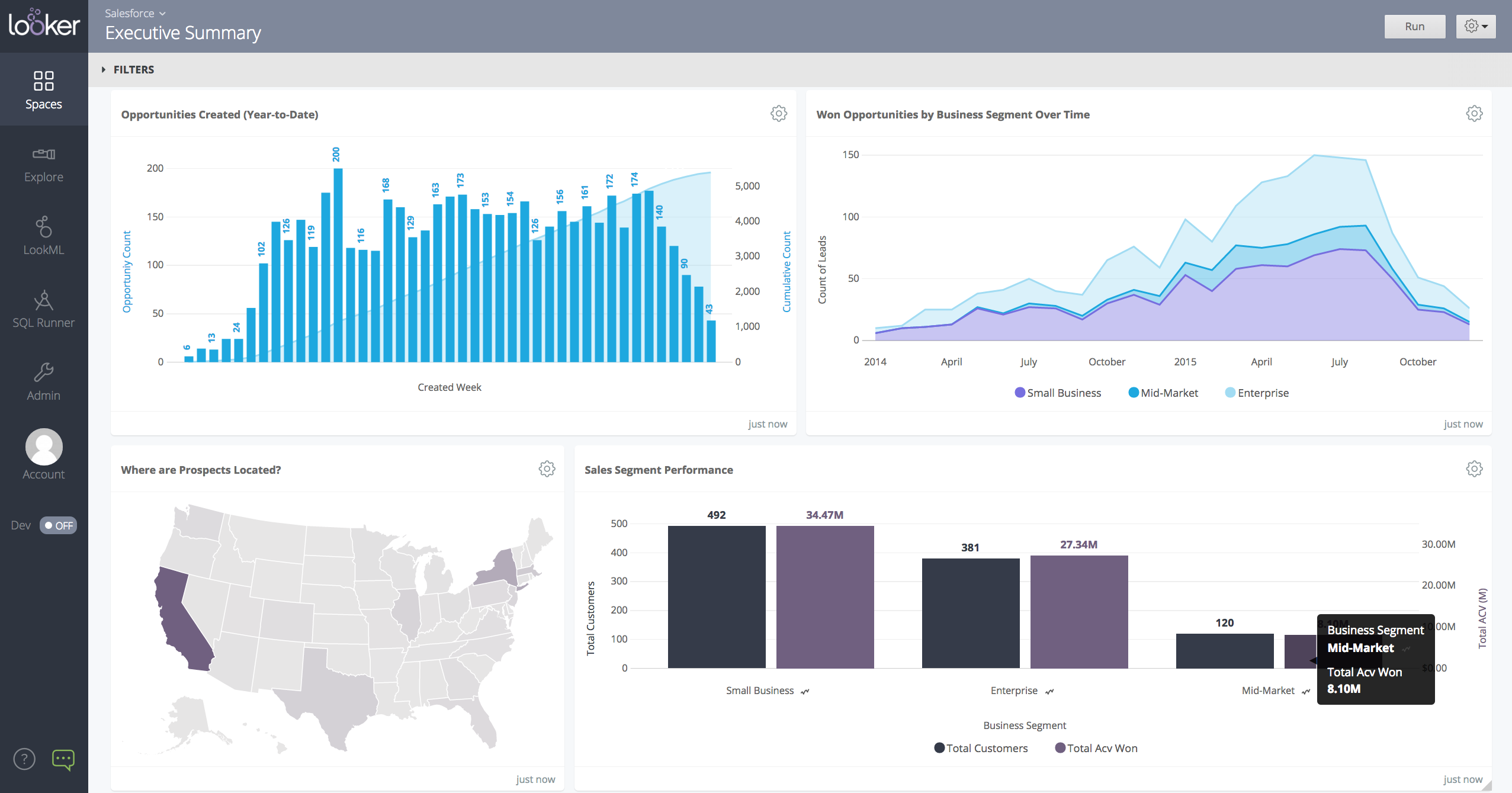
Screenshot of a Looker dashboard with a geo chart.