Cherwell Software was a full suite of service management tools competing with BMC Remedy, ServiceNow, and IBM SmartCloud. It was acquired by Ivanti, and has reached EOL.
N/A
TOPdesk
Score 8.8 out of 10
Mid-Size Companies (51-1,000 employees)
TOPdesk is the flagship highly-modular cloud-based or installed ITSM service desk and asset management solution from the Dutch company of the same name, for enterprise companies.
$76
per month Per agent
Pricing
Cherwell Service Management (discontinued)
TOPdesk
Editions & Modules
No answers on this topic
Essential
$76
per month Per agent
Engaged
$109
per month Per agent
Excellent
$155
per month Per agent
Offerings
Pricing Offerings
Cherwell Service Management (discontinued)
TOPdesk
Free Trial
No
Yes
Free/Freemium Version
No
No
Premium Consulting/Integration Services
No
Yes
Entry-level Setup Fee
No setup fee
Optional
Additional Details
—
The TOPdesk license model:
- Modular: Organizations purchase only the modules needed
- Saas or On premise
- Supports unlimited number of assets.
- Service agents based.
- Discount available for annual pricing.
More Pricing Information
Community Pulse
Cherwell Service Management (discontinued)
TOPdesk
Considered Both Products
Cherwell Service Management (discontinued)
No answer on this topic
TOPdesk
Verified User
Advisor
Chose TOPdesk
TOPdesk has all the modules we need, without being overly complicated.
Well suited in an IT environment where you have limited staff. It can be managed by one administrator. Reliability of the SaaS environment has been excellent. Flexibility in developing automated workflows to open, manage, and close Incidents. Change Management due to ability to modify OOB to meet the needs of our staff. Contract Management allowing us to be notified when a contract or license is up for renewal and setting reminders. Integrations are not easy to create and manage.
As TOPdesk is pretty intuitive it is often not needed to instruct colleagues on how to use TOPdesk. Most modules and fields do explain themselves. This means there aren't many additional instructions needed for the applications itself. Most information we do need to support our colleagues on based on organizational processes, not our ITSM tool of choice. And if there is more information needed, the knowledge base system can be used for this. On the other hand this could create the idea that no additional instructions are needed. Which might be true for the application itself, but not for how it is being used within your organisation
Cherwell's email handling automation works flawlessly. The only time that I have ever needed to reset the automation service that drives it is when my own server that houses the small connecting agent has some kind of problem and disconnects us from our hosted Cherwell instance. It just works. Emails to a certain address always result in a new ticket or update to an existing ticket.
Cherwell is literally 100% customization in so many ways that it would be pointless to try to enumerate them. There is a very sizable list of already-created customizations (called "mApps") that you can download and apply to your instance. If you don't like them you can roll them back in seconds. But you can add and configure entire modules using one of these pre-defined, completely free, add-on packages. It's so easy to add features this way that I check the list of available mApps every month or so just to see what functionality I can add.
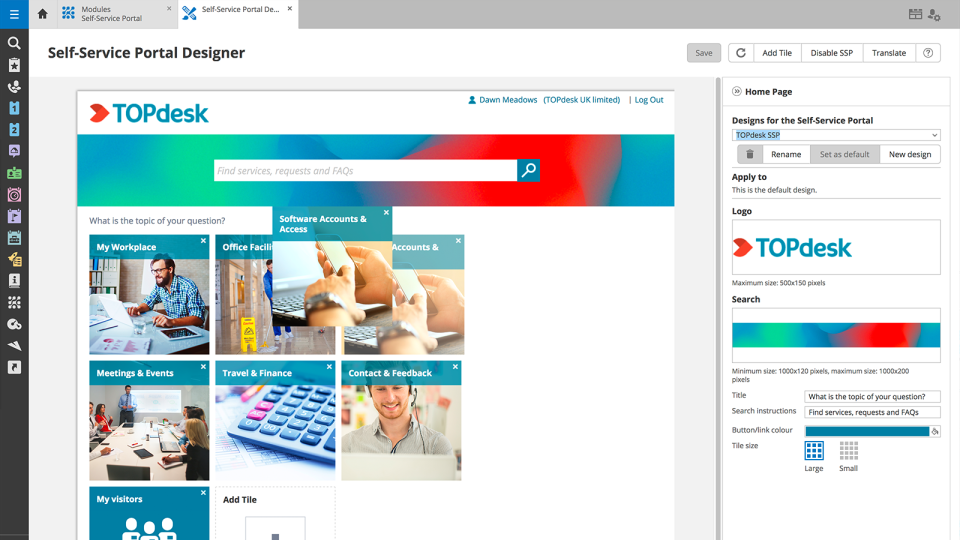
TOPdesk provides a clean and modern interface for all of its modules. Many of the modules have a similar look and feel, which makes it easy for users to utilize each one.
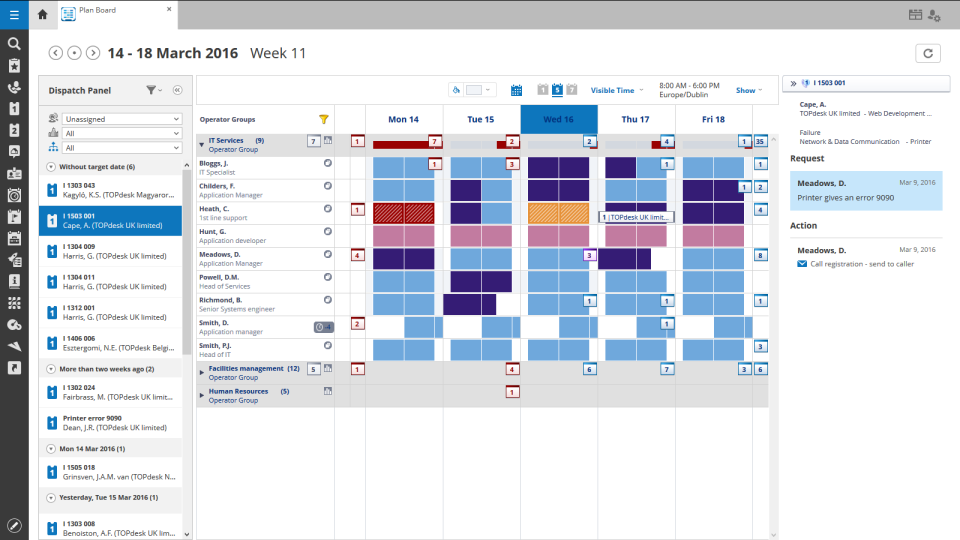
Its workflow system allows administrators and developers to define what needs to occur when certain events happen. This can ensure that processes happen in the correct sequence.
TOPdesk includes a vast API system to allow for external systems to integrate with it, and for TOPdesk to communicate with external systems.
Cherwell is still the best tool for the job in the market. Even though Ivanti bought them and are trying to convince everyone to move over to Neurons for ITSM, they have stated Cherwell will remain supported indefinitely and have a roadmap for future Cherwell development. Unfortunately, ISM is not as flexible as Cherwell (and the UX is atrocious), hence why many people are sticking with Cherwell (and why many Cherwell customers never purchased ISM originally)
It just works, has some continuous development and an easy-to-use interface, which is important especially because not all our colleagues are technical experts (or in other words, "capable of more than switching on and off the computer"). We use a large range of functions and therefore it would be really hard to replace TOPdesk in our company.
I enjoy the layout and configuration of our Cherwell Service Management instance. It did take me a bit to get used to, as with any new ticketing system, but now that I understand the system more, I thoroughly enjoy it! There are just so many options and the UI is very intuitive.
Sometimes I think some things are hard to find. I often do not know if I have to search in Settings or in Modules. In some cases the user has to do a lot of clicks for example to link a key to a user. Something could work a little smarter.
Like I said somewhere else in this review: the helpdesk of TOPdesk is top of the bill! In the Netherlands, that is. I can not plea for the helpdesks in other countries, but I guess the TOPdesk organization will make sure the quality of the helpdesk is the same in every country.
The browser client is mostly acceptable in terms of performance, but still lacks parity with the rich client. The rich client is not very performant at all. It's built on old architecture and relies heavily on a fast internet connection, good caching and database indexing. There are several unwritten rules with form design (and form arrangement) which most users are not aware of, but can severely impact performance in the rich client. This is where the flexibility of Cherwell can come back to bite you if you step outside the boundaries of these unwritten rules
Although being a SAAS solution, TOPdesk performs pretty fast. One can imagine that any SAAS solution is slow or has hiccups, but we have not experienced such with TOPdesk. Pages load quickly, logging in goes smoothly. We have made reports on premise in the past - that always took some time, as you might expect with such complex tasks. It seems that in the SAAS solution TOPdesk somehow has managed to make it even faster!
We generally have a good time with Cherwell support, however, there are the few niche cases where I have to explain how Cherwell works to the customer support agent on the other end. A little more product education for tier 1 support could go a long way in helping expedite support requests from SaaS customers.
Most if not nearly all questions are answered within the same or a few days. The helpdesk is very knowledgable about their product and are always willing to help. The only downside is that for more difficult questions it can take a while due to the experts being further removed from the helpdesk. But they are always willing to answer questions, even if they are not directly related to a problem with the service.
I didn't partake in the in-person training, but it was available. I preferred the online method instead, which was a great experience. It was nice to have someone available to bounce questions off of and demonstrate how certain functions worked.
We had Topdesk in-house here training staff for almost a month (2-3 hour meetings 3x a week.) It was invaluable and we were able to take that training and share with the rest of our IT staff. Once implemented we were able to fly from there. The challenges we found were in how to get started. Once started the knowledge base offered from Topdesk has been invaluable.
The training was great! We got together to review the system, its UI, and how to perform basic functions. Then there was plenty of time to ask questions and test out the system while there was someone available to assist.
Online training documentation is easy to access and consume. There is no real challenges with finding information on how to use the product and some really helpful knowledge base items that show us how valuable these options are in our own implementation of it. The online training we've used has been self driven
Implementation is a breeze. Each time I've implemented it, we had an outsourced vendor overseeing it & assisting where needed. However, Cherwell OOTB is ready to go, and configuring it for LDAP/SAML, etc. for authentication and user-imports is really straight forward. The infrastructure needed for Cherwell is extremely simple too - and installing the server & database takes no more than 20 mins
It was a challenge to port over years of the same thing and we ended up keeping old ideas in Topdesk that we will eventually weed out as time passes and we learn how users view categories and flows of tickets. Planning is key but bear in mind that just because you used to do it this way doesn't mean you still have to
Much more customizable than other products, especially when ran in a self-hosted environment. Cherwell [Service Management] allows for greater flexibility of custom development and integrations to allow for automating tasks that traditional ITSM apps are not well suited for. Cherwell [Service Management] gives you the freedom to develop your own objects with minimal licensing costs.
Spiceworks is an easier-to-use Help Desk solution but it lacks all other features that Topdesk has. Freshdesk was just too much for our environment. It was cost-prohibitive for our intended use. TOPdesk fit our org size and budget better than the others.
We have never had any major show-stopper issues with Cherwell itself - more so with the infrastructure it sits on. Moving from in-house cloud (on Cherwell's side), to AWS then to Azure has caused multiple problems over the years (some still on-going), however the product has remained fairly stable
TOPdesk is very flexible and scalable. Every department in you organization can you the software. Perhaps some persons need some training, but that can be provided by TOPdesk ot some keyusers.
As mentioned, they were always great to work with (minus the project management side). My only feedback would be to push back on requirements that don't make sense
As with any standard ticketing system, it helped decrease the time before first contact with clients.
Our department was always concerned with keeping a low budget, and it was cheaper than most.
My supervisor could easily tell how many resources were being put into each employee, so we had more visibility of our team's capabilities at a given time if we needed to take on something complex.