CheckMark Payroll vs. Paycor

Overview
ProductRatingMost Used ByProduct SummaryStarting Price
CheckMark Payroll
Score 0.0 out of 10
N/A
Engineered for small businesses, CheckMark Payroll software for Macintosh and Windows is a solution for small business owners, accountants, and payroll professionals. Features include direct deposit, MICR encoding blank check stock printing and users can process as many payrolls as desired for employees and companies. Up-to-date Federal and State tax withholding tables and printable IRS forms are included.
$509
per year
Paycor
Score 7.1 out of 10
N/A
Paycor provides core HR functions scaled towards small and mid-sized businesses. Paycor offers an integrated benefits platform for interfacing directly with insurance carriers and an adaptable time management platform.N/A
Pricing
CheckMark PayrollPaycor
Editions & Modules
CheckMark Payroll 2023 Edition
$509
per year
No answers on this topic
Offerings
Pricing Offerings
CheckMark PayrollPaycor
Free Trial
YesYes
Free/Freemium Version
NoNo
Premium Consulting/Integration Services
YesYes
Entry-level Setup FeeNo setup feeOptional
Additional DetailsPaycor's pricing for small, mid, and enterprise companies varies based on product bundle and company size. Because Paycor HR software is built to help businesses scale and grow, plans are based on the mix of HR products needed, and company size. Payroll is at the core of Paycor's offering, and their products are sold as a part of their payroll and HR platform.
More Pricing Information
Features
CheckMark PayrollPaycor
Payroll Management
Comparison of Payroll Management features of Product A and Product B
CheckMark Payroll
-
Ratings
Paycor
7.8
348 Ratings
5% below category average
Pay calculation00 Ratings8.2338 Ratings
Support for external payroll vendors00 Ratings8.25 Ratings
Off-cycle/On-Demand payment00 Ratings7.8143 Ratings
Benefit plan administration00 Ratings7.0239 Ratings
Direct deposit files00 Ratings8.6335 Ratings
Salary revision and increment management00 Ratings7.5282 Ratings
Reimbursement management00 Ratings7.485 Ratings
Best Alternatives
CheckMark PayrollPaycor
Small Businesses
Dayforce Powerpay
Dayforce Powerpay
Score 9.5 out of 10
Dayforce Powerpay
Dayforce Powerpay
Score 9.5 out of 10
Medium-sized Companies
Paypro Workforce Management
Score 9.7 out of 10
Paypro Workforce Management
Score 9.7 out of 10
Enterprises
Infor Human Resources
Score 7.1 out of 10
Infor Human Resources
Score 7.1 out of 10
All AlternativesView all alternativesView all alternatives
User Ratings
CheckMark PayrollPaycor
Likelihood to Recommend
-
(0 ratings)
6.9
(370 ratings)
Likelihood to Renew
-
(0 ratings)
7.9
(21 ratings)
Usability
-
(0 ratings)
7.3
(338 ratings)
Availability
-
(0 ratings)
10.0
(3 ratings)
Performance
-
(0 ratings)
10.0
(3 ratings)
Support Rating
-
(0 ratings)
5.2
(57 ratings)
In-Person Training
-
(0 ratings)
10.0
(1 ratings)
Online Training
-
(0 ratings)
9.0
(3 ratings)
Implementation Rating
-
(0 ratings)
7.5
(18 ratings)
Configurability
-
(0 ratings)
10.0
(4 ratings)
Ease of integration
-
(0 ratings)
10.0
(2 ratings)
Product Scalability
-
(0 ratings)
10.0
(3 ratings)
Vendor post-sale
-
(0 ratings)
10.0
(2 ratings)
Vendor pre-sale
-
(0 ratings)
10.0
(2 ratings)
User Testimonials
CheckMark PayrollPaycor
Likelihood to Recommend
CheckMark
No answers on this topic
Paycor Inc
In my experience, Paycor is well suited for organizations such as my own where the hiring process and fairly straightforward. A company that values ease of use, consistency, and organization will have great results with Paycor Recruiting. The system is also especially helpful when a company like mine must frequently recruit for the same exact role over and over again. That is where the customizable templates really come into play! On the other hand, a company that has a more specialized or complex recruiting process may struggle with using the platform. If more advanced integrations or data analytics are required then they would likely need a platform that is more robust in those areas.
Read full review
Pros
CheckMark
No answers on this topic
Paycor Inc
  • Onboarding works very well for us with a lot of Self-Service for employees it gives us time back and ensures data accuracy is in the employees control.
  • Recruiting works well because it links to specific jobs and automatically posts jobs when an employee is separated from service.
  • Tax filings work fairly well for us and have always been accurate.
Read full review
Cons
CheckMark
No answers on this topic
Paycor Inc
  • Administrative/C-Suite level of canned reports and dashboards
  • Displaying company reminders or documents to sign that are urgent in a way that doesn’t allow an employee to clock out until they have completed the task.
  • More options to build an org chart
Read full review
Likelihood to Renew
CheckMark
No answers on this topic
Paycor Inc
Price point is the biggest driving factor. Paycor has made some strides in the customer service area and we've seen enough improvements that renewing our contract has become more a reality than a pipe dream. The system functions well and our employees are familiar with how it works, so to make a change would be a huge lift for our team
Read full review
Usability
CheckMark
No answers on this topic
Paycor Inc
Glitches. So many glitches. The customer service number provides basic troubleshooting, which doesn’t help; some issues take weeks to resolve, with no apparent reason why they occur. The system does not work on Safari. We have dealt with Payroll not working, which has caused a manual payroll to be run. Paycor representatives do not provide any assistance.
Read full review
Reliability and Availability
CheckMark
No answers on this topic
Paycor Inc
I feel like Paycor is always up and running! If they are planning downtime, they communicate it clearly. Every once in a while, I get something that says the system isn't working but it is usually back up within the hour. I typically find by the time that the employees complain about it, that it is resolved within the system.
Read full review
Performance
CheckMark
No answers on this topic
Paycor Inc
For the most part, everything moves super fast. There are a few sections (Expense Management) that sometimes take a bit to load correctly. Or if they are interesting, it takes a minute to talk to each other! But reports are quickly downloaded and available! Even data heavy reports run fairly fast!
Read full review
Support Rating
CheckMark
No answers on this topic
Paycor Inc
I feel like support will transfer you back and forth between departments and put you on hold forever. I believe it is very difficult to see the status of an open ticket. During my experience, it feels like the client has to push all communication and request updates from support regularly.
Read full review
Online Training
CheckMark
No answers on this topic
Paycor Inc
The online trainings are super helpful. They have user guides that you can read through, interactive training that will walk you through it as well as plain web based ones. I've actually never had an in-person training but all of the information you need can be found online. They also will do individual support training if you are struggling with a certain area.
Read full review
Implementation Rating
CheckMark
No answers on this topic
Paycor Inc
Implementation of any new software is going to be challenging, especially if you are maintaining an existing program concurrently. When it is time for dual-processing (both old and new software) prior to going live, be prepared to be stressed. But trust the process and it will be over soon.
Read full review
Alternatives Considered
CheckMark
No answers on this topic
Paycor Inc
They seemed similar but Paycor was cheaper at the time. However, Paycor has so many fees they tack onto every invoice that may not be the case anymore. The support services supposedly were better at ADP but that was an unknown
Read full review
Scalability
CheckMark
No answers on this topic
Paycor Inc
I gave it a 10 because we only use it across one organization. However, it has allowed us to break it into multiple departments and layers of management. It is also easy for us to utilize across different locations but still under one master company. They have always provided us support when we decide to change something on an organizational level
Read full review
Return on Investment
CheckMark
No answers on this topic
Paycor Inc
  • Number wise, this takes field employees LESS time to execute their process THUS saving money in the field.
  • This takes the office staff MORE time to process what the field is doing and costing MORE money on an executive level as opposed to an hourly or field level.
  • The ROI was not considered while joining as the amount of employees involved necessitated a change in the previous system.
Read full review
ScreenShots

CheckMark Payroll Screenshots

Screenshot of A dashboard giving access to setup, payroll processing, and reporting functions. A News Feed is constantly updated with important payroll changes. Other useful information is listed for quick reference including the number of active employees and where the data is being saved. Quick links in the upper right-hand corner provide access to order paper products, contact support, browse the Knowledge Base, open the Payroll Manual.Screenshot of A Company or Trade Name can be used to print on checks and reports. Also, an encrypted password keeps information away from prying eyes.Screenshot of 20 Additional Income categories can be set up for the company and up to 8 per employee assigned. Offers a list of pre-set categories to use or modify.Screenshot of Set up to 30 Deduction categories for the company and assign up to 16 per employee. Users can set up an Employer Match for categories like a 401(k).Screenshot of Sort employees by their last name, employee number, or department. Separate active or inactive employees, track accrued hours and assign specific Incomes and Deductions for each employee.Screenshot of Input hours in a spreadsheet-type format or import them from a time and attendance system. Option to sort hourly employees first vs. those set up as salary for easier input.

Paycor Screenshots

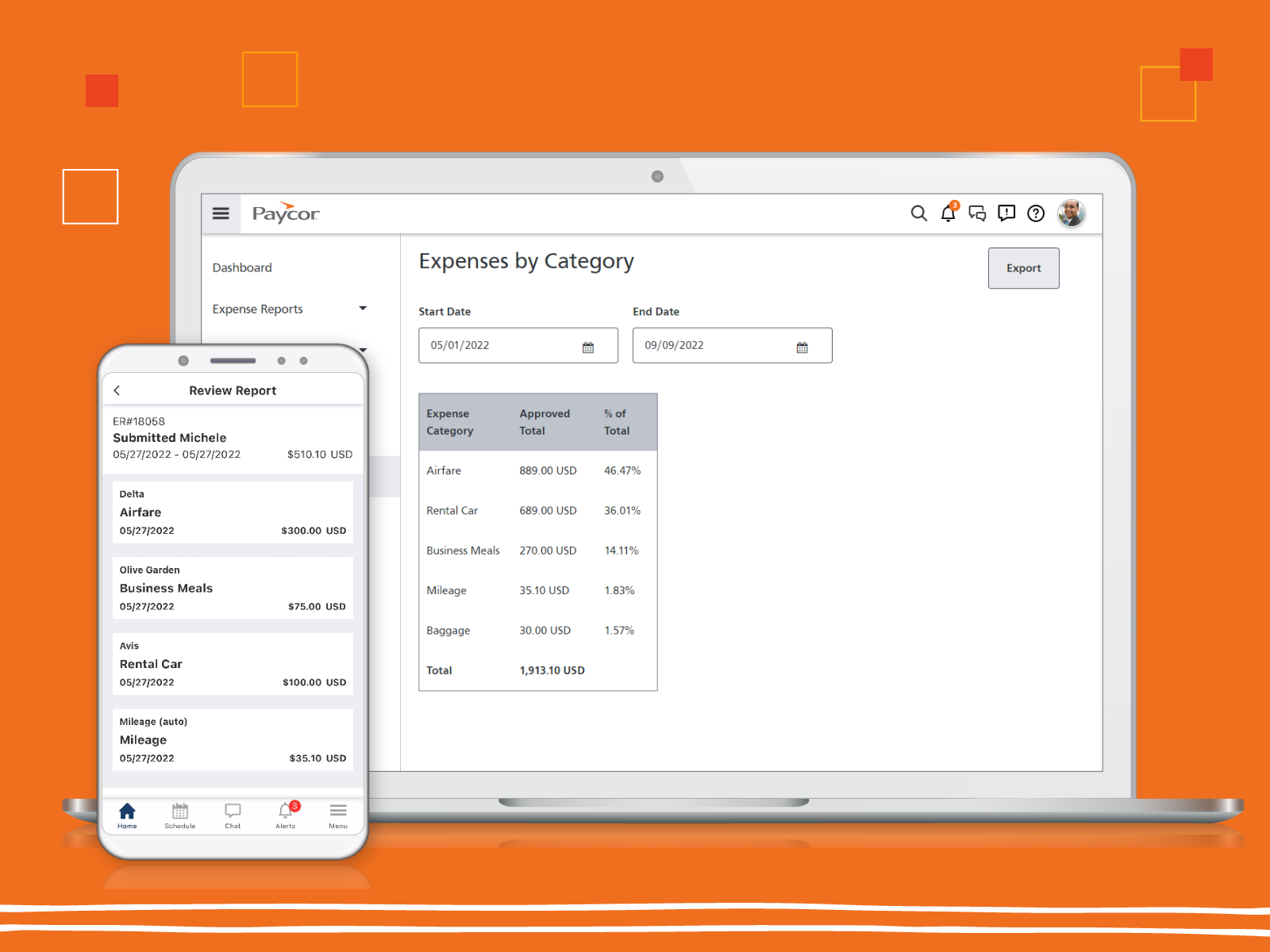
Screenshot of the real-time data insights that support critical business decisions.Screenshot of Paycor's expense reportingScreenshot of the recruiting processes streamlined in PaycorScreenshot of workforce scheduling in PaycorScreenshot of Paycor's mobile app, that allows employees to punch in and out from their phonesScreenshot of the Paycor Home Screen