Carbon Black App Control is an application control product, used to lock down servers and critical systems, prevent unwanted changes and ensure continuous compliance with regulatory mandates.
N/A
Rencore Code (SPCAF)
Score8.8 out of 10
Enterprise companies (1,001+ employees)
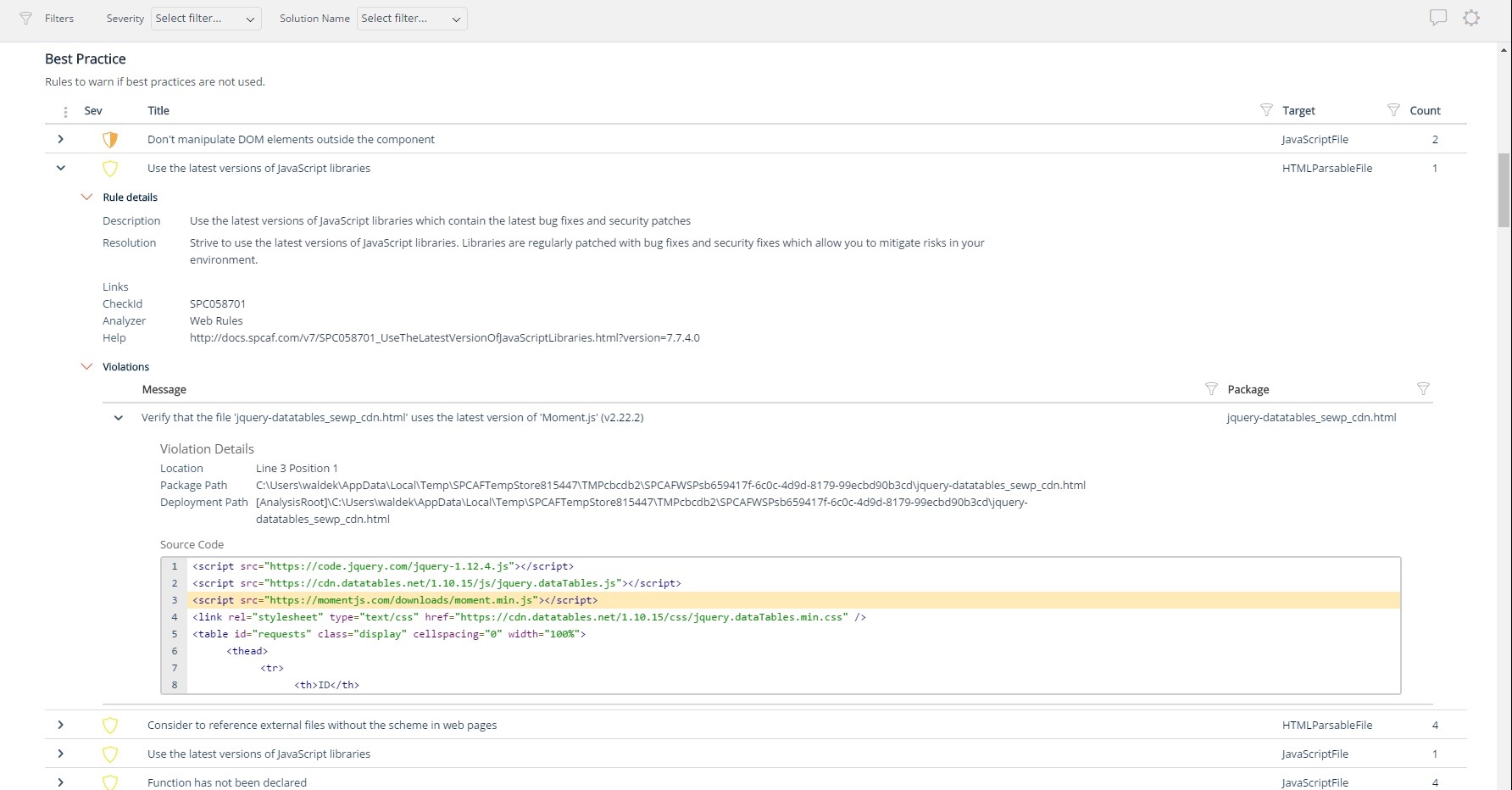
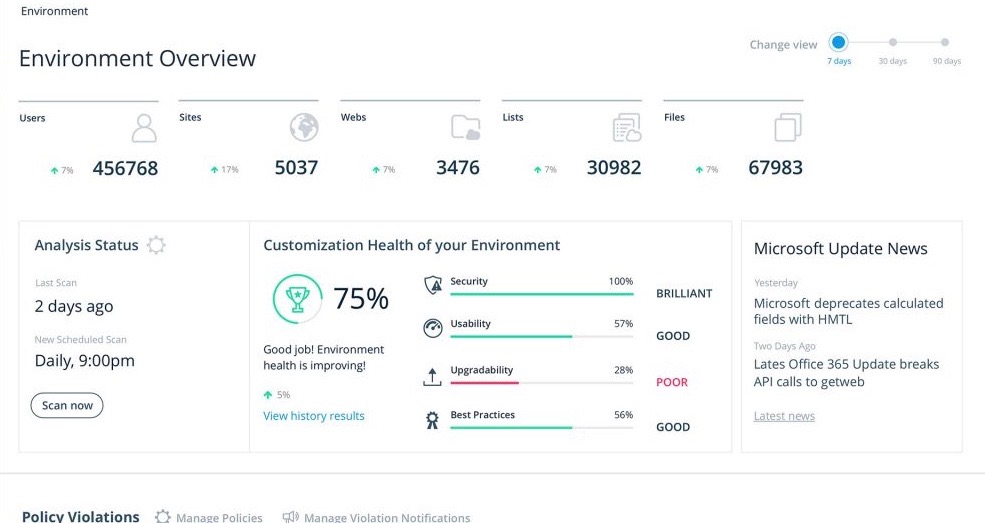
Many organizations that use Office 365 are exposed to security risks that they are unaware of. As they extend SharePoint to meet their business needs, they build applications using technologies that range from end-user Microsoft Flow to developer-focused SharePoint Framework. Unfortunately, all of these custom applications are capable of circumventing the security measures organizations have in place exposing the organization and its data to security…
Cb Protect is best suited somewhere where you want to maximize the lockdown of workstations. So moving past no local admin rights to blocking specific applications and peripherals. The idea would be to have a list of applications you want to run, and then anything else is not able to be used. As stated prior, if you have a very fluid environment where you are having all sorts of new applications installed frequently (I feel for you!!) this is still do-able, but it misses the general idea. I think especially in environments that are more sensitive to new applications, like banks, healthcare systems etc, this is a good fit. The ability to look at application levels, drift, unapproved software etc is very useful.
A de minimis incentive was given to thank the reviewer for their time. The incentive was not used to bias or drive a particular response, nor was the incentive contingent on a positive endorsement. More Info
For Microsoft shops that are doing custom development on the Microsoft cloud platform in Office 365 and Azure, the Rencore toolset is an absolute must, especially if you are involved in converting farm solutions to cloud, or just moving into cloud development for the first time.
A de minimis incentive was given to thank the reviewer for their time. The incentive was not used to bias or drive a particular response, nor was the incentive contingent on a positive endorsement. More Info
Unique expert knowledge of their target platforms. Not many companies have such a unique position in their target market. Their employees have a deep understanding of SharePoint, Office 365 and Azure and also regularly advise Microsoft on these matters.
Community involvement and contribution to open source projects. Key employees at Rencore are considered thought leaders in their area of expertise and contribute to high profile Microsoft open source initiatives.
Rencore's unique position when it comes to code quality analysis in the SharePoint space sets it apart. There's really no alternative.
Platform governance is another Rencore strength. No other product provides the insights into your SharePoint Online environment with full auditing of not only configuration changes but also who changed which code where and when. Again no alternatives exist.
A de minimis incentive was given to thank the reviewer for their time. The incentive was not used to bias or drive a particular response, nor was the incentive contingent on a positive endorsement. More Info
Rencore's product line is of course still a bit of a niche: SharePoint code quality is not something every organization on the planet is concerned with - although Rencore does much more than that.
We feel Rencore's marketing efforts are mainly targeted at technologists. There's a lot of other potential, especially for their platform governance product.
The big difference between Protect and Barkly/AMP is how exactly it goes about what it's doing. Protect is application whitelisting and program reputation. So the way it's protecting you is using a proprietary reputation service, and hash values to identify applications, and then hitting a list of whitelisted programs to decide if you are able to run that or not, based on the policy you are in. There is a LOT of value in that. We actually are working on transitioning to Cisco Advanced Malware Protection (AMP). The main reason is cost (about the same cost as Cb Protect, but with (most of) the featureset of all 3 Carbon Black products for less than 1/3 of the total spend. AMP works differently, looking at a reputation service powered by Cisco's Talos cloud. You don't really have application whitelisting, but that also reduces how many "requests" you get for applications. So I'll have to find a different way to do whitelisting and USB blocking and the like, but I'm getting more visibility across my network and also built in antivirus (TETRA engine - ClamAV with some work). Barkly is an add that we are looking to put in as it looks at behavior of programs. So specifically it watches for privilege elevation and the like. Thus far all the big name problem children (WannaCry, other ransomware problems) have been caught natively in Barkly day 0.
A de minimis incentive was given to thank the reviewer for their time. The incentive was not used to bias or drive a particular response, nor was the incentive contingent on a positive endorsement. More Info
I don't know of any products that compete in the space and if there were any, they would not stand a chance against Rencore. Behind any good product is a team of highly skilled individuals, who all have the same goal, who are passionate what they do and lastly, are in it for the betterment of where they started; As Developers themselves. You can't buy that
A de minimis incentive was given to thank the reviewer for their time. The incentive was not used to bias or drive a particular response, nor was the incentive contingent on a positive endorsement. More Info
The clear impact was the amount of time saved code reviewing or going through lines of code marked off by other tools that are not relevant. We cannot put a number on it since the project started off with the tool in place but based on the rules applied it could be as high as 20% of the project time.