Calendar vs. Zoho Calendar

Overview
ProductRatingMost Used ByProduct SummaryStarting Price
Calendar
Score 9.2 out of 10
N/A
Calendar (Calendar.com) is a productivity tool from the company of the same name headquartered in Draper that helps users solve calendar problems by helping to save time, be more productive, and focus on the things that matter most.N/A
Zoho Calendar
Score 9.7 out of 10
N/A
Zoho Calendar is an online business calendar designed to make scheduling easy. It can be used to stay on top of a schedule, or to share scheduled events with peers.N/A
Pricing
CalendarZoho Calendar
Editions & Modules
Standard
$8 ($6)
per month (billed annually)
Pro
$10 ($8)
per month (billed annually)
No answers on this topic
Offerings
Pricing Offerings
CalendarZoho Calendar
Free Trial
NoNo
Free/Freemium Version
YesYes
Premium Consulting/Integration Services
NoNo
Entry-level Setup FeeNo setup feeNo setup fee
Additional Details
More Pricing Information
Community Pulse
CalendarZoho Calendar
Best Alternatives
CalendarZoho Calendar
Small Businesses
CoSchedule Marketing Suite
Score 10.0 out of 10
CoSchedule Marketing Suite
Score 10.0 out of 10
Medium-sized Companies
CoSchedule Marketing Suite
Score 10.0 out of 10
CoSchedule Marketing Suite
Score 10.0 out of 10
Enterprises
Google Calendar
Google Calendar
Score 9.5 out of 10
Google Calendar
Google Calendar
Score 9.5 out of 10
All AlternativesView all alternativesView all alternatives
User Ratings
CalendarZoho Calendar
Likelihood to Recommend
1.3
(0 ratings)
8.3
(0 ratings)
User Testimonials
CalendarZoho Calendar
Likelihood to Recommend
Calendar has a lot of useful functions crammed into its simple UI. It works flawlessly with Gmail's calendar, and I appreciate how easy it is to keep track of all of my booked appointments. I strongly advise this to anyone who are having trouble finding open hours in their busy work schedulesand to everyone who wants to be more productive in general. The analytics are the finest part. I've never seen a calendar software that can show me who I spend the most time with before. It appears that they are more concerned with time management and efficiency than with day planning!"
Read full review
Zoho Calendar is appropriate for every scenario because it reminds you of your upcoming meetings. I am using the product to manage my team meetings in my current project and also in the past projects as well. It integrates well with other applications well and cross functional tool to manage your schedule.
Read full review
Pros
  • Makes Scheduling Easy and Better
  • Keeps Calendars organized in one place
  • Analytics of how much time we have spent on it
Read full review
  • I can see that Zoho Calendar allows for multiple tab use which seemed to be a rare and useful function to have.
  • I like how the search function is advanced and you can put specific info to find what you require.
  • I like the visual freedom the app gives in terms of the day, month, and workdays, 2-month views, and selecting colours as well, etc.
Read full review
Cons
  • The user interface may be made better.
  • Integration with other services might be improved.
  • Occasionally puzzling, but nothing a quick internet search can't sort out.
Read full review
  • It needs better software integration for use with other services and programs
  • It needs a better source code so that it doesn't crash or lock up as often
  • It should incorporate better customer service for dealing with the issues it creates.
Read full review
Likelihood to Renew
No answers on this topic
I subscribe to Zoho One so I use many of the modules that come with that single subscription. I've had intermittent issues with scheduled Zoho Meetings through Zoho CRM not appearing in my Zoho Calendar. Zoho has been working on the issue but it will be fixed for a while and then I'll miss a meeting because it wasn't appearing.
Read full review
Usability
No answers on this topic
Since there are lots of preference options, it can be a little confusing when setting up. It does integrate with other calendars where you can choose one or two way syncing which is helpful if you keep separate personal and work calendars. You can set your start day of the week which for me I have it set to Monday. There are also time zone options which are great but still a bit confusing to me.
Read full review
Support Rating
No answers on this topic
Support has been excellent. As always, they are quickly responsive, and I feel they genuinely wish to address and fix any issues. It's unfortunate that my issues with meetings created in Zoho CRM don't always appear in my Zoho Calendar. While they mostly appear, my confidence level on any given week that I can see what is on my schedule is decidedly lacking.
Read full review
Alternatives Considered
They are almost copy of each other, Calendar is the first one so I think it is a bit better.
Read full review
It as easy access, it provides platform for every member to collaborate, and it makes event management easier It sends invitations easily. It helps to schedule meetings easily with SMART ADD. We can set the reminder for events each and every member of team has access to Zoho Calendar It is easy to understand and use it is not that complicated .

Read full review
Return on Investment
  • Everything is positive, there isn't anything negative as such.
  • It has helped us to save time & inturn this helps organisatuon to achieve better ROI.
  • This has helped to save company cost on in-house meetings.
Read full review
  • Efficient and time saving and within minutes we can create events and meetings.
  • No paperwork and time saving which results in saving money and overhead cost spent on this.
  • No booking of any rooms of places we can now do visual meetings.
Read full review
ScreenShots

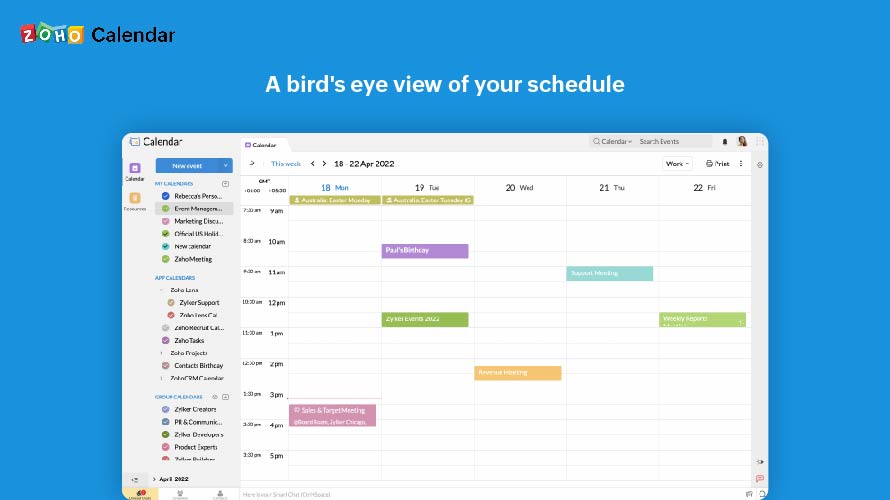
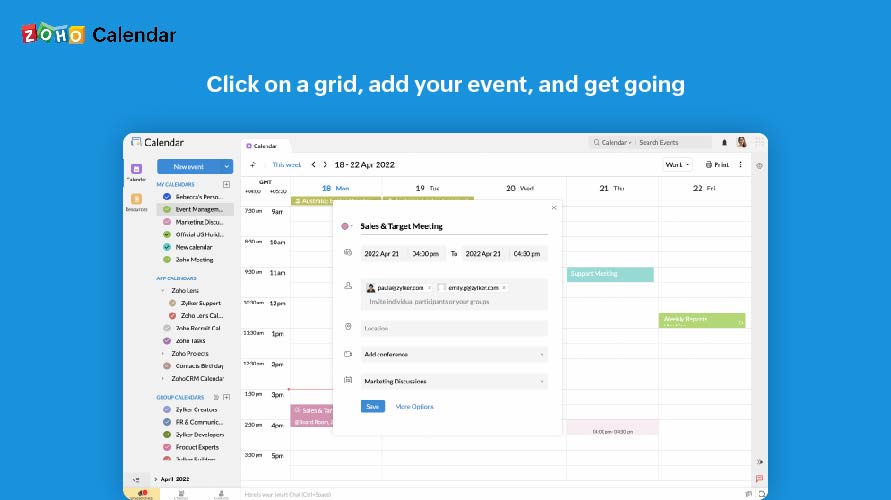
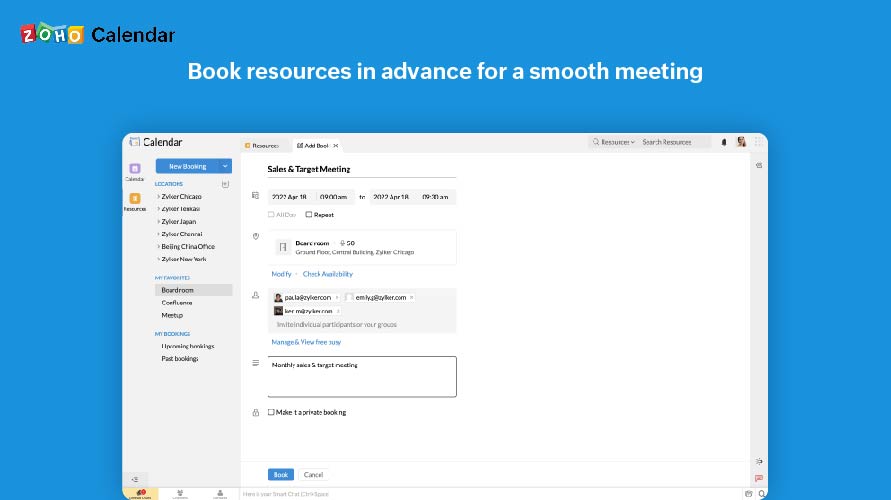
Zoho Calendar Screenshots

Screenshot of A bird's eye view of your scheduleScreenshot of Click on a grid, add your event, and get goingScreenshot of Skip the steps, one click is all it takesScreenshot of Book resources in advance for a smooth meetingScreenshot of Know what's available and what's not