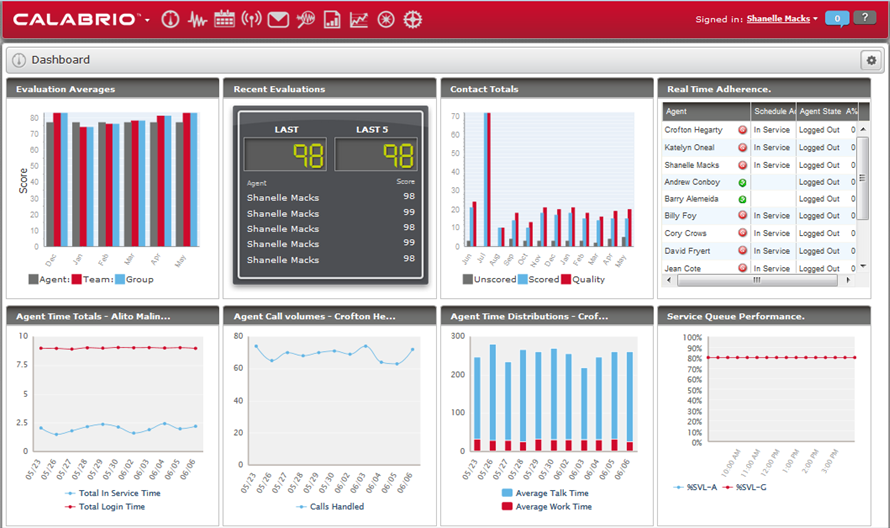
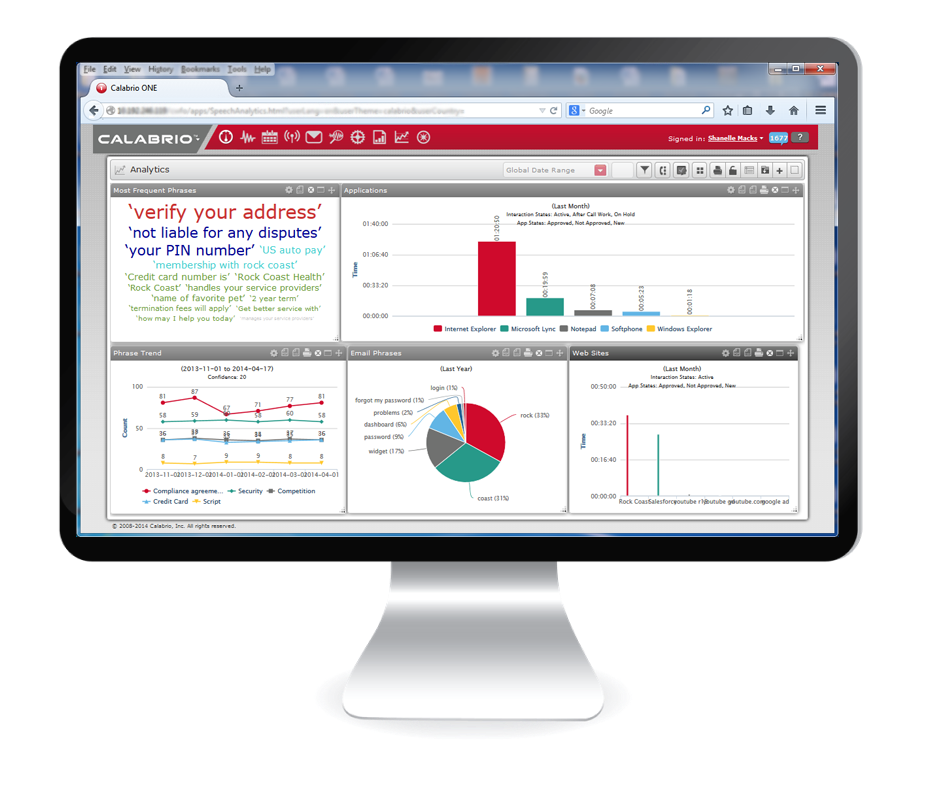
Calabrio One is a workforce optimization (WFO) platform for call centers, combining workforce management with call recording and analytics, from Calabrio headquartered in Minneapolis, MN.
N/A
LASSO Crew
Score9 out of 10
N/A
LASSO's Crew Management delivers a platform used to schedule, communicate, onboard, time track, travel, payroll, and book labor.
Calabrio has been great for our education environment. We have the ability to access live calls, recorded calls and evaluate based on the duration of calls. I would like to see the Reporting tab transformed and allow for more customizable reports. Overall, we have had success with Calabrio and we look forward to our partnership.
Transition to LASSO Crew was a real bear, but once we had all the pieces and parts in place and staff new how to use it, it solved the majority of our staffing headaches. We work on events across NYC and often have several events going on at the same time. Prior to LASSO Crew it was not uncommon for a supervisor to show up to a call with only a limited understanding of who was booked on the job, or for an employee to not be sure who or where they needed to report to that day. LASSO Crew-facing app and supervisor-facing website have entirely eliminated these headaches. Our staffing process is more streamlined than before, our rates and scheduling more transparent. Once you get past the initial hurdles of crew/team buy-in and implementation, the upsides are enormous.
A de minimis incentive was given to thank the reviewer for their time. The incentive was not used to bias or drive a particular response, nor was the incentive contingent on a positive endorsement. More Info
Quality Management (call recordings, evaluations of said calls) is an area where Calabrio has done a particularly good job. It is a solid product and they continue to refine it.
Customer Service - since we purchased the product, customer service has always been spot on for Calabrio - they have worked hard to ensure their existing customers remain happy while continuing to evolve and bring on new customers.
Innovation - with their ear to the ground, so to speak, Calabrio forges ahead and does a great job of implementing features per customer requests and makes every effort to ensure the needs are taken care of either via API or upgrade feature.
A de minimis incentive was given to thank the reviewer for their time. The incentive was not used to bias or drive a particular response, nor was the incentive contingent on a positive endorsement. More Info
Calabrio's scheduling module has room for improvement. I recommend adding options that will allow you to quickly add or delete multiple exceptions for a group or an individual.
Calabrio should add an option the will automatically optimize existing breaks and lunches based on the schedule rules and updates to schedules since they were initially published.
I'd like to have a feature in Calabrio that will automatically approve or deny employees requests for vacation based on the staffing number and other staff rules that are set.
For shift bidding, I'd like to have the option to create several schedule types and have Calabrio create the best coverage based on the available staff and the existing forecast.
In my practice, I have found that some reports have stats that should be weighed but are presented as a standard average (arithmetic mean) instead.
I'd like to have granular reporting on staff shrinkage that has occurred in the past so that I can use that data for future staff planning.
A de minimis incentive was given to thank the reviewer for their time. The incentive was not used to bias or drive a particular response, nor was the incentive contingent on a positive endorsement. More Info
Some of the page layouts are clunky, especially the crew list page
LASSO Crew has a calendar feed that can link to gcal, iCal, etc but it’s very limited and doesn’t reliably update the calendar when the schedule changes.
I would like it to push automated clock-in/clock out alerts to my team. I can set these up manually by scheduling messages but it is a very cumbersome process.
A de minimis incentive was given to thank the reviewer for their time. The incentive was not used to bias or drive a particular response, nor was the incentive contingent on a positive endorsement. More Info
A de minimis incentive was given to thank the reviewer for their time. The incentive was not used to bias or drive a particular response, nor was the incentive contingent on a positive endorsement. More Info
It would've been a higher rating if they're able to partner up with other platforms like Liveperson chat support and have a better sense of urgency when it comes to resolving issues
The app is perfectly useable, if a bit limited in its functionality. The website, which functions as the "back end" of the app, takes awhile to learn. I carve out at least an hour of training on it for every new supervisor and fully expect to spend the first several weeks they use it to send them little reminders about how and when to do things. I have a few (older) supervisors who just out-and-out refuse to engage with LASSO Crew, but I think that has more to do with their aversion to change than it does the overall usability of the website.
A de minimis incentive was given to thank the reviewer for their time. The incentive was not used to bias or drive a particular response, nor was the incentive contingent on a positive endorsement. More Info
Because, it took them time to coordinate back some updates for us when we had to report a few major issues. ie Volume data feed for our Email support/channel. I like the webinars, however to keep the community alive. I hope they improve the training modules too and how they training new WFM guys as part of their package
LASSO Crew takes customer support very seriously. My dedicated account rep responds to any issues directly, usually within one business day. When a crew member has an in-app problem they can't resolve the technical support team responds very quickly to any issue, usually with clear instructions about how to resolve the issue.
A de minimis incentive was given to thank the reviewer for their time. The incentive was not used to bias or drive a particular response, nor was the incentive contingent on a positive endorsement. More Info
It was better and more reliable/resilient then both of the products stated above. It is in-house though while the competition was cloud-based. Both of the platforms mentioned above had more problems and more failed screens then Calabrio.
A de minimis incentive was given to thank the reviewer for their time. The incentive was not used to bias or drive a particular response, nor was the incentive contingent on a positive endorsement. More Info
We explored using IntelliEvent for crew management but their platform just wasn't as robust and they didn't seem to have timekeeping and payroll partners in place to support the back end. Other than that, I haven't found another platform or software that does what LASSO Crew does, it was built for the event industry, by the event industry, and that focus on audience really shows through.
A de minimis incentive was given to thank the reviewer for their time. The incentive was not used to bias or drive a particular response, nor was the incentive contingent on a positive endorsement. More Info
Negative: I've had to create more workarounds and scheduling seems to be more time consuming. However, it has had a positive effect in that some processes have been improved because of the workarounds.
Positive: Our former WFM software was not upgraded regularly. We have planned upgrade(s) for Calabrio. I'm looking forward to seeing the improvements made with the newer version.
Positive: Calabrio's customer service has been a plus. I believe they listen to what their customers are saying, even when it may be painful, and seem to always be striving to improve their product, and maintain good customer service.
A de minimis incentive was given to thank the reviewer for their time. The incentive was not used to bias or drive a particular response, nor was the incentive contingent on a positive endorsement. More Info
We've had some complaints from crew members that the communications they receive through the LASSO Crew system feel less personal than when we used to handle everything through direct emails and text messages.
LASSO Crew branding is super prominent on every communication we send from the platform, I wish they would center the client/employer a bit more and not make the LASSO Crew logo and color scheme the most identifiable thing on the page/email/message.
A de minimis incentive was given to thank the reviewer for their time. The incentive was not used to bias or drive a particular response, nor was the incentive contingent on a positive endorsement. More Info