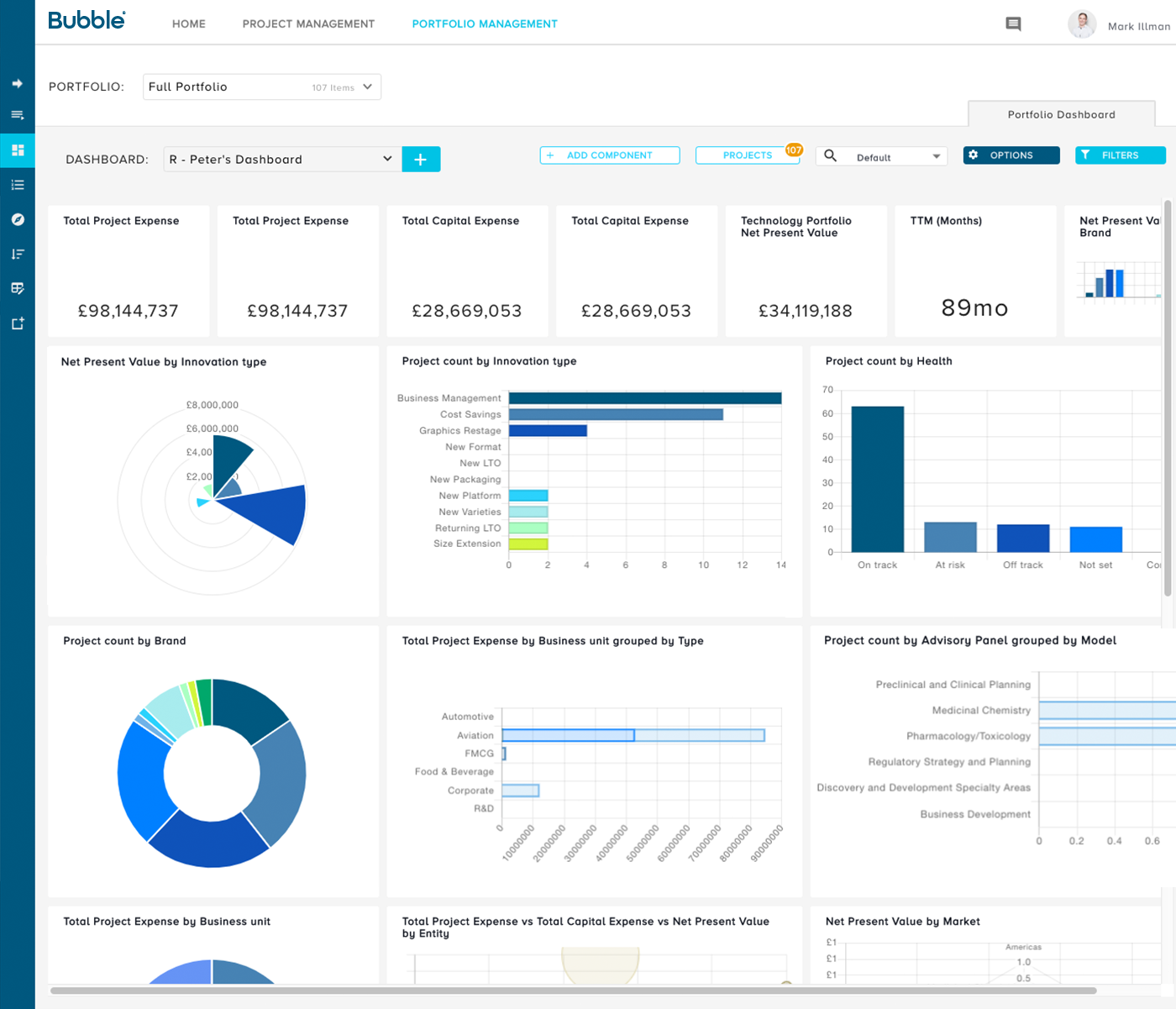
Bubble PPM is a cloud-based Project and Portfolio Management (PPM) software solution from Bubble®. Founded in 1999, the company serves clients globally via offices in London, Cambridge, and Melbourne. Its cloud-based solutions help customers improve the planning, governance, and delivery of Innovation, New Product Development, Engineering, IT, and other initiatives. Their software supports Portfolio Planning, ongoing Project and Portfolio Management, and Resource management.…
N/A
Microsoft Project
Score8.1 out of 10
N/A
Microsoft Project is a project management software. It provides core PM functionality, including agile workflow support and resource management. Project can be deployed in the cloud or on-premise.
$120
per year per user
Pricing
Bubble PPM
Microsoft Project
Editions & Modules
No answers on this topic
Project Server
$0
Planner Plan 1
$10
per month per user
Planner and Project Plan 3
$30
per month per user
Planner and Project Plan 5
$55
per month per user
Project Standard 2024
$679.99
one-time fee per installation
Project Professional 2024
$1,129.99
one-time fee per installation
Offerings
Pricing Offerings
Bubble PPM
Microsoft Project
Free Trial
Yes
Yes
Free/Freemium Version
No
No
Premium Consulting/Integration Services
Yes
No
Entry-level Setup Fee
Required
No setup fee
Additional Details
Element 1: One-time fixed SaaS set-up fee
One-time investment based on required configuration and deployment.
Element 2: Monthly license fee
Calculated on #users (per user type). Variable - According to required users/types.
Plans are billed annually.
More Pricing Information
Community Pulse
Bubble PPM
Microsoft Project
Considered Both Products
Bubble Software
Verified User
Chose Bubble PPM
We tried several systems before we went with Bubble Innovator - the key difference was that all the other systems were overly complex trying to do so many things that you just got lost in the processes they had created. Innovator seeks to stay simple and straightforward to use …
A de minimis incentive was given to thank the reviewer for their time. The incentive was not used to bias or drive a particular response, nor was the incentive contingent on a positive endorsement. More Info
Verified User
Chose Bubble PPM
When evaluating Bubble Innovator against the competition, we felt that Bubble Innovator gave us the flexibility that we were looking for. Other solutions tended to have some hardwired functionality. Bubble Innovator was a great fit for managing our projects and was efficient to …
A de minimis incentive was given to thank the reviewer for their time. The incentive was not used to bias or drive a particular response, nor was the incentive contingent on a positive endorsement. More Info
Bubble PPM is well suited for anyone who manages product related projects, especially new product development. As we've matured in our implementation of the system we found that it is great for managing all projects, but the specific strength is product development to launch. Bubble PPM would not be as appropriate for use as a CRM tool, as the references to people are best suited to users within the organization
Microsoft Project Online is suited to Turnkey Projects where more Collaboration is required in Project Progress monitoring, risk assessment and conveying, issue recording and tracking. It is less appropriate when ERP Suites other than MS Dynamics are used, i.e when Enterprises need to integrate Finance / Accounting with It and having straight project management workflow
I already mentioned the simple user interface for data upload, and the equally intuitive customized reporting. Leadership and "supporting" functions for product development get tremendous value from this because they don't need to hunt down answers anymore. Everything from pipeline planning to operational planning can be built on the same foundation of objective data, rather than many different sources interpreted through many different lenses.
But the greatest value I think Bubble Innovator delivers is not really the product itself. It's the sense of partnership and responsiveness from the Bubble Innovation team. The Bubble Innovation team becomes a part of your team. They are valued consultants with helpful input on best practices for stage gate management, portfolio analytics, and report visualization. I have continually been impressed with the responsiveness and effort that their team brings to the table. When we have challenges and need to customize our data or analytics or reporting, they are right there beside us, finding the best solution, sharing prototypes in a test environment, and implementing as fast as possible.
I love the Gantt Chart that Microsoft Project offers me, because it provides me with a view from various aspects, it provides me with exact details about the fulfillment of tasks over a period of time, it also allows me to make comparisons with the necessary data and the fulfilled data. by the employees, in order to know exactly if the project's expectations have been met.
I love the Gantt Chart that Microsoft Project offers me, because it provides me with a view from various aspects, it provides me with exact details about the fulfillment of tasks over a period of time, it also allows me to make comparisons with the necessary data and the fulfilled data by the employees, in order to know exactly if the project's expectations have been met.
The alert system for the fulfillment and delay of assignments is perfect. Microsoft Project allows me to configure the task system, I can assign the necessary tasks to fulfill the project, and the software alerts me immediately if the managers are fulfilling the assignments.
A de minimis incentive was given to thank the reviewer for their time. The incentive was not used to bias or drive a particular response, nor was the incentive contingent on a positive endorsement. More Info
Development of custom functionality, and redefining 'standard' options for the software. As Bubble grows and their customer base increases there will be opportunity for this, at present development projects can be slow and expensive. However the standard software options are excellent, but as processes evolve within organisations the flexibility to evolve the software could be made simpler.
A de minimis incentive was given to thank the reviewer for their time. The incentive was not used to bias or drive a particular response, nor was the incentive contingent on a positive endorsement. More Info
The business has been extremely satisfied with Bubble Innovator and is in support of rolling this tool out to our other businesses within the overall franchise.
A de minimis incentive was given to thank the reviewer for their time. The incentive was not used to bias or drive a particular response, nor was the incentive contingent on a positive endorsement. More Info
The user interface is highly visual and simple. Literally within 10-15 minutes of my introduction to the software, I was up and running. Of course, deeper capabilities become apparent after additional use, but the basic functionality is very simple to grasp. Where there are consistent challenges reported by multiple users, the Bubble Innovation team is quick to connect and put plans in place to address the challenges.
Microsoft Project is easy to operate because data could be inserted, changed and deleted like you are in an Excel timesheet. Besides, it provides a great level of automation beween his fields allowing few data changes. Also, its funcionalities are well defined and grouped in upper menus, so you can find a funcionality quickly
Outstanding response times, and solutions to issues requiring support are quickly implemented. For bigger issues or longer term developments, Bubble happily takes the time to meet in person and discuss requirements to drive detailed solutions.
Microsoft in recent years has transformed itself and gives a positive feeling when one interacts with the company. The company is focusing on its customers and willing to go extra mile to make customers happy.The company continues to invest in its products and bringing new features from time to time. Overall it is a positive feeling to be associated with such an iconic company.
A de minimis incentive was given to thank the reviewer for their time. The incentive was not used to bias or drive a particular response, nor was the incentive contingent on a positive endorsement. More Info
The number of variables made this extremely challenging (org changes, stage gate harmonization, pipeline prioritization, and new governance model). I think the implementation was handled very well in spite of this, and managed to deliver on time and on budget.
A de minimis incentive was given to thank the reviewer for their time. The incentive was not used to bias or drive a particular response, nor was the incentive contingent on a positive endorsement. More Info
When evaluating Bubble Innovator against the competition, we felt that Bubble Innovator gave us the flexibility that we were looking for. Other solutions tended to have some hardwired functionality. Bubble Innovator was a great fit for managing our projects and was efficient to deploy, especially within our existing business processes.
While many of the above tools are extremely well-versed, Microsoft Project's largest advantage comes from it being related to the largest business productivity company in the world. Project does have its sharing limitations - but regardless, offers one of the most robust tools in the market today. Microsoft Project is built with large-scale projects in mind but is more than up to the task for smaller projects as well. However, there are options available (especially cloud-based options) that may be more fitting for higher-level projects that do not require going into the weeds.
A de minimis incentive was given to thank the reviewer for their time. The incentive was not used to bias or drive a particular response, nor was the incentive contingent on a positive endorsement. More Info
Project saved me, as the project manager, countless hours of digging through tickets and schedules to plan everything out. It also saved me time in adjusting the project triangle as needed, since it does so much automatically.
It is costly, and since it requires extensive training to master, it's not just the high licensing cost that you need to take into account.
The reporting features - even just printing out Gantt charts - makes it far easier to communicate with stakeholders. That means less time for PMs doing all of this manually, and it means less follow-up questions and delays moving forward.
A de minimis incentive was given to thank the reviewer for their time. The incentive was not used to bias or drive a particular response, nor was the incentive contingent on a positive endorsement. More Info