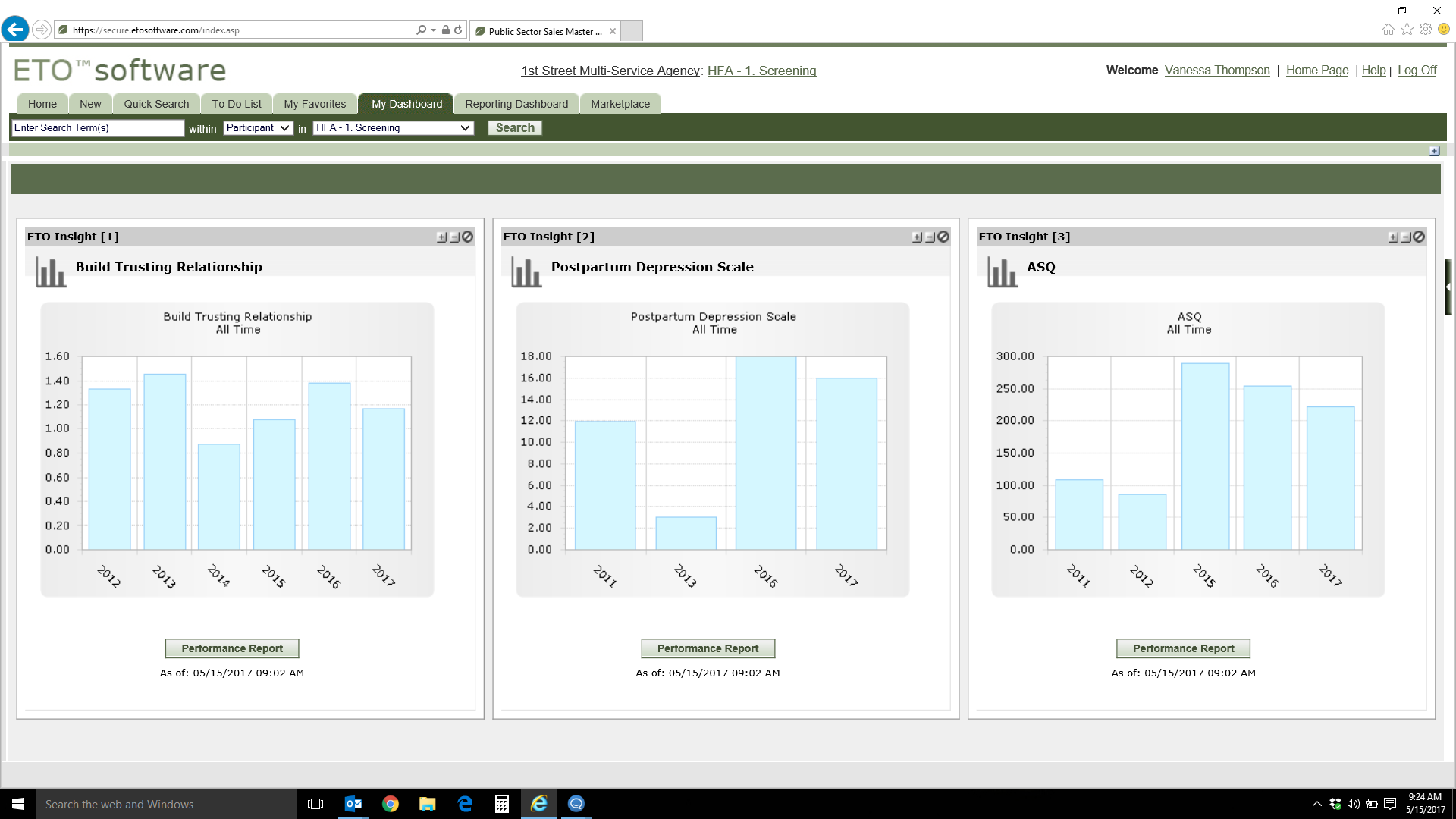
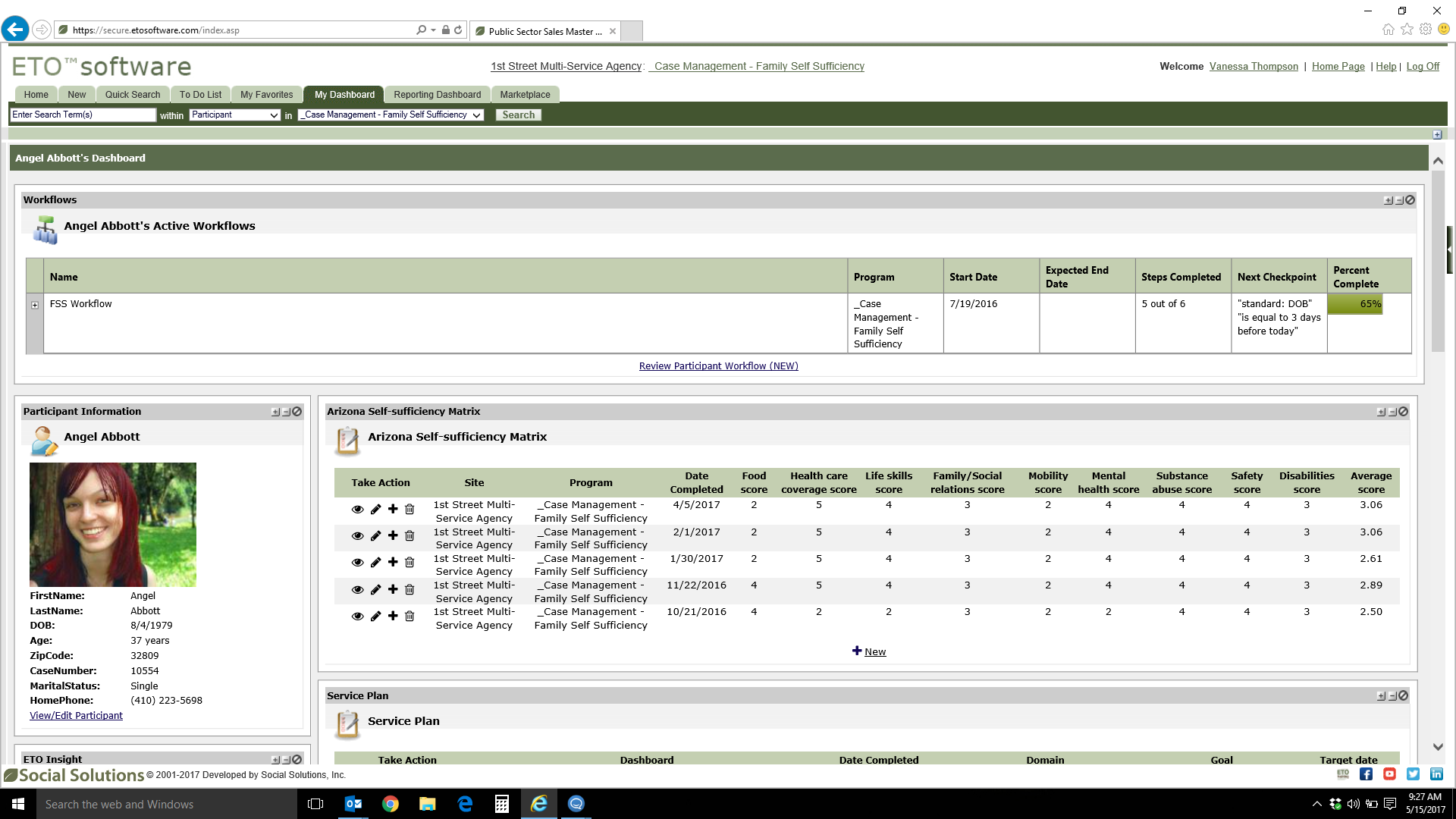
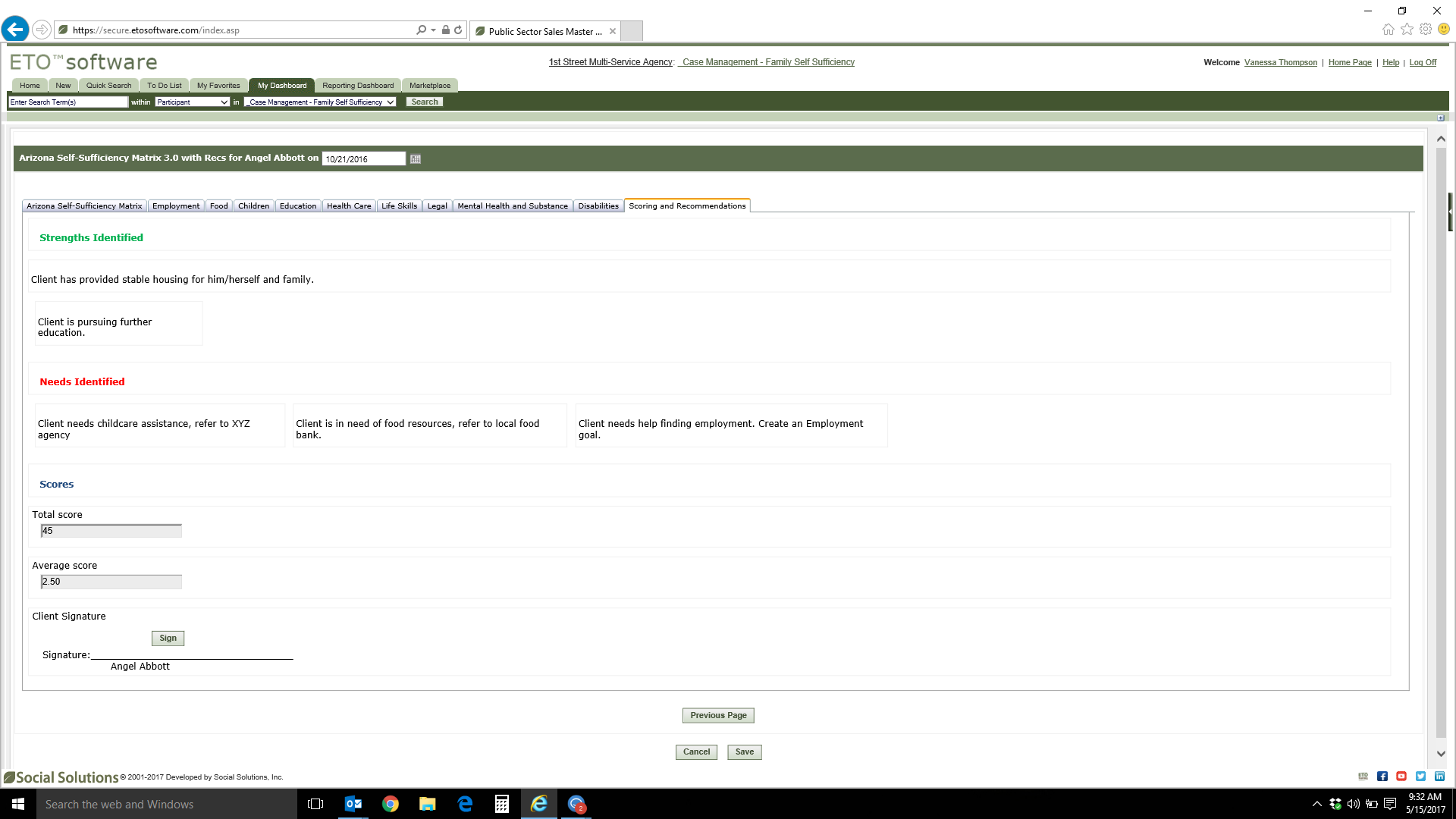
Bonterra ETO is a case management platform that consolidates data, caseloads, and service delivery programs, helping users to save time and serve more people. ETO is purpose-built for organizations looking to improve their program and case management. ETO is built in accordance with industry security standards and includes tools that helps users to focus on advancing their missions, as well as: Reduce time spent entering data into separate systems to increase…
N/A
monday.com
Score8.6 out of 10
Mid-Size Companies (51-1,000 employees)
monday.com Work OS is an open platform designed so that anyone can create the tools they need to run all aspects of their work. It includes ready-made templates or the ability to customize any work solution ranging from sales pipelines to marketing campaigns, CRMs, and project tracking.
ETO Social Solutions should be avoided until they start caring about the problems generated by their software. In regards specifically to the ARMS suite utilized by the entire state of California, until the ETO software learns how to speak with SOMS, and unless it can be customized by knowledgeable people who consult with front-line users. It is not appropriate to provide the state legislature with bad data. I have 6 years of experience with it and I have multiple sources of agreement from fellow users throughout the state.
The platform is very well suited for our nonprofit programs that serve low-income clients who need diapers, wipes, and period products. It has helped us run our programs, capturing information and allowing us to view the data for reporting purposes. The ability to filter data is very helpful by allowing us to categorize information to get a better picture of the progress of our programs.
A de minimis incentive was given to thank the reviewer for their time. The incentive was not used to bias or drive a particular response, nor was the incentive contingent on a positive endorsement. TR verified that a representative sample of customers was invited. More Info
ETO's customization allows for the use of so many different and unique applications.
The ability to build extremely customized reports also allows us to get very detail oriented results or very broad building wide stats.
The additional added features such as workflow, referrals, and ETO Engage are useful in their own way and add more ways to better track and record data while simplifying some end-user processes.
A de minimis incentive was given to thank the reviewer for their time. The incentive was not used to bias or drive a particular response, nor was the incentive contingent on a positive endorsement. More Info
I like summary of subitems, especially with subitasks as subitems and add item tracking for each subtask it can show total tracked in parent item. Similar with other columns, like numbers, status, date.
Dashboard features, Many kinds of dashboard view available, we can utilize on the basis of requirements.
monday.com workform is very powerful, easily share form link when submitted it will create line item in board with provided data.
monday.com automation is very helpful in order to automate steps with specific rules and easy setup.
monday.com also provides integrations in order to automate processes if need to integrate multiple app together. or need to transfer data between multiple apps.
A de minimis incentive was given to thank the reviewer for their time. The incentive was not used to bias or drive a particular response, nor was the incentive contingent on a positive endorsement. More Info
The user interface is not intuitive and exceptionally difficult for non-tech savvy people to learn.
The system is not as customizable as we were led to believe at the initial purchase.
The system does not interface well with other systems. Organizationally we are moving towards data integration, and we will likely replace ETO because of this limitation.
Considering the limitations of the system, the cost is quite high. We've seen only marginal benefits of this system over pen and paper, and the ROI is not promising.
The initial build process was very frustrating. We didn't understand what the developer was billing us for. Something like simple touchpoint forms was billed for more hours than it would seem to require.
A system like this should be both fully mobile compatible and have offline functionality.
We would benefit from more nuanced security settings.
A de minimis incentive was given to thank the reviewer for their time. The incentive was not used to bias or drive a particular response, nor was the incentive contingent on a positive endorsement. More Info
The desktop app for Mac seems to have a few issues with visual glitches appearing on screen, it only seems to go away when I close the tool and reopen it
Subtasks don't show on the individual users to-do list, only main level tasks
A de minimis incentive was given to thank the reviewer for their time. The incentive was not used to bias or drive a particular response, nor was the incentive contingent on a positive endorsement. TR verified that a representative sample of customers was invited. More Info
Social Solutions has been great for our organization. It has allowed us to not only report on data, but to dive into it to see trends and give snapshots of the current status of our neighbors. Social Solutions has been helpful in getting us to see additional ways we can use our data and ways that it is easier for front line staff to use this tool
A de minimis incentive was given to thank the reviewer for their time. The incentive was not used to bias or drive a particular response, nor was the incentive contingent on a positive endorsement. TR verified that a representative sample of customers was invited. More Info
Teams involved in content creation, such as marketing or editorial teams, could use monday.com to manage the entire content lifecycle. Boards might track content ideas, assignments, drafts, reviews, approvals, and publication schedules, helping teams collaborate and keep content production on track.
A de minimis incentive was given to thank the reviewer for their time. The incentive was not used to bias or drive a particular response, nor was the incentive contingent on a positive endorsement. More Info
As a technically savvy person with experience learning new database software systems I find ETO relatively straightforward now that I've been trained in it's use. However, many of our staff are less technically savvy and the learning curve for ETO can be grueling for many, who require frequent troubleshooting and support from me. Additionally, there are small quality of life improvements that would increase usability even for me - such as allowing multiple tabs to be open simultaneously or being able to use the browser's "back" and "forward" buttons.
A de minimis incentive was given to thank the reviewer for their time. The incentive was not used to bias or drive a particular response, nor was the incentive contingent on a positive endorsement. More Info
I give monday.com a 10/10 because I almost never encounter any lag or connectivity issues despite all of the many templates, boards, and automations we have. As a matter of fact, I feel like the last issue I encountered was over a year ago... and I'm in monday.com every single work day. Not only is monday trustworthy, it is easy to find what I'm looking for... making the overall usability extremely hard to beat.
A de minimis incentive was given to thank the reviewer for their time. The incentive was not used to bias or drive a particular response, nor was the incentive contingent on a positive endorsement. TR verified that a representative sample of customers was invited. More Info
Routine maintenance is announced with plenty of lead time, and the few times I've been unable to log in to the system properly a simple refresh was all that was required to fix.
A de minimis incentive was given to thank the reviewer for their time. The incentive was not used to bias or drive a particular response, nor was the incentive contingent on a positive endorsement. More Info
A de minimis incentive was given to thank the reviewer for their time. The incentive was not used to bias or drive a particular response, nor was the incentive contingent on a positive endorsement. More Info
Mostly really strong now, although I understand that for some years before switching their hosting service to AWS performance was a real issue with ETO and we had frequent problems with pages timing out or other glitches stemming from performance issues. With AWS that is mostly a thing of the past, although it is still a major issue with the reporting tool which is unable to run reports on the entire database due to performance limitations, instead requiring admins to define universes prior to running queries.
A de minimis incentive was given to thank the reviewer for their time. The incentive was not used to bias or drive a particular response, nor was the incentive contingent on a positive endorsement. More Info
Everything performs fairly well. Every now and then there are user errors where an employee will not click "ok" on a note they've created and simply exit out (I do wish that something was in place to prevent this, such as a pop "are you finished?")
A de minimis incentive was given to thank the reviewer for their time. The incentive was not used to bias or drive a particular response, nor was the incentive contingent on a positive endorsement. More Info
We love the first tier customer support folks! They're friendly, helpful, and knowledgeable within the scope of their position. The experiences we've had with their supervisors have also been mostly good and again they seem to be doing what they can within the scope of their positions. This is what prevents me from selecting 1. Unfortunately, none of these wonderful folks can offer real solutions when things are actually broken. They verify there's a problem and send it to the black hole called "the developers". After that, we don't hear anything useful and we figure out how to live with/work around the problem ourselves. (Requests for updates typically get "still with the developer" responses.) This is highly frustrating given that most of our issues are basic system issues (functionality that worked then broke after an update by Social Solutions, servers not syncing, report universes not flattening automatically, etc.). All we want is for the system to work as designed and to be fixed in a timely fashion when it doesn't. Apparently, that's too much to ask. (And no, we don't expect it to happen instantly, programming and quality control checks obviously take time.)
A de minimis incentive was given to thank the reviewer for their time. The incentive was not used to bias or drive a particular response, nor was the incentive contingent on a positive endorsement. More Info
monday.com only really care about accounts that have 20 seats or more. While this is great for monday.com, it pushes smaller organisations to evaluate alternatives. We rate monday.com highly in our organisation because key staff have already got good experience with the application and we know we will get to 20+ seats one day. But, till then the billing model and lack of permanent enterprise features is a dread.
A de minimis incentive was given to thank the reviewer for their time. The incentive was not used to bias or drive a particular response, nor was the incentive contingent on a positive endorsement. More Info
Really good trainer and exhaustive curriculum covered, but ETO is a complex enough system that you don't *really* know how to use it until you've been in the trenches for a few weeks. For instance, I took a Report Writing training and emerged with some fluency in the reports interface and a vague understanding of the process, but immediately encountered a legion of instance-specific idiosyncrasies that would have been totally impossible to address in a webinar training for a dozen folks from different orgs working in different instances.
A de minimis incentive was given to thank the reviewer for their time. The incentive was not used to bias or drive a particular response, nor was the incentive contingent on a positive endorsement. More Info
To have someone walk you thru the features and capabilities of Monday.com is priceless. Someone also coming along later in the contract to see if you are maximizing the program to suit your company needs is beyond helpful. The staff that have provided this training are fun, creative and very patient.
A de minimis incentive was given to thank the reviewer for their time. The incentive was not used to bias or drive a particular response, nor was the incentive contingent on a positive endorsement. More Info
Hard to say, as I was not with the agency at the time. However, based on our use of the software ~5years later I can say that there were no catastrophic design choices made during implementation that have become unduly burdensome as we've scaled up.
A de minimis incentive was given to thank the reviewer for their time. The incentive was not used to bias or drive a particular response, nor was the incentive contingent on a positive endorsement. More Info
We signed up for the accounts. Created the accounts. Ran the trial version and tested it live while we were running multiple projects and found that it was fitting our needs perfectly. When the trial ended and we were asked to purchase the full version, we did. We have found other ways to use it and it's a breeze.
A de minimis incentive was given to thank the reviewer for their time. The incentive was not used to bias or drive a particular response, nor was the incentive contingent on a positive endorsement. More Info
When we made our decision several years ago Social Solutions had just acquired Apricot. At that time it was recommended to use ETO based off our revenue stream. However, it seems like Social Solutions has put in a lot more time and effort into Apricot over ETO and it seems more modern and user friendly. I think it is worth a second look once our contract expires
A de minimis incentive was given to thank the reviewer for their time. The incentive was not used to bias or drive a particular response, nor was the incentive contingent on a positive endorsement. More Info
monday.com is simpler and easier to grasp, apply and navigate than ClickUp, but the ClickUp free version has so much more functionality available than the monday.com free / low-cost options (sorry, but it's true!). Google Tasks is really simple and I shouldn't really compare them - it's just really nice to be able to see my tasks right next to my Google Calendar or Gmail (widget) - the "all on one" view on the screen is really nice ease of access, but the power of monday.com outweighs the nice-to-have of an all-in-one screen layout - it feels clumsy to bring in all my Calendar items from Google to monday.com, so an integration app to the Google screen where you can see monday.com tasks would be amazing.
A de minimis incentive was given to thank the reviewer for their time. The incentive was not used to bias or drive a particular response, nor was the incentive contingent on a positive endorsement. More Info
The core product scales well, and we've grown quite a bit as an agency during our use of ETO. However, there are some real pain points particularly around creating new programs and managing report universes that require extensive offline checklist resources and a full-spectrum understanding of how changing settings in one part of ETO can have downstream impact in other areas. This can introduce a "chilling" effect on proposed changes to the system, where there is strong incentive to leave things as-is to avoid unforeseen consequences.
A de minimis incentive was given to thank the reviewer for their time. The incentive was not used to bias or drive a particular response, nor was the incentive contingent on a positive endorsement. More Info
For it to work across multiple departments and sites, I would like to see improvements made with integrations and automation. For this question, I am acknowledging not only the addition of internal triggers/automation, but also an expansion on external ones.
A de minimis incentive was given to thank the reviewer for their time. The incentive was not used to bias or drive a particular response, nor was the incentive contingent on a positive endorsement. More Info
I would say that at this point the overall ROI has been negative as we aren't getting much more out of our data by the switch we made to ETO, but the cost is much higher. I anticipate that will change as we get better at using ETO.
Most users that have switched to ETO in our organization prefer it to what they were using before and some are more appreciative of the value they can get from the data.
A de minimis incentive was given to thank the reviewer for their time. The incentive was not used to bias or drive a particular response, nor was the incentive contingent on a positive endorsement. More Info
A de minimis incentive was given to thank the reviewer for their time. The incentive was not used to bias or drive a particular response, nor was the incentive contingent on a positive endorsement. More Info