Bonita is an open-source business process and workflow management platform created by the French National Institute for Research in Computer Science. It is available as a free community edition or as a commercial subscription product.
N/A
Camunda
Score8 out of 10
N/A
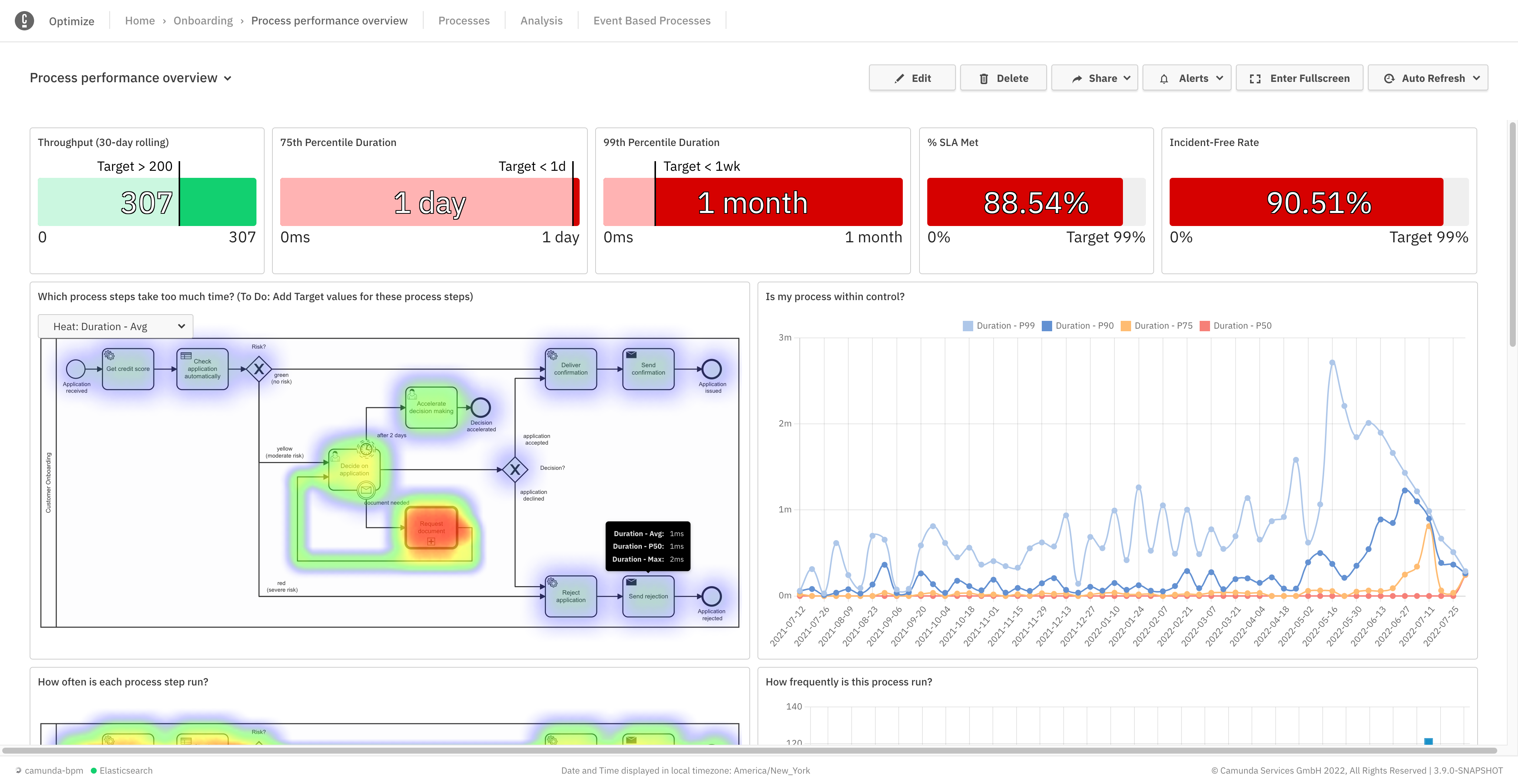
Camunda is a process orchestration tool designed to help organizations design, automate, and improve any process. Built for business and IT collaboration using BPMN and DMN standards, Camunda aims to enable seamless integration across endpoints to transform mission-critical processes.
N/A
Pricing
Bonita Platform
Camunda
Editions & Modules
No answers on this topic
Self-Managed Enterprise
Contact Sales
per year
SaaS Enterprise
Contact Sales
per year
Offerings
Pricing Offerings
Bonita Platform
Camunda
Free Trial
No
Yes
Free/Freemium Version
Yes
Yes
Premium Consulting/Integration Services
Yes
Yes
Entry-level Setup Fee
No setup fee
No setup fee
Additional Details
—
—
More Pricing Information
Community Pulse
Bonita Platform
Camunda
Considered Both Products
Bonitasoft
Verified User
Chose Bonita Platform
Bonita has a community version, open-source, so it´s easy to test the benefits of process automation for any enterprise. Bonita Platform is also very near to Java architecture, so the learning curve for developers is not difficult, and they only need to understand how processes …
A de minimis incentive was given to thank the reviewer for their time. The incentive was not used to bias or drive a particular response, nor was the incentive contingent on a positive endorsement. More Info
Verified User
Chose Bonita Platform
Bonita may be the easiest to start with without a steep learning curve, anyway on the other side it probably is not as powerful in the case you need to handle a very complicated and high volume or mission critical process. If look by the platform cost or license fee, Bonita has …
A de minimis incentive was given to thank the reviewer for their time. The incentive was not used to bias or drive a particular response, nor was the incentive contingent on a positive endorsement. More Info
Director in Corporate at Konsultex (Computer Software, 11-50 employees)
Chose Bonita Platform
The Bonita platform is by far the most complete and flexible solution as a BPM suite with the added advantage that the Community edition is usable for production deployment. From a cost perspective, Bonitasoft licenses the subscription edition per server with no limitations as …
A de minimis incentive was given to thank the reviewer for their time. The incentive was not used to bias or drive a particular response, nor was the incentive contingent on a positive endorsement. More Info
Well suited for low code/no code applications centered around approval flows. It has built-in task management for users to see their pending actions, comments, statuses, etc. It has a very nice design for process flows. Less appropriate may be for generic type applications with complex screens and logic within those screens that need a lot of data to process.
A de minimis incentive was given to thank the reviewer for their time. The incentive was not used to bias or drive a particular response, nor was the incentive contingent on a positive endorsement. More Info
Camunda Platform is well suited for scenarios where there are different stages in a business flow and the flow is driven by user action at each stage. For example placing of an order on an ecommerce platform. Depending on whether user was able to make the payment or not the workflow would go to dispatch or retry stage. Now the retry stage would trigger further actions like sending follow up emails etc. Likewise, dispatch stage would have a different set of actions. Since every order is important and we need to know where it stands, using Camunda Platform is imperative. Camunda Platform might not be a right choice where just a one off thing needs to be done. For example, uploading of product information by user or periodic processing of heavy images by a worker. These are all either one step processes or periodic automated processes where we can track the status without using a business modeler like Camunda Platform.
A de minimis incentive was given to thank the reviewer for their time. The incentive was not used to bias or drive a particular response, nor was the incentive contingent on a positive endorsement. More Info
Bonita seems particularly suited for processes requiring a great deal of human interaction. Its user model allows you to control access to business processes in a fine-grained way. This allows for business processes to move smoothly between users and services as the process advances.
The definition and usage of custom forms from the latest version of Bonita seems particularly powerful. It allows for a thorough customization of the look-and-feel and does not require complex developments.
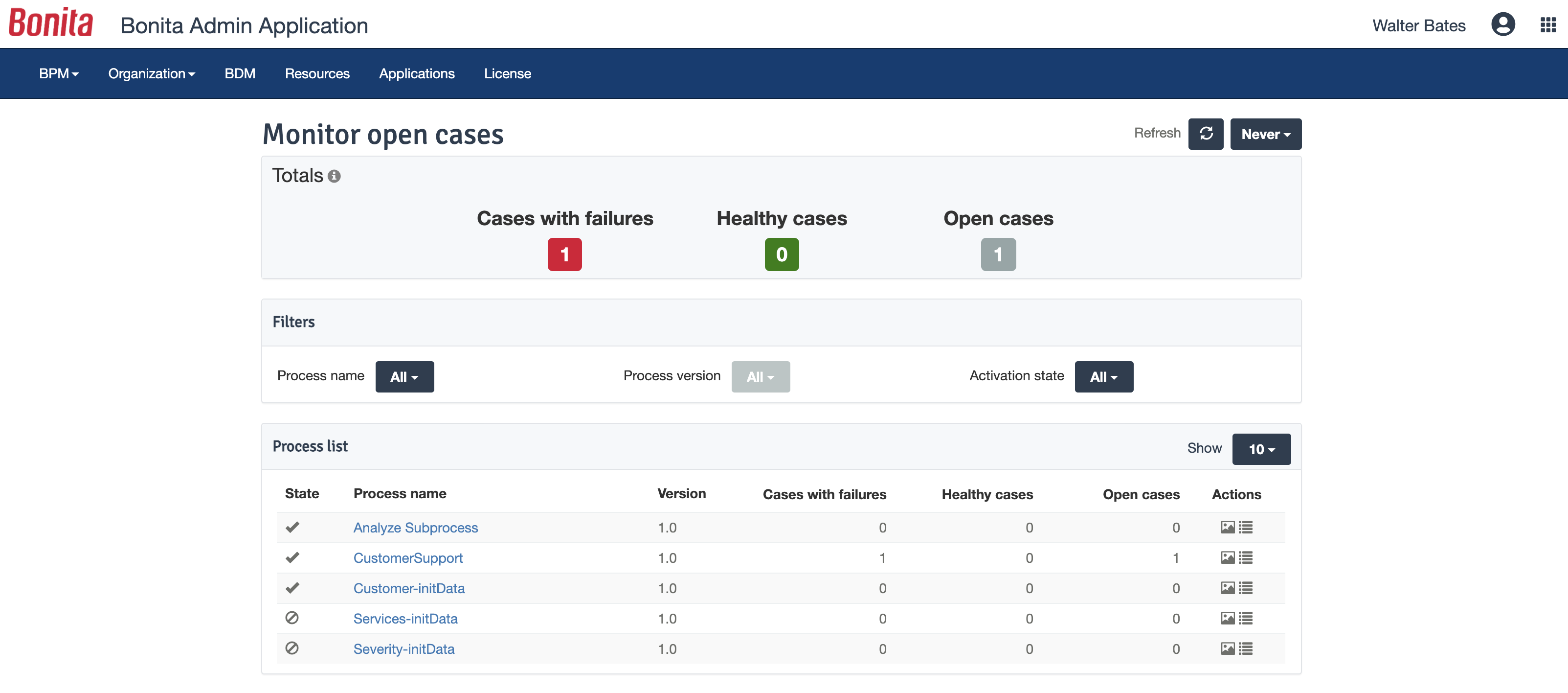
The web interface and administration section have greatly improved in the latest versions. Installation and configuration of processes has become more flexible and more structured. The administration section gives a good view on failed processes, allowing to analyse problems in an efficient way.
A de minimis incentive was given to thank the reviewer for their time. The incentive was not used to bias or drive a particular response, nor was the incentive contingent on a positive endorsement. TR verified that a representative sample of customers was invited. More Info
There is a learning curve beyond the boot camps that needs to be addressed with more structured curriculum.
The full stack technologies are industry standard, but these [are] challenging to learn and could use a learning path and orientation. There's probably opportunity for third-parties here to help with learning and adoption.
A de minimis incentive was given to thank the reviewer for their time. The incentive was not used to bias or drive a particular response, nor was the incentive contingent on a positive endorsement. More Info
A de minimis incentive was given to thank the reviewer for their time. The incentive was not used to bias or drive a particular response, nor was the incentive contingent on a positive endorsement. TR verified that a representative sample of customers was invited. More Info
Bonita Platform has allowed us to develop GUI relatively fast using its UI Designer while being able to seamlessly integrate our business logic in Java in a BPMN2 process diagram. It gives a nice productivity boost but still requires programming know-how to be able to deliver the final solution to your business problems.
A de minimis incentive was given to thank the reviewer for their time. The incentive was not used to bias or drive a particular response, nor was the incentive contingent on a positive endorsement. More Info
Engine itself is efficient enough for most cases I dealt with. It can also be extended by clustering. I have done performance tests with JMeter and only managed to induce the crash of... JMeter. If there are efficiency issues they usually concern bad design/implementation of created apps or bottlenecks in integrated systems. Although I have met two cases with efficiency loss.
1. Java 7 related PermGen saturation caused by big number of installed apps (there is no jar dependency reusal between apps option).
2. Big number of waiting event handlers in processes stresses the database.
A de minimis incentive was given to thank the reviewer for their time. The incentive was not used to bias or drive a particular response, nor was the incentive contingent on a positive endorsement. TR verified that a representative sample of customers was invited. More Info
A de minimis incentive was given to thank the reviewer for their time. The incentive was not used to bias or drive a particular response, nor was the incentive contingent on a positive endorsement. More Info
A de minimis incentive was given to thank the reviewer for their time. The incentive was not used to bias or drive a particular response, nor was the incentive contingent on a positive endorsement. TR verified that a representative sample of customers was invited. More Info
A de minimis incentive was given to thank the reviewer for their time. The incentive was not used to bias or drive a particular response, nor was the incentive contingent on a positive endorsement. More Info
Lacks good documentation. Training and documentation is geared towards those who are already technically adept. Does not have as many data integrations as other full fledged products. Paid version of Camunda is not as fully fledged as other products.
A de minimis incentive was given to thank the reviewer for their time. The incentive was not used to bias or drive a particular response, nor was the incentive contingent on a positive endorsement. More Info
Respect of BPMN standard over the long term. Good enhancements by Bonitasoft for new use cases, for example the introduction of a real form editor even if it has been technically difficult to manage. Once done though, we have far greater possibility of human interaction.
A de minimis incentive was given to thank the reviewer for their time. The incentive was not used to bias or drive a particular response, nor was the incentive contingent on a positive endorsement. TR verified that a representative sample of customers was invited. More Info
A de minimis incentive was given to thank the reviewer for their time. The incentive was not used to bias or drive a particular response, nor was the incentive contingent on a positive endorsement. More Info
The positive impact is that we are able to ensure the business process is being followed and that results in orders getting processed successfully leading to customer satisfaction and revenue
Another positive impact is that we are able to track any anomalies and any errors in the order flow and retry them so that users don't have a negative experience.
A negative point is that it is an overhead to maintain so there is significant engineering effort getting invested there
A de minimis incentive was given to thank the reviewer for their time. The incentive was not used to bias or drive a particular response, nor was the incentive contingent on a positive endorsement. More Info