Birdview vs. Magnetic

Overview
ProductRatingMost Used ByProduct SummaryStarting Price
Birdview
Score 8.8 out of 10
N/A
Easy Projects is a project management tool designed for a wide range of businesses (small to mid-sized and enterprise level). It includes both basic features like creating projects and tasks and filling in the calendar, and also some advanced ones, including an interactive Gantt chart, an executive dashboard, time tracking and billing. It provides integration with MS Outlook, is customizable and has SaaS/On-Premise options.
$6
per month
Magnetic
Score 0.0 out of 10
Small Businesses (1-50 employees)
Magnetic is a workflow management platform designed and built for professional services firms. It combines essential project management capabilities into a single system: account management, business development, task management, project management, project finances, time tracking, billing, HR management and resource scheduling. Magnetic is designed to help businesses waste less time, manage projects smarter, and deliver on time and within budget. The system offers a bird’s eye…
$0
Pricing
BirdviewMagnetic
Editions & Modules
Essentials
$6
per month
Business
$12
per month
Platform
$19
per month
Solo
$0
Essentials
$10
per month per user
Pro
$22
per month per user
Enterprise
Contact Sales
Offerings
Pricing Offerings
BirdviewMagnetic
Free Trial
YesYes
Free/Freemium Version
NoYes
Premium Consulting/Integration Services
NoNo
Entry-level Setup FeeOptionalOptional
Additional Details20% discount available for annual billing.
More Pricing Information
Community Pulse
BirdviewMagnetic
Features
BirdviewMagnetic
Project Management
Comparison of Project Management features of Product A and Product B
Birdview
8.1
Ratings
6% above category average
Magnetic
-
Ratings
Task Management8.50 Ratings00 Ratings
Resource Management7.10 Ratings00 Ratings
Gantt Charts8.50 Ratings00 Ratings
Scheduling8.00 Ratings00 Ratings
Workflow Automation7.00 Ratings00 Ratings
Team Collaboration7.50 Ratings00 Ratings
Support for Agile Methodology7.50 Ratings00 Ratings
Support for Waterfall Methodology7.00 Ratings00 Ratings
Document Management10.00 Ratings00 Ratings
Email integration7.90 Ratings00 Ratings
Mobile Access7.90 Ratings00 Ratings
Timesheet Tracking8.90 Ratings00 Ratings
Change request and Case Management8.00 Ratings00 Ratings
Budget and Expense Management8.90 Ratings00 Ratings
Professional Services Automation
Comparison of Professional Services Automation features of Product A and Product B
Birdview
8.3
Ratings
10% above category average
Magnetic
-
Ratings
Project & financial reporting7.50 Ratings00 Ratings
Integration with accounting software9.10 Ratings00 Ratings
Best Alternatives
BirdviewMagnetic
Small Businesses
Stackby
Stackby
Score 9.0 out of 10
Teamwork.com
Teamwork.com
Score 8.9 out of 10
Medium-sized Companies
InEight
InEight
Score 8.3 out of 10
Teamwork.com
Teamwork.com
Score 8.9 out of 10
Enterprises
InEight
InEight
Score 8.3 out of 10
Planview AdaptiveWork
Score 7.4 out of 10
All AlternativesView all alternativesView all alternatives
User Ratings
BirdviewMagnetic
Likelihood to Recommend
7.1
(0 ratings)
-
(0 ratings)
Likelihood to Renew
7.3
(0 ratings)
-
(0 ratings)
Usability
7.3
(0 ratings)
-
(0 ratings)
Support Rating
7.3
(0 ratings)
-
(0 ratings)
Implementation Rating
7.3
(0 ratings)
-
(0 ratings)
User Testimonials
BirdviewMagnetic
Likelihood to Recommend
I think as a project management software, Easy Projects is great. We used spreadsheets before, and that led to a whole mess of confusion. Easy Projects gets everything in one place online -- you can access it from anywhere with an Internet connection and everyone is working off the same files. This works well for us as a marketing/graphic design group. Our colleagues in web design use it, as well, I'm told with success. So I know those two scenarios will work with the Easy Projects system. If you are selecting project management software, definitely know what you need a system to do in its most basic form -- then see what additional elements appeal to you. One thing you may want to investigate during your evaluation of Easy Projects is server space. We host this program and its files on an internal server, so we have to be sure there is enough space to accommodate open jobs and archive files.
Read full review
No answers on this topic
Pros
  • Easy Projects is great for project management. It allows you to assign users, set tasks and end dates, and keep it all together in one working file/job. It's a project manager's dream -- you can look inside and see exactly what is going on and any missed deadlines.
  • Easy Projects allows good customization of the fields. We have worked it so that in a job file, we can enter info about things specific to publication design -- size, file format, delivery location, etc. And we've been able to change these further over time as our needs change.
  • Easy Projects allows for archiving of completed jobs. You don't have to see them every time you log in, but it's great to be able to go back and search through completed jobs (even several years back) to see what was done last time, who was assigning, costs, etc.
  • Easy Projects allows you to pull reports and export them. This has proved helpful when we needed an overall log of jobs for a client or to pull a large number of costs.
Read full review
No answers on this topic
Cons
  • Would love to see a way to create a project plan that is user friendly with various colours
  • More robust reporting that would provide easy view to budget by task by person
  • Would like to view various projects in different windows without going back and forth
Read full review
No answers on this topic
Likelihood to Renew
EP is great but could be better. EP has been a wonderful tool within our organization, it has helped us control expenses, resources, and the time needed to invest in each project, however when it comes to presenting reports and details it is a bit weak, there are more tools specialized in data visualization, and it would be good to make some kind of integration between EP and the other market alternatives
Read full review
No answers on this topic
Usability
EP is easy to use and adaptable, its menu is intuitive and the design is pleasant.
Read full review
No answers on this topic
Support Rating
In my personal experience, I only needed EP support once and the truth is that they attended me very well and very quickly, they helped me with what I needed, it was a question regarding the use of WebServices, they solved my doubt and then they contacted me another agent to verify that everything was resolved and if they could help me with anything else
Read full review
No answers on this topic
Implementation Rating
I am really satisfied with the implementation of EP in our organization, since it is a very useful tool in our day-to-day work
Read full review
No answers on this topic
Alternatives Considered
Most project management systems are fairly the same, however, this would be better than monday.com in that it is more suited for project management professionals, and monday.com is more for anyone to use because it's more simple. This means Easy Projects are better equipped for the details needed to manage a project. The only drawback if you are a small group is that monday.com offers a free version where Easy Projects does not.
Read full review
No answers on this topic
Return on Investment
  • Increased team collaboration improved the results significantly, because we managed to reduce the amount of time wasted on unnecessary iterations, therefore reducing costs.
  • The reasonable pricing enabled us to enjoy the service we needed with with less impact on our budget than we've expected.
Read full review
No answers on this topic
ScreenShots

Birdview Screenshots

Screenshot of Resource ManagementScreenshot of Resource Simulation ToolScreenshot of Gantt ChartScreenshot of Kanban BoardScreenshot of Time TrackingScreenshot of Finance Management

Magnetic Screenshots

Screenshot of the Project Dashboard, which is logically divided into 3 sections:

Budget
For tracking how a project is performing against what was agreed upon with the client, as well as key KPI’s such as Net Margin and Gross Margin.

Scheduling
Magnetic will predict if a project is going over- or underservice. Through key metrics such as Estimate to Complete and Estimate at Complete, Magentic helps users to understand if a project is going to be on or off track.

Financials
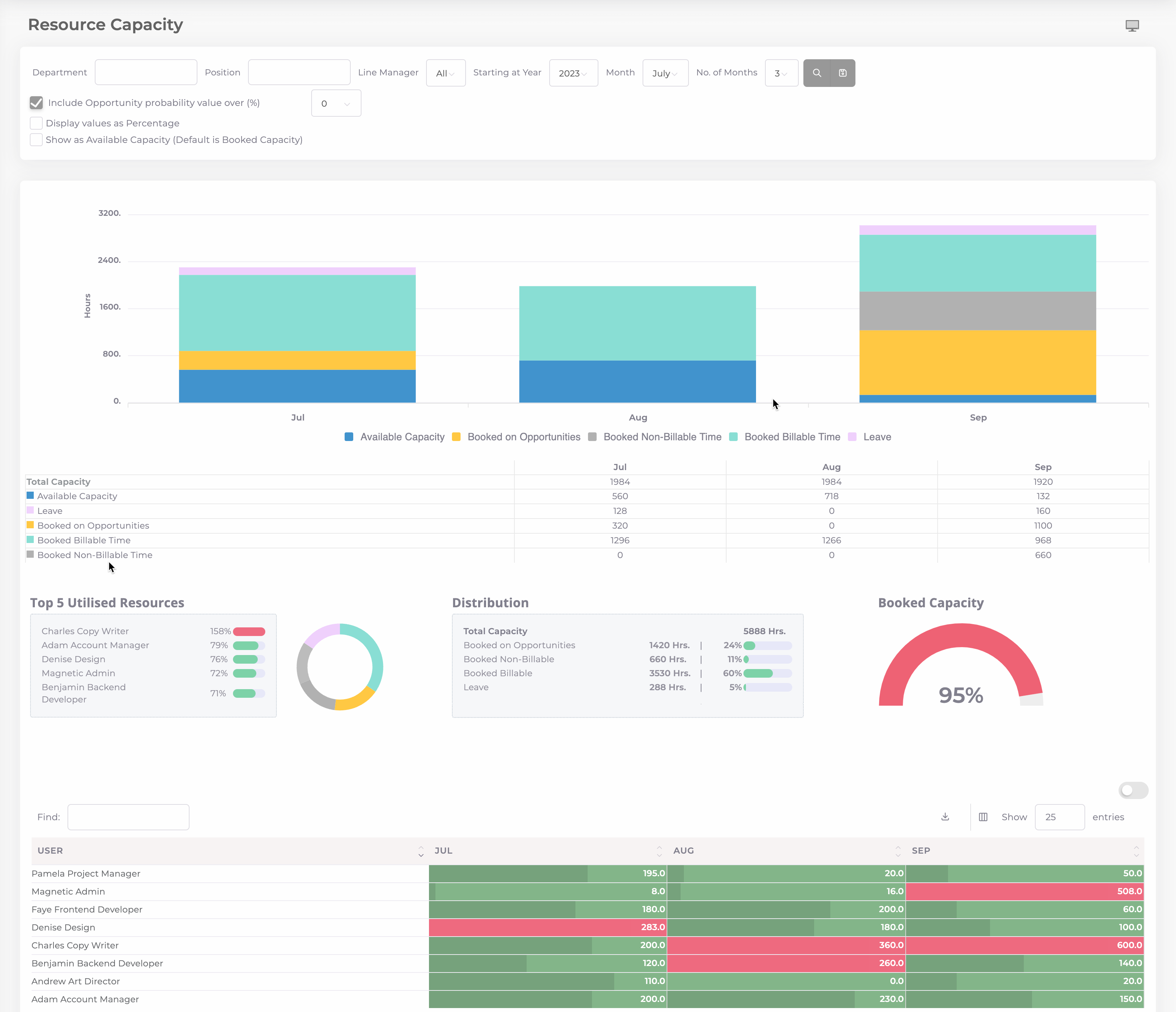
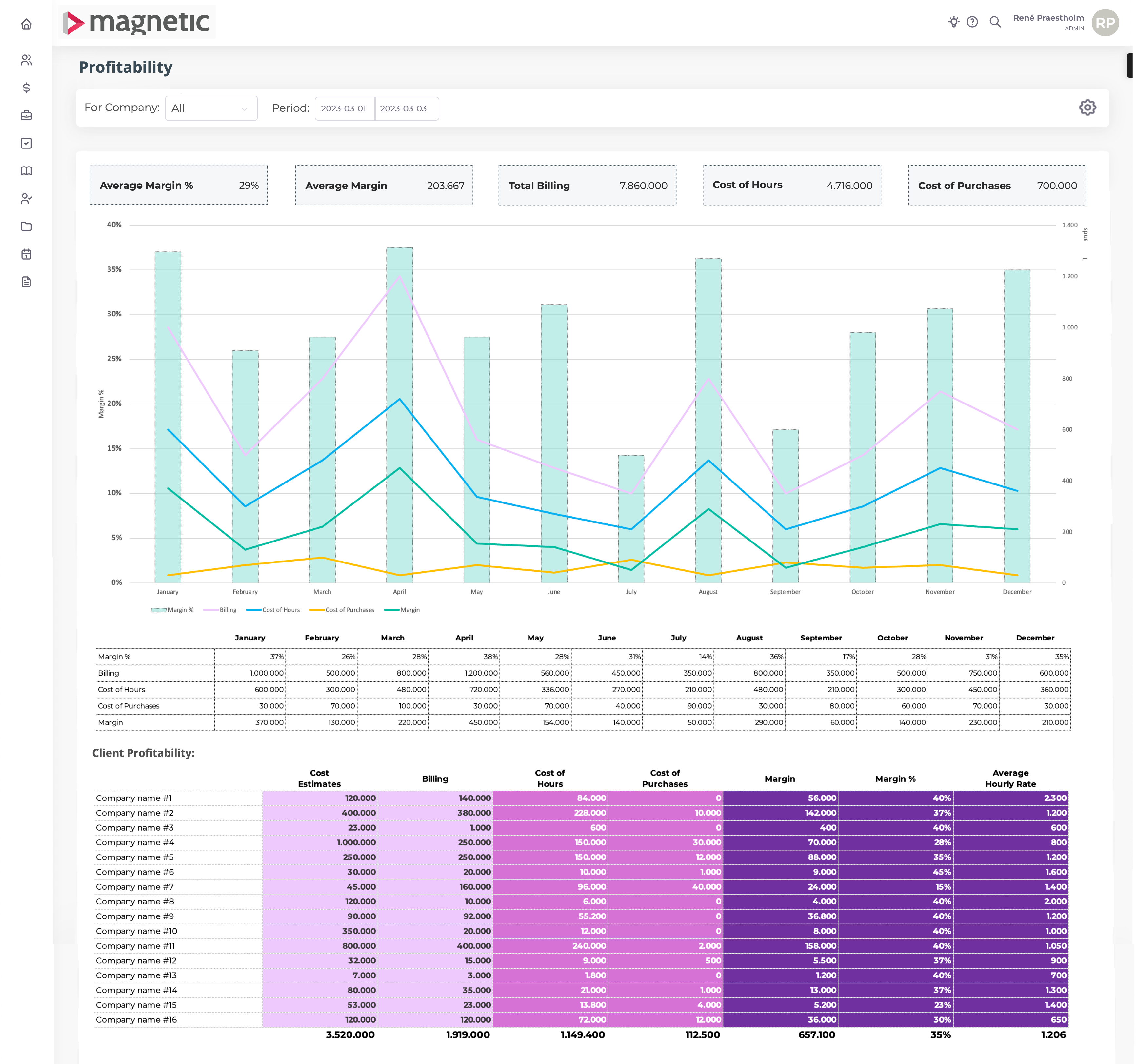
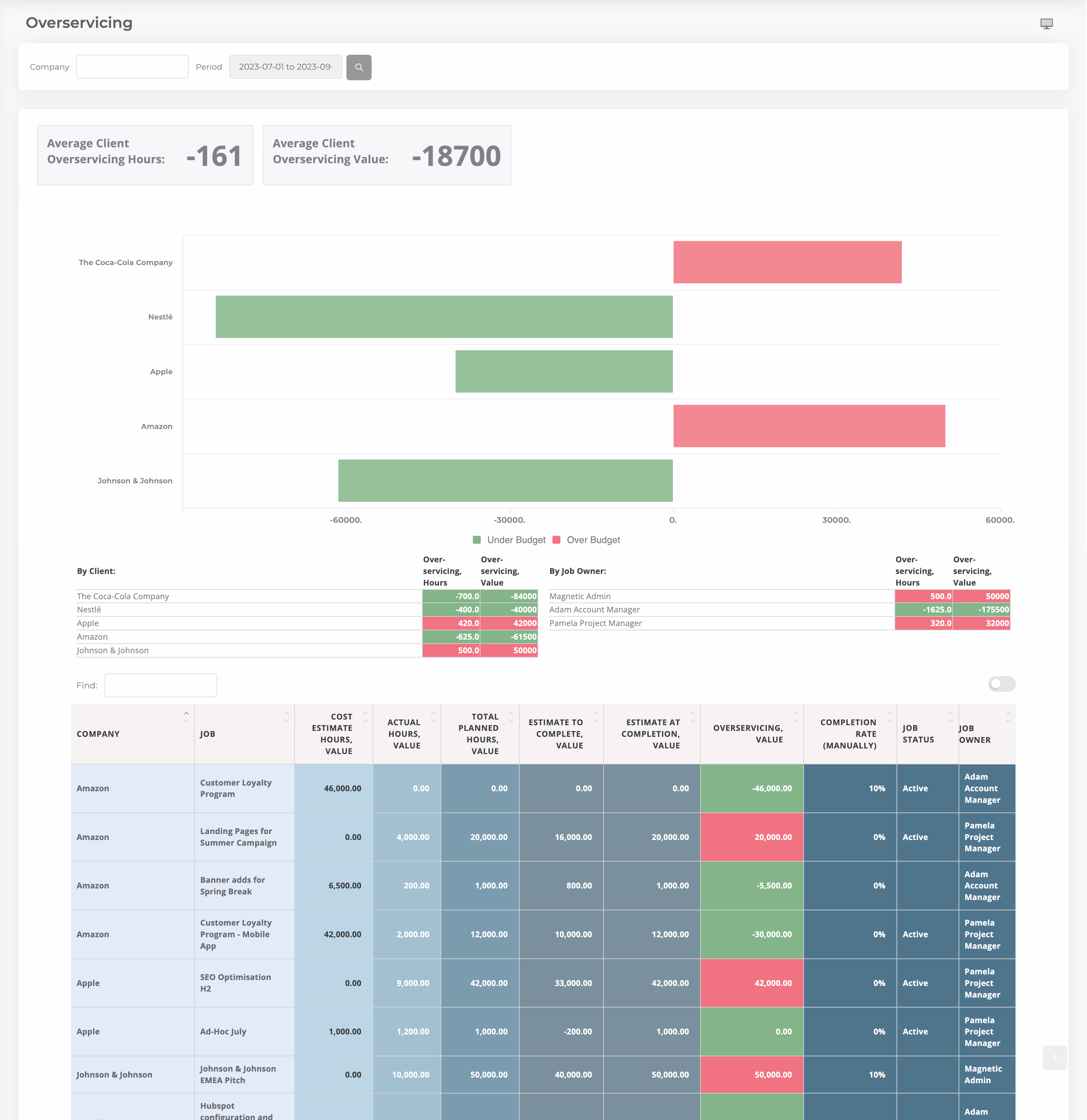
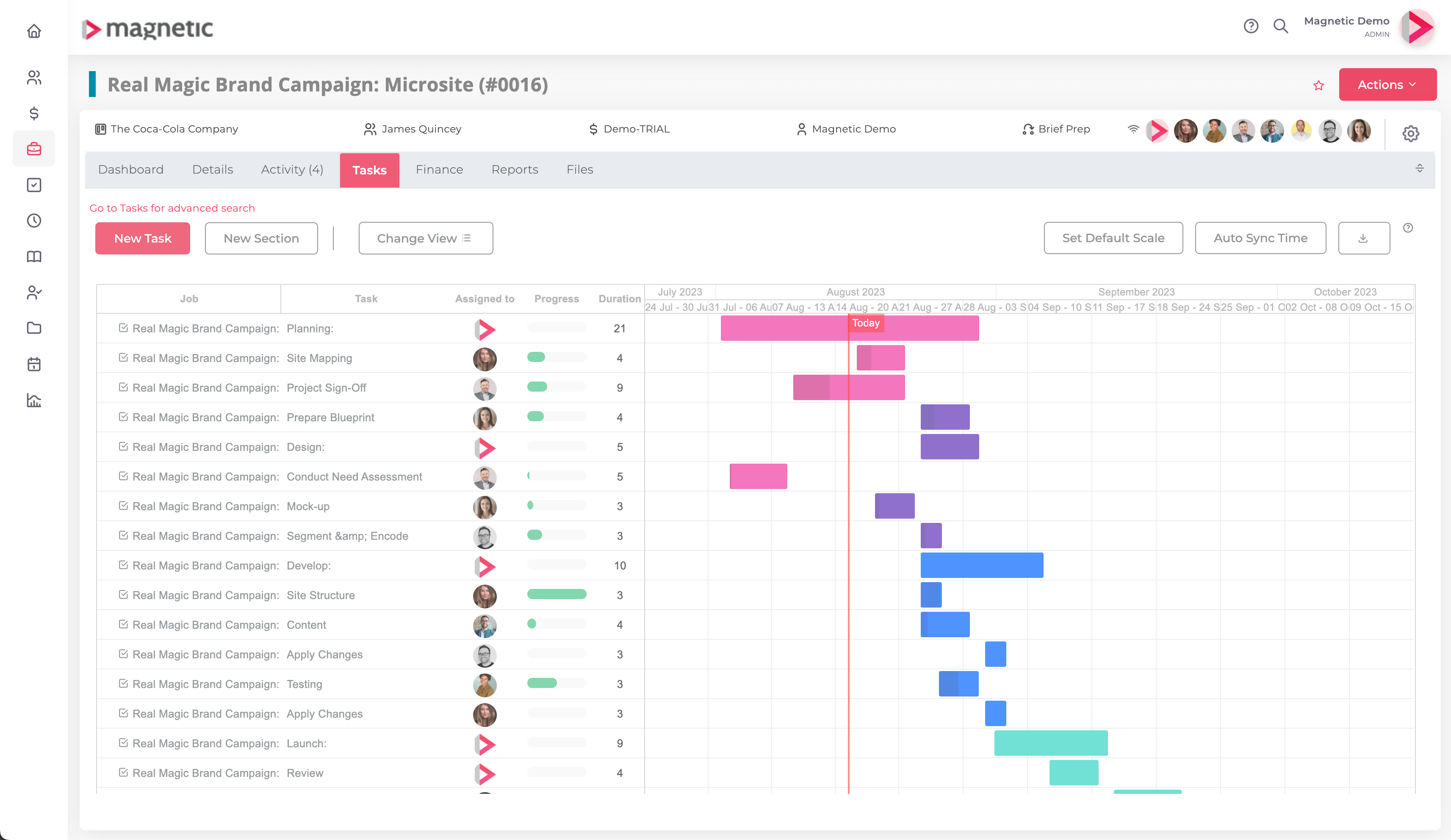
Displays projects’ financial performance through key financial indicators such as Actual Net/Gross Margin, un-billable work and supplier purchases.Screenshot of the navigable Resource Capacity dashboard in Magnetic, where users can apply filters based on department, position, or line manager. It provides instant visibility into available capacity, booked capacity across billable and non-billable work, opportunities, and leave time.Screenshot of the profitability dashboard financial tool, that offers a concise and real-time overview of a company's financial performance. It consolidates key metrics, providing a snapshot of revenue, costs, and profit margins. Customizable filters and dynamic charts enable stakeholders to analyze specific aspects of any business, fostering informed decision-making.Screenshot of Magnetic's comprehensive dashboard, providing tools to monitor and manage client engagements.

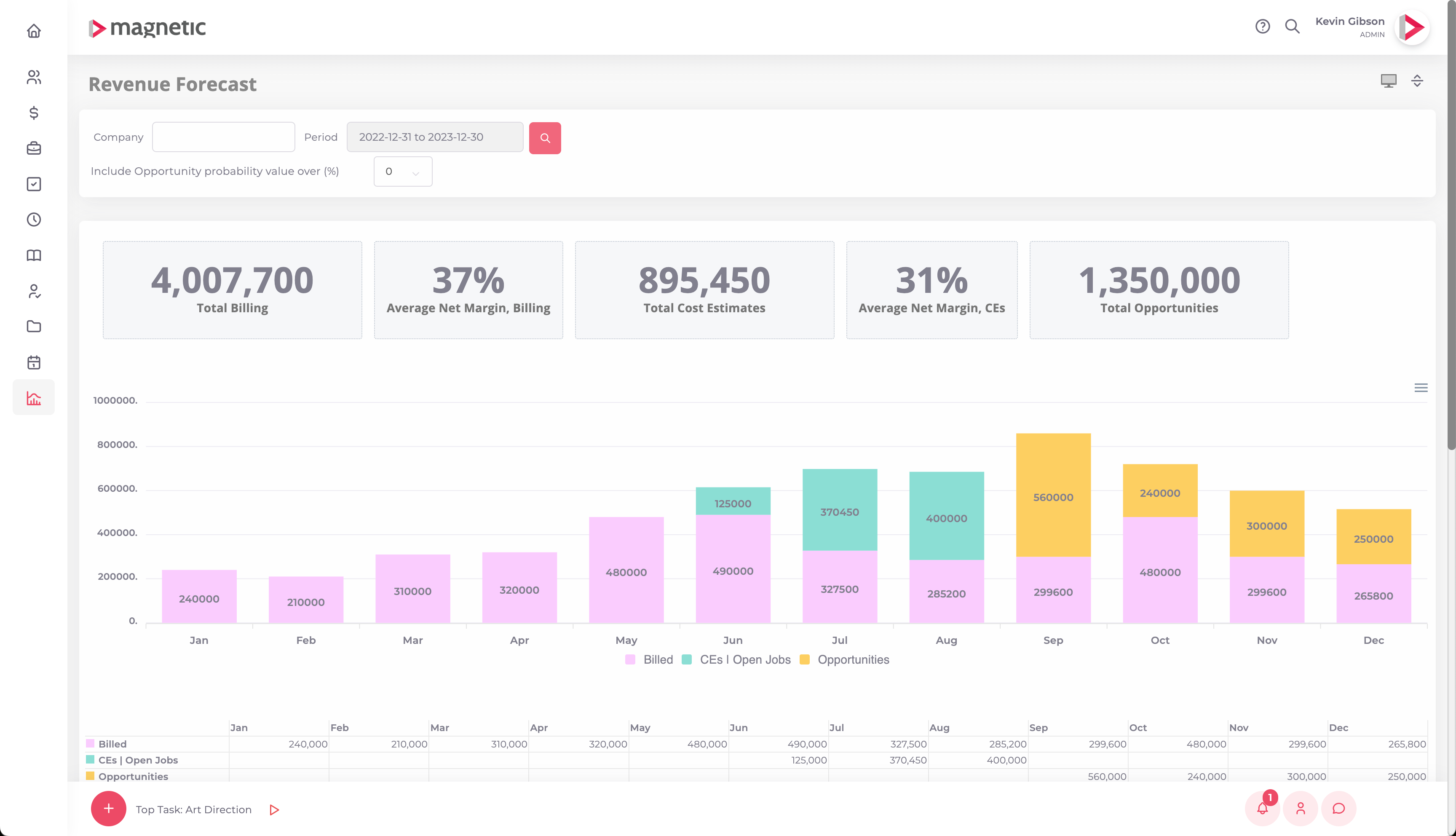
This helps users to stay informed and in control through Magnetic's interface, using valuable insights into a projects and client relationships for improved efficiency and client satisfaction.Screenshot of Magnetic's Revenue Forecast, used to monitor billings, monitor budgets for open projects, and factor in potential revenue from upcoming opportunities. With real-time tracking and analysis capabilities, Magnetic helps to drive informed decisions.Screenshot of customisable templates used to create precise cost estimates and time plans. This helps to ensure accurate client quotes and allocate tasks with optimal timings, maximising productivity and project success.