BigPicture vs. Birdview

Overview
ProductRatingMost Used ByProduct SummaryStarting Price
BigPicture
Score 0.0 out of 10
N/A
BigPicture is a Portfolio, Product, and Project Management application for Atlassian Jira. It gives managers clarity of information, helps them visualize even complex initiatives, distribute workloads and allocate resources, coordinate team's work, report on progress, and ensure perfect strategy-to-execution alignment at all levels. The system supports agile, classic, and hybrid management methodologies and allows for combining them freely at the portfolio level. BigPicture is presented by the…N/A
Birdview
Score 8.8 out of 10
N/A
Easy Projects is a project management tool designed for a wide range of businesses (small to mid-sized and enterprise level). It includes both basic features like creating projects and tasks and filling in the calendar, and also some advanced ones, including an interactive Gantt chart, an executive dashboard, time tracking and billing. It provides integration with MS Outlook, is customizable and has SaaS/On-Premise options.
$6
per month
Pricing
BigPictureBirdview
Editions & Modules
No answers on this topic
Essentials
$6
per month
Business
$12
per month
Platform
$19
per month
Offerings
Pricing Offerings
BigPictureBirdview
Free Trial
YesYes
Free/Freemium Version
NoNo
Premium Consulting/Integration Services
NoNo
Entry-level Setup FeeOptionalOptional
Additional Details
More Pricing Information
Community Pulse
BigPictureBirdview
Features
BigPictureBirdview
Project Management
Comparison of Project Management features of Product A and Product B
BigPicture
-
Ratings
Birdview
8.1
Ratings
6% above category average
Task Management00 Ratings8.50 Ratings
Resource Management00 Ratings7.10 Ratings
Gantt Charts00 Ratings8.50 Ratings
Scheduling00 Ratings8.00 Ratings
Workflow Automation00 Ratings7.00 Ratings
Team Collaboration00 Ratings7.50 Ratings
Support for Agile Methodology00 Ratings7.50 Ratings
Support for Waterfall Methodology00 Ratings7.00 Ratings
Document Management00 Ratings10.00 Ratings
Email integration00 Ratings7.90 Ratings
Mobile Access00 Ratings7.90 Ratings
Timesheet Tracking00 Ratings8.90 Ratings
Change request and Case Management00 Ratings8.00 Ratings
Budget and Expense Management00 Ratings8.90 Ratings
Professional Services Automation
Comparison of Professional Services Automation features of Product A and Product B
BigPicture
-
Ratings
Birdview
8.3
Ratings
10% above category average
Project & financial reporting00 Ratings7.50 Ratings
Integration with accounting software00 Ratings9.10 Ratings
Best Alternatives
BigPictureBirdview
Small Businesses
monday.com
monday.com
Score 8.6 out of 10
Stackby
Stackby
Score 9.0 out of 10
Medium-sized Companies
Planview PPM Pro
Planview PPM Pro
Score 9.0 out of 10
InEight
InEight
Score 8.3 out of 10
Enterprises
Planview PPM Pro
Planview PPM Pro
Score 9.0 out of 10
InEight
InEight
Score 8.3 out of 10
All AlternativesView all alternativesView all alternatives
User Ratings
BigPictureBirdview
Likelihood to Recommend
-
(0 ratings)
7.1
(0 ratings)
Likelihood to Renew
-
(0 ratings)
7.3
(0 ratings)
Usability
-
(0 ratings)
7.3
(0 ratings)
Support Rating
-
(0 ratings)
7.3
(0 ratings)
Implementation Rating
-
(0 ratings)
7.3
(0 ratings)
User Testimonials
BigPictureBirdview
Likelihood to Recommend
No answers on this topic
I think as a project management software, Easy Projects is great. We used spreadsheets before, and that led to a whole mess of confusion. Easy Projects gets everything in one place online -- you can access it from anywhere with an Internet connection and everyone is working off the same files. This works well for us as a marketing/graphic design group. Our colleagues in web design use it, as well, I'm told with success. So I know those two scenarios will work with the Easy Projects system. If you are selecting project management software, definitely know what you need a system to do in its most basic form -- then see what additional elements appeal to you. One thing you may want to investigate during your evaluation of Easy Projects is server space. We host this program and its files on an internal server, so we have to be sure there is enough space to accommodate open jobs and archive files.
Read full review
Pros
No answers on this topic
  • Easy Projects is great for project management. It allows you to assign users, set tasks and end dates, and keep it all together in one working file/job. It's a project manager's dream -- you can look inside and see exactly what is going on and any missed deadlines.
  • Easy Projects allows good customization of the fields. We have worked it so that in a job file, we can enter info about things specific to publication design -- size, file format, delivery location, etc. And we've been able to change these further over time as our needs change.
  • Easy Projects allows for archiving of completed jobs. You don't have to see them every time you log in, but it's great to be able to go back and search through completed jobs (even several years back) to see what was done last time, who was assigning, costs, etc.
  • Easy Projects allows you to pull reports and export them. This has proved helpful when we needed an overall log of jobs for a client or to pull a large number of costs.
Read full review
Cons
No answers on this topic
  • Would love to see a way to create a project plan that is user friendly with various colours
  • More robust reporting that would provide easy view to budget by task by person
  • Would like to view various projects in different windows without going back and forth
Read full review
Likelihood to Renew
No answers on this topic
EP is great but could be better. EP has been a wonderful tool within our organization, it has helped us control expenses, resources, and the time needed to invest in each project, however when it comes to presenting reports and details it is a bit weak, there are more tools specialized in data visualization, and it would be good to make some kind of integration between EP and the other market alternatives
Read full review
Usability
No answers on this topic
EP is easy to use and adaptable, its menu is intuitive and the design is pleasant.
Read full review
Support Rating
No answers on this topic
In my personal experience, I only needed EP support once and the truth is that they attended me very well and very quickly, they helped me with what I needed, it was a question regarding the use of WebServices, they solved my doubt and then they contacted me another agent to verify that everything was resolved and if they could help me with anything else
Read full review
Implementation Rating
No answers on this topic
I am really satisfied with the implementation of EP in our organization, since it is a very useful tool in our day-to-day work
Read full review
Alternatives Considered
No answers on this topic
Most project management systems are fairly the same, however, this would be better than monday.com in that it is more suited for project management professionals, and monday.com is more for anyone to use because it's more simple. This means Easy Projects are better equipped for the details needed to manage a project. The only drawback if you are a small group is that monday.com offers a free version where Easy Projects does not.
Read full review
Return on Investment
No answers on this topic
  • Increased team collaboration improved the results significantly, because we managed to reduce the amount of time wasted on unnecessary iterations, therefore reducing costs.
  • The reasonable pricing enabled us to enjoy the service we needed with with less impact on our budget than we've expected.
Read full review
ScreenShots

BigPicture Screenshots

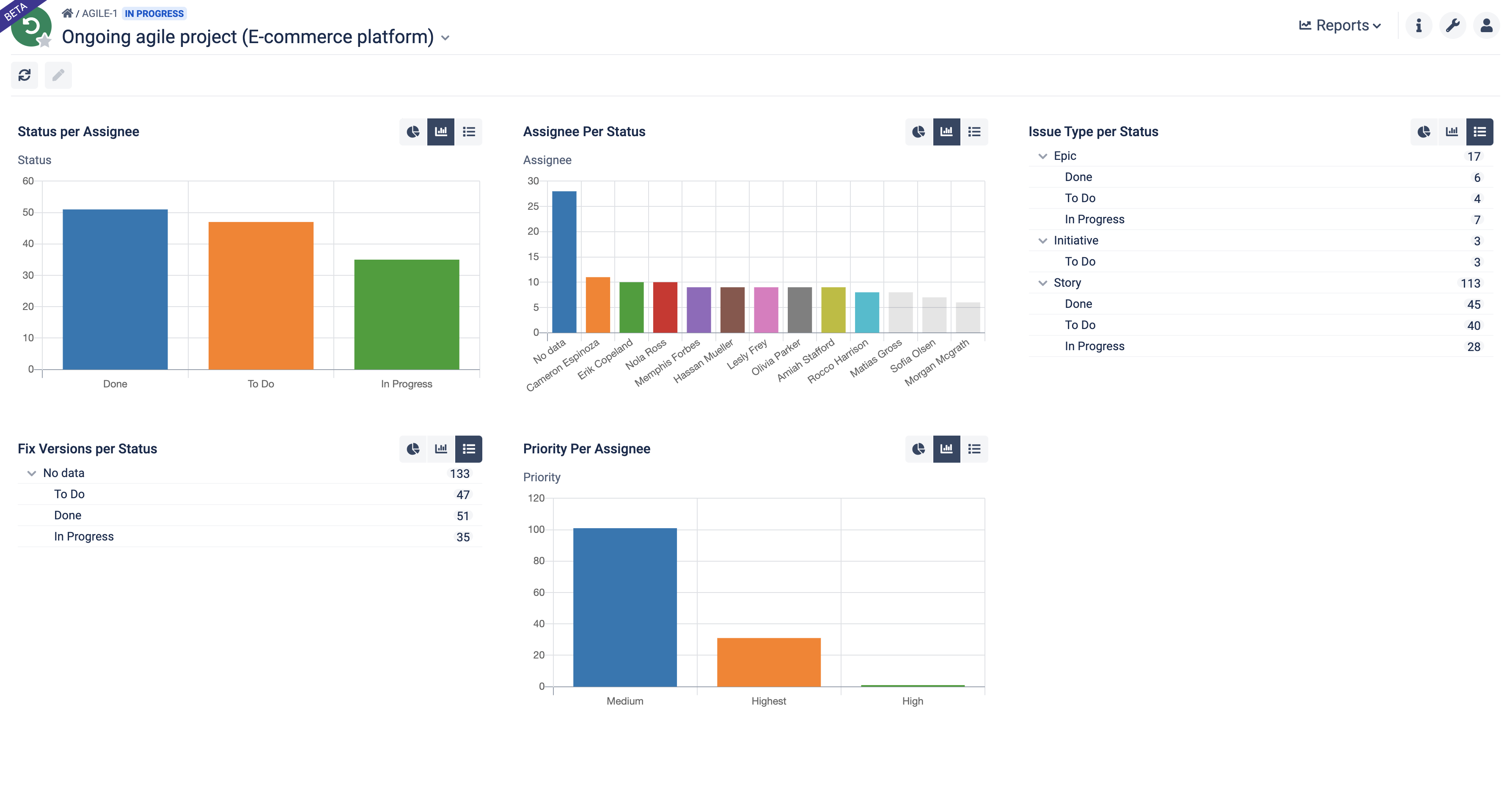
Screenshot of Build your portfolio-level command center. Visualize high-level data on initiatives in the form of a hierarchical tree, timeline, or a Kanban board.Screenshot of Craft informative timelines and roadmaps at all granularity levels. Visualize dependencies between tasks and create various What-if scenarios.Screenshot of Visualize dependencies between various tasks, teams, and resources. Bring more predictability to your agile planning, Scrum, SAFe®, or other methodologies.Screenshot of Assign tasks to individuals and teams in less than a second. Visualize over and under allocation. Automatically plan workloads in accordance with resource availability.Screenshot of Recognize the reality of your project/program/product during the planning or execution phase. Manage risks by simply drag & drop.Screenshot of Generate drillable reports and measure the health of your Iterations, Program Increments, initiatives, and the whole portfolio.

Birdview Screenshots

Screenshot of Resource ManagementScreenshot of Resource Simulation ToolScreenshot of Gantt ChartScreenshot of Kanban BoardScreenshot of Time TrackingScreenshot of Finance Management