Barracuda CloudGen Firewall vs. BrowseControl by CurrentWare

Overview
ProductRatingMost Used ByProduct SummaryStarting Price
Barracuda CloudGen Firewall
Score 9.4 out of 10
N/A
Barracuda CloudGen Firewalls provides a wide range of security and connectivity features, including web filtering, NAC and SSL VPN and other features for remote access, as well as protection as edge devices and IoT security.N/A
BrowseControl by CurrentWare
Score 10.0 out of 10
N/A
BrowseControl is a content filtering software for configuring content access to websites and Windows applications based on user, device, department, or other Organizational Unit (OU). BrowseControl's content filtering features allow administrators to configure the internet and application usage permissions of the students, employees, and patrons that use computers within their network. Content filtering policies for websites, applications, and files can be…
$6
per month per user
Pricing
Barracuda CloudGen FirewallBrowseControl by CurrentWare
Editions & Modules
No answers on this topic
10-99 Users
$6
per month per user
100+ Users
Volume & prepurchase discounts available. Please contact sales for info.
Per User Per Month
Offerings
Pricing Offerings
Barracuda CloudGen FirewallBrowseControl by CurrentWare
Free Trial
YesYes
Free/Freemium Version
NoNo
Premium Consulting/Integration Services
NoNo
Entry-level Setup FeeNo setup feeNo setup fee
Additional DetailsBarracuda offers prospective buyers a build and quote tool on their website.Price per license is based on purchase volume. There are additional discounts available for educational organizations, non-profits, managed services providers, and for businesses that pre-purchase multiple year plans.
More Pricing Information
Community Pulse
Barracuda CloudGen FirewallBrowseControl by CurrentWare
Features
Barracuda CloudGen FirewallBrowseControl by CurrentWare
Firewall
Comparison of Firewall features of Product A and Product B
Barracuda CloudGen Firewall
9.5
Ratings
10% above category average
BrowseControl by CurrentWare
-
Ratings
Identification Technologies9.70 Ratings00 Ratings
Visualization Tools8.50 Ratings00 Ratings
Content Inspection9.40 Ratings00 Ratings
Policy-based Controls9.80 Ratings00 Ratings
Active Directory and LDAP9.60 Ratings00 Ratings
Firewall Management Console9.60 Ratings00 Ratings
Reporting and Logging9.40 Ratings00 Ratings
VPN9.70 Ratings00 Ratings
High Availability9.90 Ratings00 Ratings
Stateful Inspection9.80 Ratings00 Ratings
Proxy Server9.00 Ratings00 Ratings
Best Alternatives
Barracuda CloudGen FirewallBrowseControl by CurrentWare
Small Businesses
pfSense
pfSense
Score 9.9 out of 10

No answers on this topic

Medium-sized Companies
Quantum Firewalls and Security Gateways
Score 9.6 out of 10
Quantum Firewalls and Security Gateways
Score 9.6 out of 10
Enterprises
Palo Alto Networks Virtualized Next-Generation Firewalls - VM Series
Score 10.0 out of 10
Quantum Firewalls and Security Gateways
Score 9.6 out of 10
All AlternativesView all alternativesView all alternatives
User Ratings
Barracuda CloudGen FirewallBrowseControl by CurrentWare
Likelihood to Recommend
10.0
(0 ratings)
-
(0 ratings)
Usability
5.5
(0 ratings)
-
(0 ratings)
Support Rating
6.0
(0 ratings)
-
(0 ratings)
User Testimonials
Barracuda CloudGen FirewallBrowseControl by CurrentWare
Likelihood to Recommend
The firewalls management is made easy through its very good management software. It has a lot of features such as VPN, ATP, IPS, Real-time log views, Active Directory integration, Virus Scanning of traffic / file downloads, High Availability Failover, Qos / Traffic Shaping, and a nice quick glance dashboard.
Read full review
No answers on this topic
Pros
  • Increased level of network protection against threats.
  • Visibility and control of applications that users access.
  • URL Filtering to block unauthorized or prohibited websites on the internal corporate network.
  • Protection against diverse malware at the edge of the network.
  • Firewall redundancy with another backup appliance.
Read full review
No answers on this topic
Cons
  • Very complex and steep learning curve to get up to speed.
  • Multiple ways to configure for the same service or feature. Takes time to determine "your" customized build.
  • Interface can sometimes be clunky when trying to determine how it's organized or arranged. Again, steep learning curve.
Read full review
No answers on this topic
Usability
Easy enough to use and configure using the management UI. Reporting from the web filter is a little clunky, and not very user friendly. To be perfectly honest, once it's set up and running, there isn't a lot to do from the day-to-day side of things, which is not a bad thing.
Read full review
No answers on this topic
Support Rating
They are very quick to answer the phone and I think I haven’t waited more than 5 minutes in the queue and if you have to hang up they actually call you back when it’s your turn in line. They have a secure tunnel that you can open for them to get into your device and help you with basically anything. It’s pretty magical if you ask me.
Read full review
No answers on this topic
Alternatives Considered
We used a much alder Cisco ASA router that was chocking our bandwidth and it couldn’t really be compared. It was clunky and horrible at best. Our WatchGuard was overly complicated and difficult to manage and required a version matching thick client installed locally to manage the firewall. The Barracuda solved a bunch of issues from both of these devices and allows me to really save time and money with its easy to configure the interface and inexpensive yet quality device and interface allow me to feel like I am getting a great value for my security.
Read full review
No answers on this topic
Return on Investment
  • Really neutral given we came from the x series. The move to the x series was a huge positive in terms of time spent managing and the ability to get what needed to be done, well done. The move to the NG was just the next step.
  • I will say the one thing, in terms of value, that is given is the firewall admin application. This one program saves a ton of time in configuration versus using the web-based configuration. You can only pick one, and for me, it's a no brainer - turn the web-based config off and use the app.
Read full review
No answers on this topic
ScreenShots

Barracuda CloudGen Firewall Screenshots

Screenshot of Screenshot of Screenshot of Screenshot of Screenshot of

BrowseControl by CurrentWare Screenshots
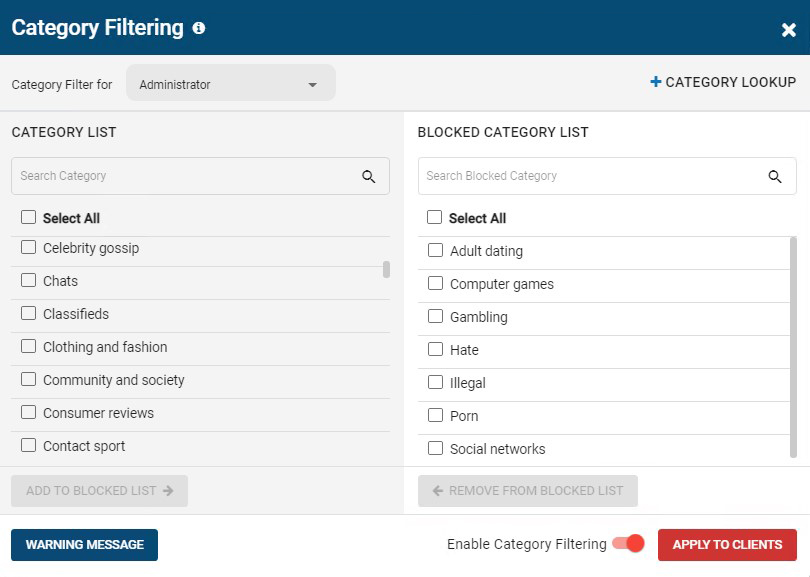
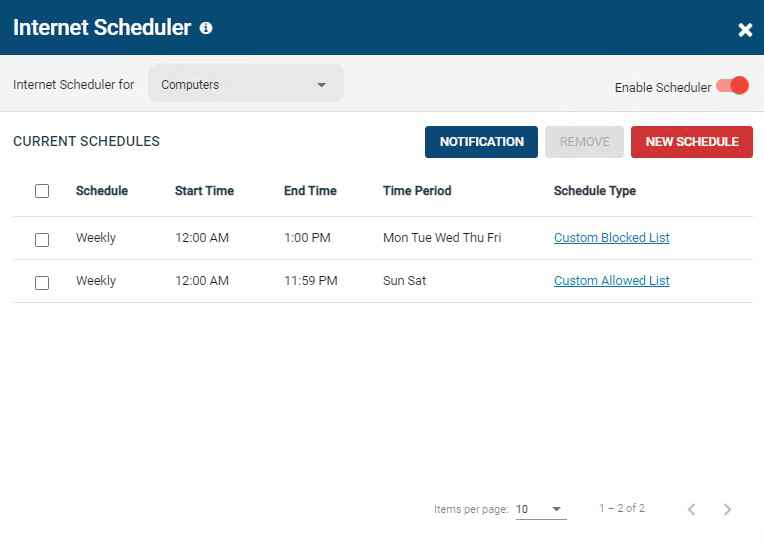
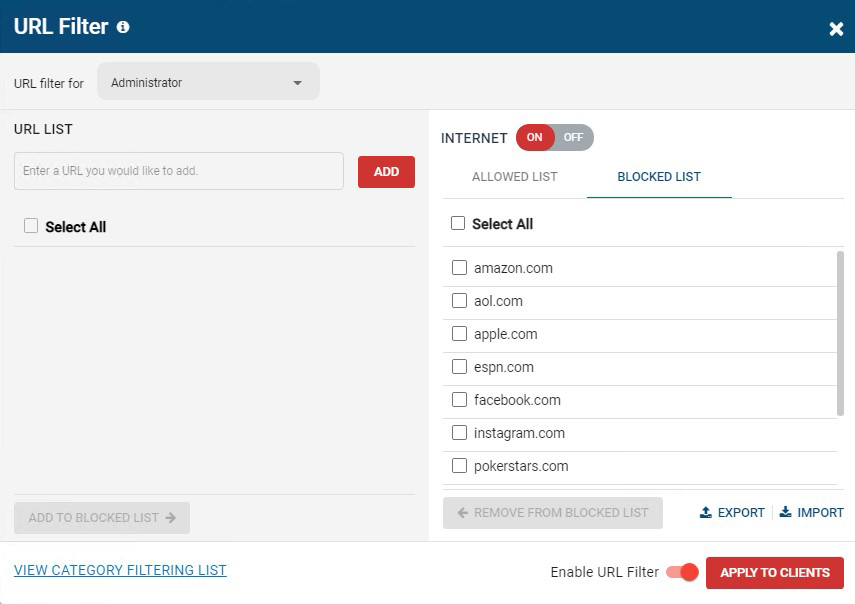
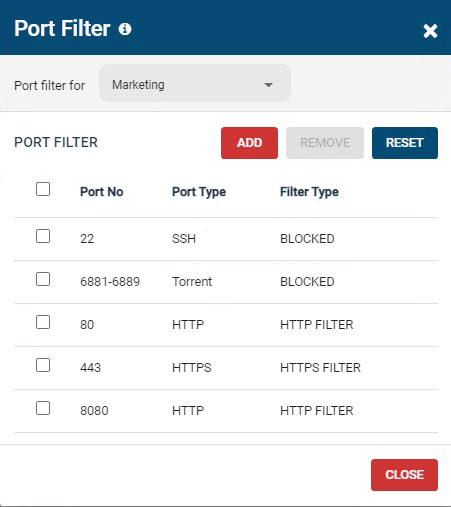
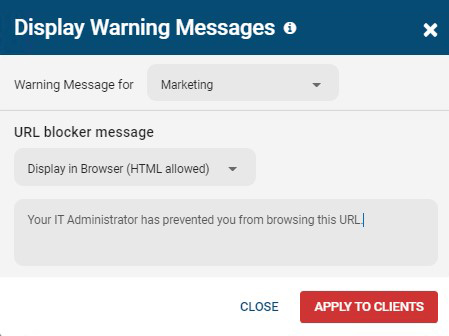
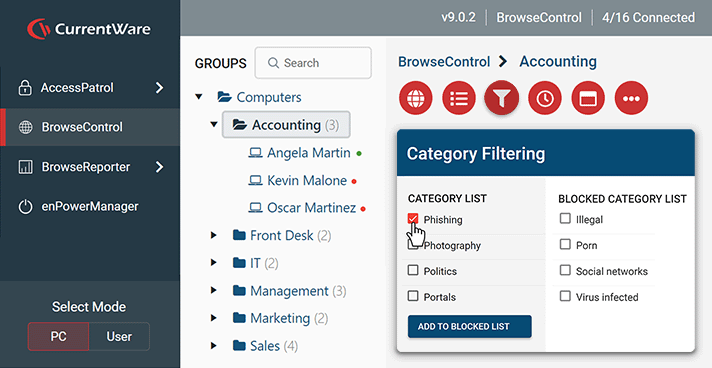
Screenshot of BrowseControl's category filtering feature window. The URL category database is constantly updated with new URLs, making the blocking of porn, malware-infected sites, social media, and other undesirable websites as easy as a few clicks.Screenshot of BrowseControl's internet scheduler feature window. Allowed and block lists can be scheduled to provide unique internet restriction policies for special occasions and breaks.Screenshot of BrowseControl's URL filter. Specific URLs/Domains can be added to the allowed or blocked list for granular control over employee internet use.Screenshot of BrowseControl's port filter. The port filter blocks egress and ingress network traffic based on network port numbers and port ranges. This allows network administrators to block unused ports and reduce the attack surface of their network.Screenshot of BrowseControl's warning message. When a user attempts to access a blocked website they will be presented a warning message. The message can be customized to include links to a company's acceptable use policy, or any other messaging.Screenshot of BrowseControl web console