AzureDevOps Server (formerly Team Foundation Server, or TFS) is a test management and application lifecycle management tool, from Microsoft's Visual Studio offerings. To license Azure DevOps Server an Azure DevOps license and a Windows operating system license (e.g. Windows Server) for each machine running Azure DevOps Server.
N/A
SpiraTest
Score8 out of 10
Mid-Size Companies (51-1,000 employees)
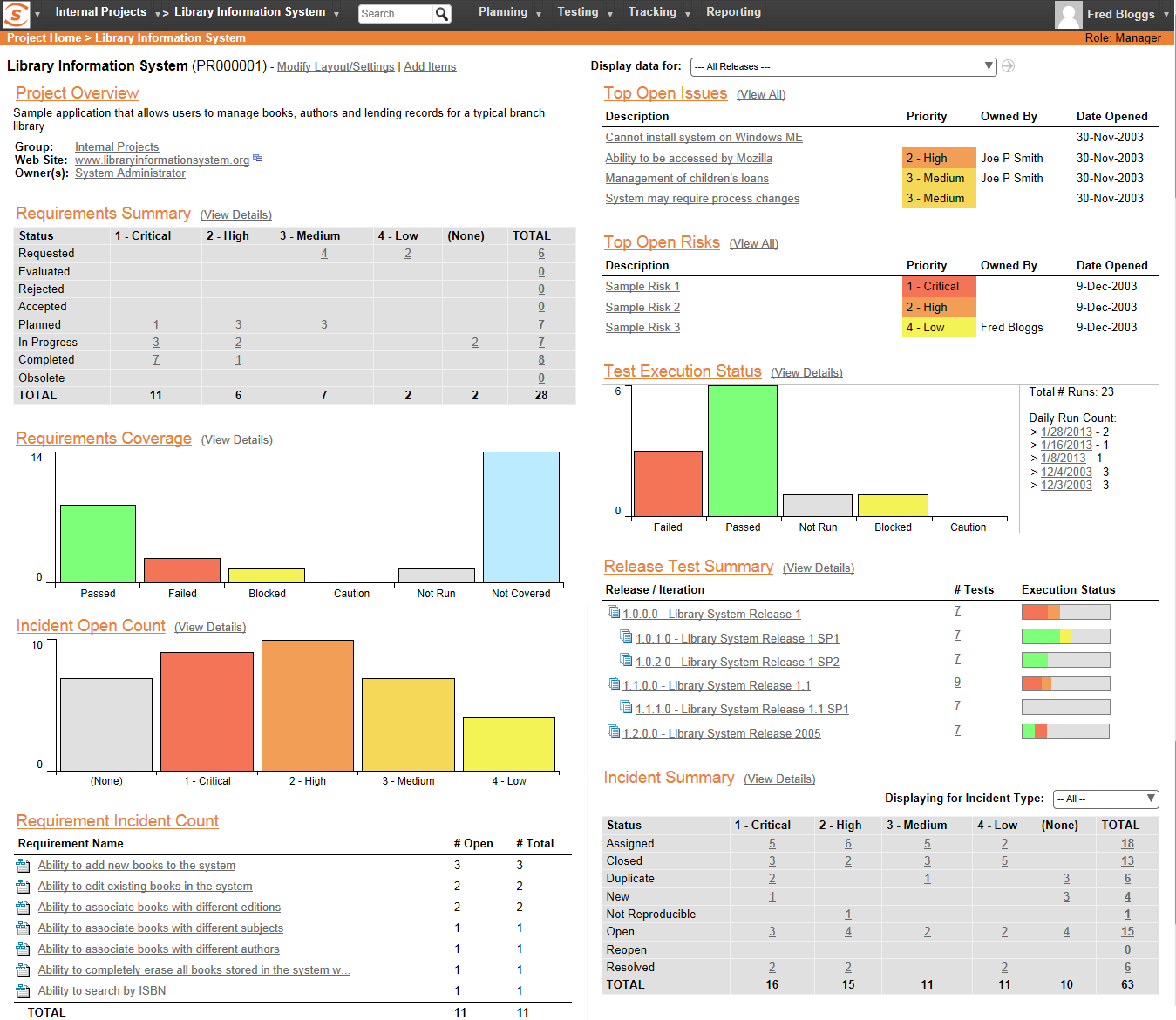
SpiraTest allows customers to manage their software testing and quality assurance activities. It provides requirements management, test management and bug-tracking functionality with integrated reporting.
$130.99
per month 3 concurrent users (minimum)
Pricing
Azure DevOps Server
SpiraTest
Editions & Modules
No answers on this topic
Cloud
$43.66
per month per concurrent user
Download
$423.66
per year per concurrent user
Offerings
Pricing Offerings
Azure DevOps Server
SpiraTest
Free Trial
No
Yes
Free/Freemium Version
No
No
Premium Consulting/Integration Services
No
No
Entry-level Setup Fee
No setup fee
No setup fee
Additional Details
—
Discount available for annual billing on Cloud solution. 3 concurrent user minimum. Volume concurrent user discount available.
A de minimis incentive was given to thank the reviewer for their time. The incentive was not used to bias or drive a particular response, nor was the incentive contingent on a positive endorsement. More Info
Azure DevOps is good to use if you are all-in on the Microsoft Azure stack. It's fully integrated across Azure so it is a point-and-click for most of what you will need to achieve. If you are new to Azure make sure you get some outside experience to help you otherwise it is very easy to overcomplicate things and go down the wrong track, or for you to manually create things that come out of the box.
A de minimis incentive was given to thank the reviewer for their time. The incentive was not used to bias or drive a particular response, nor was the incentive contingent on a positive endorsement. More Info
I think SpiraTest is well suited as a test suite, but in situations where the team is already using multiple products from one particular provider, it may be better to go with that provider's test solution. This is because integrations are very important nowadays, and should be considered when picking your project management software. It should be noted that management selected SpiraTest primarily due to the low cost of the test software. I'm less familiar with other test software in the field, but if cost is an issue, you should take a look at SpiraTest.
A de minimis incentive was given to thank the reviewer for their time. The incentive was not used to bias or drive a particular response, nor was the incentive contingent on a positive endorsement. More Info
A de minimis incentive was given to thank the reviewer for their time. The incentive was not used to bias or drive a particular response, nor was the incentive contingent on a positive endorsement. More Info
A clean view of test case steps, expected results and the ability to record a result for each step quickly on one page per test set. This really helps testers work through executing manual test cases.
Hierarchical structure of releases and builds, requirements, and test cases.
Can quickly build test sets and/or test runs per build/release.
Simple identification of each test case, requirement, test run, build, release, etc.
A de minimis incentive was given to thank the reviewer for their time. The incentive was not used to bias or drive a particular response, nor was the incentive contingent on a positive endorsement. More Info
Basic reporting can become very verbose unless you set lots of filters and parameters.
The ability to customize some of the verbiage in the application would help bridge the gap between translating what SpiraTest's testing terminology is and the company culture uses for testing terminology.
A de minimis incentive was given to thank the reviewer for their time. The incentive was not used to bias or drive a particular response, nor was the incentive contingent on a positive endorsement. More Info
Because we are a Microsoft Gold Partner we utilize most of their software and we have so much invested in Team Foundation Server now it would take a catastrophic amount of time and resources to switch to a different product.
A de minimis incentive was given to thank the reviewer for their time. The incentive was not used to bias or drive a particular response, nor was the incentive contingent on a positive endorsement. More Info
For standard users the interface is friendly. but if you are a manager some tools are a little confusing to use, like the query system that you always need to create from scratch. Templates should be more helpful for queries and for standard procedures that you need to duplicate PBIs over time. The search history of Work Items is a little painful to use.
A de minimis incentive was given to thank the reviewer for their time. The incentive was not used to bias or drive a particular response, nor was the incentive contingent on a positive endorsement. More Info
I have not had to use the support for Azure DevOps Server. There have never been any issues where I was not able to figure it out or quickly resolve. Our Scrum Master has used support before though, and the service has always been prompt and clear with a customer-focus
A de minimis incentive was given to thank the reviewer for their time. The incentive was not used to bias or drive a particular response, nor was the incentive contingent on a positive endorsement. More Info
As promised during product selection, SpiraPlan support has always been quick and helpful. Replies almost always come back in hours (and often in an hour or two). And SpiraPlan's online tech support maintains all support conversations online so no need to look through emails to try to recall repllies.
A de minimis incentive was given to thank the reviewer for their time. The incentive was not used to bias or drive a particular response, nor was the incentive contingent on a positive endorsement. More Info
A de minimis incentive was given to thank the reviewer for their time. The incentive was not used to bias or drive a particular response, nor was the incentive contingent on a positive endorsement. More Info
In my opinion, DevOps covers the development process end to end way better than Jira or GitHub. Both competitors are nice in their specific fields but DevOps provides a more comprehensive package in my opinion. It is still crazy to see that the whole suite can be used for free. The productivity increase we realized with DevOps is worth real money!
A de minimis incentive was given to thank the reviewer for their time. The incentive was not used to bias or drive a particular response, nor was the incentive contingent on a positive endorsement. More Info
A de minimis incentive was given to thank the reviewer for their time. The incentive was not used to bias or drive a particular response, nor was the incentive contingent on a positive endorsement. More Info
It has streamlined the pipeline and project management for our agile effort.
It has helped our agile team get organized since that is a new methodology being leveraged within the Enterprise.
The calendar has improved visibility into different OOOs across the project team since we all come from different departments across the larger organization.
A de minimis incentive was given to thank the reviewer for their time. The incentive was not used to bias or drive a particular response, nor was the incentive contingent on a positive endorsement. More Info
A de minimis incentive was given to thank the reviewer for their time. The incentive was not used to bias or drive a particular response, nor was the incentive contingent on a positive endorsement. More Info