AzureDevOps Server (formerly Team Foundation Server, or TFS) is a test management and application lifecycle management tool, from Microsoft's Visual Studio offerings. To license Azure DevOps Server an Azure DevOps license and a Windows operating system license (e.g. Windows Server) for each machine running Azure DevOps Server.
N/A
PractiTest
Score8 out of 10
N/A
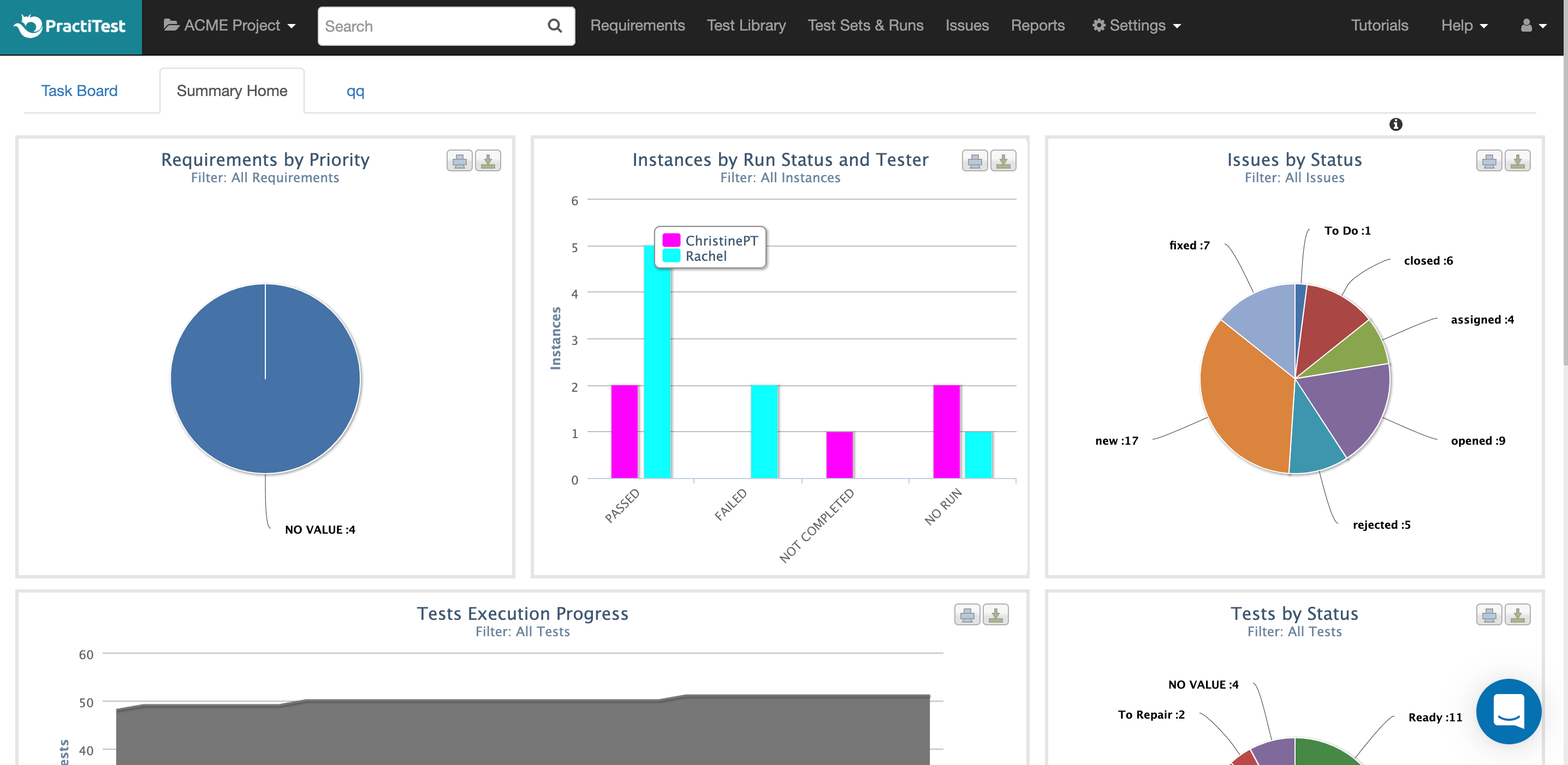
PractiTest is presented as a cloud-based test management tool that provides its customers with an end-to-end system to meet testing and QA needs. It is described by the vendor as flexible but methodological, enabling organizations to ensure visibility and communication at all levels. The solution aims to help users and project development teams streamline and manage their testing processes, while providing management with a clear and simple view of their project status at all times.
Azure DevOps is good to use if you are all-in on the Microsoft Azure stack. It's fully integrated across Azure so it is a point-and-click for most of what you will need to achieve. If you are new to Azure make sure you get some outside experience to help you otherwise it is very easy to overcomplicate things and go down the wrong track, or for you to manually create things that come out of the box.
A de minimis incentive was given to thank the reviewer for their time. The incentive was not used to bias or drive a particular response, nor was the incentive contingent on a positive endorsement. More Info
PractiTest works GREAT as a test case repository. It is very easy to gather metrics, filter, and sort based on custom fields. We were able to work with the API to pull our automation results in as well. The support team is always very quick with their responses and monitors the "in-app chat." They are very open to answering questions, providing best practice materials, and looking for additional feedback. If you already have a central location for all of your test cases and testing needs, then I guess you probably wouldn't need to add another. However, PractiTest has high capability and potential, so if it's set up properly you can easily save time managing your tests.
A de minimis incentive was given to thank the reviewer for their time. The incentive was not used to bias or drive a particular response, nor was the incentive contingent on a positive endorsement. More Info
A de minimis incentive was given to thank the reviewer for their time. The incentive was not used to bias or drive a particular response, nor was the incentive contingent on a positive endorsement. More Info
A de minimis incentive was given to thank the reviewer for their time. The incentive was not used to bias or drive a particular response, nor was the incentive contingent on a positive endorsement. More Info
A de minimis incentive was given to thank the reviewer for their time. The incentive was not used to bias or drive a particular response, nor was the incentive contingent on a positive endorsement. More Info
A de minimis incentive was given to thank the reviewer for their time. The incentive was not used to bias or drive a particular response, nor was the incentive contingent on a positive endorsement. More Info
Because we are a Microsoft Gold Partner we utilize most of their software and we have so much invested in Team Foundation Server now it would take a catastrophic amount of time and resources to switch to a different product.
A de minimis incentive was given to thank the reviewer for their time. The incentive was not used to bias or drive a particular response, nor was the incentive contingent on a positive endorsement. More Info
For standard users the interface is friendly. but if you are a manager some tools are a little confusing to use, like the query system that you always need to create from scratch. Templates should be more helpful for queries and for standard procedures that you need to duplicate PBIs over time. The search history of Work Items is a little painful to use.
A de minimis incentive was given to thank the reviewer for their time. The incentive was not used to bias or drive a particular response, nor was the incentive contingent on a positive endorsement. More Info
I have not had to use the support for Azure DevOps Server. There have never been any issues where I was not able to figure it out or quickly resolve. Our Scrum Master has used support before though, and the service has always been prompt and clear with a customer-focus
A de minimis incentive was given to thank the reviewer for their time. The incentive was not used to bias or drive a particular response, nor was the incentive contingent on a positive endorsement. More Info
The chat button is available to anyone who logs into PractiTest. In my experience, the support has always been very quick, very friendly, and very thorough. They make sure that your question is answered in a way that you understand it. They also provide documentation of best practices so you are never left hanging on what to do next.
A de minimis incentive was given to thank the reviewer for their time. The incentive was not used to bias or drive a particular response, nor was the incentive contingent on a positive endorsement. More Info
A de minimis incentive was given to thank the reviewer for their time. The incentive was not used to bias or drive a particular response, nor was the incentive contingent on a positive endorsement. More Info
In my opinion, DevOps covers the development process end to end way better than Jira or GitHub. Both competitors are nice in their specific fields but DevOps provides a more comprehensive package in my opinion. It is still crazy to see that the whole suite can be used for free. The productivity increase we realized with DevOps is worth real money!
A de minimis incentive was given to thank the reviewer for their time. The incentive was not used to bias or drive a particular response, nor was the incentive contingent on a positive endorsement. More Info
I've used many different Test Case Repository tools, and while each of them has its perks, I like the capabilities of PractiTest best. When creating a test in qTest for example, you can only input information into the fields provided, and you have everything set up in a folder tree structure. With PractiTest, we are able to create custom fields and filter our tests based on those fields to provide more accurate information in a readily available format while quickly searching for the filter instead of through a folder tree. TestRail did not appear to meet our needs as a company. It just didn't have the potential that we found with PractiTest. Zephyr for example worked seamlessly with Jira, which is really nice since that is what we use for the most part. However since we cater to many different clients, we needed an external Test Case repository so we could use something that wasn't tied to 1 Jira instance.
A de minimis incentive was given to thank the reviewer for their time. The incentive was not used to bias or drive a particular response, nor was the incentive contingent on a positive endorsement. More Info
It has streamlined the pipeline and project management for our agile effort.
It has helped our agile team get organized since that is a new methodology being leveraged within the Enterprise.
The calendar has improved visibility into different OOOs across the project team since we all come from different departments across the larger organization.
A de minimis incentive was given to thank the reviewer for their time. The incentive was not used to bias or drive a particular response, nor was the incentive contingent on a positive endorsement. More Info
A de minimis incentive was given to thank the reviewer for their time. The incentive was not used to bias or drive a particular response, nor was the incentive contingent on a positive endorsement. More Info