Azure Analysis Services delivers enterprise-grade BI semantic modeling capabilities with the scale, flexibility, and management benefits of the cloud. Azure Analysis Services helps transform complex data into actionable insights. Azure Analysis Services is built on the analytics engine in Microsoft SQL Server Analysis Services.
N/A
SAS Visual Analytics
Score 7.6 out of 10
Enterprise companies (1,001+ employees)
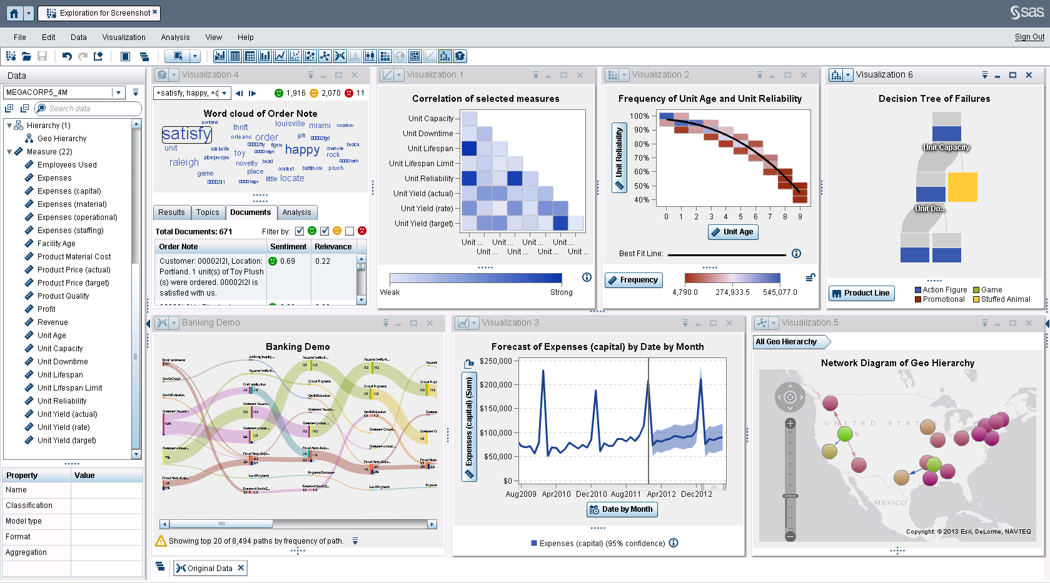
SAS Visual Analytics provides a complete platform for analytics visualization, enabling users to identify patterns and relationships in data that weren't initially evident. Interactive, self-service BI and reporting capabilities are combined with out-of-the-box advanced analytics so everyone can discover insights from any size and type of data, including text.
N/A
Pricing
Azure Analysis Services
SAS Visual Analytics
Editions & Modules
No answers on this topic
SAS Visual Analytics for SAS Cloud
$0
Annual By Users: 5, 10, 20
Offerings
Pricing Offerings
Azure Analysis Services
SAS Visual Analytics
Free Trial
No
Yes
Free/Freemium Version
No
No
Premium Consulting/Integration Services
No
No
Entry-level Setup Fee
No setup fee
No setup fee
Additional Details
—
SAS Visual Statistics and SAS Office Analytics are also available as add-ons.
More Pricing Information
Community Pulse
Azure Analysis Services
SAS Visual Analytics
Features
Azure Analysis Services
SAS Visual Analytics
BI Standard Reporting
Comparison of BI Standard Reporting features of Product A and Product B
Azure Analysis Services
8.7
Ratings
6% above category average
SAS Visual Analytics
8.3
Ratings
2% above category average
Pixel Perfect reports
8.90 Ratings
8.00 Ratings
Customizable dashboards
8.70 Ratings
8.00 Ratings
Report Formatting Templates
8.50 Ratings
9.00 Ratings
Ad-hoc Reporting
Comparison of Ad-hoc Reporting features of Product A and Product B
Azure Analysis Services
9.0
Ratings
11% above category average
SAS Visual Analytics
8.8
Ratings
9% above category average
Drill-down analysis
9.00 Ratings
9.00 Ratings
Formatting capabilities
8.90 Ratings
8.00 Ratings
Integration with R or other statistical packages
8.90 Ratings
8.00 Ratings
Report sharing and collaboration
9.00 Ratings
10.00 Ratings
Report Output and Scheduling
Comparison of Report Output and Scheduling features of Product A and Product B
Azure Analysis Services
9.0
Ratings
8% above category average
SAS Visual Analytics
9.2
Ratings
10% above category average
Publish to Web
9.10 Ratings
9.00 Ratings
Publish to PDF
8.90 Ratings
9.00 Ratings
Report Versioning
9.40 Ratings
9.00 Ratings
Report Delivery Scheduling
9.00 Ratings
10.00 Ratings
Delivery to Remote Servers
8.70 Ratings
9.00 Ratings
Data Discovery and Visualization
Comparison of Data Discovery and Visualization features of Product A and Product B
Microsoft Azure Analysis Services is best tool which is well suited for many type of scenarios. Like if the organization is dealing with a lot of critical data and need some better analysis and insights for that data then tool serves the best. It helps in depth analysis and getting the desired result which helps in making big decision for any organization. We can create role based access for sensitive data hence it is very helpful for security point of view. Helps in making the business more productive and taking decision based on facts. It is less appropriate for scenarios like where data amount is less and the solution is very costly and someone can get a cheaper solution. Also not suited for environment where user directory do not exist because without the help of user directory role could not be created hence proper utilization of this tool will not be possible.
SAS Business Intelligence is more suited to organizations which are already using SAS as the primary software for their analytics needs. Learning curve is relatively shorter for teams already skilled in BASE SAS. For organizations already working with open source software like Julia and Python, it doesn't make much sense to use SAS BI.
SAS BI makes it very easy to create interactive dashboards even for someone who is not from an IT background. For some specific requirements, basic knowledge of SQL is good enough.
A lot of functions have been predefined which makes it very convenient to create dashboards and reports. One doesn't need to be from an IT or a programming background to understand and create dashboards.
It supports other programming languages like R and also has a seamless API integration with various data management platforms.
Microsoft Azure Analysis Services is very costly solution and in that price we can get some better business intelligence tool with lot more of capabilities
The dashboard or we can say user interface is complex and need time to understand and gain expertise in order for proper working.
It needs continuation monitoring which is sometime a big task.
Sometime, the tool shows unusual behavior and become unstable, so we need to clear temp files for proper functioning.
There is no other product that can match SAS. There are some products that can compare to ETL but lack the analytics that SAS has. Others can perform a limited set of analytical procedures but lack the data processing that comes with SAS. Using thin client allows users to access data whenever they have an internet connection.
SAS BI is good for creating reports and dashboards and then sharing it with the users. It also has ability to manage access to the reports and dashboards but somehow with most of the world moving to open source languages R, Python and Julia, SAS BI feels to be archaic in terms of feature set and integrations it allow[s]. Also, comparing it with other Business Intelligence tools like Tableau and Microsoft BI, the functionality of SAS BI is very limited and doesn't justify the pricing.
When you call tech support, you are immediately routed to a person who can answer your question. Often they can answer on the spot. However, if they cannot, you are given a track number and then followed up with. There have been times when I have had multiple track numbers open and they will actually TRACK YOU DOWN to ensure that your problem has been resolved. Issues do not fall into black holes with SAS. They are also willing to do a WebEx with you to diagnose the problem by seeing your environment, which is always helpful.
We have used the IBM cloud which was truly a specific nightmare for our team. User experience, layout, and design is big for us as it understandably is with many people. Even if any type of program can technically do all that we need it to, we still found our team will not be as motivated or satisfied using it compared to something more visually appealing and smooth.
I have chosen SAS Visual Analytics because one of my colleagues suggests using the software for the same for our work. As earlier, we use to take a lot of time in analyzing the data but after using the SAS Visual Analytics software our work has improved and time has decreased. It's very helpful for us.