AWS SaaS Boost vs. Datadog

Overview
ProductRatingMost Used ByProduct SummaryStarting Price
AWS SaaS Boost
Score 8.7 out of 10
N/A
AWS SaaS Boost is an open source reference environment that helps Independent Software Vendor (ISVs) accelerate their move to Software-as-a-Service (SaaS). From small specialized software businesses to large global solution providers, AWS SaaS Boost aims to helps users accelerate moving applications to AWS with minimal modifications. Users can build, provision, and manage a SaaS environment with greater confidence based on AWS best practices and proven patterns from hundreds of successful…N/A
Datadog
Score 8.4 out of 10
N/A
Datadog is a monitoring service for IT, Dev and Ops teams who write and run applications at scale, and want to turn the massive amounts of data produced by their apps, tools and services into actionable insight.
$1.27
per month (billed annually) per host
Pricing
AWS SaaS BoostDatadog
Editions & Modules
No answers on this topic
Log Management
$1.27
per month (billed annually) per host
Infrastructure
$15.00
per month (billed annually) per host
Standard
$18
per month per host
Enterprise
$27
per month per host
DevSecOps Pro
$27
per month per host
APM
$31.00
per month (billed annually) per host
DevSecOps Enterprise
$41
per month per host
Offerings
Pricing Offerings
AWS SaaS BoostDatadog
Free Trial
NoYes
Free/Freemium Version
NoYes
Premium Consulting/Integration Services
NoNo
Entry-level Setup FeeNo setup feeOptional
Additional DetailsDiscount available for annual pricing. Multi-Year/Volume discounts available (500+ hosts/mo).
More Pricing Information
Community Pulse
AWS SaaS BoostDatadog
Best Alternatives
AWS SaaS BoostDatadog
Small Businesses
VMware Cloud Director
Score 8.6 out of 10
InfluxDB
InfluxDB
Score 8.8 out of 10
Medium-sized Companies
IBM Cloud for VMware Solutions
Score 7.0 out of 10
Sumo Logic
Sumo Logic
Score 9.4 out of 10
Enterprises
VMware Cloud Director
Score 8.6 out of 10
NetBrain Technologies
Score 9.2 out of 10
All AlternativesView all alternativesView all alternatives
User Ratings
AWS SaaS BoostDatadog
Likelihood to Recommend
8.0
(0 ratings)
9.0
(0 ratings)
Usability
-
(0 ratings)
10.0
(0 ratings)
Support Rating
-
(0 ratings)
8.9
(0 ratings)
User Testimonials
AWS SaaS BoostDatadog
Likelihood to Recommend
AWS SaaS Boost provides us with effective visualization capabilities of data. It also enables us integrate with a number of software but with some limitations. It has wonderful data merging capabilities .Boost's code is customizable enabling us modify it to meet our environmental requirements when needed. To use it well, one has to have high coding skills and should be familiar with AWS entanglements.
Read full review
A one-stop solution for everything you need. Multiple functionalities are tailored to meet specific business needs. Logs are essential for any business, and Datadog manages logs effectively. Rum sessions are something new to me and have given us a new perspective on how to reverse engineer issues that we see for our customers.
Read full review
Pros
  • Easy delivery of solutions to SaaS models.
  • consolidation of data
  • Open source
Read full review
  • Create Dashboards as per application, environments, and Custom metrics in one panel.
  • Log aggregation, one-stop Application monitoring tools for the whole infrastructure.
  • Playbooks, SLA definition, success and error quotas, request visualizations.
  • DB monitoring, Serverless stack monitoring.
  • Alerting of Production incidents so we can quickly resolve the issues on time.
Read full review
Cons
  • limited integration
  • One has to be at home with AWS complexities to effectively use it
Read full review
  • Alert windows cause lag in notifications (e.g. if the alert window is X errors in 1 hour, we won't get alerted until the end of the 1 hour range)
  • I would appreciate more supportive examples for how to filter and view metrics in the explorer
  • I would like a more clear interface for metrics that are missing in a time frame, rather than only showing tags/etc. for metrics that were collected within the currently viewed time frame
Read full review
Usability
No answers on this topic
Datadog's user interface is quite friendly and easy to navigate. With menus clearly categorized, and ability to bookmark important dashboards, one can easily find what they're looking for. For dashboards, ability to move and resize visualizations and group them, is really helpful to organize dashboards. Automatic suggestions from Datadog for important visualizations based on the metrics and logs would provide another level of ease of use.
Read full review
Support Rating
No answers on this topic
The support team usually gets it right. We did have a rather complicate issue setting up monitoring on a domain controller. However, they are usually responsive and helpful over chat. The downside would be I don’t think they have any phone support. If that is important to you this might not be a good fit.
Read full review
Alternatives Considered
No answers on this topic
I selected Datadog because of its features and the wide range of integration support. As I already told it supports more that 600+ integrations which helps and organization to keep everything in a single place and also its AI feature which is reducing the time for root cause analysis. Its custom dashboards features which helps us to visualize the data in a more attractive way.
Read full review
Return on Investment
  • Supports app transformations to SaaS, minimizing development work
  • Reduces time for development and experimenting, enabling faster delivery of software to our clients.
Read full review
  • Saved us (time & money) from developing our own monitoring utilities that would pale in comparison
  • Alerts allow us to remedy issues before our customers even know about them
  • Tracking resource usage over time allows us to better plan for future needs, before it becomes a pain-point.
Read full review
ScreenShots

Datadog Screenshots

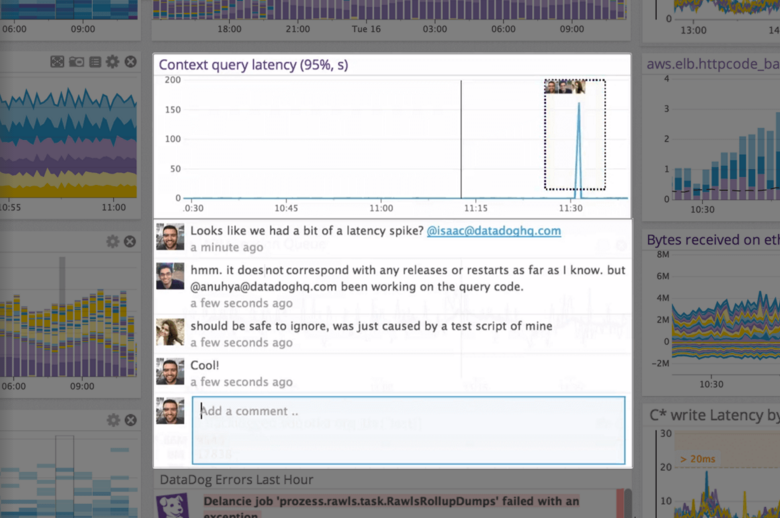
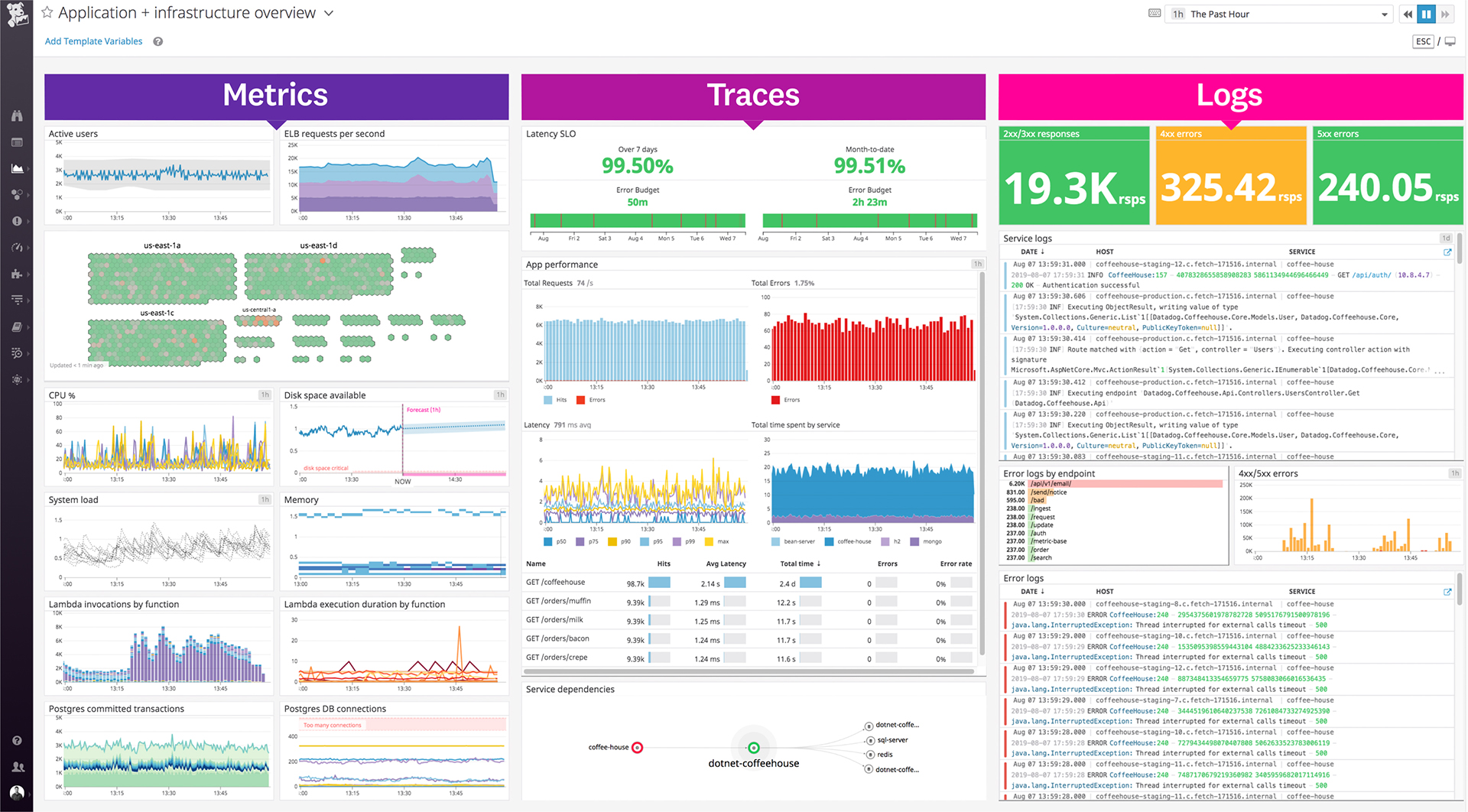
Screenshot of the out-of-the-box and customizable monitoring dashboards.Screenshot of Datadog's collaboration features, where users can discuss issues in-context with production data, annotate changes and notify their teams, see who responded to that alert before, and discover what was done to fix it.Screenshot of where Datadog unifies traces, metrics, and logs—the three pillars of observability.Screenshot of some of Datadog's 400+ built-in integrations.Screenshot of Datadog's Service Map, which decomposes an application into all its component services and draws the observed dependencies between these services in real timeScreenshot of centralized log data, pulled from any source.