AWS Config vs. OpsCompass

Overview
ProductRatingMost Used ByProduct SummaryStarting Price
AWS Config
Score 7.0 out of 10
N/A
Amazon Web Services offers AWS Config, a service that provides monitoring and assessment of AWS resource configurations to support compliance auditing, change management and troubleshooting, with resource histories and comparison of historical configurations against planned configurations.N/A
OpsCompass
Score 6.0 out of 10
N/A
OpsCompass is an enterprise-ready cloud security management software that drives multi-cloud operational control, visibility, and security to Microsoft Azure, AWS, and Google Cloud Platform. Its UI is designed to provide clear data visualization for resource management, remediation, and configuration drift management. OpsCompass utilizes CIS SecureSuite benchmarks as industry-accepted system hardening standards, and are used by organizations in meeting compliance requirements for FISMA, PCI DSS,…
$0
Pricing
AWS ConfigOpsCompass
Editions & Modules
No answers on this topic
Free Tier
$0
Pro
Starts at $500/month
Number of cloud resources
Enterprise
Custom
Offerings
Pricing Offerings
AWS ConfigOpsCompass
Free Trial
NoYes
Free/Freemium Version
NoYes
Premium Consulting/Integration Services
NoNo
Entry-level Setup FeeNo setup feeNo setup fee
Additional DetailsWith AWS Config, you are charged based on the number of configuration items recorded, the number of active AWS Config rule evaluations and the number of conformance pack evaluations in your account. A configuration item is a record of the configuration state of a resource in your AWS account. An AWS Config rule evaluation is a compliance state evaluation of a resource by an AWS Config rule in your AWS account, and a conformance pack evaluation is the evaluation of a resource by an AWS Config rule within the conformance pack.
More Pricing Information
Community Pulse
AWS ConfigOpsCompass
Features
AWS ConfigOpsCompass
Cloud Management
Comparison of Cloud Management features of Product A and Product B
AWS Config
-
Ratings
OpsCompass
7.5
Ratings
14% below category average
Cloud Management Security00 Ratings7.30 Ratings
Cost Management00 Ratings7.70 Ratings
Cloud Management Performance Monitoring00 Ratings5.90 Ratings
Governance and Compliance00 Ratings8.20 Ratings
Resource Management00 Ratings8.60 Ratings
Best Alternatives
AWS ConfigOpsCompass
Small Businesses
HashiCorp Terraform
HashiCorp Terraform
Score 8.5 out of 10
VMware Cloud Director
Score 8.6 out of 10
Medium-sized Companies
Ansible
Ansible
Score 9.2 out of 10
IBM Turbonomic
IBM Turbonomic
Score 9.3 out of 10
Enterprises
Ansible
Ansible
Score 9.2 out of 10
vRealize Operations (discontinued)
Score 10.0 out of 10
All AlternativesView all alternativesView all alternatives
User Ratings
AWS ConfigOpsCompass
Likelihood to Recommend
8.8
(0 ratings)
8.2
(0 ratings)
Performance
9.6
(0 ratings)
-
(0 ratings)
Ease of integration
6.2
(0 ratings)
-
(0 ratings)
User Testimonials
AWS ConfigOpsCompass
Likelihood to Recommend
To keep track of changes and to answer many compliance issues this is a life-saver. AWS does a good job providing tools like this. Any AWS workload should be monitored with AWS Config. It even is great for troubleshooting and seeing who changed what at what time.
Read full review
Our AWS Cloud was a perfect fit for OpsCompass. We needed a better method for understanding the size/extent of our Cloud--rather than the manual approach we'd been using. It's saved us a lot of time, and allowed us to delay adding additional heads for at least six to nine months. It also gives us a better/faster grasp of potential security issues - we see them right away, and we can assess each issue far faster than ever before. When we expand to Azure, Ops Compass will be able to do the same thing for us. (We have no plans to expand into Google Cloud Platform, but Ops Compass works well in all 3 clouds, apparently.)
Read full review
Pros
  • It can help you define rules for provisioning and configuring of your AWS. We use it for this purpose.
  • It maintains configuration history. So you can use the AWS Management Console, API, or CLI to obtain details of past configurations
  • It gives you a configuration snapshot of all of your AWS resources and you can store it in AWS S3.
  • You can integrate it with AWS CloudTrail to correlate configuration changes to particular events in your account.
Read full review
  • Quick inventory of all my cloud resources
  • Detects changes to my cloud resources--including the source of the changes (user or system)
  • Cost impacts of changes to my cloud infrastructure
Read full review
Cons
  • Vendor lock-in, no easy migration path for example if you want to move some workloads to Azure, you'd not be able to lift and shift.
  • Only at an AWS resource perspective - cannot do desired state configuration at an OS level (which makes sense but be good if you could even as a separate feature within AWS Config).
Read full review
  • I would like to see more integrations to help surface alerts. Slack would be great, as an example.
  • An imbedded tour or onboarding would help our new users, but overall, the product is pretty easy to figure out
Read full review
Performance
The performance has never been an issue for us, the dashboard gives us real-time monitoring and the alert sends us the notification within less than a minute of it happening, this applies to all of the monitored resources on AWS. However we can't (or probably haven't figured out how to) integrate with any other third party services, so we can't really evaluate how it integrates with other services
Read full review
No answers on this topic
Alternatives Considered
Despite the comparison it is not really apples to apples, the main purpose of the service is quite similar which is to monitor your application or services. In terms of AWS services, AWS Config provides more options to monitor and log your service on the infrastructure level which is very useful on that level and overall will give you more information about what is currently happening. Meanwhile PaperTrail is more suited to monitor and log your service and could only give you information on the application level.
Read full review
We like that OpsCompass is native, multi-cloud, and gives us a consistent method and approach to managing our security across multiple environments. It was more attractively priced and had easier, simpler deployment. It took us about 30 minutes to get it connected to both of our clouds and get a quick view of all of our infrastructure.
Read full review
Return on Investment
  • Enforcing audit requirements
  • Easy to set up alerting when there are rule breaches
  • Auto remediation reduces the manual policing of such breaches
Read full review
  • Our team was able to do roughly 30% more with the product. The automation helps us spot issues without a lot of manual work
  • We identified changes that would have had a massive cost impact--spinning up or forgetting about infrastructure we didn't need.
  • OpsCompass prevents configuration drift and maintains a healthy state across multi-clouds.
Read full review
ScreenShots

OpsCompass Screenshots

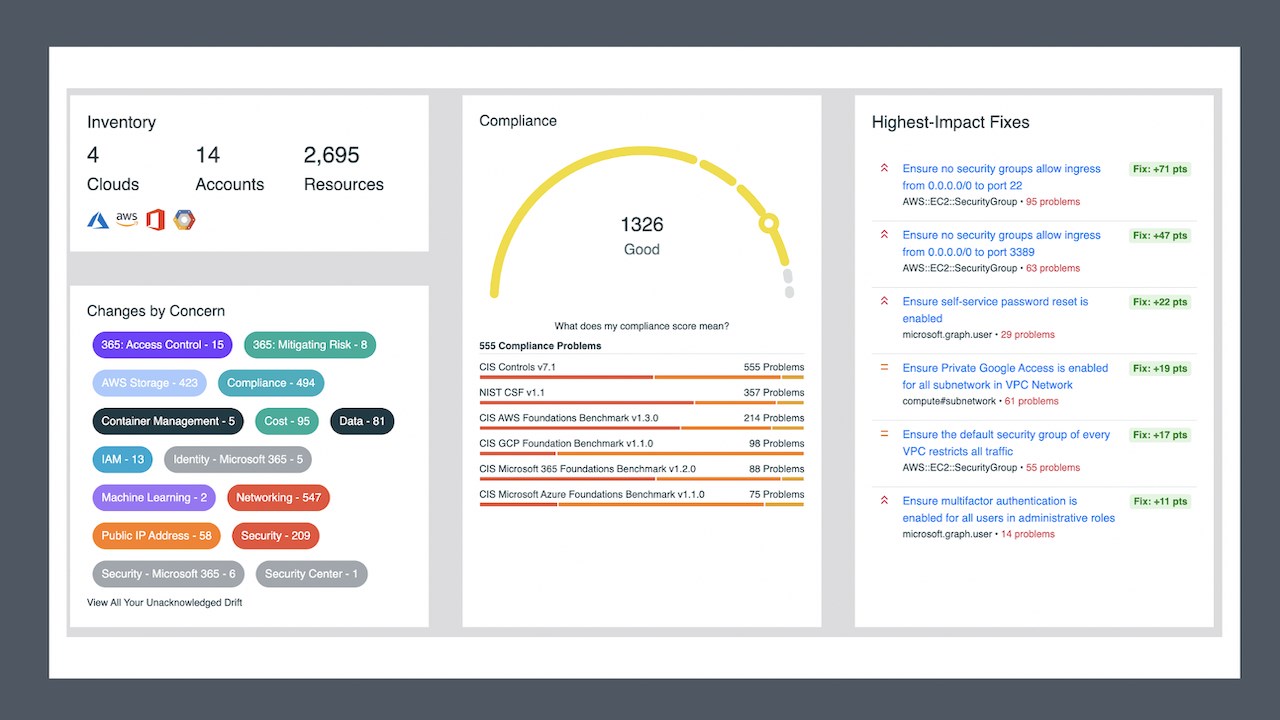
Screenshot of The OpsCompass Dashboard
- Snapshot of your key cloud inventory data points to understand your cloud inventory
- Configuration drift changes stand out by category
- Our proprietary cloud compliance score drives urgency for remediation, supported by CIS and NIST frameworks
- View cloud resource type breakdowns at a glance
- Quickly gain valuable insights into cloud accountsScreenshot of Visibility to cloud changes
The OpsCompass UI, data visualization, and cloud score make it very clear what's working and what's not.Screenshot of Scale Productivity
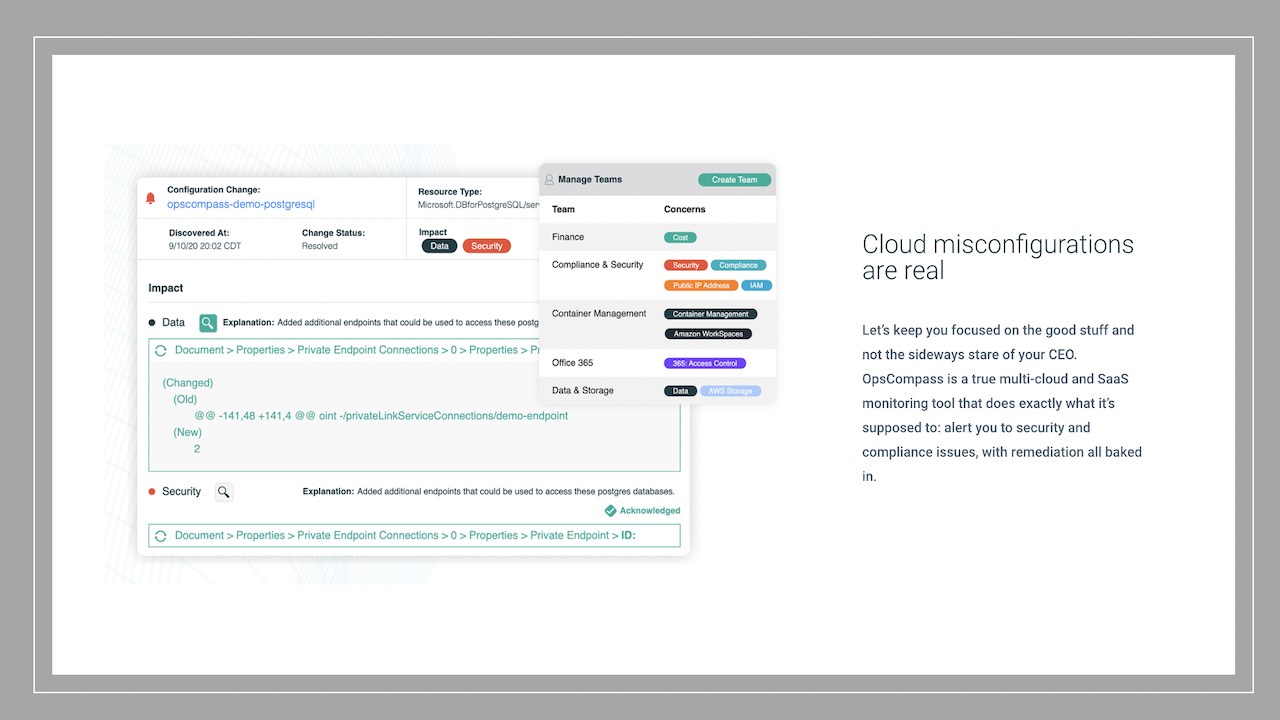
OpsCompass drives workflow efficiencies to redeploy critical resources where you need them.Screenshot of Cloud Misconfigurations are Real
OpsCompass is a true multi-cloud and SaaS monitoring tool that does exactly what it's supposed to: alert you to security and compliance issues, with remediation all baked in.Screenshot of Cost Anticipation
See the projected cost of a cloud action before you've already spent the budget.